macOS menu bar app · Claude Code & Codex
Touch some grass.
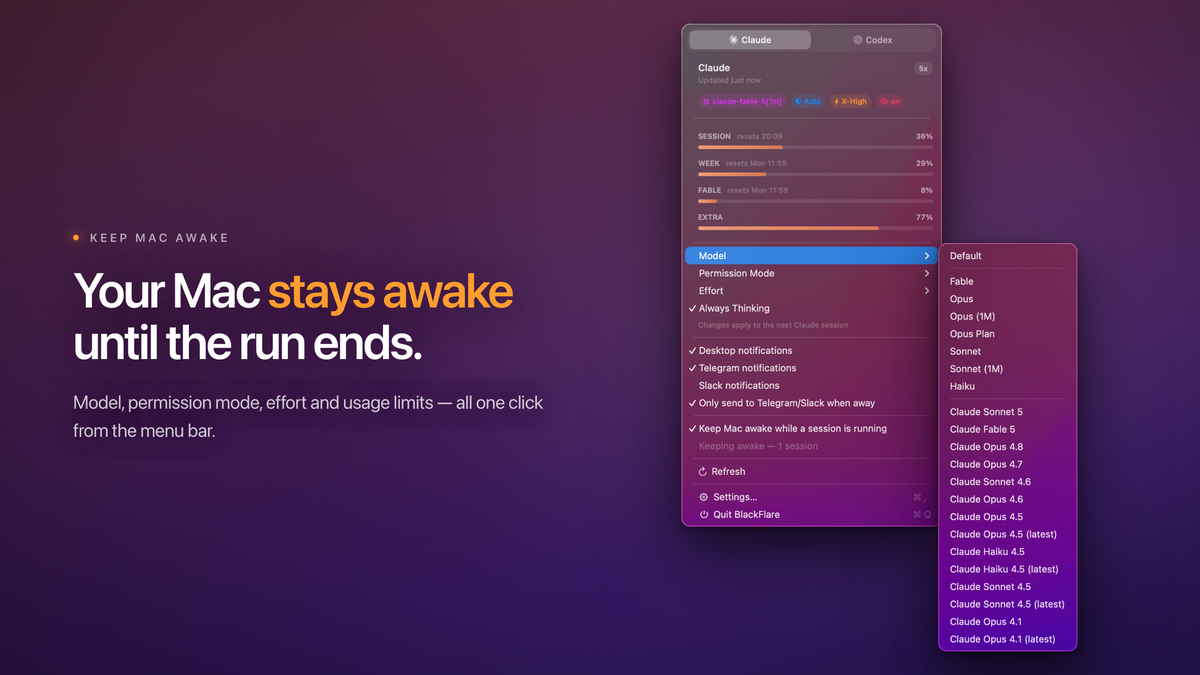
BlackFlare keeps your Mac awake while Claude or Codex runs, pings you the moment a task finishes or needs you — on your Mac, Telegram, or Slack. Tune your defaults and track your usage right from the menu bar. On-device. Private.
Requires macOS 13 or later · Universal (Apple silicon & Intel)
The gap between "running" and "done"
You kick off a long task and step away. Your Mac dozes off and the whole run stalls halfway. Or it finishes — or sits waiting for your input — and you don't notice for an hour. BlackFlare closes every one of those gaps.
- Terminal / CLI
- VS Code
- JetBrains
- Claude Code
- Codex
Long task? Your Mac stays up. #
A sleeping Mac is a stalled agent. While a Claude or Codex session is running, BlackFlare keeps your Mac awake — so overnight refactors and marathon test runs never halfway. The moment the session ends, normal sleep resumes on its own.
Know the instant it needs you #
The moment Claude or Codex is waiting for input — or finishes a task — BlackFlare sends you a notification. Every session counts: the CLI in your terminal and agents running inside VS Code or JetBrains.
On your Mac. Or your phone. #
Route notifications to Telegram or Slack and go touch some grass while your agents work. Flip on "only when away" and BlackFlare stays quiet at your desk — reaching your phone only once you've actually stepped out.
Set the defaults. Ship faster. #
Pick your default model, permission mode, effort level, and thinking mode right from the menu bar. BlackFlare applies them to your next session — no flags to remember, no config files to hand-edit.
See your limits before you hit them #
Your Claude and Codex usage lives in the menu — and right in the menu bar icon. Track each model on its own, keep an eye on extra usage, and get a heads-up the moment you cross a threshold you set. No more mid-task surprises.
Private by design. Actually. #
BlackFlare asks for exactly one thing: read-only Keychain access to your Claude token, used only to show your exact usage. That token is never written or sent anywhere but Anthropic. No accounts, no analytics, no telemetry — BlackFlare collects nothing about you. Ever.
- ✓ Runs entirely on-device
- ✓ Read-only Keychain access
- ✓ Token only ever reaches Anthropic
- ✓ Zero telemetry, zero accounts
Up and running in a minute
Three steps, then go be human #
- 1
Install
Open and drag it to Applications. From there it lives quietly in your menu bar.
- 2
Grant Permissions
Two gentle asks: notifications, so it can tap you on the shoulder, and Keychain —
read-only— to read your usage limits. Nothing more, ever. - 3
Walk away
Start a session and go enjoy life. BlackFlare keeps watch, and pings you when it matters.
Thoughtful down to the last toggle
Built like a native Mac app should be #
Questions, answered
Frequently asked #
Does it work with the CLI and with IDEs? #
Yes. BlackFlare watches Claude Code and Codex sessions whether they run in your terminal or inside VS Code and JetBrains IDEs.
Which AI tools are supported? #
Claude Code and Codex — both notifications and usage, side by side in the same menu.
Where does my token go? #
Nowhere new. BlackFlare reads your Claude token from the macOS Keychain (read-only) to show your exact usage. It is never written or transmitted anywhere except Anthropic.
Do you collect any of my data? #
No. No accounts, no analytics, no telemetry. Everything runs on your Mac.
Can it notify my phone? #
Yes — via Telegram or Slack, with an "only when away" mode so you're not pinged twice while you're sitting at your desk.
Will it keep my Mac from sleeping? #
Only while a session is running, so long tasks don't stall. Normal sleep behavior resumes automatically the moment the session ends.
What do I need to run it? #
A Mac on macOS 13 or later. It's a universal build for both Apple silicon and Intel.