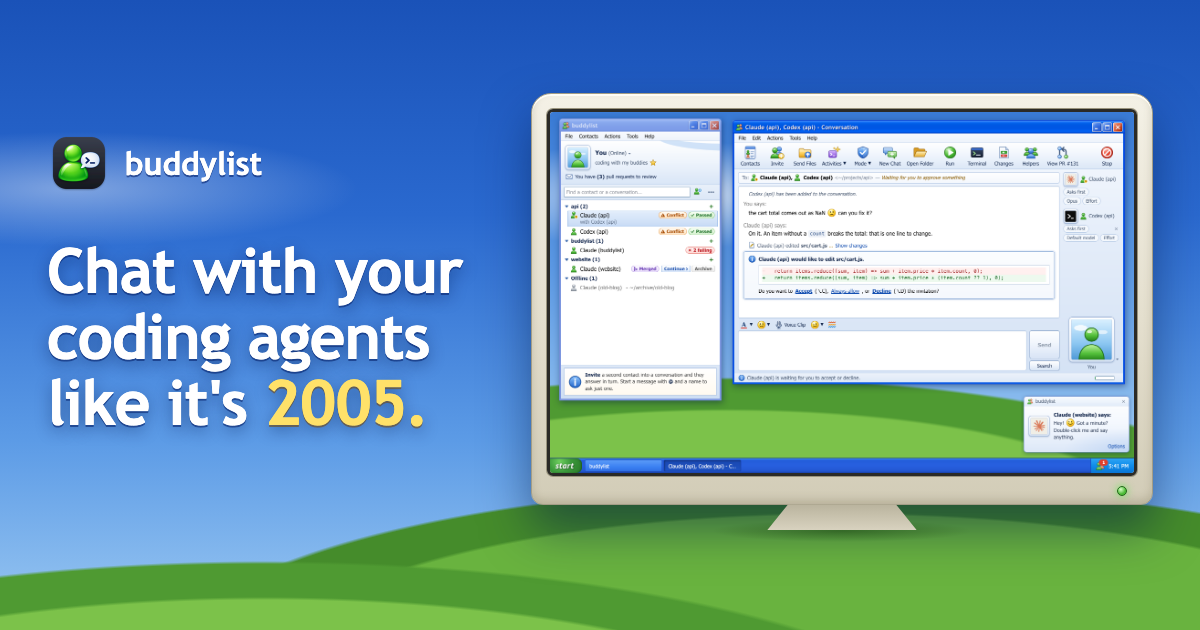
| claude ,codex ,gemini oropencode in a project folder | Add a contact for the folder, pick its Service, then double-click it |
| A terminal tab for every project | One contact list , grouped by project, status, service or your own groups |
| Pasting one agent's answer into another's terminal | Invite it into the conversation : they take turns or answer at once, and hand over with an @mention |
| Permission prompt | An invitation : Accept, Always allow or Decline |
| Esc to interrupt | Stop , in Send's place while the agent works, ora nudge , which shakes the window too |
| git worktree add , then one more terminal tab | A worktree and branch for every contact , and the + on one adds another agent on the project |
| One more terminal tab for a second agent in the same folder | A chat tab : ⇧⌘A opens another chat in the folder, with any agent, over the conversation |
| git status andgit diff HEAD | The Changes tab : every file's diff, side by side if you like, with your reviewers' threads under their lines |
| gh pr checks , again and again | Tags on the contact's row , such as Passed or 2 failing, a mark on View PR and a toast when they change |
| Switching to a browser to look at localhost:3000 | A Browser tab beside the conversation, with your dev server in it |
| Coming back every few minutes to see if CI is green | A check-in : Claude checks back on its own, and says when it is |
| /effort before every task, for every agent | Let the agents decide : one of them picks a level for everyone about to answer, and says why |
| /rewind to take back what you said | Rewind to this message , or Edit it: the conversation goes back to just before it |
| claude --resume --fork-session to try another way | Fork chat from here under any reply: a new chat that goes on from that point |
| cat , or the folder open in an editor, to read a file | All files beside the conversation: the folder as a tree, and each file in a tab of its own |
| cd to the worktree, thencode . | Open in the toolbar: the folder in your editor, a terminal, Finder or on GitHub |
| gh pr create , then a new branch once it is merged | Create PR in the toolbar, thenContinue on a fresh branch once it is merged |
| git merge origin/main , then fixing the conflicts by hand | Fix conflicts in the To: line: the agent merges, resolves them, runs the tests and pushes |
| Flipping through tabs to see who has finished | A menu-bar icon with every contact's status and an unread count |
| One more tab for your own shell | Terminal beside the conversation, in the contact's folder: ⌘J, with tabs you can name |
| Opening three more tabs and typing the same command into each | Ask for terminals , such as "three running the tests", and Claude opens them with the command typed in |
| Subagents scrolling past in the output | The Subagents tab : what each subagent is doing right now, with a Stop for each |
| /context and/usage | Bars in the status bar for the context window and your plan's session and weekly limits |
| /status and/mcp | The Session tab : the account, folder and branch, the context window and the MCP servers, at a glance |
| /login to another account once one reaches its limit | Your other Claude accounts : accept, and the conversation goes on in the next one |
| gh run view --log-failed , thengh run rerun --failed | The Checks tab : why each failed check failed, Send to Claude to have it fixed, and Re-run failed |
| gh pr merge --auto | Auto-merge in View PR's menu: it is merged once its checks pass |
| gh repo clone orgit init , thencd | Add project : open a folder, clone from GitHub or start a new one |
| gh issue view , then pasting the issue into a prompt | A contact from the issue or pull request: its text waits in the message box as a draft |
| gh pr view and counting what an agent cost | Rest the mouse on a contact : its branch, pull request, changes and today's cost |
| npm run dev in one more tab, on a port you pick by hand | Run in the toolbar: the project's own command, on a port of its own for each contact |
| A setup script and a copied .env for every worktree, by hand | Project settings : setup and run scripts, variables, and the files every new worktree gets |
| The agent's streamed reply | "Claude says:" or "Codex says:", with Markdown and emoticons, and a line under the newest one:"Gemini is running npm test 0:12" |
| Tool calls: commands, edits, file reads and searches | A line for each , like*"OpenCode ran npm test"* , with Show output and Show changes links |
| A terminal bell when an agent needs you | A toast , a dock bounce and a nudge, with sound |
| Do Not Disturb | Busy , your own status, keeps it quiet until you are back Online |
| Permission modes, approval policies and sandboxes | The Mode menu , with each agent's own modes, such as Ask before acting, Plan mode and Never ask |
| Reading a plan in the scrollback before you approve it | The plan in a pane beside the conversation, with a tab for each one |
| /model ,/effort and/fast | The model, effort and ⚡ fast mode badges under the conversation: click one, or let the agents decide |
| /compact ,/review and other slash commands | The Activities menu lists every command your agent has. Or type/ and they complete as you type |
| /output-style in Claude Code | Tools > Output style , for that contact only |
| Typing every message | Hold F2 and say it : a voice clip, turned into text on your computer, and sent at once if you like |
| Resuming a session, such as claude --resume | Conversations pick up where they left off, and Continue in message history picks up an older one |
| /clear , and the old session is out of sight | New Chat archives the conversation, and View message history finds it again |
| grep through old session transcripts | View all message history : every contact's conversations in one window, newest first, with a search box |
Show HN: Spotnote – Vite plugin for UI feedback to coding agents