iOS app
Live on the App Store. The first version ships the full grid, charts, and sync — and we keep shipping improvements.
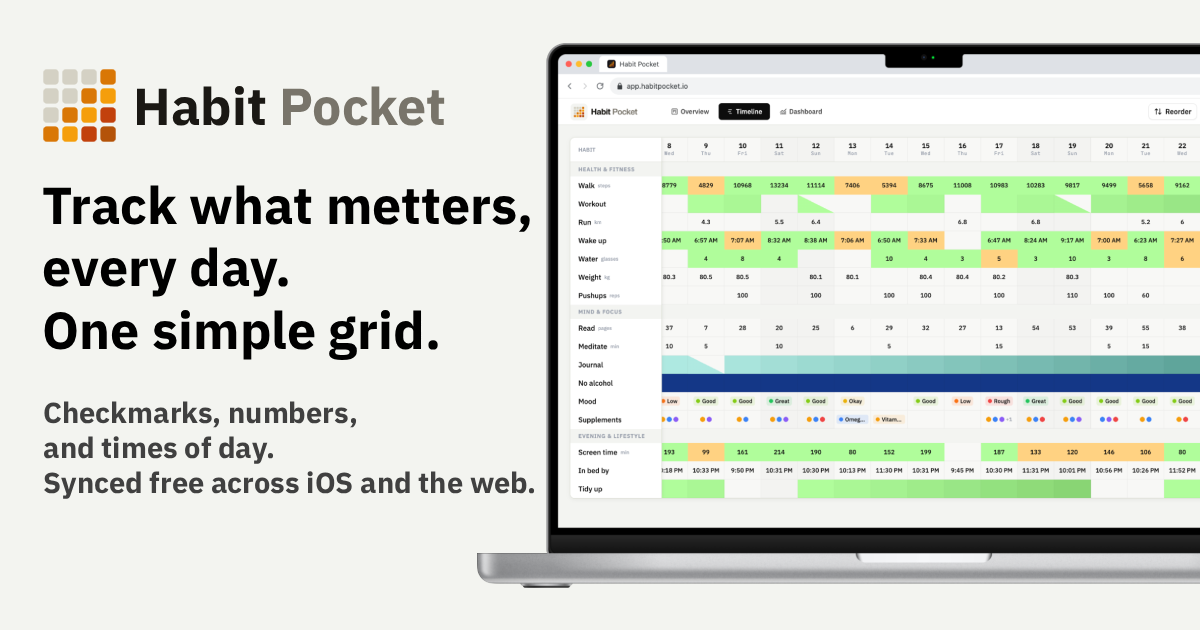
Most trackers only do checkmarks. Habit Pocket logs the numbers and times too — wake-ups, energy, workouts, mood — in one grid, so you finally see what's connected to what.
5 habits free, forever. No credit card. Your data stays private.
What you'll figure out
Most trackers only know if you did a thing. Habit Pocket logs the numbers and times around it too, so the pattern behind the question shows itself.
Why am I dead by 3 p.m.?
Log your bedtime, hours slept, and an afternoon energy score. The grid lines the flat afternoons up against the late nights, so you stop blaming lunch.
Where do my days vanish?
Track deep-work hours, phone pickups, and whether you shipped. One look shows which days got eaten — and by what.
What actually lifts my mood?
A daily mood score next to the things you suspect move it — a workout, daylight, people, caffeine. Let the pattern pick the lever instead of your guesses.
Am I progressing or just busy?
Put your top set beside sleep and soreness. See whether you’re actually getting stronger or just clocking sessions.
01 · The grid
A check, a number, a time of day, or a pick from a list, all in one grid. Click a cell to log; colors deepen as your streaks grow. The point isn't tidy tracking: when unlike things line up next to each other, you start to see what moves with what.
Overview: today at the top, scroll down through your history. Habit headers stay put.
Check it off, mark a skip, or leave it blank. Skips don't break streaks.
Steps, glasses of water, weight. Optional unit and target.
Wake at 07:15. Wind down at 22:30. Real time entries, not numbers in disguise.
Pick from a list you define. Mood, energy, workout type. Color-coded, one choice or several.
Health, Sleep, Growth. Group, drag-reorder, exclude weekdays.
No chain to break
Life happens — a camping trip, a cold, a rest day. Mark it a skip and your streak s instead of resetting to zero. Only a day you ghost with no reason breaks the run.
02 · Charts
You don’t build any of this by hand — the charts come from the handful of things you already logged. This is how you answer “why am I dead by 3 p.m.?” The candle chart stacks your bedtime, wake time, and how you slept on one timeline — see the week of 1 a.m. nights tank the sleep score, then recover. Then overlay any habit on any other to confirm what you already suspected.
Sleep — last 28 days
Wind Down → Wake Up · Sleep Score overlay
Overlay the things you think are linked. The day steps jumped from ~3.5k to ~9.5k and calories dropped, weight started a steady slide — three different units, one clear story. Hover any day to read the exact numbers.
Weight, steps & calories — last 56 days
Hover any day to read the exact numbers
Keep the views that answer your question close — a streak heatmap for consistency at a glance, summary cards for the numbers you check most.
New to the chart types? [Read the full guide to habit charts](https://habitpocket.io/charts/) for when to pick each one.

New · Claude & ChatGPT
Connect your own AI assistant over MCP and your habits become something you can ask. Log a messy week in one sentence, get an honest answer about what actually helps, have it build the chart — your data never leaves your account except to the assistant you authorize.
Works with claude.ai, ChatGPT, Claude Code, Cursor — anything that speaks MCP. See the setup guide →
How it works
No configuration rabbit holes, no onboarding courses. Sign up, add what you care about, and log your day.
Continue with Google, Apple, or email. No credit card. Five habits free, forever.
Anything you care about — wake-up time, glasses of water, reading, or the gym. Checkmarks, numbers, or times of day.
Tap a cell, type a number, pick a time. That one tap is the whole interaction — streaks build themselves.
04 · Pricing
Five habits free, forever — not a trial. Pro unlocks every habit type, every chart, and your AI connection — monthly, or pay once and own it for life.
Free
$0
No credit card, no trial clock.
Pro · Monthly
$3.99
/mo
Billed monthly · cancel anytime.
Pro · Lifetime
$49
once
About a year of Pro — then it's yours forever. No subscription, ever.
05 · Synced everywhere
Real-time across iOS and the web. Offline-first on mobile, so you can log in the woods and sync when you're back. Last-write-wins, no conflict drama.
Offline-first
Your phone holds the data locally and sends to the server the moment you reconnect. No spinners, no losing edits in a tunnel.
Real-time
Mark a habit on your phone, see it on your laptop before you set the phone down.
Sign in your way
Email and password, Google OAuth, or Apple Sign-In on mobile. Tokens stored in the system keychain.
We never share your habits or your values with anyone, and they are not accessible by other people. We don't sell your data, and the app shows no ads. You own your data: export your full history any time and delete your account in one click. End-to-end encryption is on the roadmap so your data stays private even from us.
Roadmap
Habit Pocket is actively developed. Here's what's in flight and what's queued up.
Live on the App Store. The first version ships the full grid, charts, and sync — and we keep shipping improvements.
Download your full history including chart configs and settings, not just entries. Goes both ways: import too.
A habit type where each day you pick from a list of options you define. Moods, energy levels, workout types, anything categorical. Color-coded, single or multiple choice.
Live: a public API and a hosted MCP server. Pull your data into custom dashboards, or connect Claude or ChatGPT and talk to your habits directly.
Pull sleep, recovery, steps, and weight from Apple Health and Whoop into matching habits. No manual entry for things your devices already track.
Add a note to a specific day on any habit. Shows in the entry detail and exports with the rest of the data.
Service worker plus on-device storage so the web client keeps working when you lose signal, the same way mobile does today.
A notes field alongside numeric values, so a 5K run can carry "knee felt fine" with it.
Same offline-first sync engine, native Material 3 design. Lined up right after iOS lands on the store.
Calendar view, sparklines, year-in-pixels. Built on the same chart engine as the candle chart.
Bohdan
Solo developer
Live in Canada 🇨🇦 · born in Ukraine 🇺🇦
I'm the creator of Habit Pocket. I built it to keep my habits in one place alongside the numbers I actually care about — my sleep score, the steps from my Garmin watch, the calories I logged in MacroFactor.
My biggest frustration: no app could show everything I track on a single screen.
So Habit Pocket grew out of the spreadsheets I'd kept for the last two years — the same approach, finally turned into a tool I enjoy opening every day.
More about me and why I built Habit Pocket → Where it started · two years in Excel
06 · FAQ
Not yet. iOS is live on the App Store, and Android is next on the same offline-first engine. If you're on Android in the meantime, the web app works in mobile browsers and Chrome will let you install it to your home screen.
Five habits with the yes/no and numeric types, one auto-generated chart per habit, the last 30 days of stats, and unlimited sync across iOS and the web. No credit card to sign up.
Four types, mixed in one grid: a yes/no check, a number with a unit and target (steps, water, weight), a time of day (a 07:15 wake-up stored as a real time, not a number), and a select list you define (mood, energy, workout type) with color-coded options and single or multiple choice. Yes/no and numeric are free; time-of-day and select are Pro.
They're on the roadmap, coming soon. When they land they'll be opt-in and quiet — Habit Pocket is for tracking, not for guilt-tripping you into opening it. Until then, a calendar event works if you want a nudge.
A blank day breaks the streak. A skip (the diagonal half-fill cell) s it instead, which is useful for rest days or anything you've decided to take off. Excluded weekdays don't count either way.
Yes. Export your full history as CSV or JSON any time, free on every tier — you own your data. Deleting your account wipes everything from the database in one click, immediately: no soft-delete, no waiting period, no support ticket.
Yes. The Lifetime plan is a single payment that unlocks every Pro feature for good, with no recurring charge. If you'd rather not commit, the monthly plan unlocks the exact same features and you can cancel any time.
If you're on the monthly plan, it's one click in the in-app billing portal — you keep Pro until the end of the period you've already paid for, then drop to Free with every habit and entry intact. The Lifetime plan never renews, so there's nothing to cancel. Everything keeps working on mobile. Your phone holds the data and syncs the moment you reconnect. If two devices edit the same cell while offline, last-write-wins resolves it on next sync.
No credit card. Pick five habits. Come back in a month.