DevOps
TechNative releases specgetty as open source: a terminal tool for reviewing OpenSpec change proposals and specifications without losing your focus.
The bottleneck in AI-assisted development stopped being the writing of code a long time ago. An agent produces more lines in twenty minutes than a team can read in a day. The question is no longer “can the AI build this”, but “am I sure the AI is building the right thing”.
That is where spec-driven development comes in, and at TechNative we picked OpenSpec.
Briefly: what OpenSpec does #
OpenSpec puts the specification before the code. With help from AI you first describe what has to change, in a change proposal with the specifications that belong to it, and only then does the agent start building. Those specs stay in your repository, next to the code, so you always have a readable source of truth about what the system is supposed to do.
OpenSpec works with more than thirty AI coding tools, is MIT licensed, runs locally and needs no API keys. And this matters for the way we work: it was built with existing codebases in mind, not only with greenfield projects. That makes it possible to map large codebases retroactively and get them into shape for maintaining and extending with AI.
Where it starts to chafe in practice #
The moment you start using OpenSpec seriously, something predictable happens: you end up with a lot of specs. Several projects, each with open change proposals, each with a proposal, a design, a task list and the specifications that go with them.
And then reviewing those specs turns out to be the real work. You jump between directories, you open markdown files in your editor, you scroll through a spec to find one scenario again, and meanwhile you have lost track of what you were checking. The tooling gets in the way of the attention.
That is why we built specgetty.
specgetty: a TUI for focused review #
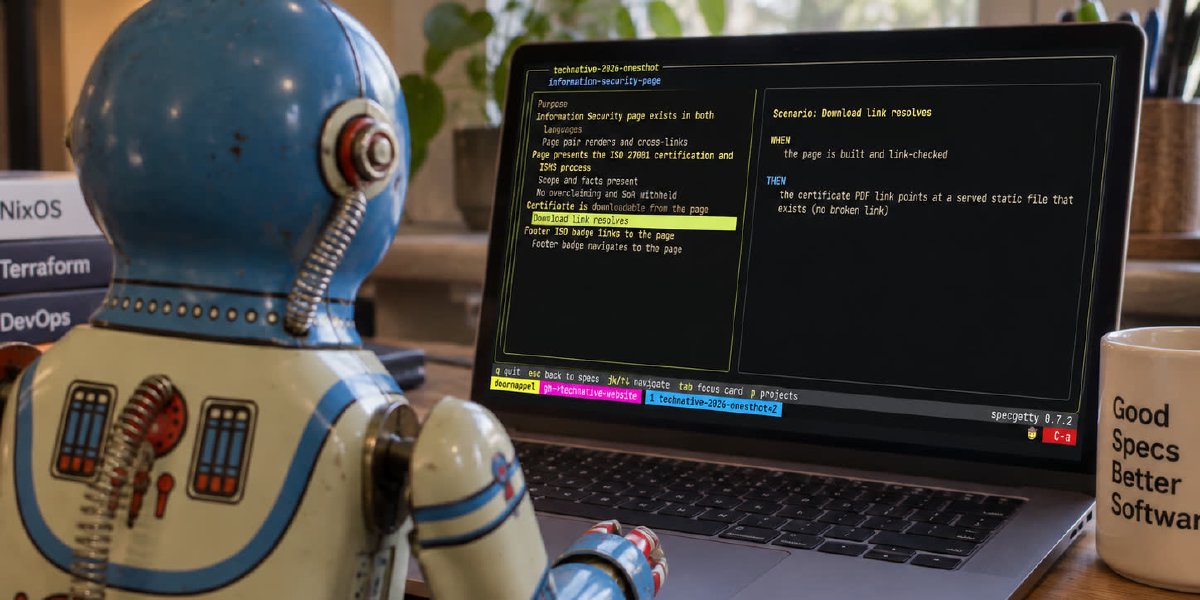
Specgetty (command: spg) is a terminal application for reviewing and managing your OpenSpec projects. No browser, no dashboard to start separately, no context switch. You start it in the directory you are already standing in and it opens the project that belongs there.
The structure is deliberately flat:
- Project view with tabs for changes, specs and config. Active and archived changes sit in one list; one key switches which of them you see.
- Change view with sub-tabs for proposal, design, tasks and specs. Everything belonging to one change proposal, reachable in one place.
- Project picker that opens over either of them, for when you do need to go to another project.
Card view: one scenario at a time #
The feature we enjoy most ourselves is the card view of scenarios inside a specification.
Reading a spec as one long sheet of markdown does not work when you want to review it properly. Your eye slides over it. In specgetty every scenario becomes its own card, which you walk through one by one. You read one behaviour, you judge that behaviour, you move on to the next.
That sounds like a small design choice. In practice it is the difference between scanning a spec and actually reading one. Which is exactly where mistakes in change proposals hide.
Speed as a starting point #
Speed is a hard requirement: a tool that thinks for half a second before it responds is one you do not reach for in passing. And in passing is exactly when you want to be able to check your specs. Specgetty is written in Go and optimized for response time. Everything goes through the keyboard, there is no screen, and the display follows your fingers.
I have spg bound to a hotkey myself. One keystroke and the open change proposals with their specifications are on screen, in the context of the project I happen to be working in. That changes how you deal with specs. Reviewing becomes something you do twenty times a day, instead of a task you keep pushing forward.
Open source, from today #
specgetty is open source under the MIT license and lives at github.com/speclib/specgetty.
If you have Nix, it runs on Linux and macOS with one command:
nix run github:speclib/specgetty
To keep it around:
nix profile install github:speclib/specgetty
No Nix? Grab the tarball for your platform from the latest release. There are builds for Linux and macOS, for both amd64 and arm64. Unpack it, put spg on your PATH, done.
The project is under active development. Issues, ideas and pull requests are welcome, and we would most like to hear where the tool falls short in your workflow.
Specgetty is part of a broader movement: we are convinced that spec-driven development is how serious teams will build with AI, and that this calls for good tooling. More on that to come.
Table of contents
Related blogs #
More reading on this topic.
No related posts found.