Open-source whiteboard · Self-hosted · Live at p5y.omni.ooo
One board. Every seat in the room.
Most whiteboards fall apart the second a real company shows up. They get sluggish on big boards, lock basic SSO behind an enterprise sales call, or force you to ship internal diagrams to someone else's cloud. So I built Plenary.
Sketch a diagram, animate the pieces, and present it live while tens of thousands watch, drop sticky notes, and react on a single board without ever touching your diagram. Self-hosted, Apache-2.0, smooth even at 25,000 shapes, and running live right now.
Scales to tens of thousands on a single board without bogging down
Real Company Admin
Google, Entra ID, and OIDC SSO, Spaces, RBAC, and Audit Logs
Phones & AI Agents
Native-feeling iOS touch + 22-tool MCP server and CLI
Live multi-user session
Live Collab (GIF) Warm Studio Obsidian Dark
Real captures straight off a running Plenary instance. Zero mockups.
See It In Action
Don't take my word for it. Watch it run.
Five real recordings of the actual app doing its thing: live cursors and emotes, timeline animations, slide glides, light/dark switching, and mobile playback. Click through them.
01Live CollaborationCursors, laser pointer, sticky notes, emotes02Timeline Animation7 tracks, draw-on arrows, wipes & dissolves03Present ModeSmooth camera glides across 16:9 slides04Tour & Theme FlipFrame zooming + instant light/dark swap05Phone Animate1-row scrubber built for an actual thumb
Live Collaboration · Live Capture
Real-Time Collaboration
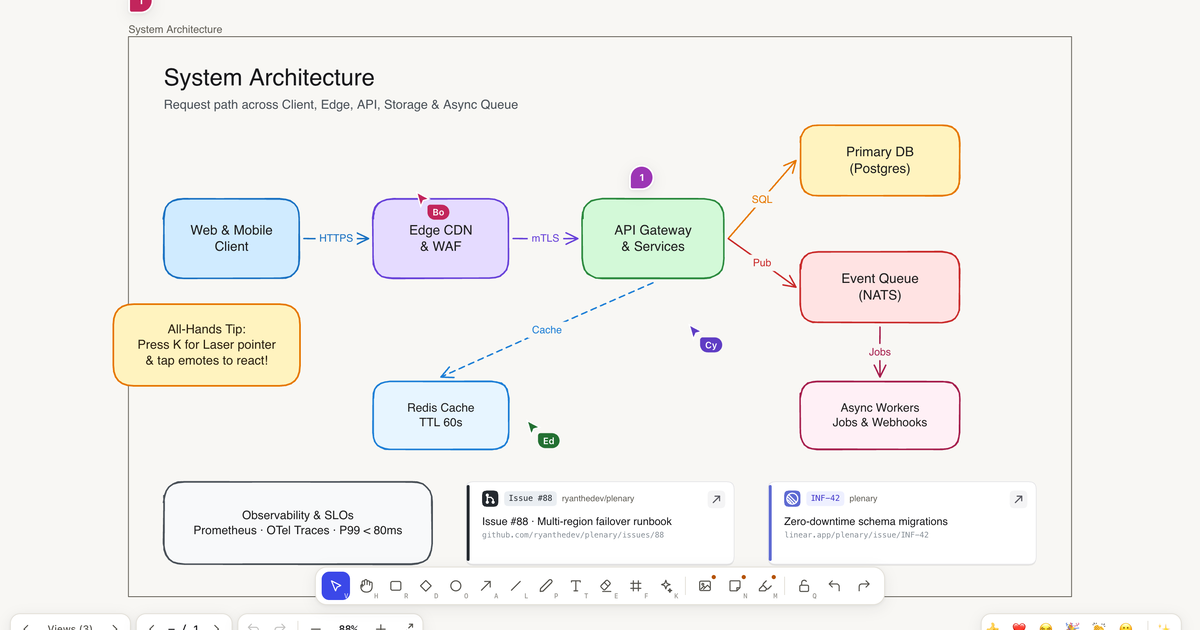
Bo, Cy, and Ed are all on the same board here. You've got labeled cursors, a laser pointer sweep, audience emotes floating up, and Cy dropping a sticky note onto the separate notes layer so the presenter's diagram never moves.
Features
Everything you need on one board, without jumping between five apps
Every team does the same broken dance: sketch a diagram in one tool, paste dead screenshots into slides, lose every question in Slack, and give up the second someone opens it on a phone. Plenary puts all of it in one spot.
Diagramming & Interop
Draw like Excalidraw, without hitting a wall
You get 12 core tools, elbow arrows that actually snap to shape ports, swimlanes, tables, and built-in Kubernetes and cloud icon packs. Drop in a Mermaid flowchart and it turns into real editable shapes. Paste a link from GitHub, Linear, Jira, or Azure DevOps and it renders as a live rich card instead of an ugly URL.
Need outside context right on the canvas? Embed YouTube, Figma, Google Docs, Notion, PDFs, or streaming video right next to your diagram. And you aren't locked in either: import existing .excalidraw and .drawio files, drag in .excalidrawlib icon libraries, and export crisp SVG, PNG, or multi-page PDF whenever you need a handout.
Canvas · Warm Studio Light
Warm Studio (Light) Obsidian (Dark)
Animate · Present · Live Scale
Turn a static diagram into a live, animated talk
Flip from Draw to Animate and your shapes get a real multi-track timeline. You've got 25 presets (pop, fade, progressive path draw, wipes, dissolves), 7 easings, and cue markers so you can walk an architecture flow step by step instead of dumping 40 boxes on screen at once.
When it's showtime, switch to Present and the editing UI disappears. Step smoothly across 16:9 frames, jump to Saved Views (⌘J), point with a glowing laser, flip on your local Solo Layer, link people straight to a specific frame or shape, and toggle Lock Audience so nobody bumps your diagram mid-talk.
Scales to tens of thousands on a single board. Sticky notes, highlights, and comment threads live on separate layers from the presenter's diagram. Huge rooms can watch, react, and drop notes live, and when you export to SVG, PNG, or PDF, your diagram comes out spotless.
Animate Mode · 7-track timeline
Animate Mode Present Mode
Admin, Spaces & SSO
Company admin you can actually figure out
Self-hosted tools usually break down the minute fifty people sign in. Suddenly nobody knows who owns a space, and making a teammate an admin means SSHing into a server. I hated hitting that myself, so I rebuilt Workspace Admin from scratch.
Your org splits into Areas, Spaces, and Boards with five roles (Owner, Editor, Annotator, Commenter, Viewer), personal spaces, 30-day Trash, and 50-snapshot Version History. You can run Google Workspace, Microsoft Entra ID, and Generic OIDC side by side with automatic domain sign-up, plus passcode-protected share links with expiry dates and no-download locks.
Inside Workspace Admin you get a searchable People directory, inline Make/Remove Workspace Admin buttons, email pre-provisioning before someone's first login, and a slide-out Member Details drawer showing every team and space they touch. Areas & Spaces flags single-owner risks on one screen, and when someone leaves the company, guided offboarding hands off their boards cleanly alongside filterable audit logs, tenant export, and GDPR erasure.
Workspace Admin · People & Governance
Workspace Admin Home (Light) Home (Dark)
Mobile & iPad
Works on a phone without making you hate yourself
Opening most whiteboards on an iPhone is a cluster. Accidental marquee boxes, clipped toolbars, blue iOS text-selection overlays, tiny buttons you can't hit. I spent a whole night testing Plenary on my actual phone and cutting chrome until it felt right.
So on a phone, it opens straight in Hand mode. One-finger drag pans right away instead of drawing random rectangles, and Hand stays pinned in slot one on the dock so you're always one tap back. When your connection is healthy, the status pill and avatar clutter stay out of your face. Flip your phone sideways and the bars move to a slim left nav rail and a right-thumb tool rail, notch and all.
Animate mode got the same diet. People on a phone want to watch animations and drop notes, not mess with keyframes, so the collapsed bar is just four controls in a 52 px strip with a full Tracks drawer one tap away. Plus 2-finger Undo, 3-finger Redo, smooth pinch zoom, Apple Pencil pressure with palm rejection, and 44 px tap targets everywhere.
Portrait · 390×844
Landscape · 844×390 · Side-rails
AI & Automation
Let your AI agents draw on the board too
I spend half my day working with coding agents, so Plenary ships with a 22-command CLI and a 22-tool MCP server out of the box. Point Claude, Codex, or a CI job at your workspace and it can spin up a board, drop in a Mermaid diagram from your repo, wire up GitHub or Jira link cards, choreograph entrance animations, save a version snapshot, and hand back a passcode-protected share link in seconds.
And nobody wants to dig bearer tokens out of browser DevTools. Run plenary login once, click your normal Google or Microsoft SSO login, and both the CLI and MCP server stay signed in automatically.
CLI + MCP · One-click SSOCopy
plenary login --url https://p5y.omni.ooo

plenary create-board --title "Q4 Edge Failover"
plenary add-mermaid --board b-edge --file ./topology.mmd
plenary set-animation --board b-edge --id gateway --preset pop --start 200
plenary create-share-link --board b-edge --role viewer --passcode "allhands"

bun scripts/plenary-mcp.js
Honest Compare
Where it wins, and where it doesn't yet
I'm not going to pretend a two-week project beats Miro's plugin marketplace. Plenary sits in a lane nobody else really owns: Excalidraw's feel and speed, self-hosted enterprise SSO and admin, and scaling to tens of thousands on a single board.
What Matters
Plenary
Miro
FigJam
Excalidraw / +
tldraw
Eraser
Live room scale
Built for it. Scales to tens of thousands on a single board without bogging down the presenters.
~100 to 300 active before lag
~500 max
Small rooms
Small to medium rooms
Small rooms
Huge boards
Buttery smooth. Stays at 120 fps even with 25,000 shapes on screen.
Gets sluggish on huge boards
Smooth up to ~5k to 10k
Slows past a few thousand
Very fast
Good for diagrams
Self-hosting & privacy
100% yours. Apache-2.0, zero third-party CDNs, runs on one box or scales to a cluster.
Cloud only
Cloud only
OSS canvas, SaaS for +
SDK (BYO backend)
Cloud / VPC
SSO & org admin
Included. Google + Entra + OIDC side by side, Spaces, 5-tier roles, offboarding, audit logs.
Enterprise tier only
Figma org tier
Basic workspaces
BYO
Enterprise SSO
Audience safety
Isolated layers. Audience stickies and comments never wreck your diagram or show up in exports.
Single shared canvas
Single shared canvas
Single shared canvas
Single shared canvas
Single shared canvas
Animation & presenting
Built in. 7-track timeline (25 presets, cues), Present mode, Saved Views, laser, Lock Audience.
Frames + basic deck
Spotlight + sections
Frames only
None native
Basic presentation
AI / Agent control
Native MCP + CLI. 22 tools with 1-click browser SSO so your agents can build boards headlessly.
Miro AI (in-canvas)
FigJam AI (in-canvas)
Text-to-diagram
SDK / Make Real
DiagramGPT
Mobile experience
Real mobile web. Hand-first pan, landscape side-rails, Apple Pencil, 1-row Animate bar.
Native iOS / Android
iPad app
Mobile web
Mobile web
Desktop-first
Facilitation & plugins
Still catching up. Live polls and Q&A are underway, but voting, timers, and plugins lag behind Miro.
#1 (massive marketplace)
Strong (stamps, timer, widgets)
Minimal
SDK extensible
Minimal
Diagram-as-code
Growing. Mermaid flowcharts work today; Sequence, ER, Class, State, D2, and PlantUML are next up in the UI.
Broad templates
Basic
Mermaid + .excalidraw
Basic
#1 (ERD, Seq, C4 sync)
What's coming next
A bunch of features are already halfway out the door and queued to land in the UI next: a public REST API with webhooks, Slack link unfurls, Microsoft Entra group-to-team sync, offline editing queue, session replay scrubbing, right-to-left localization, and full diagram-as-code for Sequence, ER, Class, State, D2, and PlantUML diagrams.