The AI we use every day runs inside data centers. It’s easy to focus on the theory behind AI, but performance comes down to much more than software. It’s tied just as closely to the hardware and infrastructure underneath. The goal of this article is to help you see all three together—software, hardware, and infrastructure—as one connected system, because that’s what it takes to get real performance out of AI.
Why data centers, and why now? #
GPUs and data centers have been getting a lot more attention as AI has taken off. You see “data center” in the news and on social media all the time now. But not many people could actually explain why GPUs and data centers matter so much, or what data centers have to do with AI’s progress in the first place.
When people talk about generative AI and other advanced systems, they usually talk about the model and how it was trained. Building one takes a lot more than that, though. You need the computing platform to run it: GPUs doing huge amounts of math, servers to drive those GPUs, plus the networks, cooling, and power that keep everything alive, and a data center to tie it all together. Get those pieces working together, on both the hardware and software side, and you can actually pull a GPU’s full performance out and run an AI system that stays up.
This article steps back and looks at the data centers that make AI possible. We’ll trace what actually happens when you train or run an AI, and explain why understanding the infrastructure underneath, not just the model, has become so important now that generative AI is everywhere.
Where does AI actually run? #
Most AI applications today are built around large language models (LLMs). An LLM is a language model with a very large number of parameters, and it shows up everywhere: writing text, summarizing, translating, helping with search, powering chat systems, and plenty more. Throughout this article we’ll use the LLM as our running example to walk through how an AI application handles work under the hood.
Training and inference
AI work splits into two phases: training and inference.
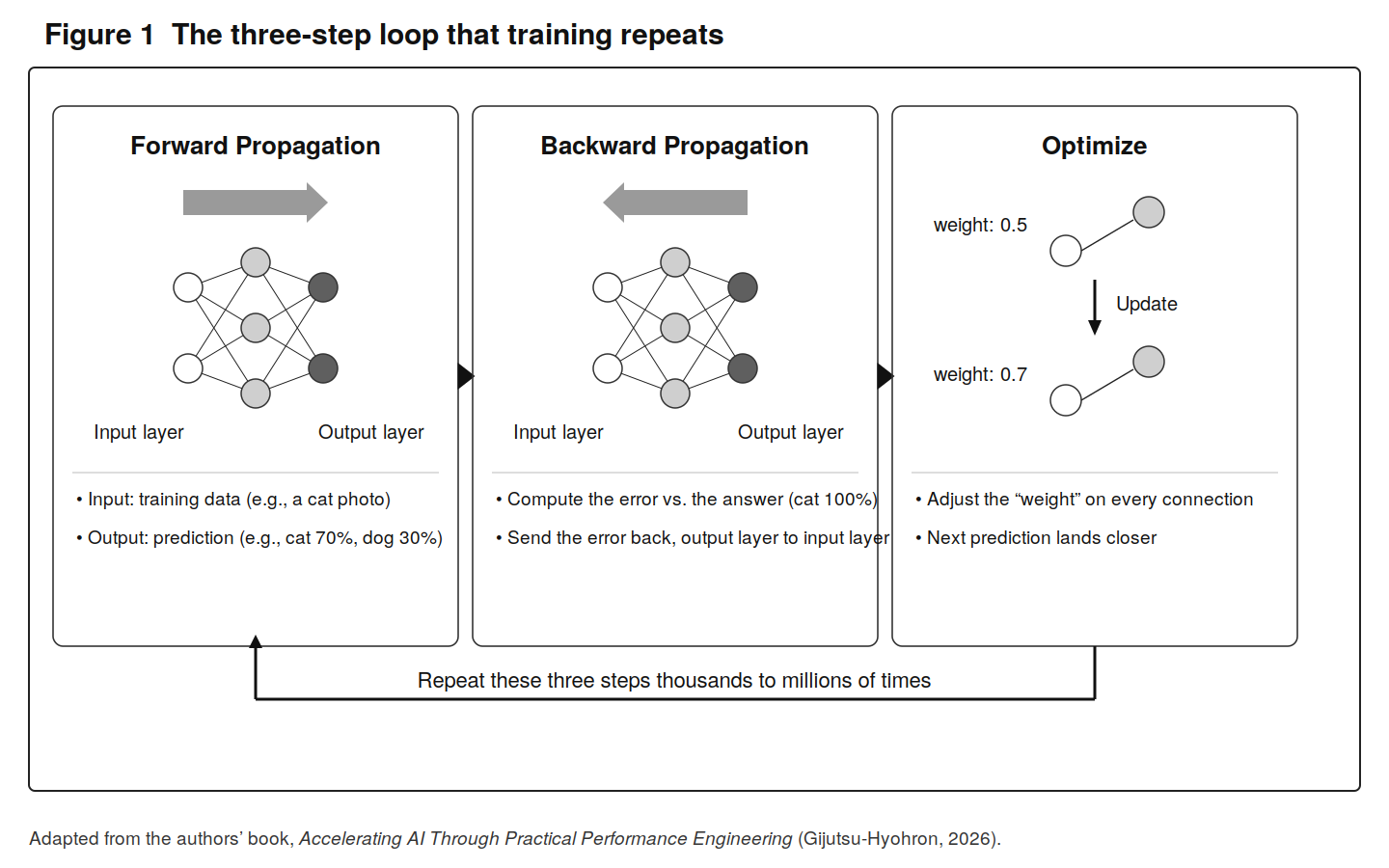
Training is how an AI picks up knowledge. It looks across a large dataset, finds the patterns and regularities in it, and tunes its own parameters, or weights, to match (Figure 1).
Inference is what happens when you actually put a trained AI to work, using the finished model to make predictions or decisions on new data (Figure 2). Any single inference is cheap next to training. But production is a different story: you’re often running a huge model against long inputs and a flood of requests at once, so the serving side needs serious performance of its own.
None of this runs efficiently without dedicated hardware like GPUs, plus the software and infrastructure that let you actually use what that hardware can do.
The five layers behind AI #
You send an inference request and a response comes back. You submit a training job and eventually a model comes out. So what’s actually going on behind the scenes?
The foundation under an AI system breaks down into five layers. On the software side you have the application layer and the middleware layer. On the hardware side, the hardware layer and the network/storage layer. And holding all of it up, the infrastructure layer.
Application layer
This is the part users touch directly. During inference, a chat UI or an API gateway takes the request, turns the user’s input into a sequence of tokens, and hands it off to the model.
Middleware layer
This sits between the application and the hardware. On the inference side, engines like vLLM (note 1) and TensorRT-LLM (note 2) batch multiple requests together and manage the KV cache, which reuses results already computed for earlier tokens. On the training side, Megatron-LM (note 3) and DeepSpeed (note 4) handle the parallelization strategies that spread a model across many GPUs, along with keeping gradients in sync.
Hardware layer
This is the machinery that does the actual computing, and the GPU server is the star of the show. To give you a sense of scale: a single server with eight NVIDIA H100 (note 5) SXM units puts out around 8,000 TFLOPS at FP16—that’s tera floating point operations per second, or a trillion floating-point operations every second—backed by 80 GB × 8 = 640 GB of GPU memory.
Network/storage layer
This handles communication between GPU servers and the flow of data used in training and inference. Inside a server, NVLink (note 6) carries traffic between GPUs at high speed; between servers, InfiniBand (note 7) does the job. For large training runs, fast storage like NVMe or Lustre and a well-designed dedicated network matter a lot too, since the whole point is to keep the GPUs fed and never idle.
Infrastructure layer
This is the physical plant that keeps GPU servers running reliably. It’s where newer options are showing up, like direct liquid cooling (DLC) and container-type data centers.
Software alone can’t fix performance #
So far we’ve looked at what training and inference involve and what’s happening underneath. Here’s the part worth remembering: clever software won’t get you LLM performance by itself.
You can often speed things up by tuning an inference engine or a training framework. How much that buys you, though, depends heavily on the GPU server layout, how the GPUs talk to each other, storage, power, and cooling. AI software optimization only works inside the limits that the hardware and infrastructure set.
Distributed training is a good example. Tensor parallelism splits the math inside a model across several GPUs; data parallelism puts the same model on several GPUs and feeds each one different data. Both make a lot of GPUs work together. To pull that off, the GPUs are constantly trading intermediate results and gradients (the numbers that say which way to nudge the weights to bring the loss down). All that back-and-forth means network bandwidth and latency shape performance in a big way. You can change the parallelization settings to shift how the work is divided and how traffic moves, but the underlying gap in communication speed isn’t something software can paper over.
And it isn’t just GPUs and networks. Say the CPU is sitting in a power-saving mode. Preprocessing and the inference engine’s control logic can back up on the CPU side and choke the GPU before it ever gets going. Or a bad setting leaves the model or training data on slow storage, like the OS drive, and the GPU ends up stalling on reads. Problems like these, rooted in operational settings or the I/O path, tend to turn into bottlenecks that no amount of software tuning will clear.
Power and cooling feed straight into performance too. A GPU delivers a lot of compute, but it also pulls a lot of power and throws off a lot of heat. When cooling can’t keep up, thermal throttling steps in, dialing down the GPU’s clock to hold the temperature in check, and your real-world performance drops with it. Push it further and protection like NVIDIA GPU THERMAL TRIP (note 8) can kill the job outright. So thermal management isn’t just a facilities headache. It’s a baseline requirement for getting steady performance out of a GPU.
The takeaway is that software settings don’t decide an AI system’s performance on their own. Your parallelization strategy is capped by the network, your data supply is capped by storage, and a GPU’s real output is capped by power and cooling. Instead of treating software, hardware, and infrastructure as separate problems, you have to work the whole system’s limits at once to move performance.
That is the real reason it pays to look past the model and understand the whole stack, from the application layer down to power and cooling. Once you start seeing an AI system as these connected layers, it gets much easier to tell where performance actually comes from, and where it quietly slips away.
Notes
- An open-source LLM inference engine that came out of UC Berkeley. Known for efficient memory management through PagedAttention. https://github.com/vllm-project/vllm - NVIDIA’s LLM inference-optimization library. Built on TensorRT with LLM-specific optimizations added. https://github.com/NVIDIA/TensorRT-LLM - NVIDIA’s training framework for large language models. Comes with distributed-training features like tensor parallelism and pipeline parallelism. https://github.com/NVIDIA/Megatron-LM - Microsoft’s deep-learning optimization library. Known for the memory savings of ZeRO. https://github.com/microsoft/DeepSpeed - A data-center GPU announced in 2022. The flagship of the Hopper generation, with FP8 support and a Transformer Engine.
- NVIDIA’s own high-speed interconnect between GPUs. On the H100, fourth-generation NVLink links GPUs at 900 GB/s in each direction.
- A high-speed networking standard for high-performance computing. Low latency and high bandwidth make it the go-to interconnect for GPU clusters.
- A safeguard that limits performance or shuts the system down when a GPU’s temperature hits a dangerous level, to keep the heat from damaging it.
First published in Software Design, July 2026 issue, published by Gijutsu-Hyohron Co., Ltd. ( https://sd.gihyo.jp/)