TL;DR:
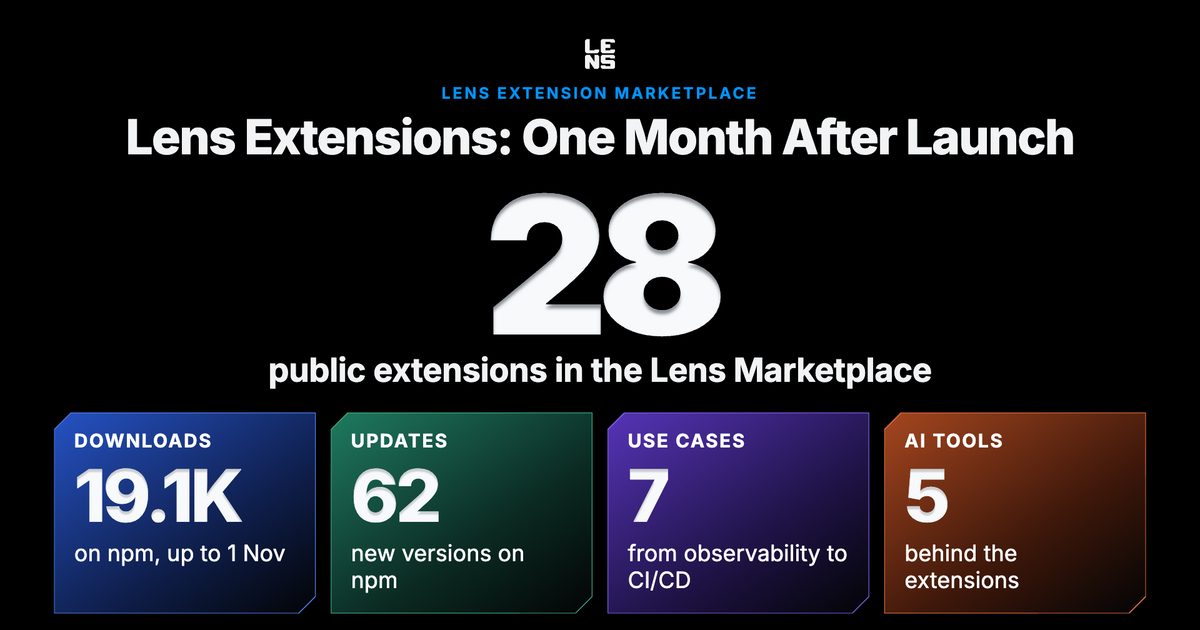
- The Lens community adopted extensions quickly. By 1 November, about 1,000 users had opened the Marketplace, 322 had openedCreate new , and 28 extensions were listed.
- Why try Lens extensions? Creating, installing, and publishing an extension is very simple. Your AI tool writes it.
- What's on the Marketplace after one month: 28 extensions in seven use cases, from observability and cluster visualization to CI/CD.
- Install one today, or build your own. Browse the Marketplace in Lens, or chooseCreate new . Installing, creating, and publishing need a Plus, Pro, or Enterprise plan.
How the Lens community adopted extensions #
The Lens Extension Marketplace opened on 29 September 2026 with Lens K8S IDE 2026.10, and the Lens community adopted it quickly, both to install extensions and to build their own. By 1 November, about 1,000 users had opened the Marketplace and 322 had opened Create new to start an extension of their own. The Marketplace listed 28 extensions, and 62 updates followed their first versions. They drew 19.1K npm downloads, updates included, which counts downloads, not users.
Why try Lens extensions? #
If you haven't tried them yet: creating, installing, and publishing an extension is very simple. There is no need to wait for a feature on the Lens roadmap or find a developer to build it. If your team needs something Lens doesn't have, such as a view of a custom resource, a page for an operator you run, or a new column or shortcut, you can add it yourself and share it with everyone through the Marketplace. Lens opens hundreds of public contracts to extensions, the same ones Lens itself is built from, and sets up each new project with instructions for your AI tool, so it works from those contracts. You don't need to be a developer to build one.
From inside Lens you can Create an extension with your AI tool, Publish it, Install any public one, Edit it, and Clone a public one to make it yours.
What's on the Marketplace after one month #
By 1 November, the Marketplace listed 28 extensions, 27 of them published since the launch. Here they are, grouped by use case.
Observability (8)
Bring the metrics, dashboards, and logs you already use into Lens, or build new ones.
Visualization (5)
See how a cluster fits together, as a graph or in 3D.
Local tools (4)
Run the tools on your machine without leaving Lens.
[ColimaStart, stop, and create local Colima clusters.](https://lenshq.io/extensions/?name=@k8slens/colima)

[Lens DockerContainers, images, and Compose apps.](https://lenshq.io/extensions/?name=lens-docker)

[k9sk9s in the context of the cluster you are looking at.](https://lenshq.io/extensions/?name=k9s-lens)

[pi agentAdds the pi coding agent to the AI tools you can pick in Create new.](https://lenshq.io/extensions/?name=@skoncar/lens-pi-agent)

### Access and policies (3)
Check who can do what in a cluster, and what it runs.
[Lens GovernanceService account permissions, admission policies, and pod reachability.](https://lenshq.io/extensions/?name=lens-governance)

[Image InventoryEvery container image in a cluster.](https://lenshq.io/extensions/?name=aureliak8s-image-inventory)
Kubernetes DocumentationThe API reference of any resource, custom resources included.
Fleet (3)
Keep many clusters in order.
[Production Cluster MarkA colored window edge on production clusters.](https://lenshq.io/extensions/?name=production-cluster-mark)

[Cluster GroupsGroups in the navigator, connected in one click.](https://lenshq.io/extensions/?name=@k8slens/cluster-groups)

[BookmarksResources and pages pinned to the hotbar.](https://lenshq.io/extensions/?name=@k8slens/bookmarks)

### Personalization (3)
Make Lens look and work your way.
[BrandingYour company logo in the top bar.](https://lenshq.io/extensions/?name=branding-lens)

[Sticky NotesNotes in the hotbar.](https://lenshq.io/extensions/?name=@k8slens/sticky-notes)

[Kubernetes for KidsA storybook guide to Kubernetes and your clusters.](https://lenshq.io/extensions/?name=@k8slens/kubernetes-for-kids)

### CI/CD (2)
See delivery next to what each cluster runs.
[GitHub ActionsWorkflow runs next to the services and charts they deploy.](https://lenshq.io/extensions/?name=lens-github-actions)

[GitLabOpsGitLab CI pipelines next to what each cluster runs.](https://lenshq.io/extensions/?name=lens-gitlab)
Install one today, or build your own #
Pick one of the extensions above, and you can have it running in Lens in a few clicks:
- In Lens, open Extensions in the navigator and chooseBrowse Marketplace , or browse theExtension Marketplace on the web.
- Choose an extension and click Install . Lens checks for new versions and offers them to you.
Can't find the one you need? Build it.
- Open Extensions in the navigator, chooseCreate new , and give the extension a name.
- Pick your AI tool: Claude Code, Codex CLI, Gemini CLI, GitHub Copilot CLI, or OpenCode.
- Describe the view, column, menu, or command you want.
- Choose Publish to put it on the Marketplace.
The create and publish guides cover each step.
Thanks, Lens community! #
Thanks to everyone who built, published, or installed an extension this month.
Find the extension for your workflow, or build it #
Note: Creating, installing, and publishing extensions are premium features, included with the Plus, Pro, and Enterprise plans. Anyone can browse the Marketplace. See pricing.