I recently got into flying FPV drones and wanted to share my learning experience. Learning anything is understanding terminology, repetition and loads of practice. I aim currently at a place where I can be air borne for 30 seconds to 1 minute or so on a real tiny whoop drone. That means I am at the beginning of my learning journey and have used the word “learning” very generously.
This post is also not a 101 to get into flying FPV drone, however, I have linked enough posts for you to get going, if you read this post and all the linked links.
The beginning: simulators #
I actually don’t remember how I got into it but about a year or so ago I purchased a RadioMaster Pocket radio / controller and started flying a bit in Liftoff simulator. I was following the famous playlist from Joshua Bardwell. I highly recommend that as a starting point.
I think my source was running into the Flow State documentary on YouTube but I am not sure.
Anyways, after about 10 hours practice in Liftoff this hobby died for the moment and I wouldn’t get to it until a year or so later.
I got back to the Liftoff simulator (early July 2026) and after another 10 hours of flying (20 simulator hours total), I felt I was no longer useless in the simulator i.e. I could recover from going out of bounds which was very hard before and crash less when trying things, kinda maintain my altitude and overall started enjoying it as a game.
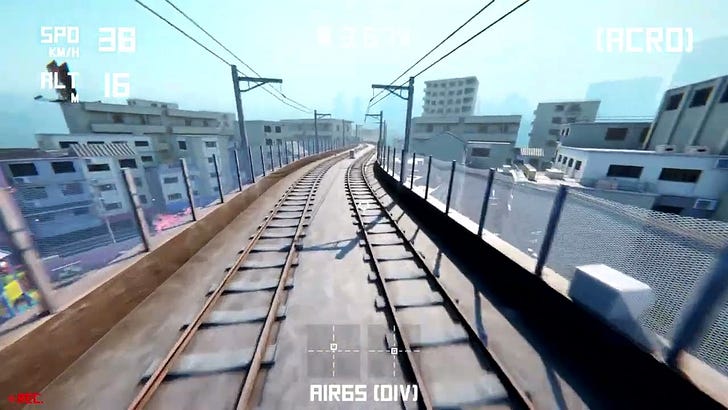
Liftoff has a mode called “slipstreams” in which you can chase a car with drone thereby simulating making a cinematic car chase video. I started playing it like a game and really enjoyed it (albeit it was and still is pretty hard).
Here is a video of me in simulator after 20-30 hours of flying practice (maybe less?)
Let’s try it for real #
At this point, I thought I was ready to try some real life drone flying and for that I explored the excellent OscarLiang blog
https://oscarliang.com/fpv-drone-guide/ Based on this guide, I knew that I have to start with a tiny whoop (<30g drones) for several reasons.
They can take a lot of beating / crashes and therefore are perfect for newbies like me.
They are small and have less licensing / formal requirements. TL;DR they are just safer.
FPV done flying seems like a pretty expensive hobby and they are relatively cheap to get into the hobby
The minimum set of gear you need to be air borne is (and listing what I got and why)
Drone - I got an BetaFPV Air65, it is a very tiny 17g drone that can take a lot of beating and highly recommended for beginners.
FPV Goggles - I got Fat Shark Echo. They are not the cheapest available goggles but if I keep into this hobby and want to fly outdoors, I can keep using them. It also has a recording feature.
LiPo Battery Charger - I got a ViFly Whopstor 3. It can charge the batteries safely and also has a storage feature. LiPo batteries when not to be used must be at middle point of their voltage for longevity.
LiPo batteries - I got Betafpv lava 320mAh. They were recommended for my requirements by both OscarLiang blog and AI agent.
Purchasing the gear was the first instance where I used AI seriously. While I had a good idea of roughly what I wanted from reading the OscarLiang blog. I made AI agent agy
(Google antigravity) look up available gear, compare prices in local shops across EU and actually override some decisions like getting a Fat Shark Echo vs a totally entry level FPV goggles.
Reality is unforgiving #
Simulator was easy. As far as I remember, the day RadioMaster pocket arrived, I didn’t have to do anything really except calibration in Liftoff to be air borne in a simulator. But getting the real gear to talk to each other requires work and understanding a lot of terminology. The FPV world is vast and has many jargon terms (most annoying part of learning anything new for me). OscarLiang has a nice glossary blog page, which got me going.
But very roughly here is what you need at the very least to get going
Bind your drone to the radio master pocket radio.
This is what I followed:plug replug the battery from drone 3 times in RadioMaster pocket, press sys, scroll to bind, click bind
if bound, pressing the arm button (LB in PlayStation speak) should Arm the drone i.e. the propellors start moving Tune Fat Shark Echo to the broadcast frequency. The FPV video goggles don’t “bind” to get the video feed. The drone broadcasts the video feed at 5.8 GHz and the Fat Shark Echo receives the feed. You need to tune the channel and luckily it has a button on top that auto scans for the channel. When in sync, your goggles should show something like this
Charge the batteries, in my case to 4.85V for flying and 3.85 for storage. Do not go below 3.3V for long, that can damage the batteries permanently and even cause a fire.
This step was also assisted a lot by AI. I have a very long thread with Gemini asking a lot of questions on which buttons to press, what to look for on my radio (it runs a whole operating system called ELRS, I am over simplifying things). All in all, without AI, it might have taken me at least a couple of days to figure everything out. With AI, I was air borne in under 1 hour.
The first day of flying was rough. Anyone who has gone from simulators to flying for real will tell you that yes simulators are good but flying in real life is different. The other mistake I made was that I had almost done no tiny whoop simulator practice yet. I was mostly doing 5 inch drones in Liftoff and may have done only 30 minutes of tiny whoop from my 20+ hours of simulator flying and small drone physics is simply different, also, they are much faster and indoors space is tight. All in all, it is hard to fly.
The idea to learn flying as a beginner is to reduce your throttle and rates (how fast propellors spin). This is done in BetaFlight app on the flight controller. This is where AI was very useful. I did setup everything manually (the old / hard way) because I really want to learn everything without off the important bits to AI. However, I could prompt agy
to “check my configuration by opening it in a browser and not changing anything” and it confirmed that all settings seem reasonable.
After several more hours of simulator flying and lowering my rates and fiddling with other flight controller options. I could fly a bit (still rough but non zero). This is where I could use AI to do more and more heavy lifting. I asked it to give me feedback by looking at video recordings (how cool is that?) and my real flight controller settings and it gave me feedback like a coach. Here is a snippet from its analysis.
I turned this into a “skill” and have been counting two types of durations
hours in simulator, currently at around 40 hours
packs (battery packs in real life), currently at 10 packs
Here is one of my better real™ flights (it is rough but it is also hard to fly a tiny drone indoors):
As you can see, I am at the very beginning of my flying journey.
Taking it further: building a custom map with AI #
Another small list of very cool things AI helped me do were the following:
It recommended a lot of tiny things but that included “The Zone” simulator. It has ability to do custom maps and much more realistic physics than other simulators. Here is a unbiased™
review of The Zonefrom its creator.I wrote a skill to compile my best flying from a day into a compilation (won’t share it today but the results aren’t that bad)
I used
agy
to actually write a custom map for my apartment for the Zone. My input to it was the floor plan, dimensions, a video walk through of the apartment. The output is functional but not a 1-1 copy of my apartment and needs a lot of work still BUT it is a fantastic start. That you can make your own maps (h/t AI agents) is fantastic. I could do this in about 2 hours while doing chores at home, how cool is that?
Here is how it looks like (very ugly but I have seen the light and I now I know that the end result I want is possible)
What is learning anyways? #
As I already mentioned a couple of time, I am in the beginning of my learning journey. But what is learning? For me, the goal of learning should be mastery and here is the list
knowing something (glossary, terminology, possibility)
being able to replicate / do something after looking it up
for some things like simple programming / most jobs, this is enough

for some real time tasks like driving, playing, there is no time to look up, so this is not enough
practice, practice, practice
repeating something so much that it becomes a reflex / second nature
automaticity
automaticity
this unlocks free mind space to do things that are otherwise very hard
like if you don’t have to look up to do math, you can start thinking in more abstract terms
in FPV drone flying, you can fly freestyle
“in FPV drone flying, you can fly freestyle” and that is my goal, practice, practice, practice. I will go for 1000+ hours in simulator and 1000+ battery packs and see where this journey takes me.