A few weeks ago, we wrote about why we rebuilt Kilo Code for JetBrains as a native Kotlin plugin designed for JetBrains split mode from day one.
That architecture matters. But architecture is only interesting when it changes what you can do.
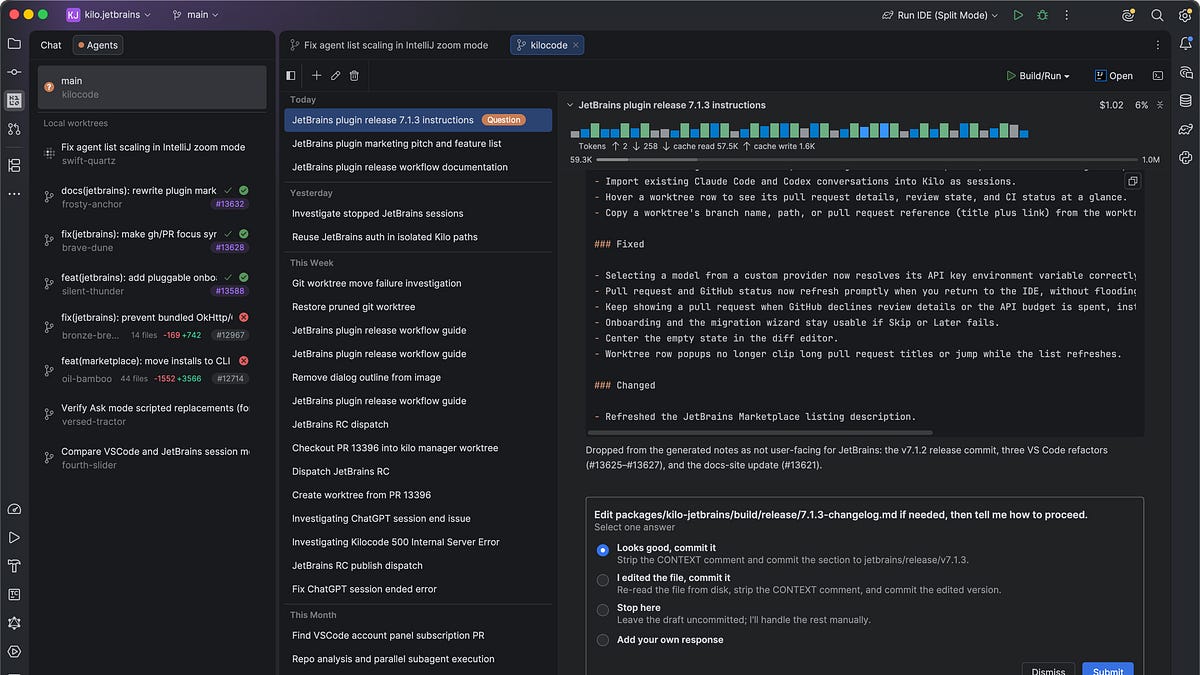
The new version of Kilo Code for JetBrains shows why we made that investment. You can now run multiple coding agents on different tasks at the same time, give each one an isolated git worktree, run the result using your existing Run Configurations, and track its diff and GitHub PR—all from one IDE frame.
In other words, Kilo turns JetBrains into a multi-agent control room.
We’re live on Product Hunt today with the new Kilo for JetBrains. Support our launch here. Kilo Code Agent Manager showing multiple agents in isolated git worktrees
One task per agent, one worktree per task
Running agents in parallel sounds useful until two agents work on the same checkout.
Kilo avoids agent coordination problems by giving every task its own git worktree. Each agent gets its own branch, working directory, and uncommitted changes. The tasks can move independently without stepping on one another’s files.
You can create a new worktree from a base branch, check out an existing branch, or import a GitHub PR directly from its URL. All of them appear in the Agent Manager, inside the JetBrains window you already have open.
Create a new worktree, import one from a pull request, or use an existing branch
That last part is important. The usual way to work with multiple checkouts in JetBrains is to open multiple IDE windows. It works, but three parallel tasks quickly become three project windows, three sets of tool windows, and a lot of context switching.
Kilo keeps the overview in one frame.
Each worktree also keeps its own session history, so you can return to an earlier conversation without losing the branch-level view.
Session history for a branch worktree inside the Agent Manager
There is also a Continue in Worktree action for the moment when a conversation becomes a bigger piece of work. You can start an agent in your current checkout, explore the problem, and then move the session and its uncommitted changes into a fresh worktree without doing the git choreography yourself.
Move an existing Kilo conversation and its changes into an isolated worktree
Kilo shows the transfer as it happens: capturing the changes, creating the worktree, transferring the files, and forking the session. When it is done, the original checkout stays clean and the agent continues in isolation.
A new isolated worktree being created while a conversation is moved
Run the result without window-juggling
An agent finishing a code change is not the same as the change working.
You still need to launch the app, exercise the behavior, and sometimes watch it fail. Worktrees usually make this difficult because a JetBrains Run Configuration points at paths in the main checkout.
Kilo takes your existing Run Configurations and adapts them to the selected worktree. It updates the working directory and relevant paths automatically, so you can launch an app from any task without rebuilding the configuration by hand.
The Agent Manager shows which worktrees have a process running. Build and Rebuild are available from the same place. This means an agent can implement one task while another task’s app is running, and you can keep an eye on both from one window.
Run Configurations, live run status, and Open in New Frame for a worktree
For full debugging—breakpoints, stepping through a JVM process, inspecting state—you can open one worktree in a dedicated IDE frame with one click. Kilo reuses the frame if that worktree is already open; otherwise it opens a new one. The default stays compact. The extra window appears only when the task needs it.
GitHub context belongs next to the task
Parallel work is easier to manage when you can tell what state each task is in.
Kilo shows the linked pull request number, title, and state in the session. You can open the PR in the browser, compare the worktree with its base branch, and see file and line counts without hunting through terminals or tabs.
Uncommitted changes are shown separately from the branch diff. That distinction answers two different questions: what is already part of the work under review, and what is still changing locally?
You can also paste a GitHub PR URL to create a worktree from it. That makes the same workflow useful beyond generation: pull down a teammate’s PR, ask an agent to review or continue it, run the app, and open the worktree in a full frame if you need to debug it.
If git or the GitHub CLI is missing or unauthenticated, Kilo gives you a guided way to fix it instead of ending the flow with an opaque error. GitHub pull request status, checks, diff against the base branch, and local changes
Still built for the machine where your code actually lives
All of this works locally, but remote development is still the architectural test.
In JetBrains Remote Development, the UI runs on your laptop while indexing, project access, and execution happen on a remote host. A plugin has to know which side owns each responsibility. If it gets that boundary wrong, features may become slow, open files in the wrong environment, or fail outright.
Kilo’s interface is native IntelliJ-platform Swing—there is no embedded Chromium UI—and the plugin is split into frontend, backend, and shared modules. The UI stays responsive on the client. The bundled agent server runs on the backend, next to the repository.
That is why creating worktrees, running commands, and opening a worktree in a new frame still target the host when you are connected through JetBrains Gateway. Kilo also ships a native CLI binary for the host’s operating system and architecture, so you do not need to install or reconcile a Node.js runtime first.
Dev containers introduce another boundary. If a project is opened in a way that leaves the plugin backend unable to see the container’s files, Kilo detects the situation and tells you to reopen it through JetBrains Gateway. Silent failure is not a remote-development strategy.
The plugin also renders its initial state immediately and fills in remote data as it arrives. Long-running calls are designed to tolerate backend restarts and reconnects. These are small details when the connection is perfect and essential when it is not.
I went deeper into the split-mode architecture in the previous post. The short version is that remote development is not a compatibility box we check after building the local plugin. It determines how the plugin is built.
Choose the model for the task
An IDE should not decide that every coding task belongs to one model provider.
Kilo gives you access to more than 600 models across major providers. You can use Kilo credits or bring your own API keys, then switch models without leaving the IDE.
Custom agents can be pinned to a specific model, so a carefully configured agent does not silently drift to a different model between sessions. You can also configure a separate small model for frequent, lower-cost operations while reserving a larger model for the main task.
Model badges surface relevant data-use information, including whether a model may train on prompts. For organizations, model access controls can block providers or individual models based on policies such as data training, retention, or datacenter location. Those rules apply consistently across Kilo’s clients.
One runtime behind every Kilo client
The JetBrains plugin is powered by Kilo CLI, the same open-source agent runtime behind Kilo’s command-line interface, VS Code extension, and cloud.
The runtime handles model routing, tool execution, agent orchestration, and session persistence. JetBrains provides the native interface and IDE integration. This separation means we do not have to rebuild the agent stack for every editor.
It also means your setup travels with you. JetBrains reads and writes the same kilo.jsonc configuration used by the CLI and VS Code. Your providers, custom agents, skills, and MCP servers can follow you across surfaces.
One agent server serves the main workspace and its open worktrees for each IDE instance. You get parallel task isolation without creating a separate agent runtime for every worktree.
Parallelism also exists inside an individual session. Subagents can work on separate pieces of a problem and open in their own editor tabs, while the parent session keeps the overall task together.
Parallel Kilo subagents opened in separate JetBrains editor tabs
Try it in JetBrains
Search for Kilo Code under Settings → Plugins in IntelliJ IDEA, WebStorm, PyCharm, GoLand, PhpStorm, Rider, CLion, or RubyMine. It works in Community and paid editions, with local projects and JetBrains Remote Development.
If you already use Kilo in VS Code or the CLI, you can bring the same account, keys, configuration, agents, and skills with you. Then give the Agent Manager more than one task. That is where this version starts to make sense.