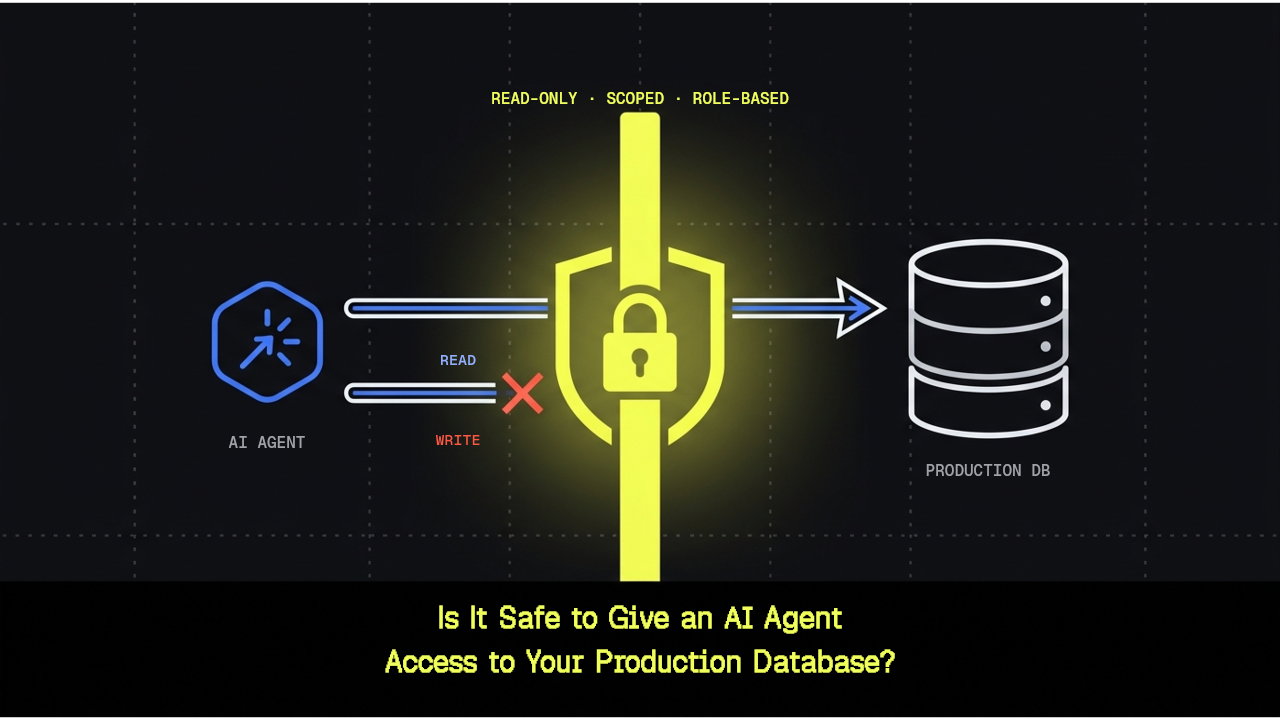
The direct answer #
No, giving an AI agent unrestricted access to a production database is not safe. Your AI agent has full production database access. Is it compromised yet, or just waiting to be? Most teams solve this with client-side restrictions: "We'll limit what the agent can request." But that's security theater. A determined (or accidentally malicious) agent bypasses it in minutes.
The real answer is harder to implement but actually works: enforce access at the database layer. Read-only access. Scoped queries. Role-based controls. But only when the database itself enforces them; not your client.
This article explores what that distinction means in practice. We use Tiger MCP and Tiger CLI as examples (full disclosure, we built these tools), but the architecture applies across any database or MCP server, whether or not you ever touch a Tiger Cloud service. Nothing below should be read as a claim that any specific setup is fully secure or satisfies a particular compliance framework. What follows describes what specific controls do and where they're enforced, which is a more useful question than "is this safe" answered as a yes or no.
Why this question is suddenly everywhere #
Until recently, connecting an AI coding agent to your stack meant giving it access to source code. Worst case, it wrote a bad function or introduced a bug that showed up in code review before it shipped. Now, through MCP servers, agents connect directly to live databases: reading production tables, running exploratory queries, sometimes writing back. The blast radius changed shape. A bad edit to a file gets caught in a pull request. A bad query against a production table can run immediately, against real data, with no review step unless someone built one in.
As we see these shifts in AI coding agents, the developer conversation has shifted with it. A year ago, the dominant question was whether you could trust an agent's judgment: would it write reasonable code? Would it follow instructions correctly? Now there's a second, separate question layered on top: can you trust the MCP server itself, independent of how well-behaved the agent connecting to it happens to be? Those are two different failure modes. One is about agent behavior, and the other is about whether the tool sitting between the agent and your database enforces what it claims to enforce.
That second question is harder to answer than it should be right now. A separate review that graded MCP servers on usability found that roughly a third scored a D or an F, meaning that a large share of MCP servers fail basic security testing when they run in isolated environments. Neither finding is about any single vendor, but together these findings say something simpler and more useful: implementation quality varies a lot across the current MCP ecosystem. "Is MCP safe" isn't a yes-or-no question, it rather depends on what a specific server's controls actually enforce, and where. Tiger Data's own engineers have talked through why that's true in general, separately from any single product's answer to it. The general consensus is that widespread adoption of MCP servers is inevitable, but there are still security concerns and implementation gaps to address.
The real risk isn't the agent: it's unscoped access #
Most incident writeups involving an AI agent and a database don't describe a rogue or malicious agent. They describe an agent that was handed too much access in the first place, and eventually did something with it that nobody wanted.
The pattern repeats because it's the path of least resistance. Someone connects an agent to a database for the first time, hits an authentication prompt, and reaches for whatever credentials are already sitting in an environment variable or a password manager entry. Often that's an admin account, or the same connection string the application itself uses. It works immediately. Nobody scopes it down later, because there's no obvious moment where that becomes urgent, until there is.
Prompt injection happens when an agent reads untrusted text as part of its normal work: a support ticket, a value stored in a table, the contents of a webpage it fetched. That text contains instructions the agent wasn't supposed to follow, and the agent can't reliably distinguish "instructions from the person who set me up" from "text that happens to look like instructions." Unscoped access makes this worse: once injected, the agent runs queries against the whole database with broad permissions, far beyond what the injection would otherwise reach. The damage scales with the access you gave it.
The subtlety here goes further than a suspicious sentence sitting in a support ticket. You can watch the whole session scroll by and see nothing unusual, because there's nothing for a human eye to see. It's a concrete example of why "I'll just watch what it does" or “human-in-the-loop” isn't a complete safeguard by itself. Manual review is the safeguard most teams reach for by default, and it has a real, measurable failure rate. A study of roughly 40,000 runs of a review exercise where humans were asked to approve or reject AI agent actions found that reviewers missed about one in three risky actions they were supposed to catch. Human review helps. It is not sufficient on its own, and treating it as the primary safety net for a database-connected agent means building on a foundation already measured to fail a third of the time. Structural, database-level controls that don't depend on a human noticing something in the moment matter more.
Safety requires a framework #
None of what follows is specific to Tiger Data. It applies to any developer connecting any AI agent to any database, on any vendor's infrastructure. Think of the six practices below as general AI agent guardrails: not a single switch, but a set of independent controls that hold even if one of them fails.
- Never hand an agent the same raw admin or superuser credentials a human or the application already uses: This is the single most common mistake, and it's the one that turns every other risk in this article from contained to unbounded. If the agent's connection is compromised, tricked, or simply makes a mistake, the ceiling on what it can do should not be "everything."
- Create a dedicated, purpose-scoped role for the agent: Least privilege means a role that can do exactly what the agent's task requires and nothing else, not "whatever's easiest to set up today." Scoping access to specific schemas, tables, and operations only takes a few extra minutes the first time and removes an entire category of risk permanently.
- Default to read-only for anything exploratory: If the agent's job is answering questions, debugging, or analyzing data, it doesn't need write access to do that job. Treat write access as something you escalate to deliberately, for a specific reason, rather than something that's granted by default because it might be useful someday.
- Use a fork or a read replica for anything destructive or experimental: Testing a migration, trying a risky query, or letting an agent iterate on a schema change is a different job than answering questions about production data. Point that work at a disposable copy, not the system you can't afford to lose.
- Keep a human in the loop for anything that writes or changes schema : AI-generated reviews catch some mistakes, but not all.The 40,000-run study above is a reasonable data point to keep in mind when deciding how much weight to put on it. As a best practice, introduce a human into the review cycle when the project involves using AI to write or change schema.
- Log what the agent actually ran: Visibility after the fact won't prevent an incident, but it's the difference between knowing exactly what happened and reconstructing it from memory.
The common thread running through all six of these: enforcement matters more than intent. Any client-side setting, whether a toggle, a configuration, or a restriction, only works if the agent follows it. Database-level enforcement is different: it applies no matter how the agent connects, which client it uses, or what it's trying to do. You don't have to trust the agent; the database enforces the restriction.
How we implement safeguards with Tiger MCP and Tiger CLI #
Tiger MCP and Tiger CLI are an active implementation of the framework above. Here's what each layer does, and specifically where it's enforced.
Read-only mode is a client-side switch with a server-side backstop. Turning it on, with tiger config set read_only true, or TIGER_READ_ONLY=true for a single session, disables mutating CLI commands: service create, fork, start, stop, resize, update-password, and delete all return an error. The matching Tiger MCP tools for those actions aren't just blocked, they aren't registered at all, so an agent can't see them or call them in the first place.
That’s the client-side half that answers the "what if the client doesn't cooperate" problem. Database sessions opened through Tiger MCP or Tiger CLI, whether via the db_execute_query tool, tiger db connect, or tiger db connection-string, run inside Tiger Cloud's immutable read-only mode at the server level. Writes and schema changes are rejected by the database itself, instead of relying on client-side restrictions alone. That's a meaningfully different restriction than a tool simply choosing not to offer a mutating action. The tool not offering an action means the tool has to keep behaving correctly. The database rejecting the write means it doesn't matter whether the tool behaves correctly, because the write will never land, regardless of how it was attempted.
A dedicated read-only database role is a second, independent layer. Tiger Cloud's default tsdbadmin role has full read and write permissions (it's not a superuser, but it can modify data). For agent access, you create a separate Postgres role scoped to read-only access, save its credentials with tiger db save-password <service-id> --role <role> --password=<password>, and connect the agent as that role rather than as tsdbadmin. Grant that role SELECT on the tables the agent needs. A role created with tiger db create role <service-id> --name <role> --read-only can log in but holds no table privileges, so an agent connecting as it gets permission denied on every query until you grant access. Because Postgres itself enforces what that role can do, the restriction holds regardless of what tool or client connects as that role, including tools you haven't configured yet or don't control directly. This is the layer that matters most if you're not fully confident every client touching your database will always respect read-only mode as intended.
Forks and read replicas remove production from the blast radius entirely for anything destructive or exploratory. An agent testing a schema migration, trying an index change, or running a query it isn't confident about can work against a fork or a read replica instead of the primary service. Nothing that happens within a fork touches production data, no matter what the agent does. If you need an agent to actually write or restructure something, give it a disposable copy to do that on.
The documented best practice is to default production services to read-only and escalate to write access deliberately, for the specific change you intend to make, rather than leaving write access on as a standing default because it's more convenient at the moment.
Data minimization is a smaller but real practice worth adopting alongside the layers above: ask an agent for a single computed answer rather than a raw export. The database does the filtering, and less data leaves it in the first place. If an agent only needs to know whether a threshold was crossed, there's no reason for it to pull the underlying rows to figure that out.
One more thing read-only mode catches that isn't about data risk at all: cost. Service creation, forking, and resizing are billable actions, and read-only mode disables the Tiger MCP tools for all three. An agent that can't create or resize services can't run up a bill by mistake, which turns out to be a meaningful side benefit of the same restriction that protects data.
For teams evaluating whether Tiger MCP's authentication model fits their setup, the tool also supports client credentials for programmatic, non-interactive access, a public and secret key pair generated separately from your personal login, so an automated agent doesn't need to share credentials with a human account. That's a different layer from the role-based authorization described above: client credentials answer "can this tool connect at all," while the role it connects as answers "what can it do once it's connected." Both matter, and they aren't substitutes for each other.
What this doesn't solve #
The above doesn't eliminate risk. It's worth being direct about where the limits are, rather than treating this as a solved problem.
Read-only mode and a scoped role reduce the odds and the severity of a bad outcome. They don't remove the underlying issue that an agent with legitimate read access to sensitive data can still be manipulated, through prompt injection, into surfacing or summarizing data it shouldn't. Nothing about read-only access prevents an agent from reading a table it's allowed to read and then describing its contents to someone who shouldn't see them.
That's not a gap specific to Tiger MCP, or to any one vendor's implementation. That's a property of how current AI agents work. Agents follow instructions Agents follow instructions they find in the content they process, and there's no database-level setting that changes that behavior. Any vendor's controls that claim to fully solve prompt injection at the database layer should be read skeptically, because the problem lives upstream of where database permissions apply.
The ecosystem-wide quality variance mentioned earlier, roughly a third of scanned MCP servers graded D or F., applies here too. Read-only mode and a dedicated role are strong defaults. They're not a substitute for knowing what a specific MCP server's controls actually enforce, and where. Verify what a specific server's controls enforce, and check your own role permissions, before connecting it to anything sensitive.
To sum things up: these controls are a strong foundation, not a finish line. Pair them with ongoing judgment about what data the agent actually needs to see for its task, not just what it's technically capable of reaching.
Decision framework: choosing an access model for your AI agent #
Different jobs call for different access models. Use this as a sort of checklist to self-select your access model based on what the agent is actually doing, not which vendor's tools you're using.
Choose read-only mode if the agent's job is exploration, analysis, debugging, or answering questions about the data. It never needs to change anything, so there's no reason to give it the ability to.
Choose a dedicated read-only database role if you want the restriction enforced no matter what tool or client the agent uses to connect, not only when it happens to go through one particular CLI or MCP server. This matters more the less certain you are about every future integration point.
Choose a fork or a read replica if the agent needs to test a migration, try a risky query, or do anything destructive. You want a disposable copy in the blast radius, not production.
Choose scoped, deliberate write access if you've made a specific decision that the agent should make an intended change, and you're escalating access for that purpose rather than leaving write access on by default.
One honest caveat applies across all four: no combination of these controls replaces knowing what data the agent actually needs to see, and how they’ll access it. Scoping access is necessary. It isn't sufficient by itself, and treating it as a complete answer is how teams end up over-trusting a setup that's only solved part of the problem.
If you're still comparing MCP servers before deciding which one to connect, that comparison, not this framework, is where the choice of vendor actually gets made.
Moving from ad hoc access to a scoped setup #
Most teams are in one of three starting points right now.
An agent is already connected with the same admin credentials a human developer uses. The fix here is a role swap, not a rewrite: create a scoped role, point the agent's connection at it instead of the admin account, and turn on read-only mode for anything that doesn't need to write. SQL still works the same way underneath. Existing prompts and workflows carry over once the connection is scoped correctly; the agent just has less room to make an expensive mistake.
An agent has no access controls configured beyond having the connection string. This is the most common starting point and the easiest to fix, because there's no existing setup to unwind. Create the scoped role first, before doing anything else, then decide whether read-only is the right default (it usually is) or whether the agent genuinely needs write access for its task.
A team hasn't connected an agent to a database yet and wants to start correctly. This is the easiest position to be in. Set up the scoped role and read-only mode before the first connection, rather than after. There's no habit to break and no existing integration to migrate.
For the exact commands behind each of these moves, best practices for AI agents covers read-only mode and forks in detail, and the Tiger CLI and Tiger MCP overview covers how the two tools fit together. If you're setting up an AI coding agent's database connection for the first time, check out our walkthrough covering the step-by-step commands.
FAQ: AI agents and database access safety #
Is it safe to give an AI agent access to a production database?
Unrestricted access is not safe. Scoped, read-only, or role-limited access, enforced at the database level rather than only by a client-side setting, can be done safely. See the framework and Tiger MCP sections above for the specifics.
What happens when an AI coding agent can see the database, not just the code?
The blast radius changes. An agent that can only edit files gets reviewed before anything ships, typically through a pull request. An agent with live database access can read, and potentially change, real data immediately, with no equivalent review step unless one is built in. That's why scoping access matters more than reviewing individual actions after the fact.
Can I trust an MCP server the same way I trust the agent using it?
No. They're separate trust boundaries. The agent's behavior is one risk. The MCP server's own implementation, how it enforces read-only mode, what it logs, how actively it's maintained, is a separate one. Ecosystem-wide quality varies enough right now that both deserve scrutiny before you connect anything sensitive.
How do I authorize an AI agent that calls an MCP server?
There are two independent layers: authenticating the tool itself, so only your intended agent can connect at all, and authorizing what it can do once connected, which is the role or permissions it connects as. Tiger CLI and Tiger MCP support client-credential-based authentication, a public and secret key pair, as one concrete example of the first layer, separate from the database role that governs the second.
What's the difference between an agent's read-only mode and a read-only database role?
Read-only mode is a setting on the tool (Tiger CLI or Tiger MCP) that disables mutating commands and tools on the client side and puts database sessions into a server-enforced read-only state. A read-only database role is a separate, Postgres-level restriction that applies no matter what tool or client connects as that role. They work together. Neither is a substitute for the other.
How do I stop an AI agent from making a destructive write?
Layer the controls: read-only mode for anything exploratory, a dedicated read-only role so the restriction holds regardless of connection method, and a fork or read replica for anything that needs to test writes without touching production.
What is the principle of least privilege for an AI agent, in practice?
A role scoped to exactly the schemas, tables, and operations the agent's task requires, not the same account a human or the application uses, and not broader access "just in case" it's needed later.
Does giving an AI agent read-only access fully protect my data?
No. It substantially reduces risk but doesn't eliminate it. An agent with legitimate read access can still be manipulated, through prompt injection, into surfacing data it shouldn't, even without writing anything.
Should I ever give an AI agent write access to a production database?
Yes, conditionally. Scoped, deliberate write access for a specific intended change is different from leaving write access on by default. Default production to read-only and escalate deliberately, for the change you actually intend to make.
What is prompt injection, and why does it matter for database-connected agents?
Prompt injection is untrusted text, a table value, a document, a webpage, that contains hidden instructions capable of redirecting what an agent does next. It matters more for database-connected agents because the "next action" can be a real query against real data, not just a suggestion a human reviews before acting on it.
How do forks or read replicas help when working with AI agents?
They give an agent a disposable or isolated copy of the data to work against, so destructive testing, migrations, or exploratory queries never touch production, regardless of what the agent does or gets tricked into doing.
What should I do before connecting any AI coding agent to a production database for the first time?
Create a scoped role rather than reusing existing credentials, default to read-only, point genuinely risky or exploratory work at a fork or replica, and confirm the restrictions are enforced by the database itself, not only by the client you happen to be using today.