Your coding agent can already read your repo, run your tests and open pull requests. Until now, though, the Kilo platform itself has sat outside its reach. Your usage data, agent profiles and cloud agents all lived behind the web app.
The Kilo MCP server gives your agent access to them. It’s a remote MCP server that puts the Kilo platform’s API in front of any MCP-compatible client: the Kilo CLI, the Kilo VS Code extension, or anything else that speaks MCP. You ask in plain language, and the agent finds the right endpoint and calls it for you.
Set it up in two steps #
Add the server to your kilo.json:
{

  “mcp”: {

    “kilo”: {

      “type”: “remote”,

      “url”: “https://mcp.kiloapps.io/mcp”,

      “enabled”: true

    }

  }

}
Then sign in:
kilo mcp auth kilo
A browser window opens for sign-in, followed by a second tab where you choose a personal account or an organization. Other clients work the same way. Point them at https://mcp.kiloapps.io/mcp and complete the OAuth sign-in.
How it works #
The Kilo platform’s API is too large to load as one tool per endpoint. So the MCP gives your agent two tools instead:
- search looks through the API catalog and returns matching endpoints, along with what each one does and the inputs it expects.
- call runs an endpoint from that catalog. If the agent passes the wrong inputs, the error names the missing field, so it can correct the call and try again.
A simple task usually takes one search and one call. More involved work, such as setting up a cloud agent, can take several searches, because the relevant endpoints sit in different parts of the API.
The connection acts as you, not as one fixed organization. If you belong to several organizations, name the one you mean in your prompt.
What you can do with it #
Ask about your usage and spend
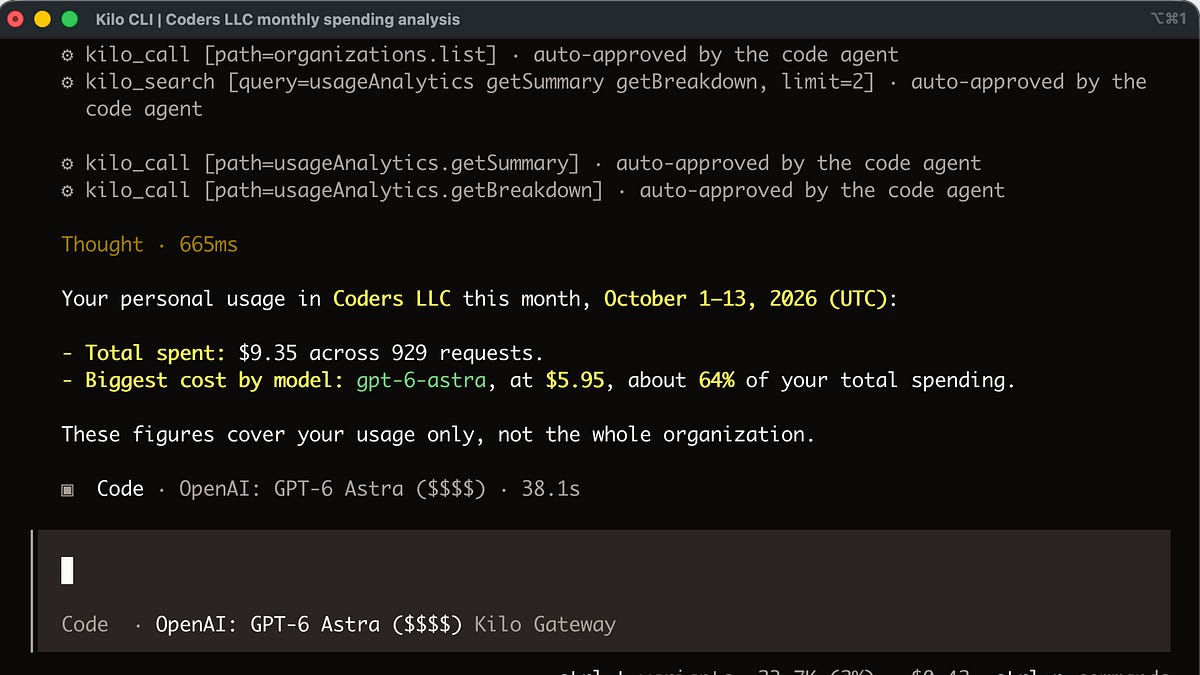
Ask “How much have I spent on Kilo this month, and what was the biggest cost?” Your agent pulls your usage, totals it and breaks it down by feature, such as the CLI, Agent Manager or code reviews. Usage can also be broken down by day or by month.
Before the MCP, one of our engineers trying to work out what his cloud code reviews cost had to build a private API endpoint to get the answer. Now it takes one prompt.
Manage agent profiles
Agent profiles hold the setup your agents run with: skills, MCP servers, commands, variables and repository bindings. Through the MCP, your agent can list them, read their details, create new ones, update them, set variables and delete them. For example, you can ask “Which of my agent profiles have MCP servers enabled?” and get a one-line answer, without clicking through each profile.
Start and manage cloud agents from wherever you work
The API covers the cloud agent lifecycle: starting a session, checking its status, sending follow-up messages, interrupting it and deleting it. In internal testing, one of our engineers created a cloud agent, deleted it, recreated it with a different model and reasoning level, sent it instructions and asked to be told when it finished, all from a chat session.
This is useful if you’d rather not install the Kilo CLI, or if you want your agent to hand work off on its own. You can send small tasks, like “add a field to the admin page,” to a cloud agent and check back later. When you aren’t sure how to implement a change, you can have cloud agents try different approaches in their own isolated environments while your laptop stays free.
What’s next #
We’re watching how agents use the MCP so we can add tools for the actions they repeat most. So try it, and share in the comments or Kilo Discord which tasks you’d like it to handle better.