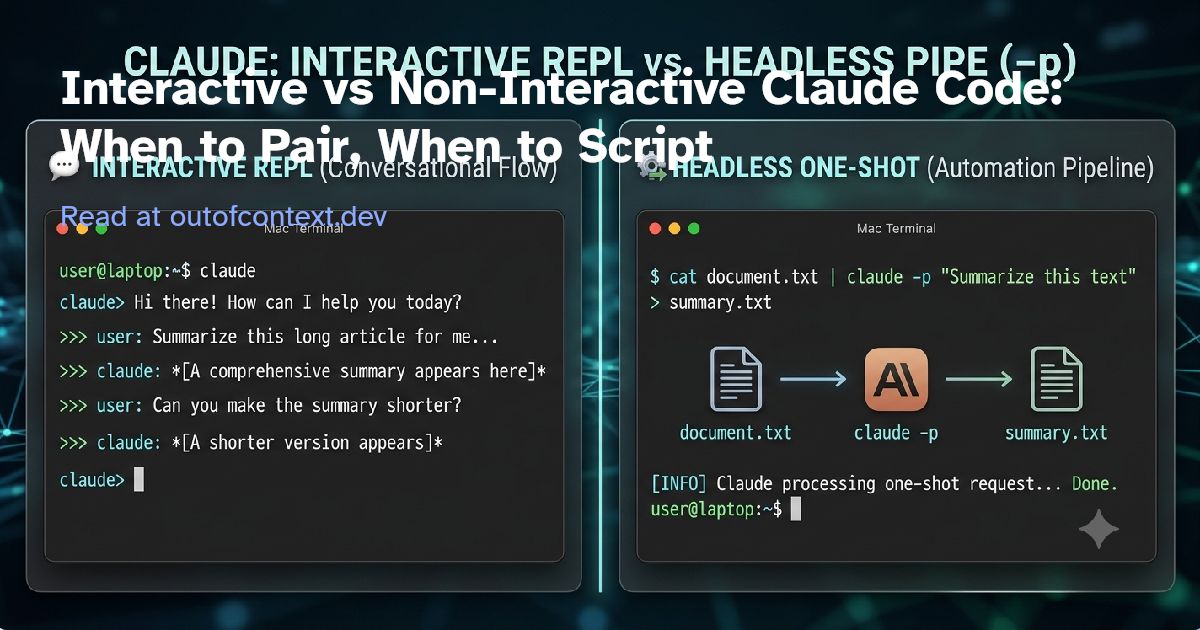
You already run claude
, watch it read the repo, approve a tool call, nudge it, and move on. That’s one mode. There’s a second one you may not have wired up yet, and it’s the one that turns Claude Code from a thing you talk to into a thing you build with.
Same binary. Same tools. Same agent loop. The only thing that changes is whether you’re steering it live or handing it a job and walking away:
claude "prompt"
— a live REPL. A pairing session.claude -p "prompt"
— one shot, prints to stdout, exits. A Unix command you can pipe, script, and put in CI.
Pick the wrong one and you either babysit a task that should have been a one-liner, or you fire off an unattended run that aborts the first time it needs a decision you didn’t pre-make. Here’s the split I actually use.
Two ways to run the same agent #
The mental model is one sentence: the REPL is a conversation; -p is a command that returns a value.
Everything downstream follows from that. In the REPL you’re present — you approve tools mid-run, ask follow-ups, change your mind. With -p
you’re not there, so every decision has to be made up front, and the output is something a script consumes. Nothing about the agent’s capability changes between them. What changes is who’s in the loop.
Interactive: claude #
and claude "prompt"
claude                          # start a session
claude "explain the auth module and suggest a refactor"   # seed it with a first prompt
Both open the REPL. claude "prompt"
just skips the first thing you’d type. From there you get the interactive affordances:
Mid-run approvals— Claude asks before it runs a tool; you say yes or no.** Permission cycling**—Shift+Tab
moves through permission modes without restarting.Follow-ups— the conversation holds context, so you can steer turn by turn.
Reach for this when the task is exploratory, ambiguous, or needs human judgment somewhere in the middle — the cases where you can’t write the whole spec before you start. It’s a one-off you think through with Claude, not a step in a pipeline.
Non-interactive: claude -p #
/ --print
claude -p "What does the auth module do?"
-p
(or --print
) runs the prompt once, prints the response, and exits. No REPL, no interactivity. Because it reads stdin and writes stdout, it behaves like any other command-line tool — which means you can pipe into it and redirect out of it:
cat build-error.txt | claude -p 'concisely explain the root cause of this build error' > output.txt
For scripts and CI, add --bare
:
claude --bare -p "Summarize this file" --allowedTools "Read"
--bare
skips auto-discovery of hooks, skills, plugins, MCP servers, auto memory, and CLAUDE.md
. Without it, claude -p
loads the same context an interactive session would — including whatever happens to be configured in the working directory or ~/.claude
. Bare mode is how you get the same result on every machine: a teammate’s hook or a project .mcp.json
server won’t silently change the run, because bare mode never reads them. Only the flags you pass explicitly take effect.
Two things to know: in bare mode Claude has Bash, file-read, and file-edit tools, and you pass anything else in by flag (--append-system-prompt
, --mcp-config
, --settings
, …). And it skips OAuth and keychain, so auth has to come from ANTHROPIC_API_KEY
(or an apiKeyHelper
in --settings
).
The docs call
--bare
the recommended mode for scripted and SDK calls, and say itwill become the default forWiring it in now is future-proofing, not extra work.-p
in a future release.
--bare
is the reproducibility twin of the interactive-side debugging flag: when a live session misbehaves, --safe-mode strips the same customization layers so you can find which one broke. One skips your context for consistency; the other skips it to isolate a fault.
Making -p #
machine-readable
Text output is fine for a human reading a terminal. For a script, use --output-format
:
text
(default) — plain text.json
— structured JSON: the answer lands in.result
, alongsidesession_id
,total_cost_usd
, and a per-model cost breakdown.stream-json
— newline-delimited JSON events, token by token.
Parse json
with jq
:
claude -p "Summarize this project" --output-format json | jq -r '.result'
Need the output to conform to a shape? Pair --output-format json
with --json-schema
. The result lands in .structured_output
— the extract-and-pipe use case:
claude -p "Extract the main function names from auth.py" \
  --output-format json \
  --json-schema '{"type":"object","properties":{"functions":{"type":"array","items":{"type":"string"}}},"required":["functions"]}' \
  | jq '.structured_output'
For live progress, stream-json
with --verbose --include-partial-messages
emits an event per token. It also emits system/init
(session metadata: model, tools, MCP servers, loaded plugins) and system/api_retry
(attempt count, delay, error category) — useful for CI observability and failing a build when a plugin didn’t load.
Sessions without the REPL #
Headless runs can still be multi-step. Two flags carry state across invocations:
--continue
/-c
— reload the most recent conversation in this directory.--resume
/-r <id|name>
— resume a specific session.
claude -p "Review this codebase for performance issues"
claude -p "Now focus on the database queries" --continue
For multiple parallel conversations, capture the session_id
and resume it by hand:
session_id=$(claude -p "Start a review" --output-format json | jq -r '.session_id')
claude -p "Continue that review" --resume "$session_id"
Run both from the same directory — session lookup is scoped to the current project directory and its git worktrees.
Guardrails: bounding a headless run #
An unattended -p
run can loop on its own, so bound it. These two are print-mode only:
--max-turns N
— cap agentic turns; error on overflow.--max-budget-usd N
— hard dollar ceiling per invocation, stop when hit.
Then set the permission posture. --permission-mode
takes one of: default
, acceptEdits
, plan
, auto
, dontAsk
, bypassPermissions
, manual
. The two that matter for scripting:
dontAsk
— denies anything not in yourpermissions.allow
rules or the built-in read-only command set. This is your locked-down CI mode.acceptEdits
— auto-approves file writes plus common filesystem commands (mkdir
,touch
,mv
,cp
). Other shell commands and network calls still need an allow rule, or the run aborts when one is attempted.
For finer control, allow specific tools with permission-rule syntax:
claude -p "Apply the lint fixes" --allowedTools "Bash(git diff *),Edit"
Mind the space before *
: Bash(git diff *)
prefix-matches git diff …
, while Bash(git diff*)
would also match git diff-index
.
There’s also --dangerously-skip-permissions
(equivalent to --permission-mode bypassPermissions
). It approves everything. Justified in a throwaway sandbox or container you’ve isolated; reckless against a repo you care about or anything with network and secrets. Reach for dontAsk
plus an explicit allow-list first. (The same review-vs-autonomy trade-off shows up in the editor, covered in Cursor auto-review vs YOLO.)
Real recipes #
These are the payoff. Every one is a real -p
invocation.
Explain a failure. Pipe a log in, get the root cause out:
cat build-error.txt | claude -p 'concisely explain the root cause of this build error' > output.txt
Project linter as a package.json script. Piping the diff means Claude doesn’t need Bash permission to read it; the escaped quotes keep it portable to Windows:
{
  "scripts": {
    "lint:claude": "git diff main | claude -p \"you are a typo linter. for each typo in this diff, report filename:line on one line and the issue on the next. return nothing else.\""
  }
}
Commit helper. Review staged changes and write the message:
claude -p "Look at my staged changes and create an appropriate commit" \
  --allowedTools "Bash(git diff *),Bash(git log *),Bash(git status *),Bash(git commit *)"
PR security review. Feed a PR diff in, reshape Claude’s role with --append-system-prompt
, get JSON out:
gh pr diff "$1" | claude -p \
  --append-system-prompt "You are a security engineer. Review for vulnerabilities." \
  --output-format json
Batch loop. One -p
call per item, collect the JSON:
for f in src/**/*.py; do
  claude --bare -p "Summarize what $f does in one sentence" \
    --allowedTools "Read" --output-format json | jq -r '.result'
done
User-invoked skills and custom commands work in -p
too — put /skill-name
in the prompt string and Claude Code expands it before running. Commands that open an interactive dialog, like /login
, don’t work headless.
Which mode, when #
| Task shape | Mode | Key flags |
|---|---|---|
| Exploratory, ambiguous, needs mid-run judgment | Interactive | — |
| One-off you want to think through | Interactive | claude "prompt" |
| Deterministic, repeatable, composable | -p |
--bare , --allowedTools |
| Unattended / CI | -p |
--bare , --permission-mode dontAsk , --max-budget-usd |
| Output another program parses | -p |
--output-format json , --json-schema |
| Multi-step scripted workflow | -p |
--output-format json + --resume "$session_id" |
Rule of thumb: if a human needs to be in the loop, use the REPL. If a program is, use -p
.
Gotchas #
Things that bite the first time you script this:
No mid-run approvals. In-p
there’s nobody to ask. Decide permissions up front, or the run aborts the first time it hits an un-approved tool. This is the single most common headless surprise.Quoting and escaping. Shell quoting rules apply, and inpackage.json
you escape the double quotes (\"…\"
) for Windows portability.Piped stdin is capped at 10MB(as of v2.1.128). Exceed it and Claude Code exits with a clear error and non-zero status. For larger input, write it to a file and reference the path in the prompt instead of piping.Cost.-p
can loop autonomously. Pair--max-turns
and--max-budget-usd
, and track spend withtotal_cost_usd
from--output-format json
.Great for reproducibility, surprising if you expected your--bare
skips your local context.CLAUDE.md
or MCP servers to load. If a bare run behaves differently than your interactive session, this is usually why.Background tasks at exit. A background Bash task (dev server, watch build) is terminated ~5s after Claude returns its result and stdin closes (a fix landed in v2.1.163 so a never-exiting process no longer holds the run open forever). Background subagents and workflows are waited on instead, capped at ten minutes by default since v2.1.182.
TL;DR #
Use the REPL to think with Claude. Use -p
to build with it. The move: take something you keep doing by hand in the REPL, ship it as a one-liner, then graduate the one-liner to a package.json
script, a git hook, or a CI job. Add --bare
and a permission posture, and it runs the same everywhere.
Sources #
All flags and behavior verified against primary docs on 2026-07-06.
- Claude Code CLI reference —
https://code.claude.com/docs/en/cli-reference(flag names and behavior, permission-mode enum, session flags,
--max-budget-usd
,--bare
). - Run Claude Code programmatically (headless) —
https://code.claude.com/docs/en/headless(stdin piping and 10MB cap, output formats, JSON fields,--bare
default note, recipes, session capture, background-task grace period).