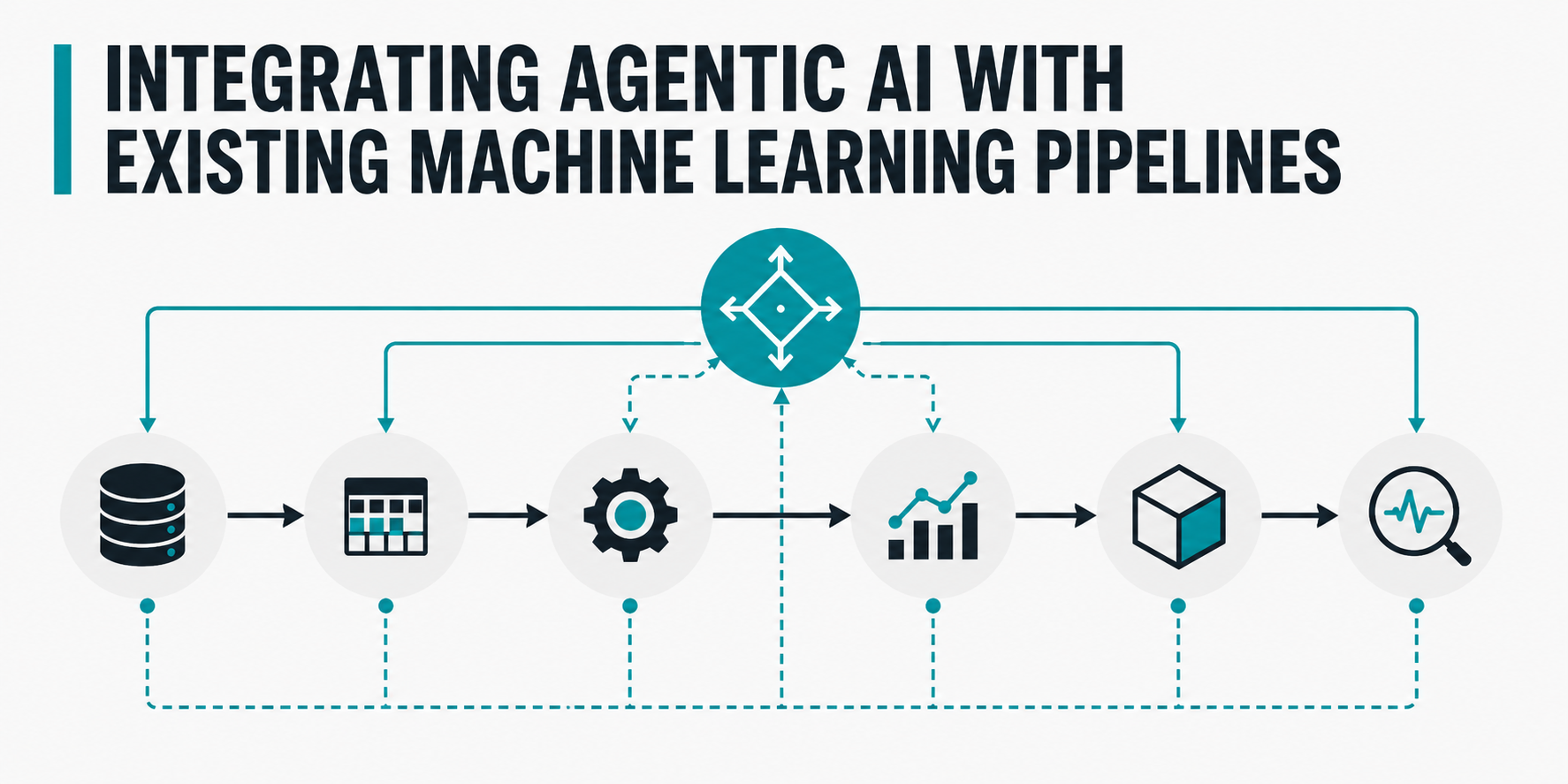
In this article, you will learn how to combine a classical machine learning pipeline with an agentic AI system to build a hybrid, autonomous customer retention workflow.
Topics we will cover include:
- How to generate a synthetic dataset and train a random forest classifier for customer churn prediction using scikit-learn.
- How to design an agentic AI system — complete with tools and an LLM-powered reasoning core — that interprets machine learning predictions and acts on them autonomously.
- How to wire the machine learning pipeline and the agent together into a single, end-to-end runnable Python application.
Introduction #
Agentic AI and machine learning pipelines are far from incompatible when it comes to building production-ready AI applications. In fact, embracing them as two sides of the same coin has become more than a mere trend: it constitutes a modern foundational architecture pattern that drives the shift from passive predictive analytics to autonomous decision-making and action.
Traditional machine learning pipelines excel at pattern recognition tasks of varying complexity, but they are purely reactive in their base form. Meanwhile, agentic AI systems are all about proactivity: combined with predictive machine learning models, they can build on the insights yielded by such models to plan, use tools, and address real-world use cases with little or no human guidance.
In this hands-on article, we will show you how to bridge the gap between reactive machine learning models and proactive AI agents. We will construct a lightweight, free, runnable Python pipeline that:
- Predicts customer churn based on a classical machine learning model built with scikit-learn.
- Hands the obtained predictions over to an agent endowed with a state-of-the-art LLM to autonomously reason and execute different customer retention strategies.
Prerequisites #
The entire coding tutorial can be run for free in Google Colab or a local Jupyter notebook, provided you have the necessary libraries installed and imported.
If you are using Colab, at the time of writing, the only library you might need to manually install is Groq:
!pip install groq

1

!pip install groq
Make sure you also import the following:
import numpy as np
from sklearn.ensemble import RandomForestClassifier
from sklearn.model_selection import train_test_split
from groq import Groq

1234

import numpy as npfrom sklearn.ensemble import RandomForestClassifierfrom sklearn.model_selection import train_test_splitfrom groq import Groq
Since Groq — one of today’s most capable open-source LLM providers — requires an API key, be sure to register on their website and create your own API key here. You will need to incorporate it in your notebook or Google Colab account. The code below is designed to read the API key from the “Secrets” section found on the left-hand sidebar in Google Colab: create a new secret variable there called GROQ_API_KEY
, and paste your actual Groq API key into the “value” field.
These instructions will help you inject the newly added API key into your program:
import os
from google.colab import userdata

os.environ["GROQ_API_KEY"] = userdata.get('GROQ_API_KEY')

12345

import osfrom google.colab import userdata # Injecting the Colab secret into standard environment variablesos.environ["GROQ_API_KEY"] = userdata.get('GROQ_API_KEY')
Step-by-Step Guide #
Once the prerequisites are set up, we will start building the classical machine learning pipeline — for customer churn prediction — that will later be extended by incorporating agentic AI principles and tools.
First, we need a customers dataset to feed to our machine learning model. For this example, we will synthetically generate our own dataset containing 500 customers, each described by two predictor features plus a target variable indicating whether the customer is prone to churn. The two input features are the monthly customer spend and the number of support tickets issued by the customer: both are real-world predictors of a customer’s willingness to stay with or abandon a brand. Notice that the code uses numpy
functions to introduce random noise, making the artificially generated data look realistic:
np.random.seed(42)
n_samples = 500

spend = np.random.uniform(10, 150, n_samples)

tickets = np.random.poisson(lam=1.5, size=n_samples)

base_churn_risk = (tickets * 0.15) + np.where(spend < 30, 0.3, 0) - np.where(spend > 100, 0.2, 0)
base_churn_risk += np.random.normal(0, 0.1, n_samples)
base_churn_risk = np.clip(base_churn_risk, 0, 1)
y = (base_churn_risk > 0.5).astype(int)
X = np.column_stack((spend, tickets))

1234567891011121314151617181920212223
Next, we build a simple, classical machine learning pipeline by splitting the dataset into training and test sets and training a random forest ensemble classifier. We verify the model’s performance on the test set before continuing:
X_train, X_test, y_train, y_test = train_test_split(X, y, test_size=0.2, random_state=42)

print(f"Training ML Model on {len(X_train)} records...")
ml_model = RandomForestClassifier(n_estimators=50, max_depth=5, random_state=42)
ml_model.fit(X_train, y_train)
print(f"Model Accuracy on Test Set: {ml_model.score(X_test, y_test)*100:.1f}%\n")

123456789101112
Prediction results on the test data:
Training ML Model on 400 records...
Model Accuracy on Test Set: 91.0%

12

Training ML Model on 400 records...Model Accuracy on Test Set: 91.0%
A 91% accuracy is good enough for our purposes, so we will proceed to incorporating our agent into the loop.
The first aspect we will create for our agent is its “hands” — in other words, the tools the agent can use to perform specific actions as a result of its reasoning and decision-making. While in real-world settings these tools typically interact with external components, services, and databases via API calls or similar protocols, we mock two customer-oriented actions here using simple printed messages:
def send_discount(customer_id):
    return f"[Action Executed] Sent a 20% discount code to Customer {customer_id}."

def schedule_support_call(customer_id):
    return f"[Action Executed] Escalated Customer {customer_id} to a human agent for a check-in."

12345678910
While having the agent call its accessible tools is how it exerts impact once deployed, it is the cognition core — responsible for the agent’s reasoning and execution — where the actual “intelligence” takes place:
class RetentionAgent:
    def __init__(self):
        print("Connecting to Groq API (Llama 3.3 70B)...\n")
        self.client = Groq()
        self.model_name = "llama-3.3-70b-versatile"

    def _reason(self, prompt):
        chat_completion = self.client.chat.completions.create(
            messages=[
                {
                    "role": "system",
                    "content": "You are an autonomous customer retention agent. You must output exactly one word: either 'call' or 'discount'."
                },
                {
                    "role": "user",
                    "content": prompt
                }
            ],
            model=self.model_name,
            temperature=0.0, # Zero temperature ensures deterministic, logical choices
        )
        return chat_completion.choices[0].message.content.strip().lower()

    def process_customer(self, customer_id, features):
        print(f"--- Processing Customer {customer_id} ---")

        churn_prob = ml_model.predict_proba([features])[0][1]
        spend_val, tickets_val = features
        print(f"ML Prediction: {churn_prob*100:.0f}% churn risk.")

        if churn_prob < 0.5:
            return "Agent Decision: No action needed. Customer is low risk.\n"

        prompt = (
            f"Customer {customer_id} has a {churn_prob*100:.0f}% risk of churning. "
            f"They currently spend ${spend_val:.2f} per month and have filed {int(tickets_val)} support tickets. "
            f"Business Rule: If a customer has filed more than 2 support tickets, they are frustrated and need a human 'call'. "
            f"Otherwise, they are just price-sensitive and we should send a 'discount'."
        )

        decision = self._reason(prompt)
        print(f"Agent Reasoning output: '{decision}'")

        if "call" in decision:
            result = schedule_support_call(customer_id)
        elif "discount" in decision:
            result = send_discount(customer_id)
        else:
            result = f"[Action Failed] Agent returned an unrecognized tool name: {decision}"

        return result + "\n"

1234567891011121314151617181920212223242526272829303132333435363738394041424344454647484950515253545556575859606162
Let’s briefly break down the code above:
- Using object-oriented programming, we created a specialized agent for our target domain called
RetentionAgent
. Importantly, this agent is connected to an LLM that acts as its inner cognition engine. We specifically chose a Llama 3.3 model served by Groq, which is lightweight enough to run feasibly in a notebook but powerful enough to reliably perform the intended reasoning task. - The agent’s
_reason()
method prepares the prompt for the LLM and configures model settings appropriate to our scenario, such as setting temperature to zero for deterministic output. - The agent’s
process_customer()
method bridges the gap with the machine learning model built earlier. It fetches customer churn predictions and constructs a prompt that injects the prediction alongside other customer data, asking the LLM what action to take. The core decision logic that triggers agent action is handled here.
Once all the building blocks are in place, it’s time to run our hybrid ML-agentic pipeline. We instantiate the agent and test it on three example customers. Pay close attention to the profiles of these three customers and cross-reference them with the LLM prompt defined inside the agent’s reasoning method:
agent = RetentionAgent()


print(agent.process_customer(customer_id=101, features=[25.50, 1]))

print(agent.process_customer(customer_id=102, features=[45.00, 5]))

print(agent.process_customer(customer_id=103, features=[140.00, 0]))

12345678910111213141516
Output:
Connecting to Groq API (Llama 3.3 70B)...

--- Processing Customer 101 ---
ML Prediction: 57% churn risk.
Agent Reasoning output: 'discount'
[Action Executed] Sent a 20% discount code to Customer 101.

--- Processing Customer 102 ---
ML Prediction: 88% churn risk.
Agent Reasoning output: 'call'
[Action Executed] Escalated Customer 102 to a human agent for a check-in.

--- Processing Customer 103 ---
ML Prediction: 0% churn risk.
Agent Decision: No action needed. Customer is low risk.

123456789101112131415

Connecting to Groq API (Llama 3.3 70B)... --- Processing Customer 101 ---ML Prediction: 57% churn risk.Agent Reasoning output: 'discount'[Action Executed] Sent a 20% discount code to Customer 101. --- Processing Customer 102 ---ML Prediction: 88% churn risk.Agent Reasoning output: 'call'[Action Executed] Escalated Customer 102 to a human agent for a check-in. --- Processing Customer 103 ---ML Prediction: 0% churn risk.Agent Decision: No action needed. Customer is low risk.
The results align with what one would expect. That said, be aware that the model choice matters: we selected an LLM that is well-suited to this task and set its temperature to zero to prevent non-deterministic behavior, which is undesirable in this context. If you choose a different model, your results may vary.
Closing Remarks #
In this article, we built a hybrid pipeline step by step that combines classical machine learning for customer churn prediction with an agentic AI solution capable of turning those predictions into an autonomous reasoning, decision-making, and action workflow. This demonstrates how to bridge the gap between two key pillars of modern AI solutions in corporate and organizational environments.