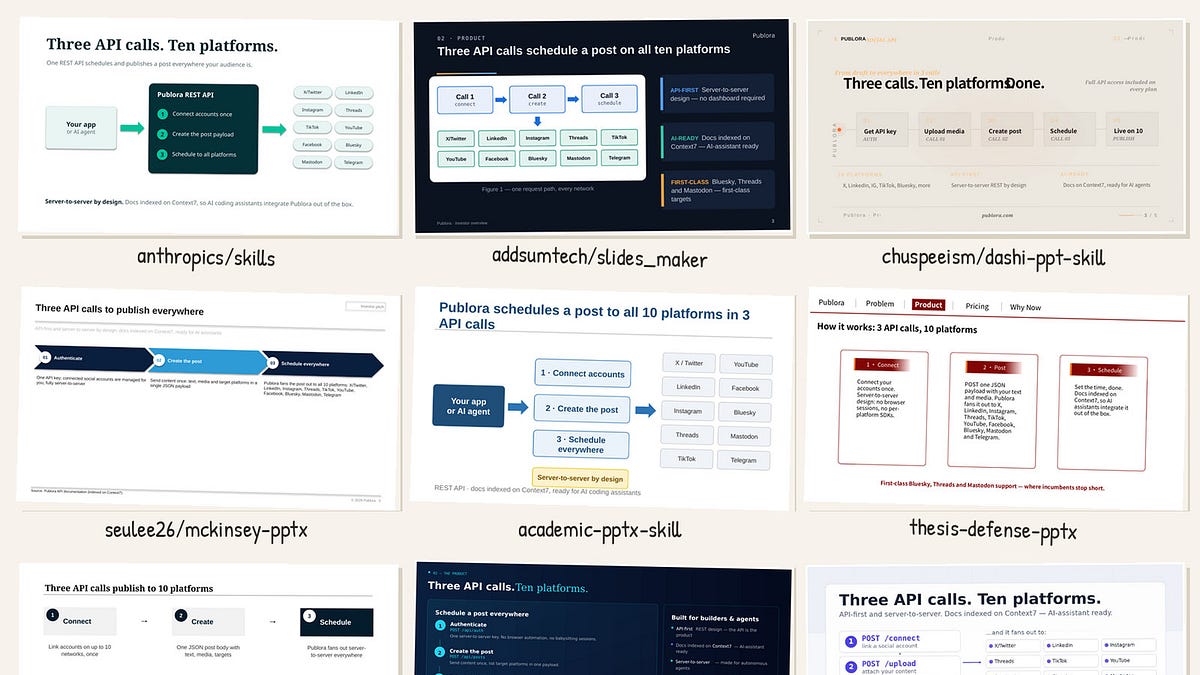
The same 5-slide pitch deck brief, eleven presentation skills, eleven parallel Claude subagents, zero mercy. Screenshots included.
Claude Code skills went from a curiosity to an ecosystem in about six months. Search GitHub for "pptx skill" today, and you'll find everything from Anthropic's official document skills to a McKinsey-cosplay design system with Harvey balls to a pipeline that clones the look of your old decks with an image model.
The question nobody answers: Which of them produce a deck you'd actually present — and then edit in PowerPoint on the flight to the meeting?
So I ran an experiment.
The setup #
I write about AI tooling a lot, and my publishing pipeline is itself agent-run — so testing agent skills with agents felt right. The method:
One brief for everyone. A 5-slide investor pitch forPublora(a real product: social publishing API, 10 platforms, $2.99/account). Fixed facts, fixed slide structure, one hard trap: Slide 4must contain a real table or chart— not a picture of one.** Eleven skills, eleven isolated subagents.**Each agent cloned one repo, read its SKILL.md, and followed the skill's own documented methodology — no freelancing. Each wrote a report: what broke (with exact errors), what it worked around, scores 1–10 on ease of use, output quality, editability, and docs.Independent rendering. Every resulting deck went through the same LibreOffice → PNG pipeline, and I reviewed the slides visually myself.
Total: ~1.3M agent tokens, about an hour of wall-clock time, and eleven decks on disk.
One number that sets the scene: a single skill's instruction file can now run to 82,000 tokens (slides_maker's SKILL.md) — longer than most novellas — and the agents read all of it before touching the brief.
The scoreboard #
The asterisk: claude-office-skills turned out to be a verbatim snapshot of Anthropic's pre-release pptx skill. Its own README tells you to use the upstream. Treat rows 1–2 as one entry.
claude-office-skills: a pre-release snapshot of the official skill — the family resemblance shows.
The one finding that matters most #
Before the individual reviews, here's the pattern that cuts across the whole field:
Almost every third-party skill paints tables instead of building them.
The brief demanded a real comparison table on slide 4. Out of eleven skills, exactly two produced native OOXML table/chart objects through their own pipeline: the official Anthropic skill and slides_maker. Everyone else — including the two prettiest generators — draws "tables" out of text boxes and rectangles. It looks identical in a screenshot. Then your CFO opens the file, tries to add a row, and finds sixty-two loose shapes where a table should be.
My subagents patched real tables in via python-pptx to satisfy the brief, and every report flagged the same thing: beauty and editability are currently a trade-off, and most skilled authors chose beauty.
A native, editable table — the official skill.
Gorgeous — and made of loose shapes. mckinsey-pptx.
Tier 1: use these #
1. anthropics/skills — the boring, correct answer (6/9/9/9)
The official document-skills bundle is the only entry that treats a .pptx as a document format rather than a rendering target. Real tables, real charts, a design rulebook, an XSD validator, and a mandatory render-and-look QA loop that caught every layout defect in our run.
The catch: its primary create path assumes pptxgenjs
is preinstalled (it is in Anthropic's own sandbox; it wasn’t in ours — npm ENOTCACHED
). The agent fell back to python-pptx and the skill's tool-agnostic rulebook carried it to a clean slate anyway. That's the sign of a well-designed skill: the methodology survives the tooling.
Use it when: you need decks people will edit. Which is most decks.
What the reports surfaced beneath the surface: the SKILL.md is ~240 lines of hard-won scar tissue — twenty-odd documented gotchas like "hex colors without #
" and "negative shadow offsets corrupt files." The render-QA wrapper goes as far as compiling a small C shim on the fly with GCC and LD_PRE it so LibreOffice's sockets work inside sandboxes. The design section explicitly bans the classic AI-slide tells — accent lines under titles, decorative color bars, and cream backgrounds. One human moment: its placeholder check greps for TODO
and flagged our deck — the match was "Mastodo n," an actual platform in the brief.
2. slides_maker — the dark horse (6/9/9/7)
The only third-party skill that shipped both a native table and a native editable chart through its own engine. Its build → strict-lint → render → render-lint → critic loop caught 30+ real defects in our run before a human ever saw the file. The output (dark_tech preset) looks like a real startup deck, not a python-pptx demo.
Sharp edges exist: two incompatible runs
content formats, and a dark-theme palette flip that made flowchart text white-on-white until the linter caught it.
The scale behind it: a ~5,800-line python-pptx helper library with ~60 components (native tables and charts, KPI tiles, and diagram kits), 14 design presets, and a check_env.py
preflight that verifies every dependency in one command. The first build didn't just warn — the strict linter refused to save the file with 19 CRITICALs, each naming the slide, the fault and the fix. The render-linter's messages read like a designer with measurement tools: INVISIBLE TEXT: 'Call 1' ink #E8EDF5 on fill #FFFFFF — contrast 1.18:1, unreadable.
That's the level of feedback most human reviewers don't give.
Use it when: you want slides_maker's exact niche — papers/docs/code in, natively editable deck out — with QA discipline built in.
3. dashi-ppt-skill — the beauty (7/9/6/8)
4,000 stars, and the visual output explains why: our Publora cover slide looks like a designer charged $2k for it. The agent workflow (goal.json → layout queries → three validators → CLI export) is genuinely pleasant, everything runs locally, no paid APIs.
Two honest caveats. The proprietary exporter emits text boxes only — no native tables or charts exist in the engine. And our independent LibreOffice render showed text clipping at slide edges that the browser preview didn't: the design is tuned to its own renderer, and fidelity degrades once the file travels.
Use it when: the deck will be presented, not edited — and you control the machine it renders on.
Under the hood it's a template orchestrator with real discipline: 12 themes, ~1,020 pre-built layout pages, 20 semantic roles, and per-layout contracts (copyKeys
, character budgets, array shapes) precise enough that our agent filled a deck blind and passed all three validators on the first render. The philosophy is "lock the template, fill the copy" — styling is deliberately off-limits. Details worth knowing before you adopt it: the SKILL.md is Chinese-only, the documented browser export returns 403 Forbidden
to scripts by design (it assumes a human clicking), the CLI fallback works, and the exported comparison "table" arrived as roughly forty absolutely-positioned text boxes over drawn grid lines — 186 editable text objects across five slides, zero real tables.
4. mckinsey-pptx — the consultant cosplay that works (9/8/6/7)
Highest ease-of-use score of the field: plan → pick from 40 templates → generate script → build. First build succeeded. The output is unapologetically MBB — action titles, chevron process flows, Harvey-ball comparison matrices, and a sources line at the bottom. Slide 4 of our test could be dropped into a real engagement deck.
Caveats: README is Korean-only (the English template catalog saves you), and — again — zero native table/chart objects; everything is shapes.
Use it when: you need the consulting dialect fast and your edits will go through code, not PowerPoint.
Two details sold me on the methodology even where the engine cuts corners. First, the bundled subagent definition forces the model to write a one-line rationale for every template pick, defending it against neighboring templates from the 885-line catalog — that one rule kills most lazy slide choices. Second, the whole 5-slide build executes in about one second of Python. The corner-cutting is equally concrete: the Harvey balls are circles masked by little white rectangles, and the footer routine advances a fixed y += 0.18
per footnote regardless of text wrapping — which is exactly how our slide 4 got a footnote stamped over the source line until the mandatory render-inspect loop caught it.
5. academic-pptx-skill — the best editor you'll hire (5/8/8/7)
The surprise of the test. This skill is not really a builder — it's an editorial methodology: action-title discipline, a "ghost deck" outline test, exhibit annotation rules. Pointed at a startup pitch (off-profile on purpose), the editorial layer transferred almost 1:1 and produced the most argumentatively sound deck of the batch.
The trade: it delegates the actual file-building to Anthropic's built-in pptx skill (not bundled), and its "funding pitch" mode is an empty pointer. Our agent had to rebuild the technical layer itself.
Its signature tool is the "ghost deck" test: strip the deck to just the action titles and check whether they still tell the story on their own — our Publora pitch passed only after two titles were rewritten. It also enforces exhibit annotation (every chart carries its takeaway as a sentence, not a label), which is the single habit that most separates readable decks from decorative ones. The two layout defects it produced — a title/subtitle overlap and a divider through a wrapped headline — both traced to hardcoded pattern coordinates, and both were caught by its own fix-and-verify loop.
Use it when: paired with skill #1. The combination — Anthropic's builder + this skill's editorial brain — beat either alone in our run.
Tier 2: interesting, with reservations #
thesis-defense-pptx(4/7/9/8) — earned the field's second-best editability score by doing the unfashionable thing: reusing a native template and replacing content in place. Its dump-first/scan/inspect methodology generalizes surprisingly well. But half the pipeline is Windows PowerPoint-COM-only, input must be PDF/LaTeX, and a Chinese university logo is embedded in the slide layouts. A great methodology trapped in a niche product.
Mck-ppt-design-skill(7/8/5/6) — genuinely engineered: a five-stage harness with machine-readable QA gates that scored our deck 97/100 on the first pass. But the documented layout-reference tier is simply missing from the repo, the engine path is hardcoded to ~/.workbuddy
, and some layouts leak hardcoded Chinese labels into your English deck.
ppt-agent-skill(4/7/6/6) — the 26 styles are real. The pipeline out-of-the-box is not: its SVG converter silently drops gradient backgrounds (producing white-on-white slides from the skill's own default style) and has no polygon handler, so its own recommended arrows vanish. The "18 charts" are HTML/CSS recipes, not chart objects. Fifty-five minutes of fixes to reach a valid deck — the most of any skill tested.
Tier 3: know what you're buying #
ppt-image-first(4/6/2/7) — a disciplined design protocol (three previewed style directions, a locked spec) that deliberately produces images-on-slides. Editability score: 2. That's not a defect, it's the philosophy — but combined with a hard dependency on an external image model, it's a narrow tool being marketed broadly.
gpt-image2-ppt-skills(3/4/2/6) — without an OpenAI key it generates nothing: image generation is 100% of the output. The style rules hardcode Simplified Chinese text. The result is flat PNGs in a PPTX wrapper. If you're a Chinese-language user who wants art-directed image slides and owns the API cost, it delivers its promise; for everyone else there's nothing here.
What I'd actually install #
1. anthropics/skills        → the builder (native objects, validation, QA loop)
2. academic-pptx-skill      → the editor (structure and argument discipline)
3. slides_maker             → when input is a paper/codebase and you want charts
4. mckinsey-pptx            → when the audience expects the consulting dialect
And one meta-observation. Testing eleven skills took eleven agents about an hour of parallel work. Every skill that survived contact with our brief had one thing in common: a self-verification loop — render the deck, look at it, fix what's wrong, repeat. The skills that failed hardest are the ones that trust their own output. That's true of presentation skills, and increasingly it's true of everything else agents build.
If you've used any of these skills — or found one this test missed — tell me in the comments: what did you build with it, which one earned a place in your workflow? And did the deck survive contact with a human editor afterwards? Eleven data points is a start; yours would make it better.
Methodology notes: identical brief (facts fixed, 5 slides, mandatory native table), each skill driven by an isolated Claude subagent following the skill's own docs, all decks rendered through the same LibreOffice pipeline, slides reviewed by a human+agent pair. Scores are the testing agent's 1–10 assessment; the ranking averages four axes. Full per-skill reports and all 55 slide renders available on request.