.view()
, .reshape()
, or .transpose()
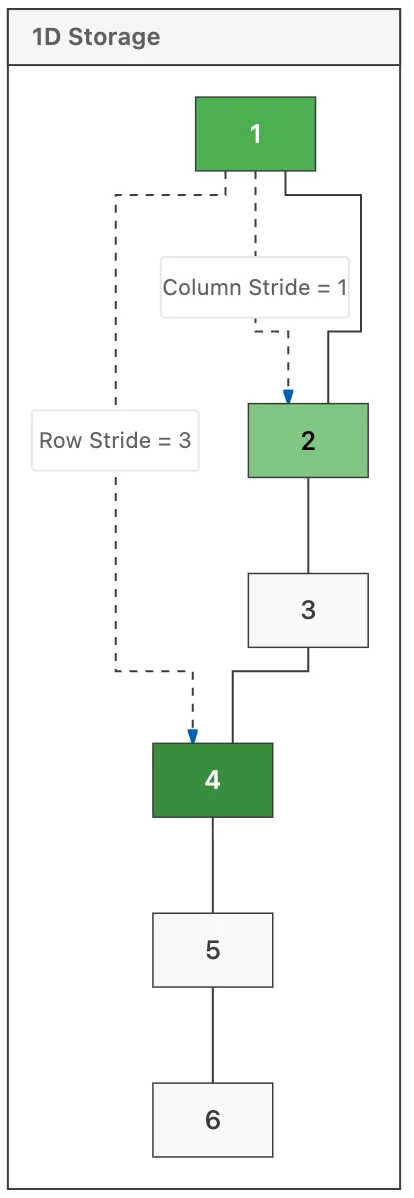
and assume the underlying memory stays organized. But if you're trying to optimize an AI workflow or write high-performance training loops, you cannot ignore how strides and memory layouts actually function under the hood.Most people visualize a tensor as a multi-dimensional grid, like a 3D cube of numbers. That's fine for a mental model, but it's a lie when it comes to hardware. In reality, your RAM is a flat, one-dimensional line of addresses. The "shape" is just an interpretation of how we jump through that line.
The difference between shape and strides #
When you define a tensor, you have the shape
(the dimensions) and the stride
(the number of steps to skip in memory to reach the next element in a specific dimension). This is where the real bugs hide.
If I have a 2x3 tensor:
import torch
x = torch.tensor([[1, 2, 3], [4, 5, 6]])
print(x.shape)   # torch.Size([2, 3])
print(x.stride()) # (3, 1)
The stride (3, 1)
tells PyTorch: "To move down one row, skip 3 elements. To move one column over, skip 1 element." This works perfectly because the data is contiguous.
The "Contiguous" trap #
The headache started when I used .transpose()
. When you transpose a tensor, PyTorch doesn't actually move the data around in memory—it's too slow to do that every time. Instead, it just swaps the strides.
y = x.t()
print(y.shape)   # torch.Size([3, 2])
print(y.stride()) # (1, 3)
print(y.is_contiguous()) # False
Now the tensor is "non-contiguous." The elements are logically in a new order, but physically, they are still sitting in the old order in your RAM.
This is a huge problem when you try to use certain operations like .view()
. I kept getting this specific error:RuntimeError: view size is not compatible with input tensor's size and stride (at least one dimension spans much more than 1 stride)
The error happens because .view()
requires the tensor to be contiguous. It wants to re-interpret the memory layout without copying anything, but if the strides are scrambled from a transpose, the math doesn't line up.
How to fix it (and when not to) #
If you hit that error, the quick fix is usually:
z = y.contiguous().view(new_shape)
Calling.contiguous()
forces PyTorch to allocate a new block of memory and copy the elements into the correct physical order. But here is the deep dive takeaway: .contiguous()
is not free. It’s a memory copy operation. If you are doing this inside a tight training loop for every single batch, you are effectively killing your GPU throughput.
Instead of constantly calling .contiguous()
, try to design your AI agent or model architecture to minimize transpositions, or use .reshape()
instead of .view()
. While .view()
is strict about memory, .reshape()
is smarter—it will return a view if possible, but if the tensor is non-contiguous, it will automatically handle the copy for you. It’s a bit more "beginner-friendly," but for real-world deployment, knowing exactly when a copy is happening is the difference between a model that runs in 10ms and one that drags at 50ms.
All Replies (3) #
.stride()
when debugging those weird dimension mismatches.