Kalshi: Engineering for the Moments That Move Markets (Sponsored) #
Markets don’t wait. On a prediction market, prices move in milliseconds, and every trade has to land the moment it happens. At the Agentic Data Summit on December 9, Batu Balimtas, Member of Technical Staff at Kalshi, takes you behind the scenes in Engineering for the Moments That Move Markets: Kalshi and Redpanda. Hear how Kalshi’s data infrastructure keeps pace when it matters most, and what it takes to run it in production. Catch Kalshi live at 12:00 PM PT. The summit is free and virtual and runs 8:30 AM–2:00 PM PT, so you can join for the sessions that matter most to you.
An off-the-shelf large language model can explain why there’s an error in your code. It can suggest possible causes. Or it can perform tasks like writing a database query. However, all this would be at a general level based on the model’s training. You cannot expect it to write answers based on your system’s internal workings.
This is handled using tools. Each tool is built for a specific job. But you can end up with lots of tools, especially when working in an enterprise setup. This is the situation the Uber engineering team faced.
To deal with this, they built the MCP Gateway. You can think of it as a shared platform that lets different AI agents find which tools are present and use them to perform their job. In this article, we’ll look at how Uber built this gateway in detail. Here’s what we will cover:
- What are tools and why AI agents need them
- The role of MCP at Uber
- How the Uber MCP gateway is designed
- How the gateway finds out the available tools
- How does the MCP gateway work
- How the MCP gateway deals with permission and access
Disclaimer: This post is based on publicly shared details from various sources. References at the end. Please comment if you notice any inaccuracies.
Why AI Agents Need Tools #
If you want a general-purpose LLM to write answers specifically for your current systems, you need to give it access to information about your system. For example, let’s say a developer asks an LLM-based AI assistant why XYZ service suddenly started failing. The answer is hidden in the system’s logs, deployments, metrics, and incidents. The LLM needs to access this information to be able to answer this question. This is where we can create tools. You can think of a tool as an operation an AI application can execute. For example, you can have a tool to search logs. Retrieve incident details. Or check the status of a deployment. The model selects a tool and provides the necessary inputs. The application executes it and sends the result back to the model.
Many of these tools already exist as APIs. As you might already know, an API is an interface through which one program can request something from another program. For example, we can have a logging service that exposes an API. It takes the service name and time range as input and sends back all the log entries that fall within the range.
However, for an agent to use such a service, we need to describe what it does and what inputs it needs. This structured definition takes the form of a tool that the LLM application can use. Behind the scenes, the API performs the real search.
The Role of MCP at Uber #
MCP stands for Model Context Protocol. With MCP, you get a standard way for AI applications to find out available external capabilities and talk to them. Uber uses MCP for its tool ecosystem.
We must know three important terms to understand the role of MCP in a better way.
First, you have the MCP client. This is the component that sits inside an AI application. It communicates using MCP and handles various interactions, such as requesting the available tools. Or making calls to the selected tools.
Second, there is the MCP server. It exposes the capabilities (or tools) through MCP. In Uber’s case, the server shows the available tools and accepts any requests made to those tools.
Third, you have the MCP tool. This is the individual operation exposed by a server. You can also think of them as capabilities. One server can provide multiple tools.
MCP requires you to define the tools properly. This definition is made up of information such as name, description, and input schema. A schema provides the structure of data. Things like which fields are present, which are mandatory, and what types of values they can accept. For example, you can have a schema where service_name has to be a string and limit is an integer.
MCP uses a structured way to format a request or its parameters. Also, the corresponding result or error. The format is usually JSON-RPC 2.0. This standardization makes it easy to integrate stuff. You can have the same MCP client talk to different MCP servers.
However, this standardization doesn’t come for free. Someone has to decide which tools exist and where they run. Also, you need to track the ownership of the tools and how they work. Initially, the engineering teams within Uber built their own MCP integrations. The autonomy was great at a small level. But as adoption increased, it was obvious that each team was solving similar problems. For example, exposing tools. Managing connections. Dealing with permissions. And so on. To make things even more difficult, finding out which tools were available was difficult. Everything was scattered.
On top of all this, Uber’s existing service landscape brought another challenge. All the services in Uber didn’t talk to each other in the same way. Some used HTTP. Some used gRPC. And others used TChannel. For example, you might have an HTTP API use JSON and a gRPC API use Protobuf messages. You cannot simply forward an MCP request across these services without modifying the request format.
Therefore, Uber needed a common layer that could connect MCP clients to the tools. They also wanted this layer to handle shared discovery, security, and operational support. This layer is known as the MCP Gateway.
How the Uber MCP Gateway is Designed #
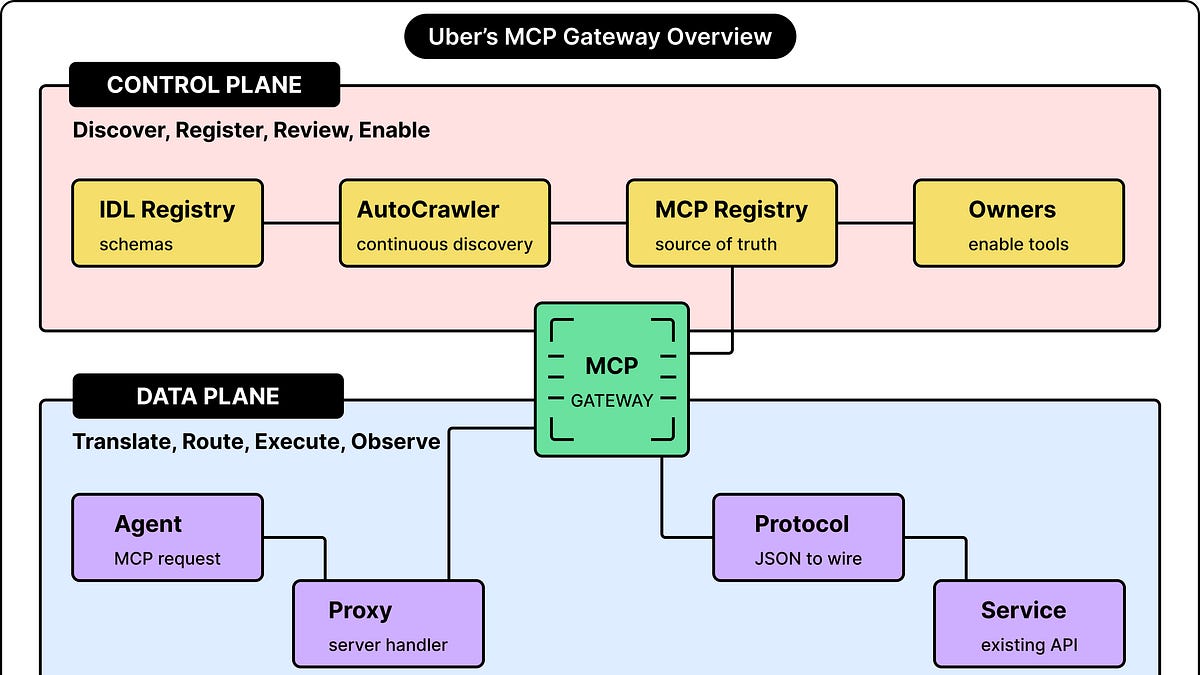
The Uber MCP Gateway platform is divided into two main components: the MCP Registry and the Proxy Gateway. This separation helps Uber’s engineering team manage tool definitions and permissions independently.
Let’s look at both in detail.
MCP Registry
You can think of the MCP Registry as the control plane. It holds the catalog of MCP servers and tools. You can record the information needed to discover the tools and learn more about them in the registry.
The reason they call it the control plane is that the registry also manages the configuration. For example, you can enable or disable the tool from the registry. It is also a shared source of truth.
The Proxy Gateway
This is the data plane. It handles the real MCP requests while agents are doing their work.
The gateway identifies the requested tool. It applies the necessary controls and sends the request to the right service. Also, it returns an MCP-compatible result.
How Tools Are Discovered #
You can’t manually create MCP integrations for 1000s of services. It’s a lot of work, and there are chances of errors. Uber has automated much of this work by using AutoCrawler.
AutoCrawler finds out existing APIs and MCP servers. It generates or retrieves their tool definitions and registers them in the MCP registry.
On a technical level, AutoCrawler is a distributed workflow system. It’s powered by Cadence. In this setup, you have a scheduled job start workflow that looks for any new services, APIs, or schema changes.
But how does AutoCrawler discover new things? It has two main discovery pathways:
From Existing API Definitions
Many APIs use an Internal Definition Language (IDL) to describe their APIs.
An IDL is a machine-readable description of a service interface. You can use it to specify operation names, request fields, and documentation comments. For example, you may have an API definition describe an operation named GetDeploymentStatus. It might take a deployment ID as input and return a status and timestamp.
AutoCrawler can read these definitions and then go through several steps.
First, it creates an MCP server representation for the service. It might also update an existing representation. Next, it pulls out method names, request and response structures. Then, it translates whatever it has found into tool schemas that MCP can make sense of.
AutoCrawler also uses an LLM to come up with better tool descriptions from the details it has extracted from the service. Finally, it stores these tool definitions in the registry.
As you can see, AutoCrawler is a good example of Uber’s no-code approach. Existing service contracts have enough information for the platform to build the MCP interface.
Discovering Native MCP Servers
Some services directly implement MCP. At Uber, these are called native MCP servers. These servers already have tool definitions. So less work for AutoCrawler to get those definitions.
Each native server emits a heartbeat metric. It signals the presence and readiness of the server. AutoCrawler keeps track of these signals. When it finds a server, it calls the server’s listTools operation. Once it finds the tools, it creates a proxy representation in the registry for all the tools and their schemas.
As you can see, both discovery pathways end up in the same catalog.
Discovering Tools vs Permission to Use Them #
Uber made a design choice that newly discovered servers and tools start in a disabled state.
This means that automatic discovery only makes the capability visible to the platform. After this, the team that owns the service should review and enable the service to make it available for the agents. The choice to enable is an ownership decision. It’s better that the service team has the opportunity to check whether the tool description is correct.
The owner team can review the tool definitions and update them using the registry’s interface. Every modification is a new diff that should be approved. Only approved changes are deployed. Also, you can have owners roll back to the previous version if needed.
How Uber’s MCP Gateway Works #
Once you have saved the tool configurations in the registry and have marked them as available, the data plane consumes these tool details to refresh its in-memory state. This happens at a fixed periodic interval.
The gateway uses the mappings at the time of request processing. The periodic refresh process makes sure that any new changes can take effect without the need to restart the service. Or redeploy it.
The gateway takes these configuration details and uses them to create virtual MCP servers. You can think of a virtual server as a logical MCP interface that exists inside the gateway. It’s made up of a collection of tools along with an endpoint for clients to reach those tools. For example, you can have a service called “logging” exposed on the endpoint “logging/mcp”.
To use the tool, the clients talk to this endpoint as an MCP server. You have a handler within the gateway that knows which tools are part of that server and how to reach the service that backs the tool.
To understand things in a better way, it’s good to follow the path of a request through the gateway.
Let’s say you have an AI agent that calls a tool backed by a gRPC service
- First, the MCP request hits the gateway. The gateway finds the corresponding virtual server and the tool that is requested.
- Next, the server handler uses an in-memory mapping to find out the downstream destination and operation. In this case, the downstream service is the service to which the gateway will send the request.
- The handler converts the tool’s JSON arguments into a form that the service expects. For example, in the case of a gRPC operation, you have to serialize the request into Protobuf bytes.
- Moving further, the service runs the operation and sends back the response.
- Finally, the gateway converts the response into an MCP-compatible result and ships it back to the caller.
As you can guess, the same approach works for other types of services. For example, an HTTP backend receives an HTTP request. Or a TChannel service uses the TChannel or Thrift path.
How the Gateway Takes Care of Access #
You can consider the gateway as a shared place to enforce access rules for all the tools.
The Uber engineering team uses their internal Access Control System to apply access rules and policies. These policies are based on the caller. You can have a human caller. A service. Or an AI agent. You can configure policies at the server level. Also, you can go as far as setting up specific policies for specific tools if needed. So the system provides a lot of flexibility.
This means that the platform supports authorization at the tool level. For example, you can have an incident management server expose tools for reading incidents and changing incident status. You can have a policy grant different access to those operations even though they are part of the same server.
The gateway can also redact responses for personally identifiable information (PII). Or any other sensitive data that may be present in the tool’s response.
For 3rd-party services such as Jira and Google, you need to have an additional identity check. This is because an internal Uber credential is different from a credential that might be accepted by a 3rd-party system. The gateway sends the caller’s internal user token to this service as part of its process flow. The 3rd-party service exchanges that token for the external auth token. Then, it sends the request to the external MCP server with that auth token. As you can see, the responsibilities are divided. The gateway handles common access and execution details. The 3rd-party service takes care of the external stuff.
How the Uber MCP Gateway Deals With A Huge Catalog #
The huge catalog of tools running at Uber can create a context problem for the MCP gateway.
You can have a gateway make 1000s of tools available, but an AI agent needs to have an efficient way to select the useful tools. This is because each tool definition takes up space in the model’s context window. You can think of this context window as the space available as part of the model’s input. This window has a limit. You also need it for other things like system instructions, conversation history, and results coming back from the tools.
If you have an application that loads tool descriptions and schemas for 1000s of tools in advance, they can take up a huge part of the context. Also, the amount of input that the model has to process shoots up. The same goes for tool responses. An API may send back a detailed object even when the task can be accomplished with just two fields. To deal with these problems, Uber made three additions to the gateway:
- Omni MCP helps agents discover capabilities gradually. It’s a single proxy server that lets MCP clients access any of the gateway’s servers with gradual discovery. It provides tools like “discover_server”, “discover_tools”, “get_tool_schema”, and so on.
- Response Projection reduces the fields that are sent back in tool results. It’s a GraphQL-like pattern for MCP tools. You inject a new field in the tool request that tells the gateway which fields should be part of the response. The gateway removes the other fields.
- Code Mode lets coding agents work with results using shell commands and files.
Conclusion #
Building the MCP Gateway has changed how AI agents operate at Uber in a big way.
It began as a fragmentation problem. You had dozens of teams independently wiring up MCP integrations. There was inconsistent tooling. No shared security guarantees. Also, duplicated infrastructure. Now, everything is a unified platform that can be scaled. Any team can plug into this platform within minutes.
The core philosophy that drove Uber’s team was that existing APIs are the fastest way to let AI agents access the tools. They didn’t want the teams to rewrite their services to make them fit for the gateway. The MCP gateway does the heavy lifting.
The key takeaway for developers is that the hardest part of building agentic systems is not the AI. You should worry more about building the right connective tissue. Things like discovery, security, and reliability are very important in a production environment.
References: