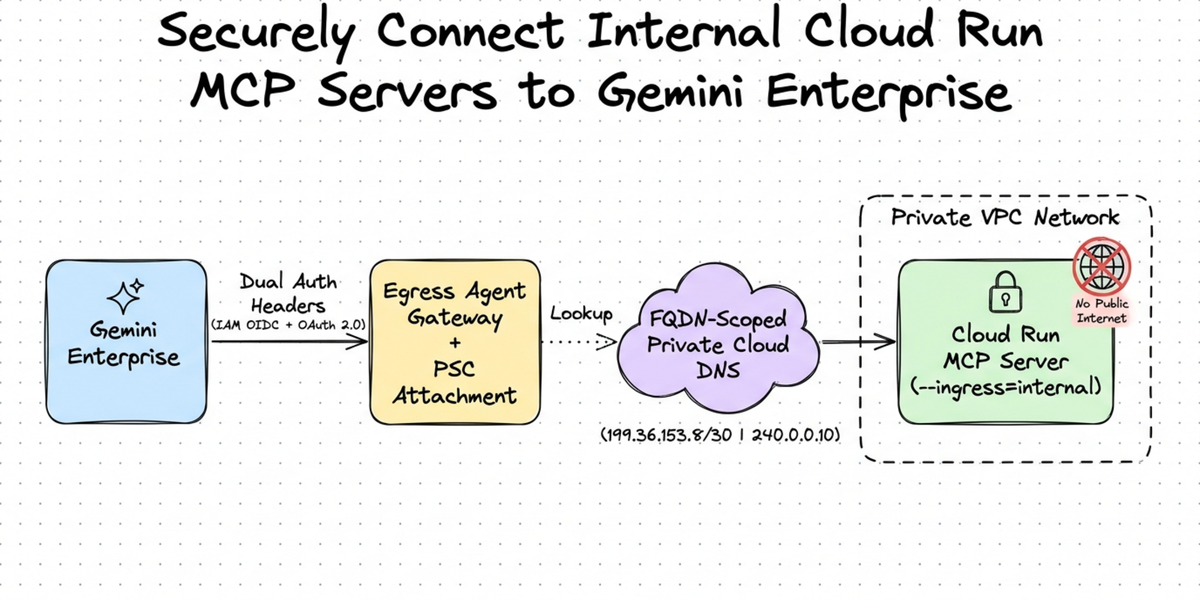
Enterprise teams adopting Gemini Enterprise are increasingly building custom ** Model Context Protocol (MCP)** servers to connect AI agents with internal APIs, databases, and business workflows. Google Cloud Run is a natural fit for hosting these lightweight StreamableHTTP MCP servers: it scales automatically, manages TLS certificates out of the box, and integrates natively with Cloud IAM.
However, moving a custom MCP server from an initial prototype to an enterprise production environment immediately introduces three real-world security and networking challenges:
Here is how you can solve all three challenges using Egress Agent Gateway, Private Service Connect (PSC), and FQDN-scoped Private Cloud DNS, complete with a runnable reference implementation and setup scripts on GitHub.
Connecting Gemini Enterprise (which runs in a Google-managed tenant project) to an internal serverless Cloud Run MCP server requires bridging two network hops and one scoped DNS lookup:
Three Google Cloud networking and identity mechanisms work together in this architecture:
Unlike a Compute Engine VM with an internal IP address inside your subnet, Cloud Run is serverless. Private routing therefore uses two bridges:
When the Egress Agent Gateway receives a tool call for your Cloud Run MCP server URL, it resolves the hostname once before injecting the packet into your VPC. Without Private Cloud DNS, public DNS resolves .run.app domains to public internet IPs, which time out (HTTP 502) because a PSC Network Attachment does not route out to the public internet.
Instead of creating a wildcard *.run.app private zone, which would override DNS resolution for every Cloud Run service in a Shared VPC, you create a Private Cloud DNS zone scoped exclusively to your MCP service's exact fully qualified domain name (FQDN) and peer only that domain with the Agent Gateway. Because Cloud DNS uses longest-suffix matching, every other Cloud Run service in your Shared VPC continues resolving normally. Meanwhile, the Agent Gateway opens its HTTPS connection to the private VIP (199.36.153.8 or 240.0.0.10) while preserving your Cloud Run service hostname in the TLS SNI and HTTP Host header so Cloud Run routes the request to your exact container.
When connecting to a Cloud Run MCP server URL, Gemini Enterprise sends two distinct authorization headers on every request:
class OAuth2ValidationMiddleware(BaseHTTPMiddleware):
  """Validates the end-user OAuth 2.0 Bearer token on incoming MCP requests."""

  async def dispatch(self, request: Request, call_next) -> Response:
    if request.url.path == "/health":
      return await call_next(request)

    has_serverless_auth = "x-serverless-authorization" in request.headers
    auth_header = request.headers.get("authorization", "")

    if auth_header.lower().startswith("bearer "):
      raw_token = auth_header.split(" ", 1)[1].strip()
      verified = await _verify_google_oauth_token(raw_token)
      if verified is None and REQUIRE_OAUTH:
        return JSONResponse(
            {"error": "Invalid or expired OAuth 2.0 Bearer token."},
            status_code=401,
        )
    elif REQUIRE_OAUTH:
      return JSONResponse(
          {"error": "Missing Authorization: Bearer <token> header."},
          status_code=401,
      )
    return await call_next(request)
Our companion GitHub repository automates the entire deployment into sequential setup scripts alongside step-by-step Cloud Console instructions:
Deploy your StreamableHTTP MCP server to Cloud Run with internal-only ingress and IAM authentication enabled, and grant the Cloud Run Invoker role to your project's Gemini Enterprise service agent so only your Gemini Enterprise instance can invoke the container.
Enable Private Google Access on your regional VPC subnet and create a Private Service Connect Network Attachment set to accept connections automatically. Next, create a Google-managed Egress Agent Gateway in Agent-to-Anywhere mode, grant networking and DNS peering permissions to the auto-created gateway service accounts, attach your network attachment, and apply an outbound authorization policy.
In Cloud DNS, create a private managed zone attached to your VPC for only your MCP service's exact Cloud Run hostname. Point its A record to Google's Private Google Access VIPs (or to your internal PSC endpoint IP for isolated VPCs without a default internet route), and configure DNS peering on the Agent Gateway for that single hostname.
In the Gemini Enterprise console under Security Configuration, bind your Egress Agent Gateway to your app. Register your Custom MCP Server data store with your Cloud Run endpoint and OAuth 2.0 client credentials, and enable Agent Gateway egress and Actions mode on the connector.
Reload your custom actions in the console and run a test prompt in the Gemini Enterprise web app. In Cloud Logging, you can verify that tool initialization, discovery, and execution calls route privately through the Egress Agent Gateway to your internal Cloud Run container with both service IAM and user OAuth 2.0 checks passing.
To deploy and test both private routing patterns in your own Google Cloud project, check out the GitHub repository for: