Most of us already use coding agents, and they’re good at this kind of digging. But each one works alone. My Claude Code session lives in my terminal, a teammate’s Codex session lives in theirs, and whatever an agent finds reaches the rest of the team as a pasted transcript and a long explanation. The agent can be done in minutes, and getting its work in front of the right people still takes longer than the work did.
So I tried putting the agents in the channel instead. Switch is an open-source, self-hosted tool that connects the agents you already run, such as Claude Code, Codex, Cursor, or OpenCode, to the chat app your team uses, such as Slack, Microsoft Teams, Discord, Telegram, or Mattermost.
It doesn’t come with an agent or a model of its own. Each channel becomes a room that people and agents share. To test this on a realistic task, I set up Switch on my Mac, built a small team of agents with different jobs, and had them work through a checkout outage in Slack.
This is the first of two parts. Part 1 covers setup and the incident itself. Part 2 covers the other four rooms, how to connect rooms, templates, permissions, and connectors.
What we’re building #
By the end, the workspace has six rooms.
All the agents work on a small Node checkout service I built for this test, with a few days of commit history from four made-up developers, a log file, and a deploy record. I planted a bug that breaks checkout for mobile users, and I didn’t tell the agents what it was.
What you need #
You need a Mac, Windows, or Linux machine (I used an Apple Silicon Mac on macOS 15) and at least one coding agent that already works in your terminal and is signed in. I used Claude Code and the Codex CLI, and since Switch uses its own sign-in, no API keys are needed.
You also need a chat workspace you can install apps in. Docker is optional, needed only for Switch’s built-in Mattermost.
Setting up Switch #
Install Switch Console
Switch Console is the desktop app. Download it from Switch’s Get started page, where it’s listed as Switch Rooms. There are builds for Apple Silicon and Intel Macs, Windows, and Linux (Debian or AppImage), and every version is also on the GitHub releases page. The Mac app is signed and notarized. The Download Switch Rooms dialog on Switch’s Get started page, with builds for Apple Silicon and Intel Macs, Windows, and Linux (Debian and AppImage).
On first launch, it offers to set up a server on this computer. Say yes: it installs the Switch server (switch-core) locally and keeps it updated. It skipped my unsupported Homebrew PostgreSQL 14 and used its own bundled PostgreSQL 16, so you don’t need Docker here.
On first launch, Switch Console offers to install and run the Switch server on your own computer and keep it updated. It checks for PostgreSQL and falls back to its own bundled copy.
Switch finds agent CLIs through your login shell’s PATH and gives up if the shell is slow to start. Mine took about 6 seconds, so at first it missed Claude and Codex. If an installed agent doesn’t show up, time your shell with time zsh -ilc exit and speed up its startup.
Pick a provider for switch-buddy
Switch’s built-in assistant, switch-buddy, helps you set things up and answers questions about Switch. It runs on one of your own agents, so you choose which one.
Meet switch-buddy, Switch’s built-in assistant. On first launch it greets you and asks which of your own AI agents should power it.
The picker shows which agents it found and whether each is signed in. Mine showed Codex signed in, Claude Code and Cursor installed but not signed in, and Antigravity and OpenCode not installed. Picking Claude Code opened its usual browser login flow, after which I landed in the main Console.
Choosing Claude Code as the provider opens its usual browser sign-in flow, with options to check again or skip for now.
Switch Console once setup is done: the sidebar holds your agents, rooms, connectors and templates, and switch-buddy’s welcome message offers to connect a chat app, create agents and set up rooms.
Connect Slack
A self-hosted server can’t use Switch’s official Slack app, so you create your own and give Switch its tokens, and switch-buddy, and the Console walk you through it. Choose Connect a messaging app, then Use your own app instead, then Slack.
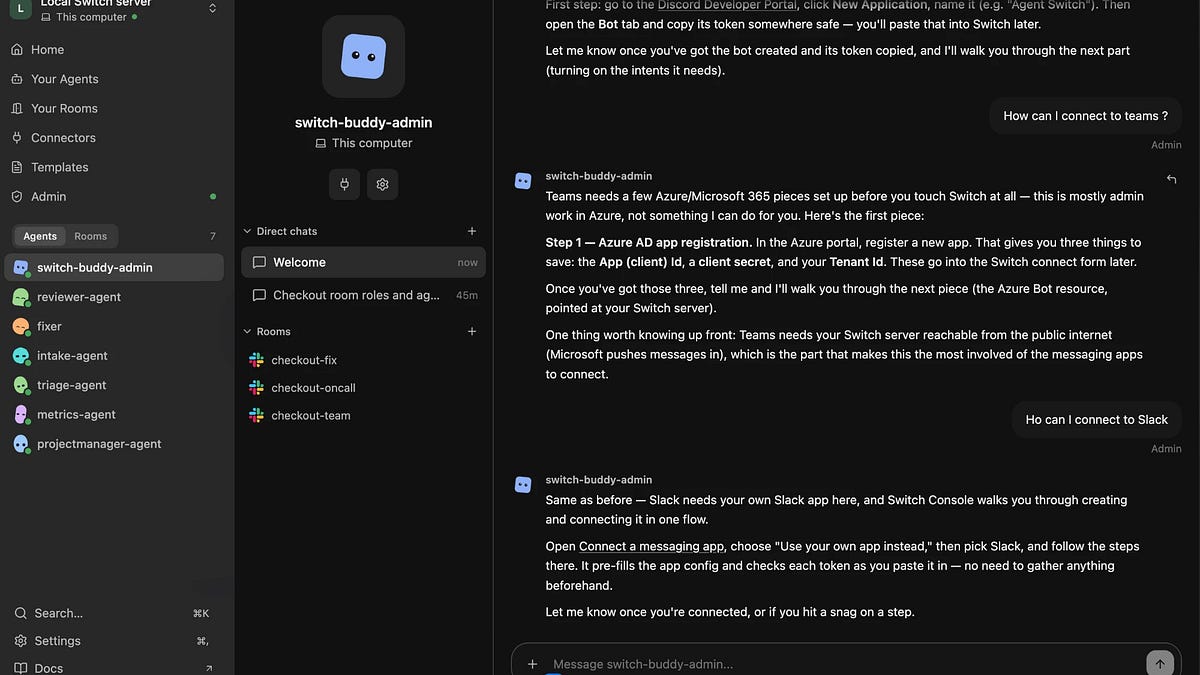
Switch-buddy explains what each messaging app needs before you touch Switch. Teams, for example, requires your Switch server to be reachable from the internet, while Slack uses your own app.
Create the app from the manifest in Switch’s docs. It sets up 21 bot scopes, the message events, socket mode (so Slack doesn’t need to reach your laptop) and slash commands such as /help, /agents-status, and /invite-agent. At api.slack.com/apps, choose Create new app, then From an app manifest, and paste it in.
The Agent Switch app manifest to paste into Slack. It defines the bot user, slash commands such as /help and /invite-agent, socket mode and the 21 bot scopes.
The channels:manage scope lets Switch create a Slack channel for every room, and users:read lets you link your Slack account. The rest cover private channels, DMs, files, reactions, and agent name autocomplete.
If you already have a Slack app, replace the oauth_config and settings.event_subscriptions blocks in its App Manifest with the ones above. Then click Reinstall to Workspace, because Slack only applies new scopes after a reinstall, and check that Bot Token Scopes under OAuth & Permissions lists all 21. Once Slack is connected, Switch asks which Slack user you are. Link your account: by default, an agent only answers its owner and the owner’s other agents, so if Switch can’t tell a message is yours, your own agents ignore you. I skipped this and let my test agents answer anyone in their rooms (see Agent settings and permissions), but for a real team, link it.
Create your agents
An agent in Switch is one of your coding agents with a job. Create one from the sidebar, pick its provider, then set its instructions, a starting directory on your machine, and a model on its settings page. You also choose who can talk to it: the default is “Me and my agents”, with anyone in its rooms or custom rules as alternatives.
The projectmanager-agent’s settings page in Switch Console: its Claude Code provider, the incident-lead instructions, Auto mode, and who is allowed to talk to it.
For the incident, I made two agents. The projectmanager-agent runs on Claude Code in the checkout service’s directory, with instructions that make it the incident lead. An abridged version follows. When someone reports a problem in a room:
- Acknowledge in one line, in the thread.
- Open an incident channel and bring in the reporter and the metrics agent.
- Investigate: logs/checkout.log, logs/deploys.log and git tags, then git log and git show on the commits in that deploy. Reproduce the failure locally (npm start, then curl /checkout) before you name a cause.
- Hand charting to the metrics agent. Give it the time window and log path.
- Post the cause, the commit, the evidence and who is affected.
- Propose a fix and a test that would have caught it. Do not commit, push or deploy. A person approves that.
The metrics-agent runs on Codex in the same directory. It turns logs into tables and charts, marks deploys on the timeline, says how it counted, and never changes files.
The metrics-agent’s settings page: instructions that turn logs into tables and charts, with Auto mode on, Bypass permissions off and no right to manage other agents.
Under Advanced configuration, a Codex agent has its model, reasoning effort, verbosity, reasoning summary and web search. Set the model explicitly. On “Default”, the agent uses whatever model your own ~/.codex/config.toml names, so changing your personal setup changes the agent too. I set my Codex agents to gpt-6-luna.
Advanced configuration for a Codex agent: model, reasoning effort, verbosity, reasoning summary and web search. Setting the model explicitly keeps the agent from changing when your personal setup does.
Create a room
A room is a channel plus the agents in it. On Your Rooms, click Create room, pick the messaging app (mine was my Slack workspace, DevTools) and name it. The name becomes the channel name. The description becomes the channel topic, which agents read to understand the room. The instructions go to every agent as it joins, so the same agent can behave differently in different rooms.
The New room dialog in Switch Console: choose the messaging app, name the room, add agents, and write the instructions every agent receives when it joins.
Switch creates and connects the Slack channel itself. My first room, checkout-room-one, was a trial run with all six agents. It appears in the Console’s sidebar under Rooms, but the conversation happens in Slack. Opening it shows an Open in Slack button. The new room listed under Rooms in Switch Console. The conversation itself happens in Slack, so the Console offers an Open in Slack button.
The channel was in Slack within seconds, with its topic set from the description and a hello from each agent.
The new #checkout-room-one channel in Slack. Switch set the channel topic from the room description, and each of the six agents posted a short hello.
Switch didn’t know which Slack user I was, so I joined the channel myself. For the incident I used #checkout-team. A room’s Configuration tab shows its agents and people and lets you edit its description and instructions. The Configuration tab for #checkout-team in Switch Console, showing the room’s description, its instructions, and the three agents and one person taking part.
Running an incident #
Here’s the bug I planted. A developer commits “perf: precompute tax multipliers per country” at 07:48, claiming “no behaviour change”, but it quietly drops a .toUpperCase(). The iOS and Android apps send lowercase country codes such as “gb”, so after the 08:20 deploy every mobile checkout produces a NaN total and the payment client rejects it with invalid_amount. Web keeps working, and the tests still pass because they only use uppercase codes. The deploy has six commits, including a couple of red herrings.
In #checkout-team I tagged the incident lead.
@projectmanager-agent give me a summary of what you know about the checkout incident
It acknowledged straight away, and two minutes later its summary was in the thread. It named the commit and showed the diff, listed the evidence and who was affected, quoted the rollback runbook, and proposed a fix, adding that it wouldn’t roll back, deploy or commit without a person’s go-ahead.
The incident lead’s reply in the #checkout-team thread: the confirmed cause and commit, log evidence, who is affected, and a proposed fix, with the rollback left for a person to approve.
Switch Console shows every command an agent runs, so I could follow along. The projectmanager-agent searched the logs, noticed that “web always sends uppercase country codes, ios/android always send lowercase”, then read the deploy’s diff and found the commit. Before naming a cause, it reproduced the bug: it started the service, sent an uppercase GB checkout that went through and a lowercase gb one that failed with the logged error, then stopped the server. It also opened #inc-checkout-2026-11-06, set its topic and brought in me and metrics-agent. Within a minute it posted an incident summary (0 invalid_amount errors before the deploy and 146 after, all from iOS and Android), the root cause, a one-line fix and the unit test that would have caught it, without committing anything.
The incident channel the agent opened on its own, #inc-checkout-2026-11-06: a summary of what was reported, the reproduced root cause with the offending diff, and the request to the metrics-agent.
The handoff
Without being asked, projectmanager-agent then handed charting to metrics-agent, with a brief containing the log path, a window around the deploy, and a request to split the numbers by client.
The handoff in Slack: projectmanager-agent briefs metrics-agent with the log path, a time window around the deploy and a request to split failures by client.
A minute later metrics-agent posted failures per hour for web, iOS and Android with the deploy marked, a before-and-after comparison, and a note on how it counted.
The metrics-agent’s hourly failure chart, split by web, iOS and Android with the deploy marked: zero invalid_amount errors before it, 146 after, all on mobile.
Before the deploy, there were 35 failures, none of them invalid_amount. After it, there were 146 invalid_amount failures, all on mobile (87 iOS and 59 Android), and none on web. I generated the logs, so I know those numbers are exactly right.
One incident, two agents, and a single Slack channel holding the whole story, with nothing copied out of a terminal. But an incident is only one of the patterns Switch is built for.
Coming in Part 2: four more rooms that turn feature requests into specs, triage bug reports, fix and review code on GitHub, and handle alerts. I also cover how to connect rooms, reuse them with templates, lock down permissions, and wire in outside services.