This is a guest post written by the DataImpulse team; all the numbers and ideas are drawn from a survey of its users.
46.7% of users surveyed for Apify’s State of Web Scraping Report noted that they face more difficulties while scraping protected websites. One of the main reasons is AI - its development has caused scrapers to become more sophisticated, and naturally, anti-bot systems evolve too. This makes scraping teams constantly look for solutions to deal with blocks.
DataImpulse, a proxy provider, conducted its own survey among its users to find out what errors occur the most often now and what actually helps get data.
In the survey, which took place in October 2026, representatives of different occupations participated. Solo specialists are the largest group (42%), data-based SaaS company employees (19%), and only 4% belong to in-house teams of big companies. The most often named use cases are price and goods scraping for e-commerce (31%), social media scraping (25%), and data gathering for LLMs and AI training (16%).
What blocks look like in practice #
Blocks do not always look like instantly denied access. Moreover, the most dangerous are those that teams do not notice - not those that stop a scraper immediately.
Error 403 Forbidden is the most obvious version and the most honest answer. A server directly notifies that a request was denied. Usually, 403 happens when a WAF (Cloudflare, Akamai, Imperva) filters a request even before it reaches an app. The reasons often lie lower than the HTTP level: TLS fingerprint (JA3/JA4) that does not match the claimed User-Agent header, the order of HTTP/2-frames, which is typical for libraries like requests or httpx, or the poor reputation of an IP subnet. 403 itself is easy to spot while monitoring the process, so it rarely goes unnoticed. Understanding why it happened is another story, though.
Error 429 Too many requests is often misinterpreted. Teams react to it by increasing the number of IPs in use and aggressively rotating them, though modern anti-bot detectors consider not only IP rate limits, but also sessions, cookies, device fingerprinting, and even behavioral patterns. A situation where IP changes and browser fingerprint remains the same only makes the error happen faster, as a system sees the same client with different addresses and switches from rate limiting to full block. The majority of scrapers ignore a Retry-After header.
CAPTCHA (reCAPTCHA, hCaptcha, Cloudflare Turnstile) happens when an anti-bot sees a user as suspicious, but not enough to block immediately. The problem is that such pages often return a 200 status code. If a parser checks only the status code, it successfully scrapes a blank page.
JS challenge is an intermediate step between an access permit and a CAPTCHA. Cloudflare Managed Challenge, Akamai’s sensor scripts (sensor_data), DataDome, or HUMAN (PerimeterX) execute code in a browser, which collects hundreds of signals: navigator properties, Canvas and WebGL rendering, event timing, automation signals like navigator.webdriver, or CDP artifacts. Without a real JS engine, this step is impossible, and a headless browser without disguise passes it less often now.
A 200 Soft block is the main reason for failed requests that go unnoticed. A website returns a valid HTML page, but with wrong data: an empty list of goods, prices without discounts, an abridged catalog, redirects to the main page, or data that is purposely falsified, so-called data poisoning. HTTP status monitoring shows a 100% success rate, but the dataset obtained is useless. Detection of such blocks is only possible by validating content: checking schemas, fill rate, and response size anomalies. Comparing the run to previous ones also helps.
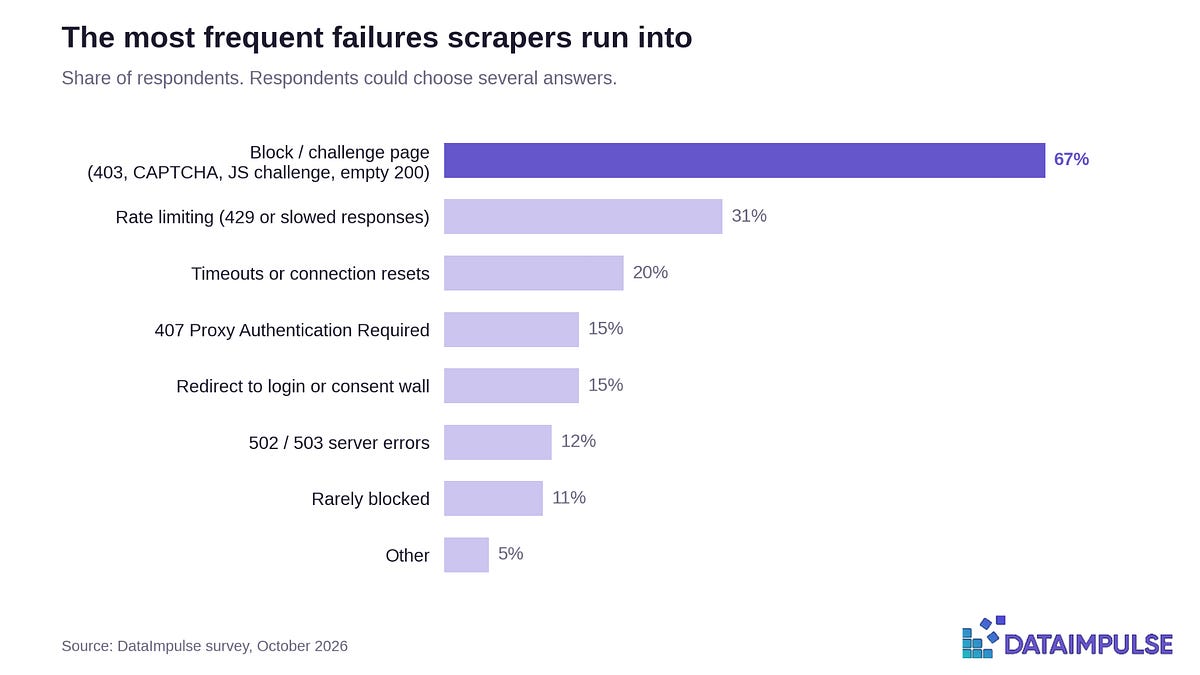
Results of DataImpulse’s survey support the theory: 67% of respondents named error 403, CAPTCHA, JS challenge, and 200 soft block as the most common problems. Rate limiting comes second - 31% of pros dealt with error 429 or slow responses without an error code.
There are also other errors that occur less often. Timeouts or lost connections happen to 20% of respondents, redirects to a login page or consent page happen to 15%, and 502/503 (server errors) happen to 12%. 15% of specialists faced a 407 Proxy Authentication Required error, though this error is about proxy setup and usually happens due to typos, wrong credentials, and other small inconsistencies. Only 11% of respondents say that they rarely experience blocks.
How long does a workaround remain effective?
Nothing works forever. Anti-bot solution providers issue updates non-stop. Akamai regularly changes versions of a sensor script and obfuscation, Cloudflare updates challenge logic without any announcement, and DataDome and HUMAN train their models using fresh traffic, including your scraper’s. The more widely used a workaround is, the faster its signature gets to detectors.
It is important to distinguish between two scenarios:
- A clean break - the success rate falls almost to 0 in a matter of hours. It is noticeable, so teams react right away. Among DataImpulse’s users, 65% noticed something was wrong on the same day.
- Slow fall - the percentage of successful requests decreases gradually because an anti-bot system first flags a user, collects data, and only after that does it amplify the reaction. Retry rate grows, as well as proxy spending and the number of soft blocks, but no alerts go off as there is no sudden drop below the threshold.
The second scenario is the most expensive one. Between the moment when the workaround stops being useful and the moment a team notices, weeks may pass. This whole time, a scraping infrastructure uses resources and returns biased data.
The survey shows that 22% of respondents noticed mistakes only within a week. Almost one in ten respondents learned that the pipeline does not deliver the right data only after a week or longer. About 3% knew about the problem after more than a month.
So the metric that really proves a scraper’s health is not “the website returns a 200 status code”. It is “we see the same data real users see”.
How teams deal with scraping blocks
Often, after a block occurs, teams follow a classic scenario, trying to solve the problem quickly to avoid wasting resources and time. The irony is that the reasons behind the blocks are different, and standard steps taken without investigation only delay the fix.
So, often the first step would be to retry sending a request. This helps with random glitches like timeouts, 502/503 errors caused by an overloaded origin server, and temporary rate limiting. If a block happened because a bot was detected by its fingerprint, a retry is at the very least useless - your request will be denied again. Or worse (and more real): aggressive retries without backoffs and delays trigger protection mechanisms further and may lead to a ban.
Changing the IP is another method that solves the problem only if it was an address that was blocked. If an anti-bot identifies a client by its TLS fingerprint, cookies, or device fingerprint, IP rotation changes nothing; it only burns out the proxy pool, as more IPs become associated with a particular bot’s activities.
One more method is changing a proxy type. Datacenter addresses are cheap, but often blocked by the majority of WAFs. Only 15% of respondents use them. Residential IPs are more costly, but have a better reputation. They help fit the normal usage patterns and have a good ratio of price and benefits, so they are the most popular type - 79% of scraping pros use rotating residential proxies and 44% use sticky residential proxies (for some questions, respondents could choose more than one answer, so the general share of residential proxies is more than 100%). Mobile proxies are rarely blocked because the IP via a CGNAT operator is used by thousands of real users, so if such an address gets blocked, it affects a lot of ordinary people. The price is relatively high, though - that is why only 17% of people use them. 15% of users also said that they rely on cloud-based solutions or VPS addresses.
Switching between sticky and rotating sessions is another widespread solution. Whether it helps depends on how a website verifies a user. Rotating sessions are suitable for mass data collection from independent pages, and they are used by 59% of respondents. Sticky sessions are necessary when an anti-bot issues a token after passing a challenge (cf_clearance, _abck, datadome): a token is tied to an IP, and changing an IP mid-session makes the token invalid. That is why 40% of users rely on them. Mismatching IPs, cookies, and fingerprints within the same session is one of the main reasons for “unexplained” blocks. At the same time, only 8% of users claimed that switching to sticky sessions truly enhanced the success rate.
Fingerprinting is where the majority of blocks happen. It is about coherence of the whole stack: TLS (JA3/JA4), HTTP/2-parameters, headers and their order, JS browser environment (Canvas, timezone, language, etc.), and also whether all of it matches the IP’s location. Anti-bots look for inconsistencies: Chrome running on Windows with a TLS fingerprint specific to Python, Kyiv timezone with a Texas IP address. Tools like curl_cffi, patched browsers, and anti-detect solutions fix some of these inconsistencies, but they need constant monitoring and updates.
Unblocker APIs (Web Unlocker, Zyte API, ScraperAPI, etc.) are often the last resort. Teams pay for successful requests and hand over all the struggles to data providers. It is faster and somewhat predictable, but expensive at scale, creates dependency on a vendor, and still never explains why blocks happen. When an unlocker is unable to deal with a particular domain, there is no internal expertise or solution. Only 7% of DataImpulse users tried this method.
The summary is simple: before changing the proxy or session type, it is necessary to understand at what level detection happens: IP, fingerprinting, JS environment, or behavior patterns. The reason determines the solution.
How many retries it takes for one successful run
DataImpulse asked its respondents about websites that were the hardest to scrape. 31% of respondents said that the first request goes to waste in only 5% of cases; for another 31%, it happened in more than 15% of cases. 27% of users reported 5-15% unsuccessful first requests. At the same time, 10% of respondents do not have such statistics.
If we talk about how many requests it takes to get one usable data record, it is even more interesting. Only 11% of respondents were lucky on the first try. 32% of users said it takes them 2 requests on average; another 32% needed 3-5 requests and 11% used 6 or more. In other words, on a protected website it takes 2-3 attempts to get data. Note that the data looks a bit contradictory. Not so many users reported obvious denials, but for most of them it still takes several attempts to get a usable data record. One of the possible explanations is that some responses are technically successful, but impossible to use. It may be due to soft blocks, incomplete pages, or data from the wrong regions.
What really works and what turns out to be useless
For this question, users could choose several answers. For half the respondents, switching to residential proxies was a way out. Fingerprinting solutions work too: 26% of respondents praised headless browsers and 25% - fingerprint and TLS emulation. 18% of pros shared that precise geolocation was a game-changer, and 17% said mobile proxies worked. Some popular fixes turned out to be not so effective. Reducing speed and the number of parallel threads worked for 8% of users; CAPTCHA solvers for 5%, switching to another provider for 5%, and an API unblocker for 5%.
What happens after “success”
For the majority of pipelines, a request is successful if it returns status code 200 and the parser does not crash. From here, data often gets into a database without any validation. Here, a number of glitches accumulate. Experienced teams validate content on several levels. The first one - structural: whether key selectors are present, response size is typical, and challenge markers or CAPTCHAs are present. Second - data schemas: required fields, types, allowed ranges (like price is not 0 and not 10 times higher than the market median). Third one - statistical: fill rate across fields, the number of goods in a category compared to the previous run, and sudden changes. If a fill rate drops from 98% to 70%, it almost always means a soft block or layout change, not real changes on a website.
Even with all of this, some typical production problems still go unnoticed during the basic validation because the data looks correct.
- Mismatching geo. Residential proxies that belong to another region or incorrect targeting - and a website shows different goods, prices, and delivery options.
- Wrong currency. Prices shown in dollars instead of euros, which lands in the currency field as a number.
- Outdated prices. Response from a CDN cache or an old version of a page provided by a website purposely.
- Empty pages with a 200 status code. “No goods were found” instead of a catalog - and such a response may pass as a legitimate result.
86% of DataImpulse’s respondents dealt with at least one scenario. 33% of them noticed missing pages or goods. 57% of users learned about the problem from alerts or auto-monitoring. Basic validation worked for only 18% of cases. 14% of users learned about the problem via another team, 9% through their clients, and 13% accidentally.
What do blocks cost
Proxy bills rarely show the price of blocks. Price per GB may be low, but when it takes 3 requests to get a response, the real price of a data unit is three times higher. Add to that challenge pages and browser rendering - all of which also consume traffic.
Not all scraping teams count it this way. Only 24% of respondents track accurate prices for usable records and 22% track approximate prices. 51% of users only account for price per GB or 1 request, meaning they track the price of resources, but not results.
Time is another thing blocks consume. 36% of DataImpulse’s users say that they spend less than 10% of working hours dealing with blocks; 28% of users invest from 10 to 25% of their time. At the same time, 12% of respondents sacrifice 25-50% of their time to blocks and 6% - even more than half their business hours. In other words, one out of five teams waste at least 25% of their time not collecting data, but fighting for access to it.
To summarize
Blocks often do not stop a scraper, but quietly spoil data. Residential proxies solve the IP reputation problem, but success depends on the whole stack: fingerprinting, sessions, geolocation. So, status code 200 OK and low price per GB are good, but the real metrics are whether the data you get matches what real users see and the cost per usable record.