A personal update to "How I use AI (2025)".
One of the best ways to learn how to use AI effectively is just to look over the shoulder of a “power user” and play with a bunch of these technologies to tease out what’s hype vs what meaningfully sticks.
In this one-year follow-up to How I use AI (2025), I wanted to snapshot the latest ways I’m messing with AI personally.
Coding / Research Projects #
I spend most of my tokens on coding and research projects. Effectively just taking random questions like:
My workflow right now looks nearly identical for every project:
Hand-write (~paragraph) a CONCEPT.md — the theoretical Hacker News title, my project thesis, some scattered constraints
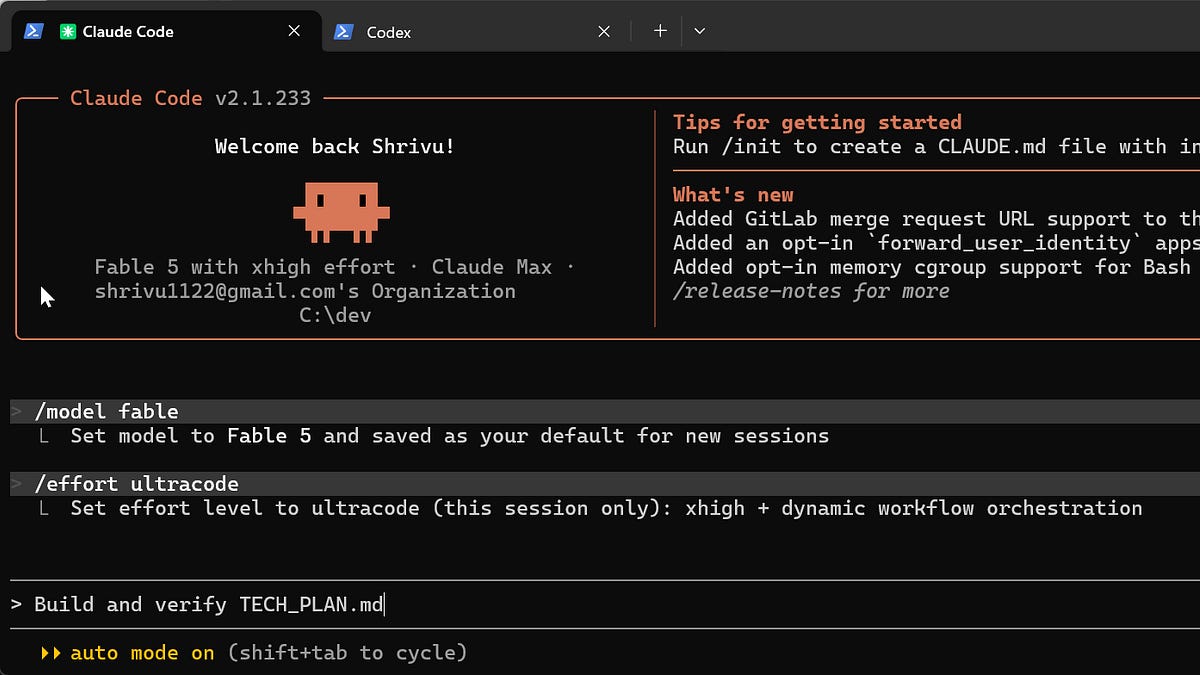
Pair with ultra code fable “Flesh out CONCEPT.md, what’s ambiguous, ask me questions, what are dimensions I’m not considering, what API keys do you need…”
Pair with ultra code fable (or codex sol max) “Convert to TECH_PLAN.md, here’s how much I’m willing to spend, host on …, here’s some API keys …”
Then I will literally just prompt “Build and verify TECH_PLAN.md” and over the next 4-48 hours I’ll let it build everything out.
For these runs: I’m completely vanilla Codex and Claude Code. No custom skills, plugins, or settings. For side-projects, I see most of those features as training wheels for using these agents as pair programming workflows — which to me is a coding workflow that shouldn’t really exist anymore. I’m also not intentionally designing any sort of “subagent workflows” and just letting
dynamic workflowstake the wheel when I fire off the implementation prompt.95%+ of the code is written in that first mega build run. I don’t think folks appreciate how much
shifting leftis the secret weapon against codebase slop (i.e.SlopCodeBench). Like step (4) really is binary here — there’s no pairing or even reading what the terminal agent says. If the output is wrong, I throw it completely away and add constraints to the CONCEPT.md. For many vibe coders out there, the first build prompt writes 5% of the code and I think that actually underlies most of their issues.An intentional side-effect of prompting with a single stage “Build and verify TECH_PLAN.md” is that I am also turning my entire project history into
harbor-style evalswhich allow me to pulse check “real work” against new model releases. Codex and Claude Code are close enough now that I’ll round-robin what I pick for the original implementation.I read the code a little bit. Often the shape (i.e. file tree) and entry points. If there’s some core algorithm, I’ll ask for a .html explainer rather than digging through the source. If I do end up digging into the code, it’s because I suspect some sort of “cheating” in the implementation.
For any written text in the final output I set arbitrary word counts in the plan. “This entire app may only have 500 user-facing words”. I find this to be the most effective way to keep things readable (vs simplified English or “be concise” prompts). I fire off the implementation prompts usually around 7 am (letting them run while at work) and around 9 pm (while I’m sleeping). The coding agents are always set to auto-mode and the tech plan is usually clear enough that there’s no human-verification required at intermediate steps. I don’t really use claude/codex ‘remote control’ features that much because to me it’s an anti-pattern to need to pair on intermediate outputs.
The outcome of these projects is often an insight or the answer to the what-if question. Rarely does it make sense for me to share the code or even the app URL. Instead I typically consider the entire loop and its artifacts ephemeral and just share the insight on X or with a blog post.
I use three different machine types, with one to ~ten agent CLI terminals running at the same time:
A gaming PC (Nvidia 5090, Windows + WSL v2) — for ML/RL research and gaming/graphics-related projects
A Mac Mini — for most day-to-day projects. I ssh over a cloudflared tunnel from whatever device is closest to me.
Modal functions — for extremely parallel CPU compute or for
big boy GPUresearch projects. Often doing fast scaled-down iteration on my PC and then scaling it out to a cluster for a final $$$ run.
Writing #
We have entered an era of peak corporate and social AI-slop. I firmly believe that you can use AI to write high-quality content but have over the last year become more grounded in the reality that most of the time that’s not what ends up happening. As a result “was this text written by AI” has de facto become the same as “was any effort put into the writing”. It’s unfortunate, but I get it. On the plus side, I think typos and poor grammar (to a limited extent) have come back into style so I do personally feel much less pressure to have “perfect” text.
So as a result, for human-facing writing, I’ve gone back to pre-GenAI-level AI typo and sub-sentence grammar checking so there’s no ambiguity as to whether what I wrote had effort put into it. Hand typing really doesn’t take that much more time though I do just feel slightly less “sure” that my writing is as well synthesized and audience optimal as before. At this point, it’s a worthy trade-off for the “human-written” Pangram badge.
Not everyone gets the memo. I do find myself getting more comfortable setting writing and AI-use expectations (at work and outside of it). Never shaming someone for using AI but explicitly making it clear that bloated and/or unreviewed text is a bad use of AI and is not enjoyable to read.
Learning #
I’m obsessed with learning things with .html files (see The unreasonable effectiveness of HTML). I’ll discover (through X, lab/startup blog posts, or Hacker News) some topic, book, or research paper and just convert them into “interactive playgrounds”. Typically:
See hot new research paper on X
Skim the abstract, throw the full text into Claude/Codex, “build an interactive playground artifact to explain what’s novel here, I’m a technical person who already knows …, I’m less familiar with …”.
Play with the .html file
Ask some follow-up questions that generate an updated .html file, go to (3)
This works best for learning technical topics though I’ll often still attempt it for current events (e.g. an interactive map/digital museum) and non-technical books (e.g. re-formatted as structured, progressively disclosed chapters of the verbatim content). I would go as far as saying that most of the lectures I sat in during college could have been more effective (personally) as a well-crafted interactive .html file.
As more of the rapidly evolving AI community sits on X, I also use the Grok X Search API via a custom CLI (used with dynamic workflows) quite a bit for deep researching prior art on some topic or for high-signal folks to follow (fun fact: it’s 10x cheaper via Grok than the X API directly).
Personal Background Assistants #
While the hype around OpenClaw has died down a bit, autonomous personal assistants are better and cheaper than ever. I’m mostly vanilla here as well. Using my existing Claude subscription, I ssh into my Mac Mini, open a tmux session, and just launch Claude Code like this:
$ tmux attach -t 0
$ claude --dangerously-skip-permissions “/start-ops-team” Where “/start-ops-team” is a custom skill.
“/start-ops-team” teaches the agent some operating principles and a local markdown directory layout for it to use along with the subagents that it might want to spawn. It makes heavy use of Claude Code’s “/loop” built-in for keeping it running continuously for weeks.
I use
brwfor efficient parallel browser automation. Most of the things I want it to do don’t have an MCP and traditional browser use is pretty costly or sketchy so I built this for my agents to use.I use a
custom WhatsApp pluginto let me chat directly from WhatsApp. My assistant has its own real phone number set up as well. This uses a niche but very powerful“channels”MCP feature.
I don’t believe in personal “command centers” or Jarvis-like assistants. Instead I’m extremely background agent-pilled and focus my assistant on tasks it can do without me in the loop. I’ve literally prompted it to contact me at most once a week unless there’s an urgent exception. I also just get notification fatigue super easily. Tasks include:
Paying recurring bills without auto-pay and forwarding the receipts for expenses.
Responding to social media inbounds. Particularly sussing out LinkedIn DMs by researching and triaging strangers into scheduled coffee chats and other direct channels. The assistant pulls from a running runbook for how to respond and escalates in the weekly message when it hits edge cases. It’s important to me that folks aren’t having drawn-out conversations with the assistant not knowing it’s not really me so it’s steered heavily towards triaging to the right channel.
Signing me up for stuff and syncing my Google Calendar as my source of truth (e.g. I get invited to an event → It decides with enough certainty I’d want to go → signs me up + updates my calendar with a hold). These are often events from folks I have met up with in the past and the assistant knows that. Also like haircuts and other similar-shaped recurring appointments.
Costs #
Weirdly enough, I spend less now than I did a year ago per month ($800 → $500). That’s completely driven by me consolidating into just the Anthropic and OpenAI subscriptions and the incredible amount of usage you can get out of them. A lot of my historical costs came from API token billing which I also now *tactically *route through these subscriptions. My napkin math indicates my actual usage cost would be around $6,000/mo at this point without them.
Claude Code Max 20x ($200/mo)

ChatGPT Pro 20x ($200/mo)
Google AI Pro ($20/mo) — a handy AI family plan with GSuite benefits
Modal, Railway, Netlify ($20-500+/mo) — for hosting or running experiments Dropped: Elevenlabs, Suno, Cursor, Vast.ai, Perplexity, Gemini Ultimate
Despite Fable/Sol ultra mode maxxing, I typically still have a bit of wiggle room in the max plans each month. I’ve never hit my ChatGPT Pro limit while I do regularly run out of Fable on idea-heavy weeks.
Recommendations #
I’ll end with my latest recommendations for getting the most out of AI:
Wean off of using AI like a chat-based assistant.Shift-leftso that most of the work is done in your first prompt and think of yourself as more of a manager than a co-pilot. Review results, not intermediate chat messages. In pair-prompting sessions I’ve done, the most common mistake I see is folks trickling narrow tasks into the chat session to accomplish a larger goal rather than just shifting left the full goal into a document and just letting the agent cook (without interruption!) from that.Use frontier models as a proxy for scoring your own AI ambition and skill. I know it’s very popular to claim “AI has plateaued” or that the labs are actually making newer models worse. Resisting this and self-discovering the hardest verifiable tasks you can think of where only the frontier models work is a great way to keep up with the latest capabilities and where the true boundary is for what is and isn’t possible.