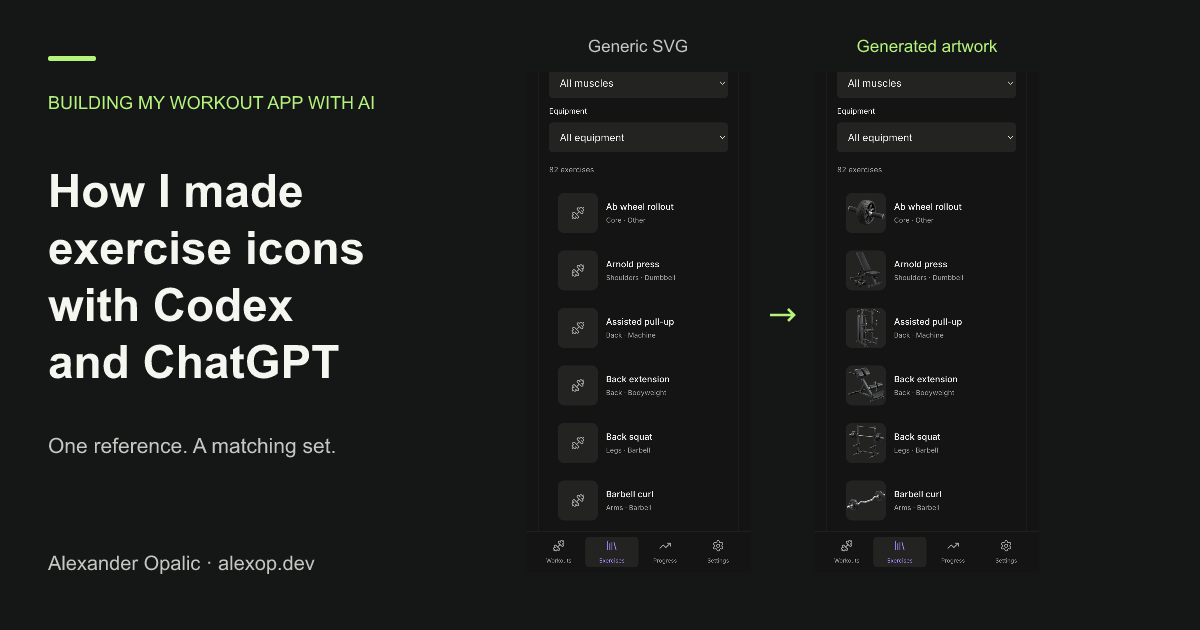
I’ve always wanted my own workout tracking app. Something I can use at the gym and change whenever I don’t like how it works. Last weekend I started building it with AI, using Codex to do the implementation while I decide what I want and review the result.
I think this could become a small series about the things I learn along the way. The first one is about exercise icons, because that part surprised me.
A workout tracker needs exercises. And once you have a long list of exercises, you want pictures to help you recognize them. I wanted to see the bench or machine next to the name.
I started with SVG icons. They worked, but I didn’t like the look. I wanted something closer to the equipment I see at the gym.
So I took a screenshot of one of the exercises from my gym and asked ChatGPT what it would look like as an icon. I really liked the result. It gave me a style I wanted to use for the rest of the app.
I gave that image to Codex and asked it to use the image generation tool for bench press, squat, deadlift, and a few other exercises. I also asked for a preview in Histoire, the component playground I use for the app, so I could check the images before adding them.
The images use black equipment, silver details, a three-quarter view, and a transparent background. Keeping the reference and those details the same helped them look like they belonged together.
Once I liked the first batch, I asked for 20 more. Then another 20. After those batches, I had 46 illustrations covering 51 exercises. Some exercises share the same equipment image. The catalog has 82 exercises, so there was still more artwork to add.
What I like about this is how much work I would have had to do before. I would have drawn the images myself, paid someone to make a matching set, or searched for an existing library and accepted its style and gaps. For a personal workout app, that would have been a lot of time or money.
Now I can find a look I like, use it as a reference, and ask for more images as I add exercises. I still have to review the results, but creating my own artwork feels like a reasonable part of a weekend project.
I’m already thinking about trying short generated videos to explain the movements. I haven’t done that yet. These icons show equipment, not exercise technique. But being able to even consider that for my own little workout app is crazy.