{"slug": "how-i-built-an-offline-ai-powered-html-to-wordpress-theme-generator", "title": "How I Built an Offline AI-Powered HTML to WordPress Theme Generator", "summary": "A developer built an offline AI tool that converts static HTML sites into installable WordPress themes using a local language model paired with a retrieval-augmented generation layer, requiring no API keys, cloud services, or subscriptions. The tool parses the DOM to identify components, preserves the original responsive CSS and assets, groups shared components across multi-page sites, and outputs a ready-to-install ZIP with standard WordPress template files. The developer reports that local LLMs are reliable enough for structured code generation when constrained by retrieval and heuristics, and cites developer privacy and one-time payment as key motivations.", "body_md": "A technical breakdown of using a local AI model + RAG to convert static HTML sites into installable WordPress themes — no API keys, no cloud, no monthly fees.\"\n\nI built a local AI tool that converts static HTML sites into complete WordPress themes. It runs offline using a local model + RAG, preserves your responsive design, and outputs a ready-to-install ZIP. No API keys, no cloud, no subscriptions. I’m sharing the technical journey here and the tool at the end if you want to try it.\n\nThe Problem\n\nIf you’ve ever converted a static HTML site to WordPress by hand, you know the pain.\n\nYou start with clean HTML, CSS, and a bit of JS. It looks great. It’s responsive. Then someone says: “Can we put this on WordPress?”\n\nSuddenly you’re writing `style.css`, `functions.php`, `header.php`, `footer.php`, and `index.php` from scratch. You’re converting links, moving assets, fixing responsive bugs, and losing days of billable time.\n\nI wanted to automate that. Not with a cloud API that charges per request, but with a local AI that runs entirely on my machine.\n\nThe Goal\n\nBuild a tool that:\n\nThe Stack\n\nAt its core, the tool uses:\n\nThe combination matters. A raw LLM alone isn’t reliable enough for structured code generation. But when you pair it with a retrieval layer that knows common WordPress theme patterns, the output becomes surprisingly accurate.\n\nHow It Works\n\nYou point the tool at a folder of HTML files. You also provide a base URL so it can download assets like images, fonts, and CSS.\n\nThe tool parses the DOM and uses the local model to identify:\n\nThe RAG layer helps map these patterns to standard WordPress template parts.\n\nThe output is a standard WordPress theme structure:\n\ntheme/\n\n├── assets/\n\n│ ├── css/\n\n│ ├── js/\n\n│ ├── images/\n\n│ └── fonts/\n\n├── style.css\n\n├── functions.php\n\n├── header.php\n\n├── footer.php\n\n├── index.php\n\n└── readme.txt\n\n```\n`functions.php` enqueues the assets. `header.php` and `footer.php` contain the global parts. `index.php` is the main template. And `style.css` includes the theme metadata.\n\n### 4. You download a ZIP\n\nThe final ZIP is ready to install on any WordPress site. No manual file editing required.\n\nChallenges I Ran Into\n\nComponent detection is hard\n\nEvery HTML site is different. Some use semantic tags, some use divs with class names like `.hero-wrapper`. The AI helps, but the heuristics matter just as much. I ended up combining both: fast DOM rules for obvious cases, and the model for ambiguous ones.\n\n Preserving responsive design\n\nThe safest approach was to leave the original CSS untouched. The tool copies your CSS and assets into the theme, then enqueues them properly. That way your mobile, tablet, and desktop layouts stay exactly as you built them.\n\n Multi-page support\n\nConverting just `index.html` is easy. Converting an entire static site into a unified WordPress theme is harder. The tool groups shared components across pages and generates a consistent template hierarchy.\n\n Keeping it offline\n\nRunning a local model means dealing with model size and inference speed. A one-time download of a few gigabytes is acceptable for most developers, especially when the alternative is sending client code to a third-party API.\n\nWhat I Learned\n\n- Local LLMs are good enough for structured code generation** when you constrain them with retrieval and heuristics.\n- **Privacy matters to developers.** Many people don’t want to upload client code to a cloud service.\n- **One-time payment is a feature.** Not everyone wants another subscription.\n- **Developers hate repetitive work.** If you can remove a boring, error-prone task, they’ll listen.\n\nWho It’s For\n\n- **Web developers** who want to deliver client projects faster\n- **Digital agencies** migrating legacy HTML sites to WordPress\n- **Freelancers** offering WordPress migration services\n- **Designers** turning static prototypes into editable WordPress themes\n\n## FAQ\n\n**Do I need an internet connection?** \nOnly for the initial model download. After that, it works fully offline.\n\n**Does it support Elementor or Gutenberg?** \nIt currently generates a classic PHP WordPress theme. Elementor and Gutenberg support are planned for future updates.\n\n**Will it break my responsive design?** \nNo. Your CSS and layout are preserved.\n\n**Is there a project limit?** \nNo. The license is lifetime, and you can use it on unlimited projects.\n\n## Try It\n\nI packaged this as **AI HTML to WordPress Converter Pro**. It’s a paid tool, but I wanted to share the technical side here because I think the offline + local AI approach is useful beyond this specific use case.\n\nIf you want to try it, you can find it here: \n👉 [AI HTML to WordPress Converter Pro](https://www.epicpxls.com/items/ai-html-to-wordpress-converter-pro-the-ultimate-offline-ai-powered-html-to-wordpress-theme-generator)\n\nIf you do try it, I’d love to hear how it handles your HTML. What would you want next — Elementor support, Gutenberg blocks, WooCommerce integration?\n\n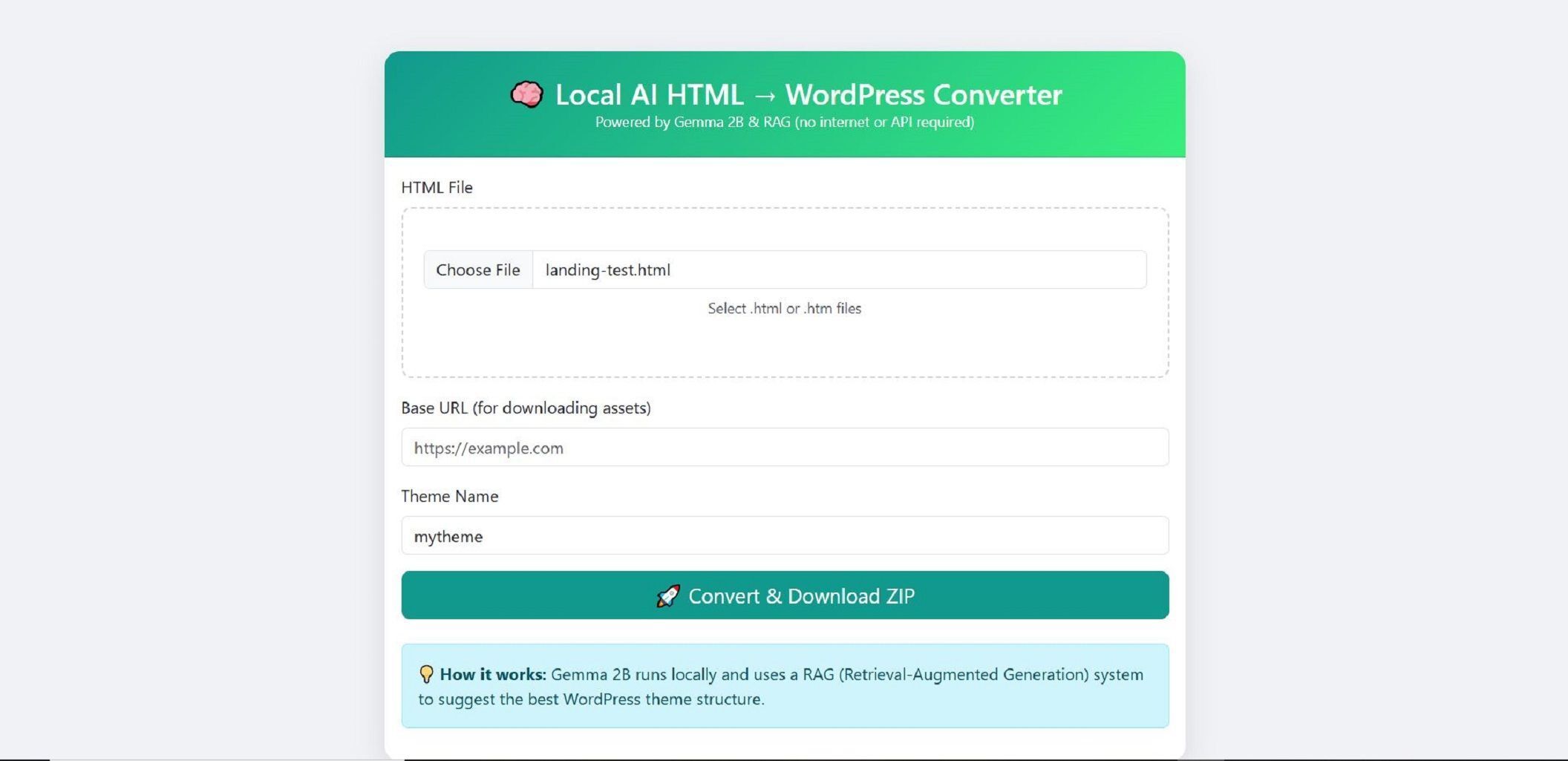\n\n*Disclosure: I’m the maker of this tool. It’s a paid product, but the technical breakdown above is the same approach I’d share even if it were free.*\n```\n\n", "url": "https://wpnews.pro/news/how-i-built-an-offline-ai-powered-html-to-wordpress-theme-generator", "canonical_source": "https://dev.to/kiani_e55ae9c94c3f8e86abf/how-i-built-an-offline-ai-powered-html-to-wordpress-theme-generator-1ld", "published_at": "2026-09-19 18:24:58+00:00", "updated_at": "2026-09-19 18:53:11.603472+00:00", "lang": "en", "topics": ["ai-tools", "developer-tools", "large-language-models", "generative-ai"], "entities": ["WordPress"], "alternates": {"html": "https://wpnews.pro/news/how-i-built-an-offline-ai-powered-html-to-wordpress-theme-generator", "markdown": "https://wpnews.pro/news/how-i-built-an-offline-ai-powered-html-to-wordpress-theme-generator.md", "text": "https://wpnews.pro/news/how-i-built-an-offline-ai-powered-html-to-wordpress-theme-generator.txt", "jsonld": "https://wpnews.pro/news/how-i-built-an-offline-ai-powered-html-to-wordpress-theme-generator.jsonld"}}