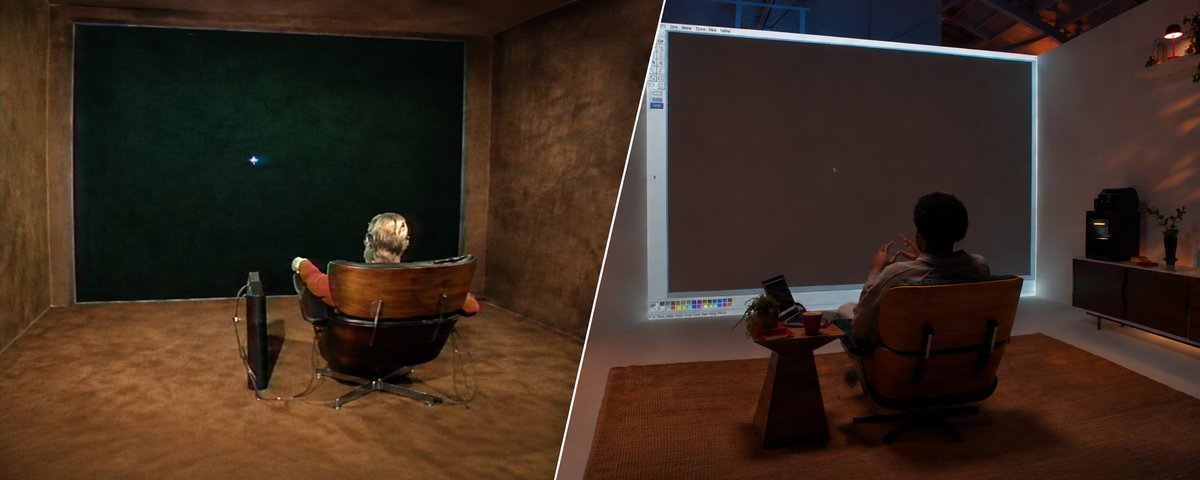
Last week, OpenAI released GPT‑6 Astra, their most intelligent model yet. Despite it crushing agentic coding and alignment benchmarks, they chose to highlight one specific ability: computer use.
The model launch video is an extension of “Put That There”, a clip from 1979 featuring Chris Schmandt and Eric Hulteen at MIT’s Architecture Machine Group (which later became the MIT Media Lab). In it, they instruct a computer to, you guessed it, “put that there” and place shapes on the projector screen. At the time of writing, the post has 131M views (what?).
The notion of computers being able to use themselves has been around for a really long time. But how is Astra so good at it?
In this post I aim to teach you exactly how Astra is able to use your computer so effectively. My name is Kyle and I work at Browserbase, where we’ve been working on deploying computer use to production for the last 3 years.
What actually is computer use? I define it as an AI’s ability to autonomously control a computer-based system.
This may be through various modalities (image, video, text), and we’ve changed the approach multiple times of the course of the last 3 years.
A brief history of computer use
I actually already wrote about this briefly 9 months ago, but a lot has changed since then.
In October ‘24, Anthropic released computer use with Claude 3.5 Sonnet. Their approach was vision-only computer use, meaning their model figured out how to interact with your computer screen via screenshots. It was post-trained on pixels, and returned pixel + actions in JSON format like:
which are translated into browser/computer interactions using drivers like Stagehand or Playwright.
After 3.5 Sonnet, other labs began releasing similar computer use models that use vision and trained their models to identify pixels on a screen. OpenAI released Operator and computer-use-preview, Google Deepmind added computer use to Gemini 2.5 Pro (which we actually helped eval).
But these models aren’t perfect. Since they’re post-trained on pixels, labs must select a specific viewport (like 1288 x 711) and stick with it throughout training. When you use these models on a different window size, they completely fall apart and start to miss buttons and become useless.
Another obvious limitation here is that these models naively use a vision-only approach to interact with applications that have more complex interactions that “only eyes” can’t see.
There’s been lots of experimentation with text-only approaches as well as hybrid DOM + vision agents. A cool computer use experiment is FDM-1 from Standard Intelligence, which encodes video (rather than static screenshots) for computer-use.
What’s different about Astra?
To understand why Astra is different, we’ll backtrack to the 5.6 model family and talk about the Codex/ChatGPT harness. Computer use is a harness (engineering) and model (research) problem—the model decides what to do, and the harness does it. In order to build great computer use, you need to solve both.
Computer-use has been “cool” for a while, but hasn’t yet proven to be production-ready (mostly because of it’s unreliability we talked about earlier). When OpenAI released computer-use in the codex app, many developers started using it daily and now understand how powerful it can be.
You can delegate literally any task to Codex and it’ll open an in-app browser or control yours to complete whatever task you asked it to do. It can even do tasks in the background so you can continue using your browser for other stuff.
Instead of being slow and inaccurate, computer use in Codex actually feels good. It’s much faster than Atlas (OpenAI’s browser with native CUA), and can do so much more by writing + executing code (make charts, call other tools, etc).
Astra takes 5.6’s capabilities and makes them faster and cheaper (well at least on max thinking).
To understand the how, you have to understand the layout of a computer. Today, most computers offer a GUI (Graphical user interface) that you and I can see. We look at the pixels on the screen and decide what to click (similar to the old models). But what if you actually are blind?
For people with impaired vision or hearing, every website on Chrome and most computers offer some version of an “Accessibility Mode,” which maps everything on the screen to an Accessibility Tree (or a11y tree). This forces apps to expose semantic information for UI elements, and makes them interact-able. Here’s what an a11y tree looks like in the browser:
It’s much easier for models to read since it removes all the code that defines the visual layer (in the case of a webpage, that’s mostly the CSS and class names).
The a11y tree uses less tokens than a screenshot, while providing the same (if not better) context of the screen. Astra takes advantage of this tree and uses it to dispatch computer actions (click, type, press). Literally every website on Chrome gets an a11y tree autogenerated, which means they’re all out-of-the-box compatible with Astra.
The architecture
It’s relatively simple actually.
When a computer use session starts, Codex starts a Node REPL for session state, with bindings for browser or native computer use. The agent chooses which bindings to use based on the task.
For both native app and browser, the agent observes the page using text, screenshot, or both for the most accurate representation of state. Then it chooses what action to take using code. Yep, computer use is now just code mode. OpenAI’s API docs even recommend code exec for all computer use. A sample output looks like this:
The local service (named CodexComputerUseIPC-5) executes the action. The execution wrapper converts the element selection into the native element ID (or coordinates if the model chooses) then uses a native pipe transport with JSON-RPC messages and request IDs to resolve and complete it.
In practice, OpenAI recommends Playwright and PyAutoGUI as the framework to control browser & computer respectively.
Then Astra checks its work. Just because the request was delivered successfully doesn’t mean that the action actually worked. The model requests another observation to validate the current state against the intended state.
Then the loop continues until your task is complete. Since computer use is inherently stateful, the Node REPL must persist the entire session.
In the table above, Astra is the only model that requires auto-review. But it’s not what you think. Astra uses a Guardian Policy, which reviews suggested computer actions for safety before allowing them to be executed.
Guardian uses GPT 5.6 Luna as a background classifier that assesses the current workflow and potential upcoming risks, then returns high or low. A high classification triggers blocking review on future actions. Then the action goes through a blocking reviewer, which fully evaluates the proposed action.
The policy receives context on the proposed action and arguments, conversation evidence (including user authorization), parent environment and permission context, available REPL evidence and images, and the approval request and its reason. (Source) It’s technically not guaranteed to see the full a11y tree, which it doesn’t always need for a proper classification.
If you’ve been delegating to Codex, you’ve probably run into these common Guardian blocks: Permission grants: Specific authorization for the permission and recipient
Sign-in and consequential account actions: Whether the user specifically authorized them
Sensitive data submission: Permission for both the data and destination
Consequential clicks: Actual interface state and effects; incorrect form inputs/settings; whether they match the user’s instructions
Restriction bypass: Whether the alternative route was authorized
Destructive actions: Meaningful state loss or irreversible damage
Out-of-scope private-data access: Whether access belongs to the authorized task In alignment benchmarks, Astra scores significantly better than it’s predecessor.
I am speed
Okay, so if it does exactly the same thing as GPT 5.6 but requires an extra review, how is it faster?
Short answer: it’s smarter so it takes less turns.
Astra was post-trained on 100k GB300s, so it took a LOT of compute. But the model is way smarter and has been RL’d a ton in computer use environments. Smarter → fewer turns for a task → faster task. In this case, inference speeds aren’t really something you’ll see immediately affecting computer use abilities; at anything above 300+ TPS, you’ll get bottlenecked by the action execution speed.
There have been a few harness optimizations as well, like websocket prewarming, connection reuse, and incremented requests using previous_response_id, but none of these correspond to action speed, just tool startup time.
Current failure modes
It’s really good, but it’s not perfect. Astra may fail observations and receive incomplete a11y state or a screenshot without enough detail or a stale view. State may also drift between observation and action. In some apps, the a11y tree can change quite often, which breaks the actions.
Long-horizon computer use is also still relatively unsolved. You can run Astra for a long time at high fidelity because compaction is so good, but we’ve yet to see how computer use performs after running for days, or even weeks at a time.
The frontier of computer use
Computer use is just starting to get good. We’ve watched it go from failing constantly at trivial tasks, to getting to diamonds in Minecraft faster than a 10 year old. People are finally realizing how much they can offload to AI.
Once models shifted from vision + screenshots to using the a11y tree, they got way better. More compute means better models and lower prices, and as we continue pushing the boundaries of post‑training, the models will keep getting better at domain‑specific tasks that labs choose to train on.
Astra combines speed and accuracy with strong guardrails to make sure your agent doesn’t get hijacked. Each new iteration of computer use models gets us closer to production‑ready computer use.
The future of software is AI doing work on your behalf, so you can focus on the problems that need a human brain. If you want to deploy computer use to production, I’d love to chat!
→ Kyle
If this content was helpful or entertaining to you, I’d greatly appreciate a follow and share. My DMs are always open for questions or feedback. Sources:
The Codex Repo
Astra Launch Blog
The ChatGPT app source code: