by Rohit Agrawal, Shuyu Cao, Darming Zhao, Zack Siegel and Aaron Davidson
• At Databricks, we govern AI spend at scale by routing every coding agent through Unity AI Gateway, giving our teams one place to enforce budgets, visibility, and policies across every model and tool.
• We balance innovation with cost control, using separate daily and monthly budgets that stop runaway AI spend while keeping our engineers productive with self-service budget increases instead of approval bottlenecks.
• This proven governance model combines centralized spend controls, unified observability, and data-driven policy enforcement to scale AI adoption without slowing our developers down.
At Databricks, the way we build software is changing quickly as we aggressively adopt AI for engineering. Thousands of our engineers use coding agents every day, mixing between Claude Code, Codex, Cursor, and others, often several at once. That adoption is great, but it creates a new problem: coding agent spend is now one of the fastest growing line items in R&D, and a single runaway automation loop can burn through a month of budget in an afternoon.
This post shares how we solved this internally, using the same Unity AI Gateway Budgets we ship to customers. Because every coding agent at Databricks, regardless of tool or model, routes its traffic through our gateway, we can enforce one spend policy across the entire fleet without touching individual coding-agent admin consoles.
The main lessons from rolling this out were:
Let's dig into how we got here. Note: Dollar figures in this post are illustrative, not our actual internal numbers.
When we started our cost management journey, we set exactly one limit: every engineer got a default monthly spend limit (let’s say $500), and when they hit it, they filed a request to raise it. This sounds reasonable on paper but we found the strategy creates friction everywhere in practice.
Because this limit was also our only protection against runaway spend, every limit increase was also performed in the same $500 steps. Heavy users had to file a new request every time they hit their new limit, sometimes several times in one month, and anything past $2500 needed manual review.** **Worse, every increase was permanent. An engineer who made one expensive mistake, or worked on a high-spend project, kept a large limit indefinitely, quietly growing the share of the company susceptible to expensive mistakes. Furthermore, there was no break glass process so engineers could unblock themselves for critical, time-sensitive tasks, such as using AI to debug customer incidents.
At our scale, somewhere between 500 and 1,000 engineers were hitting the limit every month. That is hundreds of tickets, hundreds of interrupted work sessions, and a very grumpy #ai-devtools Slack channel.
Before designing anything, we wrote down what we actually believed about AI spend, and it came down to two principles:
Writing this down exposed the conflict. To catch runaway spend, a limit must be small enough that a few hours of accidents trip it. But a limit that small constantly interrupts normal monthly usage. No single number can do both jobs.
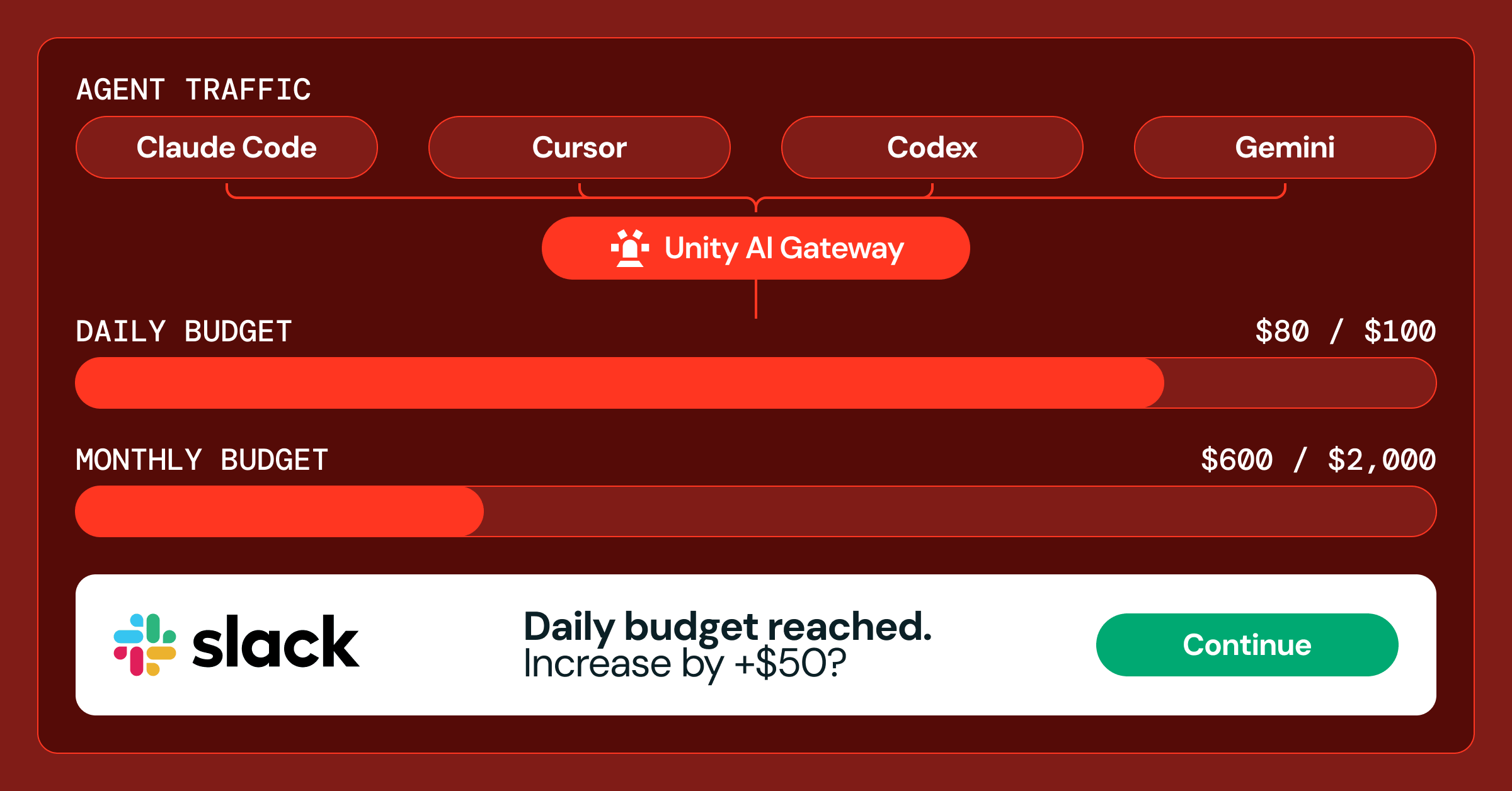
We restructured around a simple principle: let engineers spend unimpeded, and only intervene for the two kinds of waste that actually matter, short-term waste and long-term waste.
The solution for those two failure modes map to two budgets in Unity AI Gateway:
A daily limit to catch runaway spend. This limit is deliberately small relative to monthly spend. When an engineer hits it, we do not assume anything is wrong. They get a Slack notification, they acknowledge that the spend was intentional, and the limit raises itself by another increment. No approval, no ticket, no waiting. If the spend was an accident, the notification is exactly the alarm they needed. The daily budget resets each evening at our lowest-usage hour, and clears fully at the start of each month.
A monthly limit to govern extraordinary spend. This limit is set high enough that the typical engineer never encounters it. Crossing it means someone is asking to spend meaningfully more than their peers, which is fine, but should trace back to a specific business priority. These increases go through manager approval instead of a centralized approval committee and come in a few coarse tiers rather than endless small bumps, and critically, they are time-limited to the duration of the project. When the project ends, the limit reverts.
The two limits stay coupled through a fixed ratio. In our deployment, an engineer spending smoothly across the month will never trip the daily limit at all, because the monthly budget divided across working days sits comfortably under the daily threshold. If a manager raises someone's monthly limit for a big project, their daily limit and increment scale up proportionally, so the runaway protection stays meaningful without becoming a nuisance.
Under the hood, the effective limit at any moment is simple to state. A user's spend is governed by both budgets thus will be capped at the minimum of two limits: their usage so far this month plus one runaway increment, and their monthly maximum. When a user gets blocked, that formula also tells us exactly which case we are in. If they hit the runaway limit, the usage can be resumed after a self-serve acknowledgement. If they hit the monthly maximum, they need to have a conversation with their manager.
The daily limit only works if unblocking is genuinely frictionless, so we spent most of our design effort on that path. Here is what an engineer actually experiences.
Once a user crosses roughly 90% of their daily limit, they become eligible for a raise before they are ever blocked. A Slack notification arrives with the context (what they have spent today, what their remaining headroom is) and a single button to acknowledge that the spend is intentional. Clicking it raises the daily limit by one increment immediately. The same self-raise is available from our internal budget portal and from the CLI, which prints remaining daily and monthly quota along with the links to raise either one.
There is no cap on the number of self-acknowledgements per day. An engineer running a genuinely heavy workload might acknowledge two or three increments in a single day, and that is fine. Each acknowledgement is a deliberate human signal that says "yes, this is me, and I mean to do this". An unattended cron job cannot click a Slack button. The increment size matters here: too small and the notifications become noise that trains people to click through them, too large and the guard stops guarding. We sized ours so that an engineer spending smoothly against their monthly budget never sees a notification at all.
Instead of letting limits float to arbitrary per-user values, both budgets move through a small set of fixed tiers, implemented as group membership in the gateway. Everyone starts at the base tier, and each tier up raises the threshold by a fixed step. This keeps the system legible: a group listing answers who is above the default and by how much.
The two budgets move through their tiers differently, matching their different jobs.
Daily tiers move automatically. Everyone starts the month at the base tier. Each self-acknowledgement promotes the user one tier, and a scheduled job also promotes users proactively when their spend approaches their current ceiling, at most once per day, so normal usage never gets interrupted. At the end of the month, another job resets everyone back to base. Last month's big push does not carry over as this month's headroom.
Monthly tiers move deliberately. There are only a few, roughly 2x, 5x, up to effectively unlimited, and each promotion needs manager or skip-level approval. Promotions are scoped to the project that justifies them, typically one, three, or six months, then reverted. The coarse steps force a real conversation about the spend instead of small increases nobody reviews. Raising the monthly tier also scales the daily increment proportionally, so the runaway guard stays calibrated.
The reason this works with almost no custom infrastructure is that Unity AI Gateway already sees everything. Every request from every coding agent, whether it is hitting Claude, GPT, Gemini, or Open source models, is attributed to a user identity and metered in one place. Budgets configured for the gateway apply across all tools an engineer uses, and spending cannot exceed any of the applicable budgets. That last property is what implements the "minimum of the two limits" behavior for free: we define both budgets, and both are effective at any given time.
The daily and monthly tiers are implemented by assigning the budget’s per-user thresholds overrides to different groups. And tier promotion is achieved by making user a member of the higher tier’s group, through daily automation, self-acknowledgements, and manager approvals.
Because the gateway lands all of this usage data in Unity Catalog, we also get the observability side for free. Managers see team-level spend in the same Lakehouse tables where we built our internal coding agent benchmark, and finance sees one bill instead of five.
The interrupt-driven approval queue is gone. Under the new model, we expect only a small handful of our heaviest users to ever hit the daily limit in a given month, and each of those cases resolves with a single acknowledgment click. Monthly limit increases have gone from a recurring per-engineer chore to a rare, project-scoped decision a manager makes once.
Just as important, engineers stopped rationing. The point of these guardrails was never to reduce AI usage. It was to remove the fear of unbounded cost so we could keep pushing adoption up. Spend is now something we shape with data rather than something we cap out of caution.
We are continuing to tune the numbers as usage patterns evolve, and the patterns that proved themselves internally are informing the Budgets product itself: native daily budget cycles, temporary overrides that expire with the budget cycle, and a permission model that lets end users self-raise their own daily threshold directly through the budget API with more flexibility than the predefined override groups.
We are also working on making the expensive path less necessary in the first place through smarter model routing, so that everyday tasks land on efficient models and frontier models are saved for the work that needs them. More on that in a follow-up post.
If your organization is scaling coding agents and every tool has its own budget console, the fix is the same one we used ourselves. Coding agent support in Unity AI Gateway is available for all Databricks customers today. Check out the documentation to get started. Subscribe to our blog and get the latest posts delivered to your inbox.