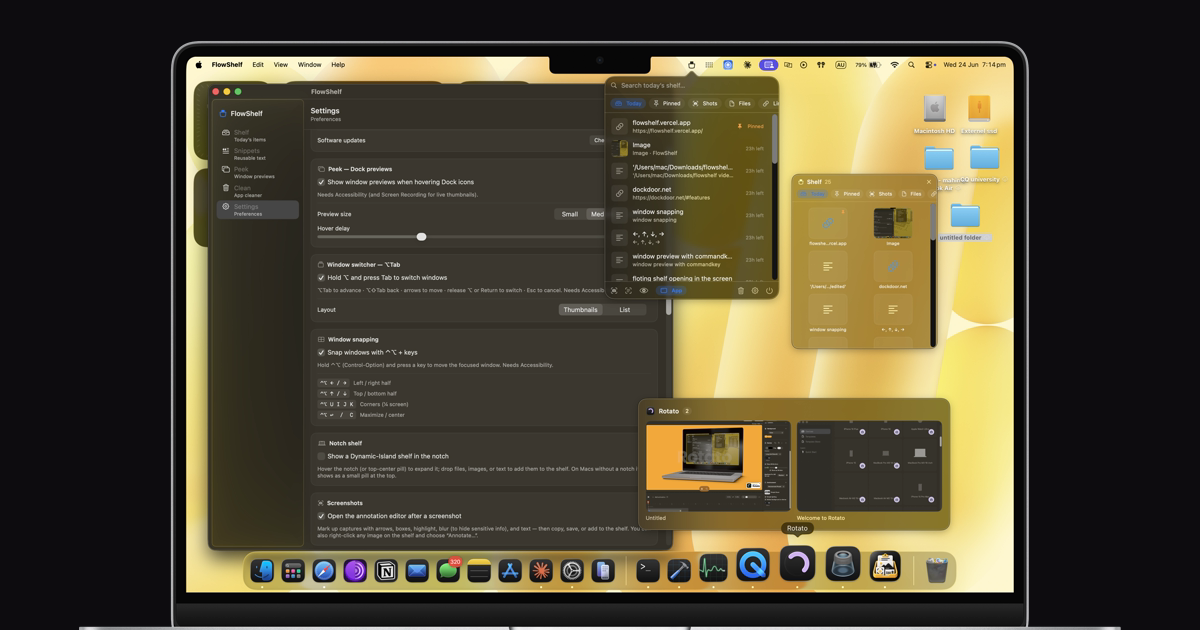
A free menu-bar app that auto-captures your clipboard, summons a shelf at your cursor, turns screenshots into text, and previews your windows — without the clutter.
- Notarized by Apple
- 100% on-device
- Source-available
- No subscription
- — downloads
One app. Everything you juggle all day. #
The shelf is just the start — FlowShelf folds a whole stack of Mac utilities into one lightweight, private menu-bar app.
Everything you copy, in one place #
Copies, screenshots, files, and links all land on a self-cleaning shelf. Search it, pin what matters, and it clears itself after 24 hours so it never becomes clutter.
A shelf that comes to your cursor #
A glass shelf appears wherever you're working. Drop files in, carry them between apps, and drag them out at the destination — no window-juggling.
Summon it with a quick shake #
Give your mouse a little shake and the shelf pops up right where you are — no hotkey to remember, no menu to hunt for.
Carry things between apps #
Park files, text, and images on the floating shelf, switch apps, then drag or paste them out exactly where you need them.
Your notch, finally useful #
A Dynamic-Island-style shelf lives right in your MacBook notch — and on external monitors too. Swipe down to open, drop files in, click a tile to copy.
Snap windows with a keystroke #
Hold ⌃⌥ and tap an arrow to snap the focused window to halves, quarters, or fullscreen. The one Mac feature you'd usually pay for — built in.
Preview windows without clicking #
Hover a Dock icon for live thumbnails of its windows. See what's open and jump straight to the exact window you want.
See every window at a glance #
Hold the key and your windows fan out as live previews. Pick the one you want and switch to it instantly — no fumbling through ⌘-Tab.
Reusable text, one click away #
Save signatures, addresses, and canned replies once. Paste them anytime from the dashboard or straight from the menu-bar menu.
A full screenshot toolkit, built in #
Grab a region or a window, then mark it up with arrows, shapes, a real highlighter, numbered steps, and text. Blur, pixelate, or black out anything sensitive. Drop a spotlight, add a magnifier callout, measure in pixels with the ruler, or wrap the shot in a gradient backdrop. Pin it on top of everything, scan a QR code, or stitch a before/after — then copy, save, or drop it on your shelf.
Private AI that never leaves your Mac #
Summarize, rewrite, translate, and smart-search your shelf — powered by Apple's on-device models. No accounts, no cloud, no cost, and it runs only when you ask.
Uninstall apps completely #
Drag an app in and FlowShelf finds every leftover — caches, preferences, support files — and moves them to the Trash. It even tells you what it couldn't remove.
One app, instead of five. #
FlowShelf does what you actually used these popular Mac apps for — in one free, private menu-bar app.
| What you’d reach for | Typical price | FlowShelf |
|---|---|---|
| Paste / Maccy clipboard & shelf | $29.99/yr | ✓ Included |
| Magnet window snapping | $4.99 | ✓ Included |
| AltTab window switcher | Free | ✓ Included |
| CleanShot X screenshots & annotate | $29 | ✓ Included |
| AppCleaner uninstaller | Free | ✓ Included |
| … plus snippets, a notch shelf & on-device AI | $60+/yr value | Free |
Easy installation. #
Drag, drop, and you're good to go.
- 1 Open the branded installer Double-click the
.dmg
file. - 2 Drag to Applications Install FlowShelf like any native Mac app.
- 3 Launch & Go FlowShelf is ready. No setup. No signup.
FlowShelf 1.4.0 is Developer ID signed and notarized by Apple. Its polished drag-to-install window opens normally on macOS.
Privacy First
Your data stays on your Mac.
Native Performance
Built with Swift, ~7 MB, light on memory.
Apple Silicon + Intel
All modern Macs.
No Subscription
One-time, yours forever.
Built in the open. #
FlowShelf's source is public. Read every line, verify the privacy claims for yourself, and open a pull request — no black boxes, no hidden network calls.
Made by one person, not a corporation. #
Hi, I'm Mahin Kadery — a solo developer. I built FlowShelf because I was tired of running five separate apps (and paying five subscriptions) for the little things a Mac should just do. No investors, no growth team, no data collection — just an app I use every day and keep improving. If something breaks, the person reading your bug report is the person who wrote the code.
Loved by people who hate clutter. #
Real reviews from FlowShelf users — no account needed to read or leave one.
reviews…
Reclaim your Mac's clutter. #
Free, native, and yours forever. macOS 14+ · Apple Silicon & Intel.
**Download for macOS** One-time download · No subscription[Support FlowShelf](https://buymeacoffee.com/mahinkadery)

- ✓ Signed & notarized by Apple (Developer ID)
- ✓ Source-available —
[read the code](https://github.com/mahinkadery/FlowShelf) - ✓ 100% on-device — no account, no tracking, no servers
The button copies: brew install --cask mahinkadery/tap/flowshelf
Verify your download (SHA-256) #
Every release ships with its checksum in the release notes. Current version 1.6.1:
e51f9bc153eb1bc0ca3dbffdaa0ca53296ec128534debdf69eb3e9f8829b6250
In Terminal, run shasum -a 256 ~/Downloads/FlowShelf.dmg
— the output must match exactly.
Questions & answers #
Everything you need before your first launch.
Is FlowShelf really free? #
Yes. FlowShelf is free and source-available, with no subscription and no account required. Download it once and it's yours.
Can FlowShelf turn a screenshot into text (OCR)? #
Yes. Press ⌘⇧O to select any region of your screen and FlowShelf extracts the text straight to your Shelf and clipboard. Press ⌘⇧7 for a plain region screenshot.
What is the floating shake-to-summon shelf? #
Shake your cursor (or use a global hotkey) and a floating glass shelf appears right at your pointer, so you can drop and grab items without leaving what you're doing. You can also use the menu-bar popover or the dashboard.
Does FlowShelf have a private mode? #
Yes. Private mode s clipboard capture whenever you want, so sensitive copies never land on your Shelf.
How do updates work, and why do my permissions persist? #
FlowShelf checks for updates daily and installs them with Sparkle, the standard macOS auto-updater. Version 1.3.4 and later use the same Apple Developer ID identity, helping Accessibility and Screen Recording permissions persist across future updates.
Is FlowShelf signed and notarized by Apple? #
Yes. FlowShelf is Developer ID signed and notarized by Apple, so the app opens normally on macOS.
Where is my data stored? #
Everything stays on your Mac. FlowShelf has no servers and no tracking — your clipboard, screenshots, files, links, and text never leave your device.
How does auto-delete work? #
Shelf items expire automatically after 24 hours to keep today's workspace light. Pin anything you want to keep, or clear items manually whenever you like.
Which Macs are supported? #
macOS 14 (Sonoma) or later, as a universal binary for both Apple Silicon and Intel.
How is FlowShelf different from Yoink, Dropover, or a clipboard manager? #
FlowShelf combines a drag-and-drop shelf, automatic clipboard capture, screenshot OCR, and live window previews in one private menu-bar app — and it auto-cleans daily so it never becomes clutter. It's free and source-available.