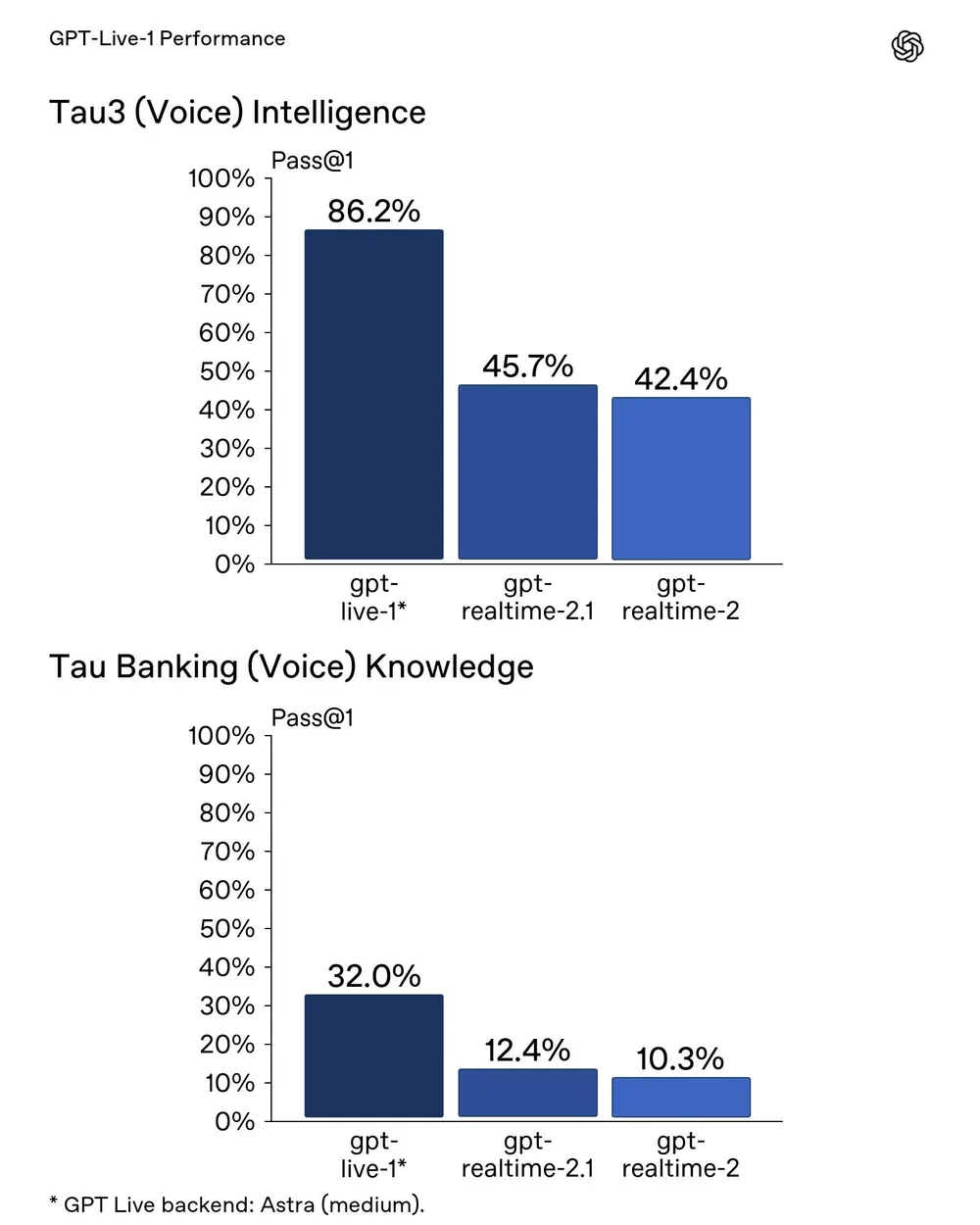
The jump from GPT-Realtime-2.1 to GPT-Live-1 is actually massive for voice apps. We're looking at a turn-taking latency of 0.798 seconds, which is a huge improvement over the 1.41 seconds we had with the previous version. The most impressive part is the performance on Tau3 tasks—covering retail, telecom, and airline support—where it hit an 83.6% first-attempt completion rate when paired with GPT-6 Astra at medium reasoning effort. For comparison, the older Realtime-2.1 only managed 45.7%.
How does it handle real-world voice interactions? #
The full-duplex nature here means it can actually listen and speak at the same time without breaking. It handles interruptions and backchannels naturally, so you don't get that awkward "robot overlap" where the AI keeps talking after you've already interrupted it.
Looking at the benchmarks, it's scoring 97.3% on the Artificial Analysis Conversational Dynamics benchmark and 80.1% on Full Duplex Bench v1.5 interactivity. It's not perfect—it scored 38.1% on TauBanking (which involves account tools and document retrieval)—but for general conversation, it's significantly tighter.
Setting up the connection and voices #
You have three main ways to hook this into your stack:
- WebRTC for browser-based apps.
- WebSockets for server-side audio processing.
- Telephony/SIP for building phone agents.
There are 12 new voices available: Quartz, Ripple, Vesper, Willow, Stone, Gleam, Meridian, Bossa, Tempo, Beacon, Delta, and Cinder. These cover a wider range of dialects and accents. You can use system prompts to tweak the pace and tone, which is essential if you're trying to avoid that "standard AI voice" feel.
Managing backend delegation and Codex #
The architecture is interesting because GPT-Live-1 handles the "live" part of the conversation but delegates the heavy lifting. You can use managed Responses delegation or client delegation to connect your own agent framework or model. One critical detail for devs: if a user interrupts the speech, it doesn't automatically kill the backend work. Your app still maintains control over permissions and the state of the task.
If you're using the Codex SDK, you can pass the conversation context to a Codex thread. This lets the AI investigate a repo or finish a task in the background while the voice session stays active, so the user isn't sitting in silence while the model is "thinking" or searching.
What does it cost to run? #
The pricing is straightforward but separate from the logic:
- Voice sessions: $0.05 per minute (billed per second).
- Backend usage: You pay separately for whatever model or tool you're using for the actual reasoning.
For those of us building production tools, the addition of native ASR transcripts, response text, and keyword biasing should make the "unpredictable" parts of voice AI much easier to manage, especially regarding background noise and silence detection. Next ChatGPT is flagging my account for suspicious activity but won't let me log out of devices →
All Replies (4) #
Want a live back-and-forth? Join the global AI chat room — login to talk. Relieved that 0.798 seconds is finally the standard. That 83.6% completion rate makes this a total game changer for support bots.
Finally! That 0.798-second latency is a game changer for voice. 83.6% completion on Tau3 is still too low for production.
Relieved that session.input_transcript.delta works for auditing. Using the stored stereo WAV is the only way to actually verify those timestamps.
Confused why anyone cares about 0.798 seconds when the completion rate for Tau3 tasks is only 83.6%. That's a huge failure gap.