Google’s first smart speaker in six years is finally here, and with its launch, the company is ushering in a new era of shouting at an inanimate object to turn your lights on and off. Wave goodbye to Google Assistant; this is the age of Gemini for Home.
The new Google Home Speaker, which retails for $100, is less about the bright new colors, audio upgrades, and fancy new ring lighting, and more about how all of those things wave the flag for Gemini, Google’s new North Star, and all of the smart home improvements the AI chatbot promises to usher in.
In this generation of smart speaker, Google is pitching something that’s smoother, smarter, and more human than anything it’s released before. It’s a tall order for a short speaker, but given the state of voice assistant progress over the past decade (or lack thereof), it’s a welcome proposition on paper.
“On paper” isn’t where progress takes place, though, and unfortunately, neither is the Google Home Speaker, lots of the time.
Google Home Speaker
The Google Home Speaker looks great and sounds decent, but Gemini for Home doesn't feel revolutionary quite yet.
Pros
- Love the new look, especially the new colors
- Snappier in processing commands
- Light ring is useful and fun
Cons
- Gemini for Home doesn't feel super smart
- Hardwired cable is limiting
- Sound is just okay
Berry charming on the surface #
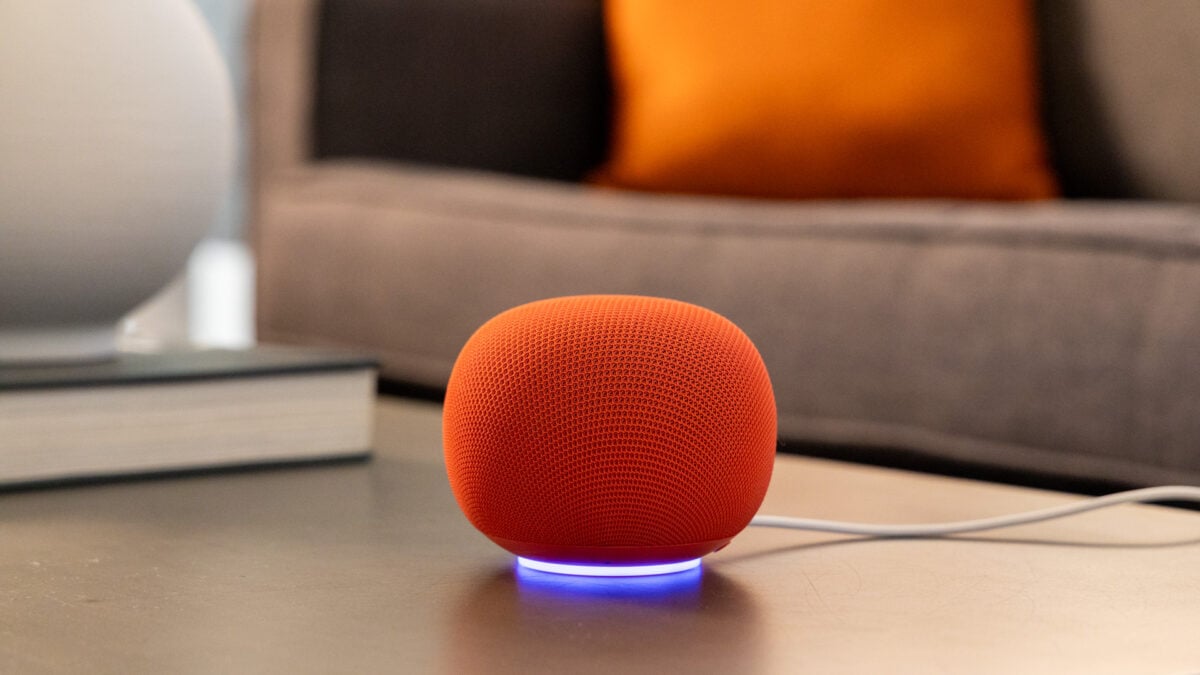
Though I have complaints about the experience of using the Google Home Speaker, almost none of them are about the hardware itself. Let me just start by saying it looks great. I love the new berry (red) color as well as the new jade (green). Props to Google’s design team for making a speaker that I genuinely want to put in my home for aesthetic purposes.
I also like the new lighting flourishes—a light ring on the bottom of the speaker that glows in different colors depending on what you’re doing. Purple is for when you’re chatting with Gemini Live, white is for regular voice commands, and a yellowish glow appears when your mic is disabled with the switch. It’s nice to look at, but also functional, in that you know when Gemini is listening or if your session has ended. Like previous Google speakers, there are tap controls on top that work fine—you can use them to activate Gemini for Home or adjust volume, for example. There’s also a new mesh 3D-knit cover, which feels interesting to the touch. Honestly, not my favorite tactile experience, but you’re probably not going to be touching your speaker a lot anyway.
One thing I do not love in terms of hardware is that the cable is hardwired this time around. Unlike previous generations of Google smart speakers, including the Nest Audio, you cannot remove the cable from the speaker itself, meaning you’re stuck with what Google gives you. In the event that something happens to the cable, or if you want to extend the reach, you’re kind of SOL. It’s not a great choice for consumers or for the environment. Though, to be fair, Apple’s HomePods also have hardwired cables.
As nice as the speaker looks, the audio is a little less flashy. Don’t get me wrong, for its size, the Google Home Speaker does a decent job with audio playback, but I wouldn’t count on it displacing the setup of anyone who’s already invested in Bluetooth speakers like the Sonos Play, Bose’s Lifestyle Ultra Speaker, or a beefier smart speaker like Amazon’s Echo Studio. The sound quality is definitely an improvement on the Google Nest Mini that I’ve been using since 2019, but if I’m being honest, that’s not saying a whole lot.
The Google Home Speaker performs better with more low-key songs like Squarepusher’s “Andrei,” a noodling acoustic guitar track. On rock songs like Feeble Little Horse’s “Rewind,” though, things get a bit muddy at higher volumes, with mids and lows mushing together. If you’re really committed to using the smart speaker as your main audio source, you can pair two of them together for stereo sound. This option sounds pretty decent, widening the soundstage and filling out my living room a bit more, but it’s not a marked improvement on the sound quality overall, and it doesn’t catapult the Google Home Speaker into a must-have home audio device. You can also couple a stereo pair to a Google TV Streamer to listen to movies and other media through your TV, though I didn’t have one on-hand to test that feature.
It’s to be expected that the audio from the Google Home Speaker wouldn’t compete with more premium devices like offerings from Sonos, Bose, and Amazon, since all of those are around $300, but it also pales in comparison to ultra-portable Bluetooth speakers like JBL’s Grip, which is tiny, versatile, and only costs $65 compared to the Google Home Speaker’s $100 price tag. The fact is, this is not a speaker; it’s a *smart *speaker that you can play music on sometimes. If you’re looking for an audio device, buy a dedicated speaker. If you’re looking for smarts, well… keep reading.
Home is where the frustration is #
Gemini for Home is really the highlight of this generation of Google smart speaker. The Google Home Speaker is specially designed to run Gemini for Home, and that fine-tuning is palpable. Responses to queries are snappy, both in terms of processing and in microphone pickup. I rarely had to repeat myself, and the smart speaker heard my wake words almost all of the time. I also don’t have to wait nearly as long for a response as when I query my old Google Nest Mini.
The issue isn’t whether the Google Home Speaker has the horsepower, necessarily, though, it’s whether it has the brains, and on that front, there’s still work to be done. Gemini for Home is full of quirks. Take “Gemini Live,” for example, a new mode that uses the full power of Gemini to have live conversations—as opposed to the regular Gemini for Home voice assistant that only has a dash of Gemini sprinkled in. To activate Gemini Live, you can say “let’s chat live” or “let’s have a conversation,” and it allows you to have a back-and-forth, real-time conversation about a topic of your choosing. This feature, I should note, is actually paywalled for $10 a month.
The Gemini Live experience can be interesting but also frustrating. On two occasions, when I tried to discuss the bird living in my backyard (which I’ve identified as a catbird, thanks to Merlin Bird ID), I ran into some hiccups. The first time, I was interrupted mid-conversation when Gemini Live started playing music randomly despite the fact that no one in the room had asked it to do so (I was the only one speaking). The second time, it abruptly stopped listening to me in the middle of our conversation, even though I was still talking.
I found that Gemini for Home has a tendency to sometimes ignore my questions completely, despite the fact that the light indicated that it was listening. It really didn’t want to answer my question about whether I was able to create automations using voice commands. You cannot do that, for the record, though you can use natural language in the Google Home app. This is a nice flourish, since you may not have to tap as many buttons, but it can feel limited and will probably only appeal to power users who want to really lock in on their smart home tuning.
There are *some *improvements in Gemini for Home, but nothing that hasn’t been covered before. It understands more complex commands like “turn off every light, except…” and it can finally add time to an existing timer. It does feel more conversational, though that can be a good or a bad thing depending on what you’re trying to do at the time. Features like Gemini Live are interesting, though I’m not sure that they’re useful enough to make the experience of using the Google Home Speaker feel truly next-gen.
Even while having a conversation about birds and, separately, about some health issues I’ve been having lately, I’m left questioning the veracity of the things Google tells me. One minute, Gemini Live tells me that the catbird in my backyard screams at my *actual *cats because it’s “teasing” them, and then it tells me that it’s actually “threatened.” When I point out the inconsistency, Gemini, of course, apologizes, but my questions about its usefulness can’t really be brushed away so quickly. Sure, I could go into the app and double-check the sources after our conversation is done, but isn’t that just doubling the work of a Google search?
While the Google Home Speaker is faster, my opinion of Gemini for Home hasn’t changed much since I last reviewed it on my old Google Nest Mini speaker. Google, Amazon, and Apple still have a long way to go before they can successfully combine LLMs with everyday voice assistants in a way that makes everything feel leaps and bounds better—if it can even be done. Then there are the added subscriptions of it all. While you can still use Gemini for Home for free, Google is, for the first time, paywalling its home assistant features with two tiers. The standard premium tier is $10 a month and gives you access to Gemini Live, intelligent alerts that describe things seen on your camera in more detail, (i.e., “a person is walking by the bush outside your house” instead of “person seen”), and 30 days of event video history.
An advanced plan for $20 per month gives you all of the above, plus a “home brief” feature that summarizes what happened while you were gone using info from your cameras, as well as an extended 60 days worth of event history.
Google, for its part, seems to be making improvements to Gemini for Home and has been active in its updates for the Google Home app, but when you’re charging people for a premium service (as much as $20 per month, no less), consumers are going to have high expectations, and I’m not sure a work-in-progress is an easy thing for Google to sell.
How’s your Home life? #
Whether or not you find value in Google’s new smart speaker will depend mostly on your expectations. If you want a small smart speaker with decent sound that feels snappier than your old Google Nest Mini, then it will rise to the occasion. If you’ve bought in on Google’s overtures of a truly evolutionary smart home experience being driven by Gemini, you are likely not going to be a happy camper in the vast estate that is Google’s smart home ecosystem.
I’m hopeful that Google can unlock more value with the help of large language models and maybe the agentic capabilities of Gemini, but let’s be honest here: the ascendancy of voice assistants as a do-everything mode of computing has been a long time coming—like, really long—and it’s difficult to muster up optimism.
Sure, there are improvements to the experience, but I’d be lying if I said the experience of using the first Google smart speaker in six years felt like a thrilling step into the future. There are some things that I didn’t get to try, like being able to search camera footage by asking Gemini, for example. I don’t have a security camera, which is sort of a prerequisite. Maybe that would shift my opinion? But probably not.
Most people are using their smart speakers for the same old things they’ve been using them for since the beginning: turning their lights on and off, setting timers, and, in my case, asking Google to play “rain sounds” while I sleep. By those metrics, Gemini for Home and the Google Home Speaker are a fine combination, but Google will have to forgive me if I’m not busting out the golden trumpet to herald the AI-superpowered age of smart homes quite yet.
As solid as the hardware in the Google Home Speaker is, Gemini for Home could use a bit more construction before it becomes the glow-up it’s meant to be.