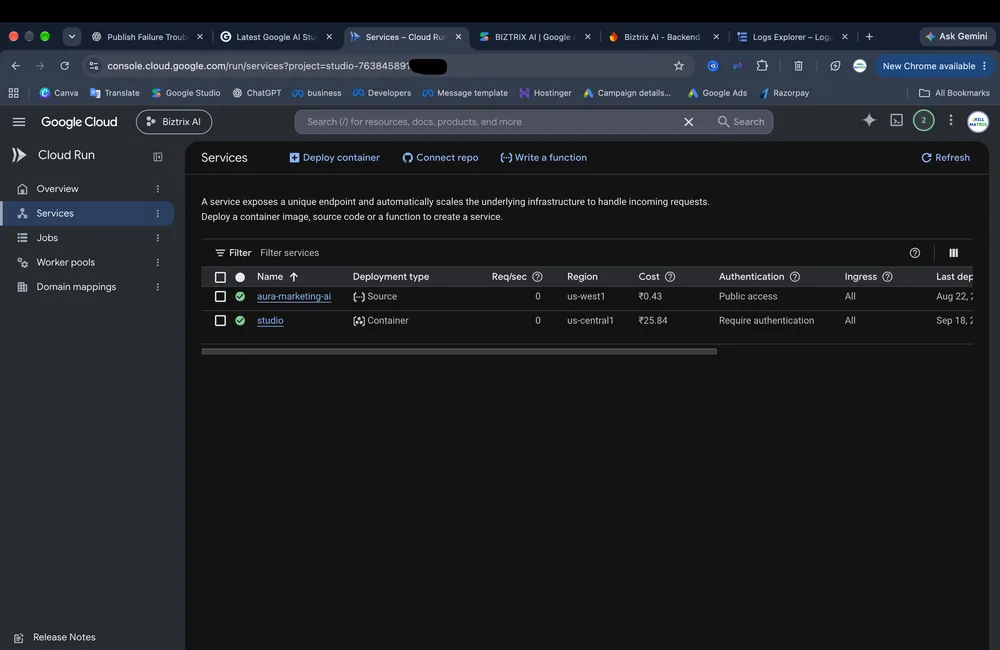
The "Precondition check failed" error during Google AI Studio publishing usually points to a race condition in the backend orchestration where the system tries to map a domain before the underlying Cloud Run service actually exists. When this happens, the deployment pipeline breaks because the infrastructure is looking for a route that hasn't been provisioned yet, leaving the user stuck in a loop of failed attempts.
Why the publishing process is crashing #
The core of the issue is a sequencing error in the managed workflow. Normally, the system should trigger CreateService first, wait for the service and its associated route to become available, and then execute CreateDomainMapping. However, in these failure cases, the order is flipped or the first step is skipped entirely.
Looking at the Cloud Run Audit Logs reveals that the operation google.cloud.run.v1.DomainMappings.CreateDomainMapping is being called with an empty spec. Specifically, the request for domains like biztrix-ai-24.ai.studio in the us-west1 region shows that the spec field is empty, and the labels for service_name, configuration_name, and revision_name are all blank.
Because the dryRun is set to all, the system checks if the target exists. Since no google.cloud.run.v2.Services.CreateService operation has successfully run, the log throws the specific error: Resource '' of kind 'ROUTE' in region 'us-west1' in project 'studio-763845891-d07da' does not exist.
How to diagnose this in your own project #
If you are seeing publishing failures, do not just keep hitting the "Publish" button. You need to verify if the service is being created at all. Use Cloud Logging to filter for the specific method that creates the service.
- Open the Google Cloud Console.
- Navigate to the Logs Explorer.
- Use the following filter to see if the service creation is even being attempted:
protoPayload.methodName:"google.cloud.run.v2.Services.CreateService"
- If this query returns no results for the time window of your failed publishing attempts, it confirms that the orchestration is skipping the service creation step and jumping straight to domain mapping.
Why manual fixes usually fail #
A common instinct is to manually create a Cloud Run service with the name seen in the failed domain (e.g., biztrix-ai-24) to "satisfy" the precondition. However, because Google AI Studio manages the publishing URL and the backend mapping automatically, manual intervention often creates a mismatch between the AI Studio state and the actual GCP resource state.
Since the DomainMapping request is coming from the google-ai-studio managed identity, manually mapping a domain to a different service won't fix the broken pipeline; it just creates a redundant resource. The failure is in the orchestration logic, not a missing resource that the user is responsible for providing.
What to do when the ROUTE is missing #
When you encounter the Resource '' of kind 'ROUTE' error, the problem is systemic. Since the spec is empty, the API is essentially asking the system to map a domain to "nothing."
The only reliable path forward is to trigger a state reset in the AI Studio backend. Since you cannot manually inject the ROUTE into a managed publishing flow, you should:
- Check if the issue persists across different domains (e.g., checking if
biztrix-ai.ai.studioandbiztrix-ai-26.ai.studiofail identically). - Document the Project ID (e.g.,
studio-763845891-d07da) and the specific region (us-west1) to provide to support. - Avoid manually modifying Cloud Run resources, as this can complicate the eventual backend fix.
This behavior indicates a bug in how AI Studio handles the dryRun phase of domain mapping. Until the backend orchestration is patched to ensure CreateService completes before CreateDomainMapping begins, the "Precondition check failed" error will likely persist regardless of how many times the app is redeployed.
Next What can OpenAI's models actually paint out? →
All Replies (1) #
Want a live back-and-forth? Join the global AI chat room — login to talk.
Is there a way to manually verify the Cloud Run service exists before domain mapping?