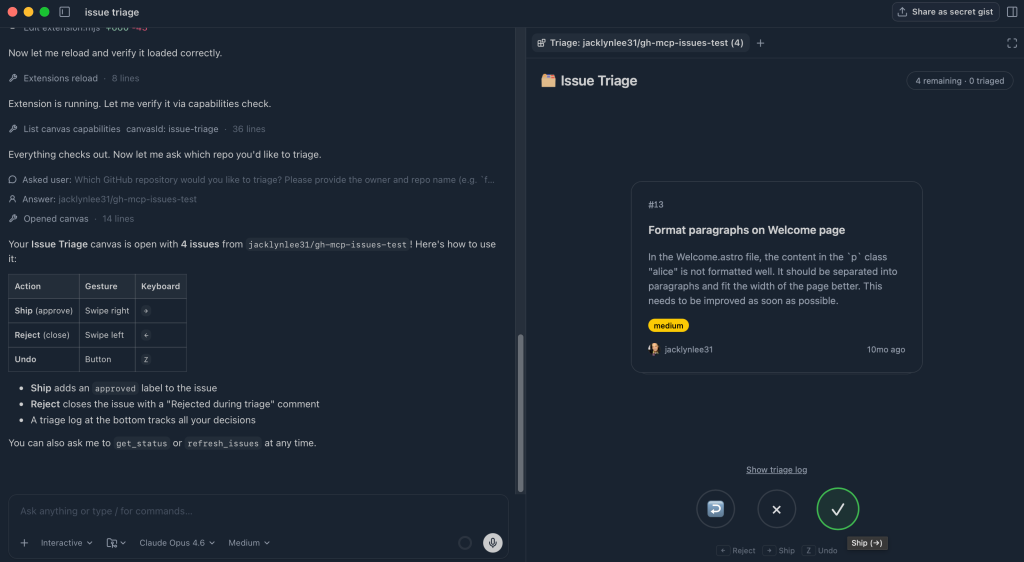
Conversational AI hits a wall when you need to triage a massive backlog or visualize a complex system architecture—chatting through a long thread of text is inefficient for these tasks. GitHub Copilot's "canvases" solve this by providing a shared, interactive workspace where the agent can render UI elements that you can actually manipulate.
The real value here is the iterative nature. You can ask Copilot to refine the canvas, add new buttons, or change the visualization logic as your project evolves, making it a living piece of documentation or a custom internal tool.
Essentially, these are dynamic extensions of the Copilot app. Instead of just receiving a code block or a text explanation, the agent generates a functional interface. You can click, edit, or swipe elements on the canvas, and those actions are fed back to the agent or processed locally.
How to get started #
You don't need a complex setup to deploy these. You trigger them directly within your agent session:
-
Open your GitHub Copilot app session.
-
Use the command
/create-canvas
.
- Describe the specific interface you need and the capabilities it should have.
Real-world use cases #
Since these are generated via prompt engineering, the utility depends on what you ask for. Here are a few ways to integrate this into your AI workflow:
Issue Triage: Instead of scrolling through a list, you can prompt for a card-based interface to swipe through GitHub Issues (right to ship, left to reject).Architecture Mapping: Use it to render an interactive codebase diagram. This transforms a static project structure into a dynamic map where you can hover over nodes to understand component relationships.Worktree Management: You can create a visual view of active and orphaned git worktrees to clean up your environment with a few clicks.Prompt Optimization: Build a "prompt coach" canvas that analyzes your past interactions and suggests more effective ways to communicate with the LLM agent.
The real value here is the iterative nature. You can ask Copilot to refine the canvas, add new buttons, or change the visualization logic as your project evolves, making it a living piece of documentation or a custom internal tool.
Next ChatGPT Health: Connecting Medical Records to LLMs →
All Replies (3) #
M
Does it handle Mermaid diagrams well for the architecture stuff, or is it mostly text?
0
M
M
been using it for refactoring old legacy code, way better than scrolling thru chat history.
0