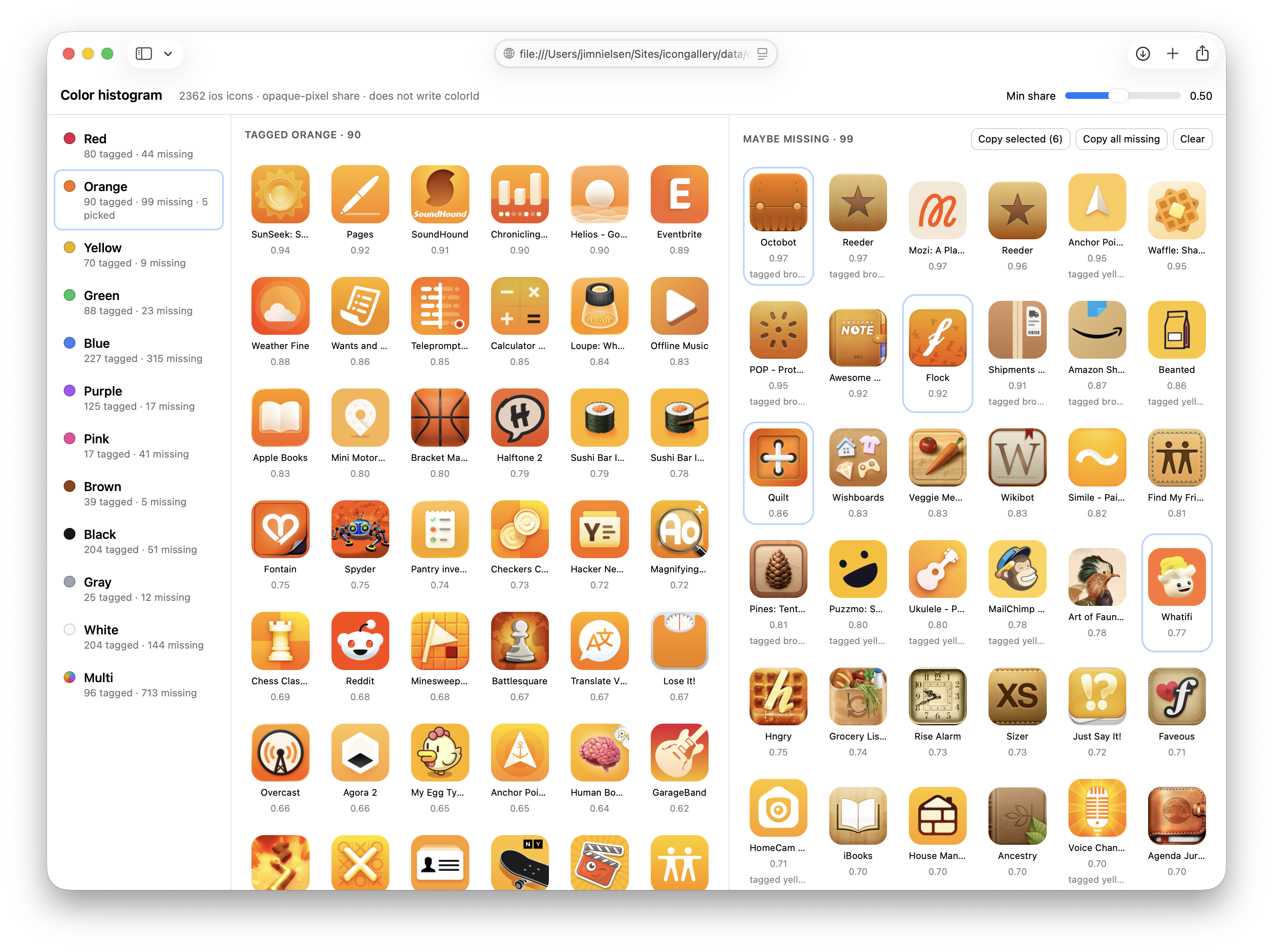
On my icon gallery sites, I have metadata I’ve manually added over the years to tag certain icons as being predominantly “blue” or “orange” or some other color.
Then I use this metadata to present icons of (roughly) the same color. It’s kinda neat to be able to browse a wall of icons that are all the same color.
The thing is: I know there are a lot of icons I’ve missed tagging over the years. But I have no idea how many, and figuring that out seems like a really arduous task. How do I go through 2,000+ icons and find all the ones that look predominantly “orange” but haven’t been tagged as such yet?
Seems like a good task to throw at an LLM. But I don’t want to just say, “Go tag everything that’s missing” and blindly trust the output. I need to be able to make a decisions as to whether I think a particular color is “orange” or not.
What I need is a tool for the job. I’m a very visual thinker, so to continue curating these color categorizations, I need some way for the computer to do its thing really, really fast, and then pull me into the loop to visually make decisions.
Here’s how I am thinking about about accomplishing this task:
- Create a page with a list of colors on the left (red, green, orange, blue, etc.)
- When a color is clicked, show two columns. 1) All icons I currently have tagged for that color, and 2) all icons that might be that color but aren’t tagged as such (you, computer, process all my icons and do the work to figure this out and make recommendations).
- Allow me to select one or more icon(s) in the “not yet tagged as this color” column. Once I have all the ones I perceive as missing, give me a button to say “Copy” which copies the IDs of those icons.
- I’ll paste the IDs back here in the chat and you go add the corresponding metadata.
That seems like it would be a good tool to put me in control of visual decision making around color categorization. So I tell the LLM to run with it.
We chat back and forth. I think, “You probably need to run all the icons through some model to make the correlation?” But it’s like, “Nah bro, just make a ‘hue histogram’.” It tells me how. For a color like “orange”, I can:
[process] each PNG, skip transparent pixels, skip low-saturation gray, convert the rest to HSV, and score how much of the remaining mass sits in the orange hue band (roughly 15–45°). Rank icons that don’t already have colorId: orange.
Ok, sure. That sounds reasonable.
[This] scores each icon PNG by share of opaque pixels per color bucket, then writes a standalone HTML page: tagged vs maybe-missing, per color.
Let’s just make it, and then I’ll decide whether it’s good enough.
After a few iterations, the computer going “brr…”, and me saying “explain that like I’m dumb”, I have a really effective little tool!
The little threshold slider is a nice touch. It lets me fiddle around with the fidelity of the matches. In some cases, sliding it down reveals more icons I would’ve otherwise missed. In other cases, I’m like “What are you thinking? I don’t see that as ‘yellow’ at all!”
Supper effective little tool. I go through each color, select the ones I think are missing, paste the IDs back into the LLM, and then have it update each icon's metadata.
Boom, done! That all would’ve taken so long before. I would’ve never done it.
Takeaways:
- The LLM is good at making throw-away code. This doesn’t need to be “production-grade” code I depend on. Just something that’s good enough for me to get a job done, then toss. The resulting metadata is the goal, not the tool I use to get to the goal.
- The LLM is good at making one-off HTML pages for a specific task. In my case, all these images were hosted on a CDN, easy enough to just point at and have a standalone
.htmlfile that I can locate on my hard drive and open directly as afile://URL. No bundling. No transpilation. None of that. I don’t even need a web server! Keeping thingsvery basic on this project is paying off: I had really elemental building blocks that didn’t require additional third-party tooling. Just HTML, CSS, a little in-page JS, and images on a server! - It’s fun to say, “Don’t do the work for me. Instead, help me make a custom-fit tool that facilitates me doing the work in the most empowering, correct way possible.”