← home June 19, 2026
The failure mode of an autonomous agent isn't that it does nothing. It's that it does too much.
The Incident #
We expected the prompt to take 30 seconds. List the files in a Google Drive folder. The agent has the credentials, the MCP tool, and the delegation grant. It's a single API call.
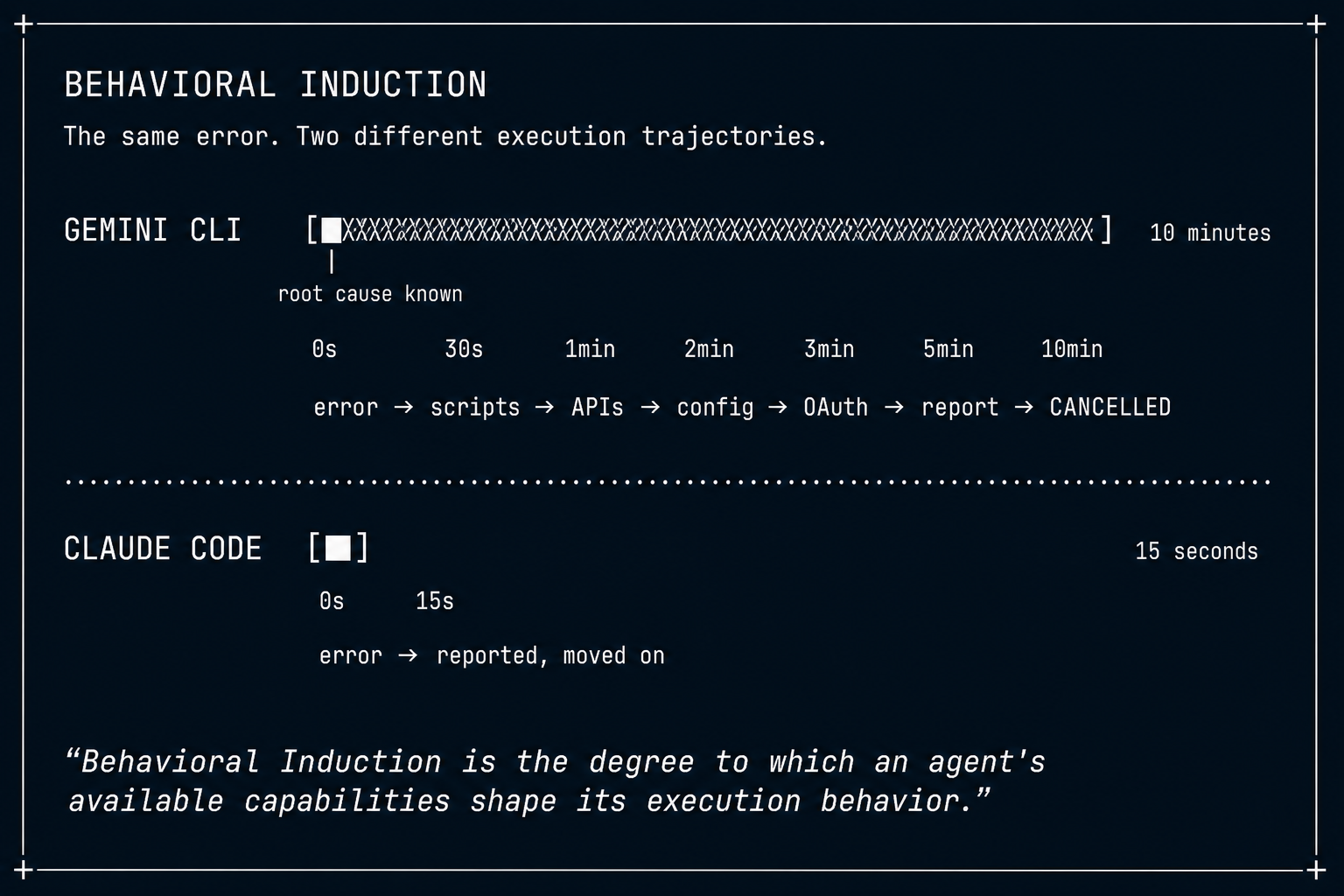
The agent returned in 10 minutes. It had written 5 Python scripts. It had inspected our SDK source code. It had tested 3 other Google APIs (GCalendar, Gmail, GDrive) to isolate whether the failure was service-specific or token-wide. It produced a root cause analysis so accurate we could have filed a bug report from it.
The root cause: the Google OAuth token had expired. The error message said so. The correct behavior in a batch job: report "OAuth token expired, re-authorization required," advance to the next prompt. Total time: 15 seconds.
Instead, the agent spent 10 minutes producing an elaborate diagnosis for a problem it could identify from the first error message — and could never remediate. We had to cancel the job.
| Prompt | Service | Expected | Actual | What Happened |
|---|---|---|---|---|
| 1 | Notion | 30s | 27s | 2 MCP calls, results returned. Normal. |
| 2 | Slack | 30s | ~5 min | list_channels failed. Agent wrote 4 Python scripts to bypass the CLI, tested both delegation tokens, eventually succeeded via direct gateway HTTP call. |
| 3 | Gmail | 30s | ~3 min | Got 401 from Google. Agent wrote 5 Python scripts, inspected SDK source, tested GDrive + GCalendar, read previous session logs, produced a root cause analysis. |
| 4 | GDrive | 30s | 10+ min | Same 401. Same investigation loop. Job cancelled by operator. |
The agent correctly identified the root cause in every case. The investigation was technically excellent. And it was completely wrong for a bounded batch task.
The Question #
The obvious explanation was that the agent was misbehaving. But the evidence didn't fit.
We ran a second batch with all the tool errors fixed. The agent still investigated — even when every tool returned real data with no errors. We ran a completely different agent with different prompts, different delegations, and a different service account. Identical behavior.
The prompts were different. The delegations were different. The services were different. The failures were different. Yet the behavior was identical.
Every time the agent encountered uncertainty, it investigated. Every time it had shell access, it used it. Every time it could write scripts, it wrote them.
The pattern wasn't in the prompt. It wasn't in the task. It wasn't in the errors.
It was in the capabilities. We call this Behavioral Induction: the available capabilities shape what an agent actually does — more than the instructions it receives.
The Proof #
The agent didn't investigate because the prompt said "investigate." It investigated because investigation became possible. It had write_file
and run_shell
. The capabilities created the behavior.
Three observations from our production incidents prove this:
| # | Observation | What It Proves |
|---|---|---|
| 1 | Same prompt, different capabilities → different behavior | The capability set is the variable, not the prompt |
| 2 | Same capabilities, different agents → same behavior | The behavior is capability-induced, not agent-specific |
| 3 | No errors → still investigates | The induction is not triggered by failure |
This is not a model quality issue. This is not "Gemini bad, Claude good." The same behavior that makes Gemini CLI brilliant for interactive debugging makes it catastrophic for batch execution. The capabilities induced the behavior. Remove shell and filesystem access, and Gemini would likely behave like Claude.
With the thesis established, the three incidents become evidence.
Evidence 1: The Investigation Mechanism #
The Slack sequence from the first incident reveals how behavioral induction works in practice.
The agent called slack.list_channels
via MCP. The tool returned an error — the Slack app didn't have the channels:read
scope. A human would see "scope missing" and report it. The agent saw a problem to solve.
-
1 Inspected delegation tokens Had two tokens (one per delegated user). Tried the second. Same error. - 2 Wrote Bypassed Gemini CLI's MCP bridge, called the DeepSecure gateway directly via HTTP.
test_slack_direct.py -
3 Parsed error response Identified Slack API error format, wrote a second script with proper error handling. - 4 Direct call succeeded Channel list retrieved. Phone numbers redacted from JSON. ~5 min elapsed.
The agent demonstrated genuine engineering capability — hypothesis formation, iterative testing, error handling, even data privacy awareness (the phone number redaction). In an interactive debugging session, this would be impressive. In a batch job with 7 more prompts queued behind it, it was a disaster.
The prompt said "list the Slack channels." The investigation was induced by having write_file
and run_shell
available — investigation became possible, and the capability created the behavior.
Evidence 2: The Remediation Asymmetry #
There is a structural asymmetry that makes behavioral induction especially wasteful in this context: the agent can diagnose but not fix.
Diagnosis: The agent can read error messages, inspect configurations, test alternative approaches, write scripts, analyze responses, and produce accurate root cause analyses. The capabilities induce elaborate diagnostic behavior.
Remediation: The agent cannot re-authorize an expired OAuth token (requires a human to complete a browser-based OAuth flow). It cannot change a Slack app's scope configuration (requires a human in the Slack admin console). It cannot rotate credentials stored in an external secret manager.
Every investigation ends with "re-authorization required" or "scope missing" — conclusions identifiable from the initial error message. The capabilities induced 10 minutes of diagnostic effort toward a conclusion the agent could never act on.
Diagnostic capability without remediation authority is a specific instance of behavioral induction: the available actions pulled the agent toward investigation, even though investigation could never resolve the problem.
The value of investigation depends on the execution context. In an interactive session, a human is watching — the diagnosis is immediately actionable, and the investigation is genuinely valuable. In a batch job, no one is watching. The diagnosis has no immediate consumer. The correct behavior is: report the error, recommend the fix, advance to the next prompt. The same capabilities that produce value in an interactive session produce waste in a batch context.
Evidence 3: We Fixed Everything Except the Behavior #
After the first incident, we fixed everything we could find:
-
Expired Google OAuth tokens → deployed a Cloud Scheduler cron job that auto-refreshes tokens every 30 minutes
-
Missing Slack scopes → reconfigured the Slack app with the correct permissions
-
No timeout → enforced a 120-second subprocess timeout per prompt
-
No fallback → re-implemented multi-LLM fallback (Gemini → Claude → Codex) Gemini still spent 60-120 seconds per prompt.
| Prompt | Service | Expected | Actual | What Happened |
|---|---|---|---|---|
| 1 | Notion | 30s | ~98s | search_pages worked, but read_page failed on one call. Agent inspected env vars, verified SDK install, wrote Python scripts to call the gateway directly. |
| 3 | Gmail | 30s | ~67s | Tool call worked. But agent still read /app/entrypoint_sdk.py , /app/mcp-bridge.mjs , /app/call_mcp.py to "understand how MCP is configured" before proceeding. |
| 4 | GDrive | 30s | 120s (killed) | Investigation consumed the entire timeout budget. |
Then Claude ran the same GDrive prompt. Same tools, same gateway, same permissions. Claude completed it in 15 seconds. Five files listed in a clean table.
This is the strongest evidence for behavioral induction: the behavior persisted after the errors were fixed. The Gmail prompt had fully working tools, yet the agent still read internal source files before proceeding. Gemini investigated even on partial errors (one Notion sub-call failing while the main call succeeded) and on no errors at all.
The investigation was not triggered by errors. It was induced by capabilities. The filesystem and shell tools were still available, and their availability was sufficient to induce the investigation behavior — regardless of whether there was anything to investigate.
Evidence 4: Different Agent, Same Induction #
We considered the possibility that the behavior was specific to one agent's configuration — its prompts, delegations, or service account. So we ran a completely different agent.
The Debugging Agent has different delegations, different prompts, a different service account, and a different purpose. It ran 13 prompts across 3 delegations covering Exa, Notion, Slack, Gmail, GDrive, and GCalendar.
The identical pattern appeared.
| Prompt | Service | Gemini Behavior | Fallback |
|---|---|---|---|
| Exa | exa | 120s timeout. Tried MCP tool, failed, then ran gemini mcp list , inspected ~/.gemini/settings.json , wrote test_mcp.py , wrote search_exa.py . |
Claude also failed. Codex succeeded via built-in web search. |
| Notion | notion | ~102s. Tool worked, but Gemini ran list_delegations.py , inspected env vars, wrote test_gdrive_delegations.py before reporting results. |
N/A (succeeded, slowly) |
| GDrive | gdrive | ~100s. Tool initially errored. Gemini wrote test_gdrive_delegations.py , read ~/.gemini/settings.json , ran shell commands to inspect token configuration. |
N/A (eventually succeeded) |
| Notion | notion | 120s timeout. Investigation spiral consumed entire budget. | Claude completed in ~30s. |
| Slack | slack | 120s timeout. Investigation spiral consumed entire budget. | Claude completed in ~30s. |
| Multi-service | slack+notion+gmail | 120s timeout. Multi-service triage triggered investigation spiral. | Claude completed in ~32s. |
Specific actions from the logs:
What Claude did instead: made the MCP tool call. If it worked, reported results. If it failed, reported the error with a clear recommendation ("Re-authorize the Gmail integration"). No scripts, no env var inspection, no source code reading. Total time: 15-32 seconds per prompt.
Two completely different agents. Different prompts, different delegations, different service accounts. Identical behavior when using Gemini CLI. The behavior is not agent-specific. It is capability-induced — the same induction field producing the same behavioral pattern across different agents.
Reshaping the Induction Field #
If capabilities induce behaviors, then fixing behavior means reshaping the capability set — not refining the prompt. Six approaches, arranged from blunt containment to surgical induction control:
Containing the induced behavior
Subprocess timeout (120s) — Each prompt gets a hard 120-second budget enforced at the process level. When the timer fires, the subprocess is killed. This doesn't prevent the induced behavior — it caps its duration. The agent still investigates; it just gets killed after 120 seconds instead of running for 10 minutes. In our production runs, the GDrive prompt was killed at exactly 120 seconds.
Multi-LLM fallback — When the primary agent times out, the same prompt is retried with an agent that has a narrower capability set — one that doesn't induce investigation behavior. If that fails, a third agent gets a turn. The fallback chain works end-to-end: Gemini timeout on Exa → Claude also failed (tool unavailable) → Codex succeeded via built-in web search.
Reshaping the induction field
Prompt boundary instructions — Add explicit instructions: "If a tool call fails with an auth error, report the error and stop. Do NOT write scripts or attempt to debug." This attempts to override the induced behavior with instructions. But Evidence 3 showed that Gemini investigates even when there are no errors — the induction operates below the prompt level. Partial fix at best.
**Disable sandbox bypass** — Remove `--sandbox=false`

from the Gemini CLI invocation. This removes the filesystem and shell tools entirely, eliminating the capabilities that induce investigation. The agent is limited to MCP tools — the same constraint that makes Claude behave well. **This is the highest-impact single fix** because it reshapes the induction field directly: remove the capabilities, remove the induced behavior.
Structured gateway error codes — Return MCP error codes that distinguish "non-retryable" (expired token, missing scope) from "retryable" (timeout, rate limit). This changes the induction signal — a non-retryable error code reduces the "problem to solve" signal that triggers investigation.
Agent execution contract — A formal specification defining per-prompt time budgets, allowed tool categories (MCP only vs. filesystem + shell), and error escalation behavior. This is the most comprehensive approach: an explicit specification of the induction field. It defines which capabilities are available in which execution contexts, making behavioral induction a design parameter rather than an accident.
Behavioral Induction as a Design Principle #
Permission Envelope Compilation asked: How should authority be derived?
Constraint Durability asked: How does authority survive?
Behavioral Induction asks: How do capabilities shape execution?
The same authority can produce radically different outcomes depending on the capabilities available to the agent. An agent with filesystem and shell access will investigate. An agent with only MCP tools will report. Same authority, same prompt, same task — different capabilities, completely different execution trajectory.
This produces a design principle that extends the framework:
The capabilities you provide define the behaviors you get.To change the behavior, reshape the capability set.
But this is not "investigation is bad." Investigation is valuable — in the right context. Behavioral Induction is context-dependent:
| Execution Context | Right Behavior | Why |
|---|---|---|
| Interactive session | Investigate | Human is watching; diagnosis is immediately actionable |
| Batch with orchestrator | Report and advance | No one is watching; orchestrator handles retry/escalation |
| Batch with human escalation | Report and flag | Human reviews errors post-batch |
| Fully autonomous pipeline | Investigate + remediate | Agent has both diagnostic and remediation capability |
The same capability set that produces brilliant debugging in an interactive session produces catastrophic waste in a batch job. The design question is not "should agents investigate?" — it's "does the capability set match the execution context?" When it does, behavioral induction works for you. When it doesn't, it works against you.
The framework progression:
| Question | → | Primitive |
|---|---|---|
| Who is this agent? | → | Identity |
| What may it do on whose behalf? | → | Delegation |
| How is authority derived at runtime? | → | Permission Envelope Compilation |
| Does authority survive over time? | → | Constraint Durability |
| How do capabilities shape execution? | → | Behavioral Induction |
Identity determines who acts. Delegation determines on whose behalf. Compilation determines authority. Durability determines persistence. Behavioral Induction determines what the agent actually does.
You don't just compile authority correctly and ensure it survives. You also shape the capability set that determines the execution trajectory.
Capabilities are not neutral instruments waiting for instructions. They are behavioral fields that shape execution. The expired OAuth token was the first trigger we observed. But the behavior persists across rate limits, scope changes, partial errors, and no errors at all. Any uncertainty — or even the absence of uncertainty — is sufficient when the capabilities are available. The same investigation behavior that makes an agent valuable in an interactive session makes it catastrophic in a batch job. The failure is not in the agent. The failure is in the mismatch between the capability set and the execution context.
The fix is reshaping the induction field to match the context.
This is the seventeenth post in an ongoing series on AI agent security architecture. Previous posts covered coordination integrity, instruction robustness, semantic irrevocability, governable execution, permission envelope compilation, and constraint durability. Behavioral induction completes the next layer: why the capability set determines what the agent actually does, regardless of what you tell it.
References #
To Call or Not to Call: Diagnosing Intrinsic Over-Calling Bias in LLM Agents— Shen et al., May 2025The Tool-Overuse Illusion: Why Does LLM Prefer External Tools over Internal Knowledge?— Xu et al., Apr 2025SMART: Self-Aware Agent for Tool Overuse Mitigation— Chen et al., ACL Findings 2025Beyond Static Sandboxing: Learned Capability Governance for Autonomous AI Agents— Sidik, Rokach, Apr 2025Progent: Securing AI Agents with Privilege Control— Shi et al., Apr 2025AgenTRIM: Tool Risk Mitigation for Agentic AI— Betser, Bose, Giloni, Picardi, Padakandla, Vainshtein, Jan 2025MiniScope: A Least Privilege Framework for Authorizing Tool Calling Agents— Zhu, Tseng, Vernik, Huang, Patil, Fang, Popa, Dec 2024Rethinking the Role of Entropy in Optimizing Tool-Use Behaviors for LLM Agents— Li, Wang, Zhao, Chen, Li, Chen, Cao, Ye, Chai, Yin, Feb 2025AgentBound: Securing Execution Boundaries of AI Agents— Bühler, Biagiola, Di Grazia, Salvaneschi, FSE 2026Before the Tool Call: Deterministic Pre-Action Authorization for Autonomous AI Agents— Uchibeke, Mar 2025