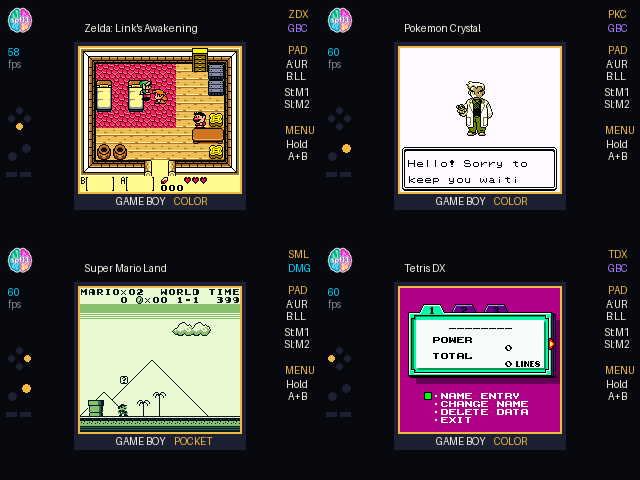
Zelda on My Conference Badge #
An NES emulator running inside MicroPython on GitHub's Universe badge, fast enough to play Zelda.
After finishing the NES emulator, every NES game I tried played fine. I even beat the first few dungeons in Zelda on the badge. This all got me thinking that while I wanted to play Zelda on this, its form factor really looked a lot like a Game Boy. A lot more like a Game Boy than an NES. And there’s Zelda and Pokémon games on the Game Boy. I wonder how hard this will be as I don’t know really anything about Game Boy hardware. Turns out it was quite hard.
So I teamed up with Gemini again to see if the same Badger board and RP2350 could run Game Boy and Game Boy Color. We had the same MicroPython Viper emitter and the same 8 MB of QSPI PSRAM, just a very different puzzle on the CPU and cartridge side.
You don’t need an emulator background for this; I’ll explain each term as it comes up.
On the NES, the CPU is a Ricoh 2A03, a trimmed MOS 6502 with three 8-bit registers (A, X, Y), one stack pointer, and 56 instructions. The whole core fit in local variables inside one @micropython.viper loop over a fixed, unbanked memory map.
The Game Boy has the Sharp SM83 (LR35902), an 8080/Z80 hybrid with eight 8-bit registers ( A, F, B, C, D, E, H, L, paired as AF, BC, DE, HL), a stack pointer, a program counter, and 512 instructions: 256 base opcodes plus 256 behind the 0xCB prefix, nine times the 6502’s count.
        MOS 6502 (NES)                  Sharp SM83 (Game Boy Color)
┌───────────────────────────┐       ┌───────────────────────────────────┐
│ Registers: A, X, Y        │       │ Registers: A, F, B, C, D, E, H, L │
│ Opcodes:   56 base        │  vs   │ Opcodes:   512 (256 base + 256 CB)│
│ Banking:   Cartridge discrete     │ Banking:   ROM, VRAM, WRAM, SRAM  │
│ Speed:     1.79 MHz flat  │       │ Speed:     4.19 MHz / 8.38 MHz GBC│
└───────────────────────────┘       └───────────────────────────────────┘
While the CPU is more complicated, the display is simpler:
| Metric | GBC ( apps/gbc/emu.py ) |
NES ( apps/nes/emu.py ) |
|---|---|---|
| Frame pixels | 23,040 | 61,440 |
| Scanlines / frame | 154 | 262 |
| CPU cycles / frame | 17,556 | 29,606 |
| Max sprites | 40 | 64 |
| CHR bank-switch copy (bytes) | 0 | 8,192 |
2.67× fewer pixels, 1.7× fewer scanlines.
To get this to work within the constraints of MicroPython I had to implement five additional Viper tricks the original NES build didn’t have.
ViperTypeError: viper:8004
On the NES that approach worked. The 6502 has three registers — A, X, Y — so PC, SP, P, and a few pointers still fit in Viper’s four fast locals ( r0– r3). Its 56 opcodes started as a 55-deep if/elif chain that collapsed into a five-level binary search to halve dispatch cost. One Viper loop, fixed memory map, compiled clean.
The SM83 doesn’t fit. Eight registers (A, F, B, C, D, E, H, L) plus PC, SP, and cycle counters overflow those four locals — the Cortex-M33’s other registers are reserved for stack, exception frame, and runtime. That’s viper:8004: the register file won’t fit in locals.
The decoder doesn’t scale either. A tree that worked well for 56 opcodes needs ~500 branches for 512 (256 base + 256 CB-prefixed). What made the NES fast won’t even build for the Game Boy.
That leaves two problems: where to keep eight registers if not in locals, and how to decode 512 instructions without 512 branches?
Reading each opcode as three small numbers instead of one collapses 512 instructions into a handful of blocks. For it to index registers directly, the 8-bit register file had to move out of Viper locals and into flat memory: eight bytes at 0x14500 inside one bytearray (self.mem = bytearray(0x14A00)):
Index 6 is the exception: on the SM83, 6 in the bitfield means indirect memory through (HL) instead of a register, so the real registers sit at 0, 1, 2, 3, 4, 5, 7.
The Z80/SM83 designers worked on paper in octal. Read any opcode byte in base 8 and it splits into three octal digits (x, y, z), which are the instruction set’s bitfields:
x: int = op >> 6          # Bits 7-6: Opcode category (0..3)
y: int = (op >> 3) & 7    # Bits 5-3: Destination register or ALU operation (0..7)
z: int = op & 7           # Bits 2-0: Source register or condition code (0..7)
All 64 LD r, r' instructions (0x40..0x7F) share x == 1, so they collapse into five lines of Viper:
if x == 1:
    if op == 0x76:
        halted = 1
    else:
        vr1: int = 0
        if z == 6:
            hl1: int = (int(mem[0x14504]) << 8) | int(mem[0x14505])
            vr1 = read_memory(hl1)
        else:
            vr1 = int(mem[0x14500 + z])

        if y == 6:
            write_memory((int(mem[0x14504]) << 8) | int(mem[0x14505]), vr1)
        else:
            mem[0x14500 + y] = vr1
That single check covers sixty-four opcodes, with y and z picking the destination and source registers.
When x == 2, those same bitfields map to all eight ALU ops on A from r[z] (ADD, ADC, SUB, SBC, AND, XOR, OR, CP), handling another sixty-four arithmetic instructions in one block.
The 256 0xCB bit ops split the same way: cb_x == 1 is BIT, 2 is RES, 3 is SET, and 0 shifts, rotates, or swaps y on r[z]. Fifty lines of bit math replaced hundreds of branches.
On the NES I could cheat. RAM, PPU, APU, PRG-ROM, everything sits where it was wired, so a read is just an address check and you’re done.
The Game Boy doesn’t do this. The CPU still sees 64 KB, but the cart is constantly swapping what lives behind that window:
$0000..$3FFF: 16 KB fixed ROM Bank 0$4000..$7FFF: 16 KB switchable ROM Bank (up to 125/128/512 banks under MBC1/ MBC3/ MBC5)$A000..$BFFF: 8 KB External SRAM (4 banks)$C000..$CFFF: 4 KB fixed Work RAM Bank 0$D000..$DFFF: 4 KB switchable WRAM (Banks 1–7 via SVBK at $FF70)$E000..$FDFF: Echo RAM (mirror of $C000..$DDFF)
My first version checked the address on every access, if it’s in this range do this, else if it’s in that range do that:
if addr < 0x8000: ...
elif addr < 0xA000: ...
elif addr < 0xC000: ...
elif addr < 0xD000: ...
elif addr < 0xE000: ...
That’s readable, and it matches how the memory map is drawn in every doc. But the Game Boy runs at 4.19 MHz — double that in GBC double-speed, so that check runs millions of times a second. Again, running into the constraints of this limited hardware. Every if is a branch the Cortex-M33 has to predict, and a miss stalls the pipeline.
The trick is that every Game Boy address is 16 bits — four hex digits like $D123. In binary that’s 1101 0001 0010 0011, where the left four bits (15–12) are the top nibble and the right twelve bits (11–0) are the position inside a 4 KB page.
A page is 4 KB = 4,096 = 2¹² bytes, so shifting right by 12 (addr >> 12) drops the low twelve and leaves just that top nibble: 0 to 15. Sixteen values, sixteen pages, exactly covering 64 KB. Masking the other way (addr & 0xFFF) keeps the low twelve as the offset 0–4,095 inside the page.
$D123 → 0xD (page 13) + 0x123 (offset 291). That top nibble already tells me which bank to use, no if needed. I keep a 16-entry page table in self.st (slots 32–47 of the array('i', [0]*64)) with precalculated offsets into self.mem, indexed directly by that nibble:
Address Range    Page Slot     Mapped Arena Region
$8000..$8FFF     st[40]   ──►  0x0000 (VRAM Bank 0 or 1, low)
$9000..$9FFF     st[41]   ──►  0x1000 (VRAM Bank 0 or 1, high)
$A000..$AFFF     st[42]   ──►  0xC000 + (sram_bank << 13)
$B000..$BFFF     st[43]   ──►  0xD000 + (sram_bank << 13)
$C000..$CFFF     st[44]   ──►  0x4000 (WRAM Bank 0)
$D000..$DFFF     st[45]   ──►  0x4000 + (wram_bank << 12)
$E000..$EFFF     st[46]   ──►  0x4000 (Echo WRAM0)
Switching banks is one store, no copy:
wb: int = vw & 7
if wb == 0: wb = 1
st[REG_WRAM_BANK] = wb
st[45] = 0x4000 + (wb << 12)  # Slot 45 points to the active 4KB WRAM bank
And a read is four lines with no branches:
page_offset: int = st[32 + (addr >> 12)]
val: int = int(mem[page_offset + (addr & 0xFFF)])
Lookup, mask, add, load. Banking stopped showing up in profiles after that.
NES cartridges in our library were 40 KB to 256 KB, small enough to read into RAM in one shot at boot. Game Boy Color cartridges are much larger: Link’s Awakening DX is 1 MB (64 banks of 16 KB) and Pokémon Crystal is 2 MB (128 banks).
Reading 2 MB off QSPI Flash at launch freezes the badge for several seconds. When we pushed the RP2350 to machine.freq(300_000_000) to get extra frame headroom, the badge hard-locked on bank switches. USB serial died with it; only a power cycle brought MonaOS back.
The bottleneck was the shared QMI bus:
                    RP2350 Microcontroller
                   ┌──────────────────────┐
                   │  Cortex-M33 Cores    │
                   │      520 KB SRAM     │
                   └──────────┬───────────┘
                              │ QMI Bus (clk_sys / 2)
              ┌───────────────┴───────────────┐
              │                               │
        XIP_CS0 (Flash)                 XIP_CS1 (PSRAM)
   ┌──────────────────────┐        ┌──────────────────────┐
   │    16 MB QSPI Flash  │        │   8 MB QSPI PSRAM    │
   │  (Firmware & ROMs)   │        │   (Heap & Buffers)   │
   └──────────────────────┘        └──────────────────────┘
The RP2350 is rated at 150 MHz, and this badge’s firmware runs at 230 MHz (a 53 percent overclock). Per the badge hardware schematic and Pimoroni’s tufty2350 board config, the 16 MB Winbond W25Q128JVPIQ Flash and 8 MB AP Memory APS6404L-3SQR-ZR PSRAM (PSRAM_CS on GPIO8) share QSPI_SD0..3 and QSPI_SCLK with PICO_FLASH_SPI_CLKDIV = 2 (clk_sys / 2). At 230 MHz, QSPI runs at:
$$\frac{230\text{ MHz}}{2} = 115\text{ MHz}$$
Both memory chips are rated for 133 MHz max (pimoroni_tufty2350.h notes 266 MHz as the “Absolute maximum before a drop in PSRAM freq”), so 115 MHz gives comfortable timing margin. At 300 MHz, QSPI hit 150 MHz — past the 133 MHz spec on both parts. The Cortex-M33 core survived, but burst-copying 16 KB banks from Flash (XIP_CS0) into PSRAM ( XIP_CS1) over the shared QMI bus locked the hardware.
Because the badge has 8 MB of PSRAM on the MicroPython heap (gc.mem_free() reports 8,189,632 bytes free), we didn’t need to evict banks or overclock the bus:
self.rom = bytearray(self.num_banks * 16384)) with direct_rom = True, falling back to the 20-slot ring buffer only if MemoryError triggers.self.mem[0x14300 + bank] = slot) and keep it pinned in PSRAM for the rest of the session.
That eliminated both the multi-second boot stall and mid-game Flash thrashing.
The Game Boy LCD is 160×144 and the badge screen is 320×240. Not enough to double the size, but it can do 1.5× (240×216, repeating every other scanline 2:1:2:1), which seemed like it was a nice compromise.
On the screen it’s ok. It results in doubling up the width of some things and keeping others normal thickness. It has the advantage of taking up the entire height of the screen, but with the visual compromise of not actually what the game should look like.
I kept in the scaler but made the default the native 1:1: 160×144 centered on 320×240, one LCD pixel per badge pixel and just have a larger gutter around it.
   320 px (Badge Screen Width)
┌──────────────────────────────────────────────┐
│  GUTTER (80 px)   160x144 LCD   GUTTER (80px)│
│ ┌──────────────┬──────────────┬────────────┐ │ 48 px Top
│ │ spf13 labs   │              │            │ │
│ │ 60 fps       │   1:1 NATIVE │   [SAV]    │ │
│ │              │   PIXEL      │            │ │ 144 px LCD
│ │ [D-PAD HUD]  │              │            │ │
│ │ (Active)     │              │            │ │
│ └──────────────┴──────────────┴────────────┘ │ 48 px Bottom
│                 GAME BOY COLOR               │
└──────────────────────────────────────────────┘
At 1:1 the pixel art replicates the original intent of the artists, but you might need glasses to actually read it. Reminds me of the old Game Boy screen magnifier which was just a magnifying glass that mounted to the Game Boy screen. Maybe someone can make one for the badge :)
The Joyplus Handy Boy with its magnifier and stereo speakers. Photo: Thomas Bresson, CC BY 3.0
Centering a 160×144 viewport leaves 80 px gutters on the sides and 48 px on the top and bottom. Empty space beside a running game reads as a mistake, and a real Game Boy has plastic around its screen anyway, so I drew a bezel in twilight slate with gold pinstriping and cream GAME BOY COLOR lettering along the bottom (switching to GAME BOY POCKET for monochrome .gb cartridges). The left gutter holds a small HUD for battery, frame rate, and a live capacitive D-pad and button visualizer; the right gutter shows SAV and RES save-state indicators.
| Link’s Awakening DX | Pokémon Crystal |
|---|
| Super Mario Land | Tetris DX |
|---|
The underlying hardware had a very long run — the original monochrome Game Boy launched in Japan on April 21, 1989 and the Color revision that doubled the SM83 to 8.4 MHz didn’t arrive until October 21, 1998, nine years later on the same 160×144 PPU. Nintendo kept the combined GB/GBC family in production until March 2003. By that tail end there were no untried registers left, so late-era GBC games lean on every trick the hardware allows, from mid-frame window layers to animated fonts streamed out of ROM.
In Oracle of Ages, walking up to an NPC brought up the bottom dialogue box, and the overworld sprites bled right through it, drawing over the text.
To draw a bottom dialogue box (LY = 80..143), the game turns on the Window layer ( LCDC bit 5) via LYC == LY at scanline 80 and clears it again at VBlank. My first renderer only checked a single frame-level WY after scanline 143 had finished, judging all 144 scanlines by whatever state the registers held at the end of the frame. Movable rocks on scanlines 0..79 acted as if the Window covered them, while sprites on 80..143 drew over the text because VBlank had already cleared LCDC bit 5.
Latching LCDC, SCY, SCX, WX, and WY into 0x14600 and 0x14840 on every scanline — and tracking the active Window line counter in 0x14900 during rendering — gives the renderer what the PPU actually saw on that line:
if sl < 144:
    sl_off: int = 0x14600 + (sl << 2)
    mem[sl_off]     = mem[0x14140]  # LCDC
    mem[sl_off + 1] = mem[0x14142]  # SCY
    mem[sl_off + 2] = mem[0x14143]  # SCX
    mem[sl_off + 3] = mem[0x1414B]  # WX
    mem[0x14840 + sl] = mem[0x1414A]  # WY
Link’s Awakening DX had a weirder glitch: Link’s two-tile walk animation tore inside-out for a single frame on every step, but only when walking down, never left or right.
Walking left or right keeps Link’s two 8×16 sprites in place. Walking down swaps their VRAM tiles ($8000/$8020) and toggles hflip (0x20) on both OAM entries ($FE0B/$FE0F) every 8 frames.
Because Link’s Awakening DX runs in GBC double-speed mode (KEY1 bit 7), the CPU gets 228 M-cycles/scanline, not 114. Budgeting 114 starved the scanline midway between the VRAM tile write and the OAM flip, leaving Link half-turned for a frame:
target_cyc: int = 228 if st[REG_DOUBLE_SPD] else 114
Giving double-speed mode its full 228-cycle scanline budget fixed the tear.
When I booted Pokémon Crystal, Professor Oak’s intro and every menu border came up as empty rectangles.
I did not know the hardware allowed what the game was doing here. To decompress 1bpp font and border tiles into 2bpp WRAM, Pokémon Crystal calls FarCopyBytesDouble_DoubleBankSwitch ($0DEF), which points SP into banked ROM ($4000..$7FFF), loops POP DE to pull two bytes every 3 M-cycles, streams the result over HBlank HDMA ($4209), and stops the transfer with RES 7, (HL) on $FF55 (424A: cb be).
I had assumed SP always lived in RAM and RES 7 was an ordinary bit op, which broke both steps. Routing POP rr through the ROM window when SP < 0x8000 and treating bit-7 clears on $FF55 as an HDMA cancel (not a 128-tile GP-DMA 0x7F) brought Oak and the borders back.
@micropython.viper
def update_palettes_cgb_16(st: ptr32, mem: ptr8, fpal: ptr16):
    st[REG_PAL_DIRTY] = 0
    for i in range(32):
        i2: int = i << 1
        bgr: int = int(mem[0x14200 + i2]) | (int(mem[0x14201 + i2]) << 8)
        r5: int = bgr & 0x1F
        g5: int = (bgr >> 5) & 0x1F
        b5: int = (bgr >> 10) & 0x1F
        col_bg: int = (r5 << 11) | (g5 << 6) | b5
        if i & 3:
            col_bg = col_bg | 0x0020
        fpal[i] = col_bg
Paired with a background renderer that skips empty tiles, render time in our serial timings sits around 1.5 to 2.8 ms per frame.
From what we measured on the badge, CPU execution stays under 12 ms and rendering under 3 ms, keeping the loop inside the 16.6 ms budget for 60 Hz gameplay.
Saving has to work too because it’s a conference badge.
A + B or START + SELECT for 650 ms (now - self.menu_hold_start >= 650 in apps/gbc/__init__.py, alongside a 60-second AUTO_SAVE_IDLE_MS timer when no buttons are pressed) snapshots state and opens the menu for frame skip, scanline filters, scaling, and exit.machine.Pin.board.BUTTON_HOME.irq, calling save_state(sync_sram=True) to write the 84 KB arena and register state to flash before returning to MonaOS.
The code is open source at github.com/spf13/universe-2026-badge-hacks. To put it on a badge:
Connect the badge over USB, open USB Disk in MonaOS, and mount the drive.
Clone the repo and copy the app over:
git clone https://github.com/spf13/universe-2026-badge-hacks.git
cd universe-2026-badge-hacks
Copy-Item -Recurse -Force .\apps\gbc F:\apps\
Copy your own legally dumped .gb/.gbc files into F:\apps\gbc\roms\ (no copyrighted ROMs are distributed):
zelda_ladx.gbc (pokemon_crystal.gbc (dw_1_2.gbc (tetris_dx.gbc (zelda_ages.gbc (mario_land.gb (ff_legend.gb (
Safely eject the drive, open the GBC launcher, flip your badge upside-down, and play.
Building the Game Boy Color emulator ended up making the NES emulator faster too. Once those five Viper tricks worked on the SM83, I ported them back to apps/nes/emu.py: pointer-based CHR bank switching ( REG_CHR_B0_OFF / REG_CHR_B1_OFF into self.mem instead of copying 8,192 bytes into Python on every switch), keeping all 262 scanlines inside one Viper call instead of breaking out on REG_CHR_DIRTY, dirty-flagged Viper palette updates ( REG_PAL_DIRTY), precomputed nametable row pointers with unrolled 8-pixel writes in render_bg_32, and tighter operand and wait-loop fast paths.
Now I have a Game Boy Color hanging from my neck, running Link’s Awakening DX and Pokémon Crystal at 1:1. If you’re at Universe in San Francisco, come say hi.