Most companies today are working hard to decide which AI agents and applications to build. But whether their data strategy will keep up, that's another matter entirely. An agent that provides answers based on outdated numbers or an app that can't see an order a customer placed five minutes ago loses trust quickly. Scaling AI, it turns out, is highly dependent on the pipelines, tables and transactional systems feeding it.
Getting that data right takes two moves: establishing a foundation that teams can trust (pipelines that are declared, versioned and tested, along with transactional and analytical data unified on the same platform) and letting AI take on more of the routine work.
Today at Expedition, Snowflake is announcing capabilities that help you do both. They range from real-time analytics and open lakehouse data to enterprise access and transactional systems, but everything starts with the way pipelines are built and kept running.
Foundations for autonomous data engineering #
AI can help produce a transformation or suggest a fix, but engineering teams still need to know what a workflow is supposed to do, what depends on it and whether a change is safe to release. Understanding those elements determines whether AI assistance actually removes work or simply creates more changes to review. To get there, organizations need the following foundations in place.
Get on modern infrastructure
Start by abstracting away hardware decisions. Adaptive Compute (generally available) right-sizes your compute automatically, matching resources to each workload without manual warehouse or cluster tuning. You describe the work, and Snowflake optimizes how to run it.
Spark workloads run on Adaptive Compute too, reducing the level of effort for these types of workloads. Getting started is also easy. Bring existing code and skills to Snowflake and run them on the same governed platform as the rest of their pipelines. Snowpark Connect for Apache Spark™ (generally available) runs existing PySpark, Java and Scala code directly on Snowflake, with no external clusters to manage. The Next-Gen File Reader for Apache Spark (private preview) runs Spark's own read semantics on JSON, CSV, XML and Parquet effortlessly to allow working with messy bronze layer files.
Snowpark Connect supports full interoperability to access Apache Iceberg™ tables managed by Horizon, AWS Glue and Unity Catalog for any operation, and deploy agents by activating a data quality check before production with Spark write-audit-publish. It works by creating an isolated branch to help prevent bad data from reaching production. Branches can be queried like any other table from Snowflake or any engine to check downstream impact. Then you publish or discard, making it easier to implement a quality check before data moves to production.
Incremental reads (generally available) make Spark jobs more efficient. Process only the changes between Iceberg snapshots rather than the full scan. Iceberg Time Travel and tags (generally available) enable safe rollback and stable shareable checkpoints for teams to easily work with for Spark or other workloads. Snowpark Connect also extended its Iceberg support to Iceberg v3 with Spark 4.0 (private preview), adding key capabilities such as VARIANT data type for semi-structured data and row lineage to simplify change data capture (CDC), auditing and compliance workflows.
Spark Monitoring UI (public preview) offers unified debugging across sessions and batch jobs, down to individual query profiles. Code Bundles for Apache Spark (public preview) let you submit Spark jobs through a REST API or SQL so they fit into the schedulers you already run, from Airflow to Snowflake tasks. And to get started, the Spark migration skill on Snowflake CoCo (generally available) converts your existing PySpark, Spark Scala and Spark Java notebooks and jobs to run on Snowflake.
For declarative SQL pipelines, custom incrementalization in Dynamic Tables (generally available) gives you full control over the incremental logic and lets you schedule when you need it. Dynamic Tables in dbt (generally available) bring incrementalization logic natively into the dbt framework, so dbt teams get Dynamic Table performance without leaving their toolchain. Customers can also use Dynamic Iceberg Tables to keep open-format data products such as clinical data sets fresh without custom pipelines, and now, in private preview, Snowflake can refresh them directly into your own external Iceberg catalog.
Define your software lifecycle
Modern infrastructure is a start, but imperative code remains hard to test, debug and trust. Moving to declarative, version-controlled workflows frees up resources, giving you time to build new data products.
dbt Projects (generally available) brings the dbt framework natively to Snowflake, allowing you to test and document dbt models without any managing infrastructure or an external orchestrator. Slim CI and defer to production (generally available) lets you reuse your dbt project object artifacts to run only the models that changed, paring validation down from minutes to seconds and making it practical to check every pull request.
DCM Projects (generally available) lets teams manage Snowflake infrastructure, data pipelines and governance configurations declaratively, with auditable CI/CD automations that validate all changes before they reach production. DCM Test Branches (private preview) extend this further, enabling automated unit and integration tests with production or synthetic data before deployment.
Add a data-native harness
With modern infrastructure and a defined lifecycle in place, the next step is a harness that powers data-driven workflows agentically — handling recurring setup, tuning and troubleshooting tasks.
Dynamic Tables Insights (generally available) surfaces specific optimization recommendations that Snowflake CoCo can implement for you. The system diagnoses itself, tells you what to fix and walks you through the implementation steps in CoCo.
Automated Snowpipe setup by CoCo (generally available) builds a continuous file ingestion pipeline from an S3 path: stage, pipe, file format and error handling, all configured and running.
Pipeline Builder (public preview) provides a visual canvas for orchestrating notebooks, ML jobs, tasks and SQL objects, built conversationally with CoCo and edited by dragging connections. The Task Graph Object (public preview) makes tasks a full orchestrator: Alter graphs without suspending them and branch conditionally.
With a data-native harness that is purpose-built for data engineering tasks, engineers are more token efficient and produce higher-quality outputs, ultimately spending less time wiring and tuning pipelines. The platform also gains the context it needs for the final step: acting on what it finds.
Enable agents to take on recurring work
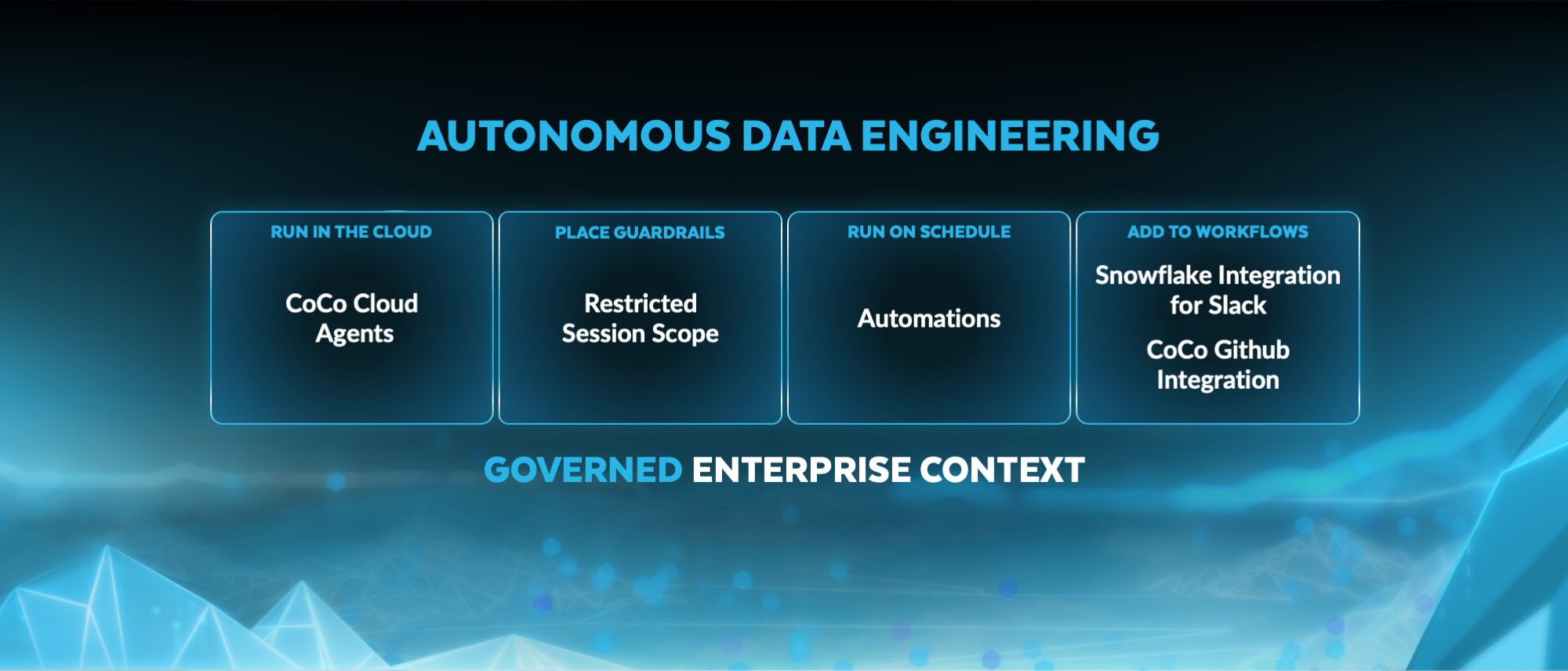
All of this culminates in agents that can take on the mundane on their own. With Cloud Agents (generally available), CoCo spins up an isolated environment that Snowflake manages instead of running on an engineer's laptop. Each session gets its own secure container and works on files in a shared Snowflake Workspace, and a data engineer can further restrict or limit what it can do with Restricted Session Scope (generally available). Because the work happens in the cloud, it can keep going after the engineer logs off, supporting long-running tasks and cross-team collaboration.
Coding Agents (generally available) add coding abilities into your own applications through Cortex Agents REST API or SQL. CoCo automations (generally available in the Snowsight interface and CLI; public preview in CoCo Desktop) allow data teams to run those agents autonomously. Data engineers can describe a recurring task in plain language, such as checking pipeline health or investigating failed jobs, and the task runs proactively. Teams can share the CoCo Skills they've built, so workflows can easily be reused. Because CoCo runs inside Snowflake, it works with an organization's lineage, catalog and governance policies, giving it context that a general-purpose coding assistant wouldn’t have.
Snowflake for Slack (public preview soon) brings CoCo into the channels where teams already work, so people can ask questions, start a workflow or review results without leaving the thread. And CoCo GitHub integration (public preview) means proposed code changes still go through the team's existing review process.
Each foundational layer builds on the last: Abstract the infrastructure, codify the lifecycle, add a data-native harness, and give agents well-defined work to automate. The next question is whether those pipelines can deliver data in real time as fast as the agents and apps that depend on them.
End-to-end real-time analytics in one environment #
A self-managing pipeline is certainly an achievement, but it isn’t the endgame. If it hands an agent stale information, it’s less useful. But getting fresher data has usually meant adding and operating new infrastructure for each workload that needs it.
Now, Snowflake brings end-to-end real-time analytics through connectivity, transformation and serving into one environment, so teams can build these use cases through a connected, cost-effective and governed approach.
Starting with high-volume ingestion, Snowpipe Streaming lets you stream continuous data pipelines directly into Snowflake with up to 20 GB/s per table, 5-second latency and throughput via predictable pricing. With Elastic Channels (generally available), thousands of producers can share one ingest path while Snowflake handles scaling so you don’t have to coordinate channels as traffic grows. Datastream (public preview soon) brings the Apache Kafka protocol that data engineers already know and love within Snowflake’s security and governance perimeter. As data arrives, Streaming Transformations (private preview) let teams transform it in motion with standard SQL, so downstream data stays fresh and is ready for apps in seconds.
Dashboards, customer-facing apps and AI agents often hit the same data at once, and that's where many real-time projects stall. Teams end up copying data into a separate serving database to keep up, which means higher infrastructure cost and operational overhead. Interactive Analytics (generally available) serves that traffic directly in Snowflake, with subsecond queries at high concurrency on the same governed tables engineers already maintain. There’s no second copy to sync, no extra system to secure and no separate pipeline to keep running. Teams get the performance they need without paying for a second system.
Choose how each source should connect #
Just as not every workload has the same freshness demands, data teams don’t need to use the same pattern for every source. Some data must be ingested and transformed in Snowflake. Other data can remain in its system of record and be queried there. Choosing how each source connects means fewer copies to manage and fewer pipelines to maintain.
For data that needs to be brought into Snowflake, Snowflake Openflow is designed to connect a broad range of sources and support ingestion at enterprise scale. Whether you need on-premises connectivity through Data Connectivity Proxy (generally available) or support for additional cloud environments, Openflow can deliver performance, enterprise reach and operational control with observability and AI-assisted troubleshooting capabilities. Runtime scheduling and auto-suspend also give teams more control over when integration workloads run. Teams also need ways to work with files already in their storage environment. Zero-Copy Parquet makes existing Parquet files available as Iceberg without rewriting the source data. Parquet Direct is a separate read-only path for querying Parquet files in place.
For data that’s already in the system of record you trust, SAP Business Data Cloud, Workday Data Cloud and Salesforce zero-copy integrations are now generally available. Zero-copy integration is designed to provide access to data in its source system, reducing the need to build extraction pipelines for analytics or AI. SAP customers can put business-critical data to work for analytics and AI while meeting private connectivity requirements. Unidirectional AWS PrivateLink connectivity between SAP Business Data Cloud and Snowflake (generally available soon) helps customers extend trusted SAP business context across enterprise data for business outcomes. These patterns can coexist in one data architecture. For example, an engineer may ingest operational events through Openflow, access partner data in place through a zero-copy integration and use Spark to process files on Iceberg. The decisions that need to be made for each source, then, are whether its data needs to move, how it will be used and which controls should apply. Those questions matter most for the transactional systems where the business actually runs.
Put operational data to work in apps and agents #
For apps and agents to gain a complete understanding of businesses and make accurate decisions, having current operational context is critical. But most organizations still run transactions in one system and analytics in another, with ETL pipelines moving data between them. These pipelines add latency, cost and one more job for engineers to maintain. To address this, we introduced Snowflake Postgres, bringing the world's most popular database to Snowflake. With open source pg_lake, it helped replace brittle, third-party ETL with a simpler, more efficient way to connect your data estate. Now, we are taking that simplicity even further by introducing data mirroring, which turns transactional data into insights — and insights into action — as a fully managed solution.
It’s simple to set up, with one command or a few clicks. Postgres data mirroring (generally available) continuously replicates your Postgres tables into the rest of Snowflake for analytics and AI. Snowflake data mirroring (public preview soon) sends data the other way. Enriched customer profiles and analytics results flow back into Postgres, where they power smarter agents and more personalized experiences.
Internal enterprise apps built with Streamlit or Snowflake App Runtime already run on Snowflake and read from Snowflake data. When those apps also need fast transactional reads and writes, hybrid tables dramatically cut down on overhead. Now, hybrid tables deliver up to 8x higher throughput, meaning that for certain workloads, what used to take eight XS warehouses now takes one, which can cut costs by over 80%.<sup>1</sup> Snowflake has also made significant improvements to latency, with P50 latency 3x lower and P99 latency about 2x lower, for operational workloads involving point operations.<sup>2</sup> For the thousands of customers already using hybrid tables, existing apps get faster and cheaper with nothing to re-architect.
Hybrid tables and Snowflake Postgres are complementary. Hybrid tables are the natural choice when you want deep integration with other Snowflake capabilities, without a separate database. Snowflake Postgres is the right fit when teams need the Postgres ecosystem or the lowest possible latency.
Build a foundation that can change with the work #
Every agent, app and decision your business makes depends on data that is fresh and trusted. But getting there takes pipelines that are tested and operational systems that are well connected. Snowflake now brings those pieces together so that AI can handle the routine work along the way.
That frees data engineers to focus on building what comes next.
Explore the full set of Snowflake Expedition announcements or join in for the virtual event.
FAQ #
Q: How can AI agents help with data engineering work?
A: Once pipelines are declarative and version controlled, AI agents can take on recurring operational tasks, such as checking pipeline health, tracing failure causes and proposing fixes for review. Snowflake CoCo automations run these agents on a schedule inside Snowflake, where they work with lineage, catalog and governance policies. Proposed code changes still go through the team's existing review process via the CoCo GitHub integration.
Q: What is real-time analytics and how is it different from batch analytics?
A: Real-time analytics processes and serves data within seconds of its arrival, rather than waiting for a scheduled batch job to run. This matters when agents, dashboards or customer-facing apps need current information to make decisions. Snowflake delivers end-to-end real-time analytics in one platform — from streaming ingestion with Snowpipe Streaming (5-second latency at up to 20 GB/s) through transformation to subsecond serving with Interactive Analytics, all on the same governed tables teams already maintain.
Q: How do Dynamic Tables simplify data pipelines?
A: Dynamic Tables let teams define a transformation declaratively — as a query — and Snowflake handles scheduling, incrementalization and dependency ordering automatically. Instead of writing and maintaining imperative ETL code, you describe the result you want and the platform keeps it fresh. Dynamic Tables in dbt bring this directly into the dbt framework, and custom incrementalization gives full control when you need it.
Q: How does Snowflake help replace ETL between transactional and analytical systems?
A: Traditionally, organizations run transactions in one system and analytics in another, with ETL pipelines in between. Snowflake Postgres data mirroring continuously replicates Postgres tables into Snowflake for analytics and AI with one command. Hybrid tables serve the reverse need — fast transactional reads and writes inside Snowflake — so internal apps built on Streamlit or Snowflake App Runtime don't need a separate database.
Q: What role do open table formats such as Apache Iceberg play in data engineering?
A: Open table formats let teams choose their compute engines while keeping data in one governed location. Snowflake supports Apache Iceberg with branching, Time Travel and tagging, giving engineers a write-audit-publish workflow: Stage changes on an isolated branch, validate them, and publish or discard. This is especially important as AI agents begin reading and writing the same tables that pipelines do — every change has a governed audit trail.
<sup>1</sup> Throughput and cost comparison based on production benchmarks of hybrid tables workloads, measured before the performance improvements and after. Equivalent throughput required eight XS warehouses before and one XS warehouse after. Cost savings are potential and depend on workload.
<sup>2</sup> Latency comparison based on production benchmarks, measured before the performance improvements and after. Results depend on workload.