Ready
What does it take to go from “build me a board” to a PCB that an engineer can actually review?
This tutorial follows a complete Synth Enterprise cockpit run for a deliberately non-trivial board: an RP2350 battery telemetry design with USB-C, battery charging, environmental sensing, motion sensing, flash storage, status outputs, expansion, test points, and mounting hardware. The goal is not to hide the engineering work behind a prompt. It is to make each step inspectable: the brief, the generated source, the revision diff, the checks, the KiCad views, and the manufacturing handoff.
Synth is still in development. The compiler, registry coverage, placement and routing quality, agent behavior, and cockpit workflow will continue to improve. Treat this run as an engineering demonstration and a useful starting point—not as a guarantee that every future board will converge without review or iteration. Stay tuned for the upcoming Synth beta.
Why this approach is different #
Some AI-assisted hardware workflows are primarily optimized to produce an attractive board preview from a prompt. Synth is designed around a stricter engineering record: the circuit remains editable source, every revision can be diffed, parts and pins are resolved against a registry, and the result is exported as KiCad artifacts that an engineer can inspect. Compiler diagnostics, schematic readability, physical placement, routing, and manufacturing checks are separate evidence gates rather than one opaque “finished” score. That makes Synth a stronger fit when traceability and review matter as much as speed—while keeping the final engineering decision with the human reviewer.
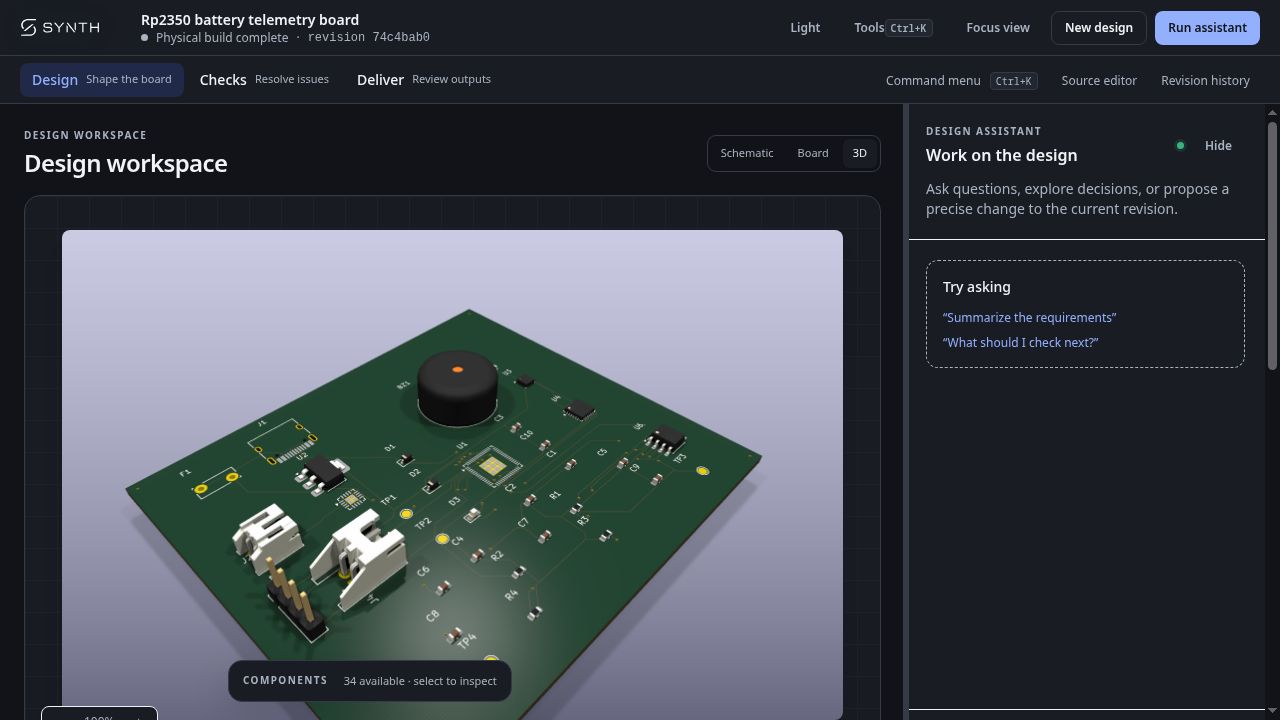
The design used here finished with 34 components, 292 traces, 45 vias, and zero unrouted nets. Its accepted revision begins 74c4bab0.
From the first recorded planning event to the completed accepted revision, this run took approximately 19 minutes wall-clock, including proposal review, physical generation, routing, validation, and acceptance. The physical-routing stage itself completed in about 5 seconds after it started. These are measurements from one local run, not a benchmark or a promise of the timing for another design.
The AI model used for the documented planning and repair steps was OpenAI GPT-4o-mini. Synth’s compiler, registry resolution, schematic review, physical checks, routing, and artifact generation remained deterministic tool stages around the model; the model did not replace those validations. Token usage was not recorded by this local run, so a reliable token total is not available for this report.
1. Start with a board brief #
Open a new design in the Synth cockpit and describe the board in ordinary engineering language. A useful brief names the major functions, interfaces, constraints, and the evidence required before fabrication.
Here is the brief used for this run:
Build a compact 4-layer RP2350 battery telemetry board with USB-C power and data, ESD and reverse-polarity protection, 3.3 V regulation and decoupling, RP2350 SWD/reset/boot controls, microSD SPI, I2C temperature-humidity sensor and IMU, LiPo fuel gauge, RGB status LED, buzzer, I2C expansion, battery connectors, test points, and four mounting holes. Use real registry parts, produce a fabrication-ready BOM, and require clean ERC/DRC with zero unrouted nets.
The brief is a starting point, not an approval. Synth carries it into a proposal where assumptions can be clarified before the design is built.
2. Let the agent turn intent into reviewable source #
Synth’s agent works against the design language and component registry. That matters for a complex board: the agent must resolve real parts and pins instead of inventing plausible-looking names. The resulting .synth source is kept as an artifact that can be read, diffed, and checked.
For this board, the source declares a four-layer JLCPCB design and resolves the main functional blocks:
board "RP2350_Battery_Telemetry_Board" {
  layers 4
  manufacturer "jlcpcb"

  component U1: mcu "rp2350"
  component U2: regulator "ams1117_3v3"
  component U3: sensor "bme680_env"
  component U4: sensor "mpu6050_imu"
  component U5: charger "bq24074"
  component U6: memory "w25q128_flash"
}
The source editor is intentionally part of the workflow. An engineer can inspect the component vocabulary, power paths, bus connections, pull-ups, protection devices, test points, and supporting passives before accepting a revision.
The schematic is also treated as a first-class review artifact. The agent groups the complex design into functional blocks—power input, 3.3 V regulation, RP2350 control, sensors and storage, and expansion—then runs schematic readability diagnostics before continuing to placement and routing. If the generated sheet is ambiguous, disconnected, or difficult to inspect, the candidate remains in the repair loop instead of being presented as finished.
3. Review the proposed revision before accepting it #
The agent does not silently replace the design. The cockpit exposes the candidate as a revision with a summary of its changes and the affected objects. In this run the candidate contained 119 additions and one removal across 34 affected objects.
That diff is a useful review boundary. Check that the proposed parts match the brief, that power and ground connections are intentional, and that the agent has not introduced an unexplained interface or changed a pin assignment without a reason. For a real product, this is also where a second engineer can review the candidate before any physical artifact is treated as current.
The accepted revision is then materialized into KiCad-backed artifacts. The design view below shows the generated schematic rather than a hand-drawn illustration.
4. Check the design in layers #
Synth keeps compiler evidence, physical validation, and routing evidence separate. This makes a green result more informative: it tells you which stage passed instead of collapsing every result into one status badge.
For the telemetry board, the checks page recorded:
- Synth compiler gate: pass, with zero blocking diagnostics.
- Physical DRC/ERC: pass, with zero reported findings.
- Routing convergence: pass, with zero unrouted nets.
- Artifact source: captured and available for review.
Passing checks do not eliminate engineering responsibility. Review the actual KiCad outputs, component specifications, footprints, tolerances, thermal behavior, and manufacturing rules before ordering hardware.
5. Inspect the routed board and its inventory #
Once the physical revision is complete, the board view exposes the generated copper layout. The board explorer provides a compact inventory of what the materialized design contains: components, traces, vias, airwires, unrouted nets, and copper layers.
In this example the explorer reported 34 components, 292 traces, 45 vias, and no airwires or unrouted connections.
This is a useful point to inspect placement and connectivity visually. The numeric evidence answers “did the run converge?” while the board view answers “does the result look like the board we meant to build?”
6. Use the 3D render as another review surface #
The 3D view is generated from the KiCad board artifact. It helps catch a different class of problems: connector orientation, component crowding, enclosure-facing parts, mounting-hole clearances, and whether the rendered board resembles the intended physical object.
Treat this as a review aid, not a substitute for a mechanical drawing or a manufacturer’s assembly constraints. The 3D renderer can show what is in the board file; it cannot approve a product’s enclosure, assembly process, or safety requirements for you.
7. Review the manufacturing package and approve the exact revision #
The Deliver view binds the package to the accepted physical revision. Before approval, the cockpit shows whether the KiCad PCB and physical checks are available and lists the package contents: Gerbers, drill files, BOM, and placement data.
Approval is a deliberate boundary. Any subsequent design change invalidates that approval, so a downloaded package remains tied to the exact revision that was reviewed. After approval, the cockpit makes the handoff state and package download explicit.
What this workflow gives you #
The useful outcome is not just a PCB image. It is a chain of evidence:
- A natural-language brief establishes the intent.
- Registry-grounded Synth source makes the circuit inspectable.
- A candidate revision makes the agent’s changes reviewable.
- Schematic readability review catches presentation and connectivity problems before physical work.
- Compiler, physical, and routing checks provide stage-specific evidence.
- Schematic, board, and 3D views expose the generated KiCad artifacts.
- The manufacturing package is bound to the revision that was actually reviewed.
That chain makes it practical to use an agent for more of the repetitive work without turning the result into an opaque artifact. The source remains the durable design record, and KiCad remains available for detailed electrical, physical, and manufacturing review.
Synth is still under active development, and more improvements are planned across the compiler, registry, routing, and agent workflow. You can explore the open-source compiler in the Synth repository; the enterprise workflow is available through Synth Enterprise. For a real board, keep the final human review step: verify the resolved parts and footprints, inspect the generated KiCad files, and validate the design against the intended fabrication and assembly process before manufacturing.