Hello GNOMErs,
I know GNOME isn’t for everybody. Honestly, I don’t fully get the philosophy behind it either, but it’s been my favorite daily driver for the past couple of years on both Fedora on my notebook and CachyOS on my desktop, I have to admit I’ve really come to enjoy it.
Along the way I ended up writing a few little projects to make it nicer to live with. Full disclosure: I built them with claude code’s help, and I’ll say it plainly, LLM has been great for Linux dev work, GNOME included. Here’s what I’ve got so far and I like to share with the community:
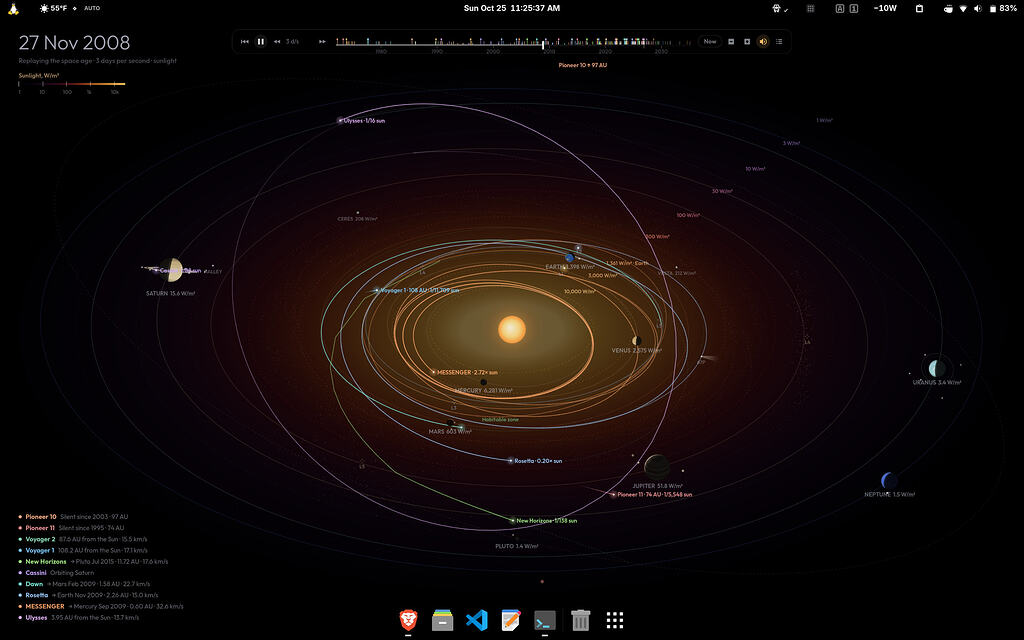
howdy-fedora-helper-script : sets up facial authentication on Fedora Workstation with GNOME, all from a single script. 2. orrery : a live, OLED-black solar system wallpaper for GNOME Shell. It shows real planet positions and replays the gravity-assist missions from the space age, which is just fun to watch. 3. shuttle : push, pull and sync folders between SMB/NFS shares and local storage. It comes with a TUI, a systemd user service, a GNOME indicator and a Quick Settings toggle.
If you try any of them, I’d love to hear what you think That being said, I’m just as curious about what everyone here has built. especial stuff that never made it to the GNOME extensions site, cool to see what everyone’s running, and I bet I’m not the only one who’s going to steal a few ideas.
2 Likes
Lurker 2
If after 30 years of development, users have to create extensions to make it nicer to live with, the DE is a failure, IMHO. I’m a KDE fan, and it is “nice to live with” without extra apps. One problem with extensions is, a user has to find the one they need, or multiple. And after every update, extensions need to be updated or break.
Does anyone use Gnome in plain version? Many distros already include extensions (e.g. Ubuntu). So it is hard to even experience plain Gnome. I suspect Debian, Fedora or Arch users are the only ones starting out with plain Gnome. I’m curious if many of those users do NOT add extensions and just use Gnome “ as is”?
I also don’t like they higher resource use (which also applies to the forks, like Cinnamon). On Ubuntu, it has a bug to show the spinning wheel after starting an app. So the user can’t really use the mouse pointer for a few seconds since the pointer still is a spinning wheel. i initially thought it is the snaps taking so long. But the wheel still spins after the app is already ready.
Anyway, thanks for your effort. How will you handle updates to the new versions of Gnome?
You state that as facts but it is merely your personal preference. I use vanilla Gnome and the only modification I did was enable the minimize and maximize buttons for the window frames. I like Gnome, it’s polished and it works.
Back in the day I used i3 and sway as well but I regularly ran into issues with applications not working correctly because i3 and sway both don’t come with all the connections to the notification system and dbus interface by default when you install them yourself.
The last couple month I was on Cosmic, developed by System76, because I wanted to try their options for tiling windows. The tiling function worked reasonably well but I am angry with them that they call Cosmic stable, it’s in a beta state at best.
I think Cosmic works for most user, but if you have a niche setup, like multiple GPUs by different vendors, a hybrid laptop or such you’ll run into trouble. I tried to overlook these shortcomings for month but in the end System76 is busy publishing new features while all these bug reports stay unfixed.
So it’s back to Gnome for me, without tiling again but the desktop environment is polished and just works.
I used to care about gui. Now no care about gui, only care about getting things done. Same with tweaking config files.