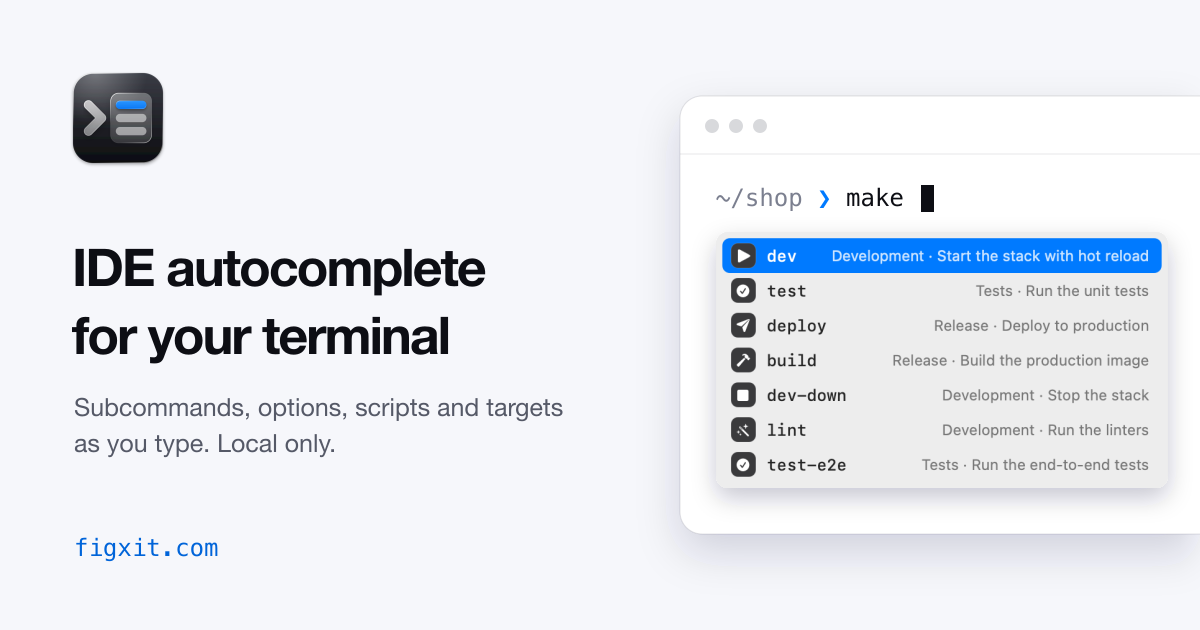
Figxit completes subcommands, options, npm scripts, and Makefile targets as you type, in zsh, bash, and fish on macOS. A free, open source replacement for Fig.
Apple Silicon, macOS 13 or later. Open source under the MIT licence. No account, no AI chat, no telemetry.
~/shop ❯
Works with zsh, bash, and fish #
Terminals
In tmux only
Not tested yet without tmux
Optional
tmuxAtuin
for ranking
Completions for git, docker, kubectl, and 700+ more #
Figxit includes the open source Fig specs for 717 tools, each with its subcommands, options, and a description on every row. These are some of the most used.
- git
- gh
- docker
- kubectl
- helm
- terraform
- npm
- pnpm
- yarn
- bun
- node
- deno
- python3
- uv
- cargo
- go
- swift
- brew
- tmux
- nvim
- psql
- vercel
- supabase
- ffmpeg
- +693 more
Scripts, subcommands, options, and your history #
The list is a native macOS window. It does not take keyboard focus, and nothing is drawn inside your terminal.
Project targets and scripts
make lists the targets of the Makefile in the current folder. npm run, pnpm, yarn, and bun run list the scripts of package.json, with the command each one runs.
There is no setup for each project.
❯ npm run
Subcommands for 700+ tools
Figxit loads the open source Fig completion specs. Type a command and a space to see its subcommands, each with a one-line description.
Specs also supply live values, such as git branches after git checkout and hosts after ssh.
❯ git ch
Options with descriptions
Type a dash to see the options of the command on the line. Options you have already typed are hidden from the list.
❯ docker run --
Ranked by your history
Figxit reads your Atuin history, read-only. A word scores higher when you used it in the same folder, in the same repository, or recently.
❯ p
Local only
Your commands and history stay on your Mac. The app does not report what you type or how you use it. Its only network request is the daily update check, which reads one file from this site. We count those checks by app version, so we know how many installs are in use. You can turn the check off in Settings. There is no account.
No typing delay
The shell hook sends the line to the engine after each key and does not wait for the answer. The shell waits for the engine only when you press Tab or Enter to insert a row.
Accessibility only for splits and editors
No Screen Recording access. In a window or tab, tmux or the terminal app gives the cursor position. A native split (Cmd+D) and the terminal of VS Code or Cursor need Accessibility, so Figxit can read where the pane is. Figxit asks the first time you type in one.
Keys #
Move the selection
Up and Down move through the list.
Tab
Insert the selected row
Tab adds the selected row to the command line.
Insert, or run
Enter inserts the highlighted row and runs the command. A switch in Settings makes Enter insert the row and not run the command. If the word is complete, the first row has a return icon, and Enter runs the command.
Esc, Ctrl-U, or more typing closes the list. When the list is closed, Tab opens your normal completion and Up searches your history, as before.
Makefile and script conventions #
Figxit uses three conventions that many projects already follow. All are optional.
Makefile help text
The text after ## is the description of the target. A line with ##@ Development starts a section, and its name shows in front of the descriptions below it.
❯ make
Red icon for production
A row is red when its name is in capitals, when it has the word prod or production, or when a Makefile target has [prod] or [danger] at the start of its help text. It works for SSH hosts, targets, and scripts.
Name a production host PROD, or write release: ## [prod] Publish the app, and that row gets a red icon.
❯ make
❯ ssh
Icons from the script name
dev, start, and serve share one icon, test has another, build another. One list of 12 verbs covers most target and script names.
A shell hook, an engine, and a macOS app #
The three parts talk over unix sockets in ~/.local/state/figxit/. The line you type is not sent over the network.
zsh, bash, fish
Adapter
A line editor hook in your shell sends the buffer, the cursor, and the folder to the engine after each key.
Bun
Engine
Parses the line, collects candidates from the project files, the spec, and your history, then merges and ranks them.
Swift, AppKit
Helper
A macOS app with no Dock icon. It shows the floating panel and hides it when you switch app, window, or tab.
Install Figxit #
One app contains the engine and the completion specs. There is nothing else to install.
Download Figxit.dmg , open it, and drag Figxit to Applications. 2. Open Figxit. An icon appears in the menu bar and a setup window opens. It lists the shells on your Mac. Click Set Up for your shell, or add the line yourself. This is the line for zsh. The lines for bash and fish are in theREADME .
eval "$('/Applications/Figxit.app/Contents/MacOS/figxit-engine' init zsh)"
Open a new terminal and type a command. To check the installation, run this.
figxit doctor
Needs Apple Silicon, macOS 13 or later, and zsh, bash 5, or fish 4. tmux and Atuin are optional. To build from source, see the README.
Questions and answers #
Is Figxit a replacement for Fig? #
Yes, for Fig's autocomplete: the list that opens as you type, with a description on each row. Figxit loads the same open source completion specs that Fig used. It does not have the other Fig features, such as scripts, dotfile sync, and team sharing, and it has no AI chat. More on the page Figxit as a Fig alternative.
Can I use it in place of Amazon Q or Kiro CLI autocomplete? #
Yes, if you only want the autocomplete. Figxit needs no account and has no AI features. It is not affiliated with Fig, Amazon, or Kiro.
Is Figxit a replacement for Microsoft inshellisense? #
On a Mac with zsh, bash, or fish, yes. Both use the Fig completion specs. inshellisense draws its list inside the terminal session. Figxit shows its list in a native macOS window and orders it by your history. inshellisense also runs on Windows and Linux and in other shells, and Figxit does not.
Which commands does it know? #
The Fig completion specs cover more than 700 tools, for example git, docker, npm, and kubectl. Figxit also reads the Makefile targets and package.json scripts in the current folder.
Does Figxit send what I type anywhere? #
No. It has no telemetry and no account. Its only network request is the update check, one time each day, and you can turn that off in Settings.
Do I need tmux? #
No. Figxit works in tmux and directly in Ghostty, iTerm2, and Terminal. A native split of the terminal app (Cmd+D) needs the Accessibility permission.
Is it free? #
Yes. Figxit is open source under the MIT licence.