Typemill is a lightweight flat-file CMS designed for fast, simple, and flexible website and eBook creation using Markdown. It offers a clean, focused authoring experience and includes a dedicated interface for AI-assisted writing. Typemill is highly extensible with plugins and themes, ranging from simple integrations like Mermaid diagrams and math support to powerful extensions like the eBook plugin, which transforms your installation into a full-featured eBook production studio.
Content #
Markdown is a future-proof format for writing and exchanging content. With Typemill, you create structured documentation in an intuitive editor and enrich it with media, diagrams, variables, and AI-assisted writing.
Markdown Editor #
Typemill offers two Markdown editors: a WYSIWYG-style editor with drag-and-drop support for content blocks, and a raw editor for writing in pure Markdown syntax. Both editors support advanced features such as tables, definition lists, images, file uploads, and embedded videos.
Media Library #
Typemill provides media libraries for images, video files, audio files, and general files.
Some highlights:
- Search for media.
- Filter media by type.
- Directly upload media files.
- Search for unused media.
AI-Assisted Writing #
Kixote is a separate interface for AI assistance and for admin tasks. You can connect the interface with ANY AI provider that has an OpenAI compatible API or an Anthrophic API (Claude).
Some highlights:
- Connect with ChatGPT, Claude, Opencode, Ollama, LM-Studio, and more.
- Save your own prompts in the prompt library.
- Set a focus on paragraphs.
- Switch between different versions of the article with pagination.
Page Status #
Authors have full control over the status of each page with a sticky publish bar at the bottom.
Some highlights:
- Publish, unpublish, draft, or delete pages using the sticky bar.
- Discard changes and reset drafts to the current live version.
- Color indicators show the current status of a page.
- Work on drafts while keeping the published version unchanged.
- Seamlessly switch between the raw and visual Markdown editors.
Page Meta Tabs #
Each page includes meta-tabs for managing standard metadata. Developers can also extend these tabs with custom inputs or embed complex applications.
Some highlights:
- Add essential metadata such as meta-title, meta-description, navigation title, and more.
- Hide pages from navigation or restrict access to specific users.
- Set up references like redirects or internal/external links.
- Extend functionality by adding new tabs, custom fields, or full applications via plugins and themes.
Shortcodes #
Shortcodes provide a simple way to add dynamic content and functionality to Markdown pages. Plugins can introduce their own shortcodes for features such as embedded content, product boxes, forms, or reusable content. Registered shortcodes can be inserted through the visual editor.
HTML Tags #
With the HTML plugin, you can add HTML elements to your Markdown content using simple shortcodes. It supports a range of HTML tags, including div, span, address, mark, kbd, sub, sup, details, summary, time, small, progress, and button. You can also add custom classes and IDs to individual elements, making it easy to create components such as slideshows, tabs, and accordions.
Content Variables #
The Variables and Snippets plugin lets you manage reusable content from one central location. Define simple variables such as names or prices, or create larger Markdown snippets, then insert them into pages with shortcodes so that a single update is reflected throughout your website.
Revisions #
The Revisions plugin keeps a history of page changes and lets you review and restore previous versions. Revisions can be created when different users edit a page, after a configurable period of time, or when a page is published, with options to control how many revisions are retained.
Mermaid #
The Mermaid plugin lets you create diagrams directly from Markdown using Mermaid syntax. Add a mermaid
code block to create flowcharts, pie charts, and other diagrams, with support for both the raw Markdown and visual editors.
PlantUML #
The PlantUML plugin lets you create PlantUML diagrams directly in your Markdown content. Use fenced plantuml-diagram
code blocks to render diagrams in the browser, with configurable output formats, alignment, sizing, and support for self-hosted PlantUML servers.
Structure #
Keep documentation organized as it grows. Build clear hierarchies, manage multiple projects and languages, and arrange content with simple drag-and-drop.
Interactive Navigation #
Editors can easily build and organize their website using the interactive navigation with drag-and-drop functionality.
Some highlights:
- Structure your site with files and folders.
- Reorder navigation items using drag and drop.
- Color indicators show the status of pages: published, modified, or unpublished.
- Support for hierarchical pages and time-based posts within folders.
- Expand or collapse the navigation for a clearer overview.
Multi-Project #
With Typemill, you can configure multiple projects alongside your default website. Each project comes with its own independent navigation and fully separated content.
Common use cases:
Large Websites: Split your site into multiple projects to improve performance — only the active project is processed. This makes it possible to run large-scale content projects with Typemill.Teams: Create a dedicated project for each team in your company to build and manage their own knowledge base.** Products**: Organize your portfolio more clearly by setting up one project per product.** Book Platforms**: Publish multiple books on one platform, with each book as an individual project (and even its own author).** Training Manuals**: Provide dedicated projects for training material, one per course.** Versions**: Manage documentation for different software versions in separate projects.
Multi-Language #
Typemill supports multi-language websites. Simply enable the multi-language option in the project settings and define a language code and language name for each language. You can then create a new language version of any page via the Language tab at the top. Typemill automatically copies the page into the corresponding language folder and sets up the cross-links between languages. Each page can be translated easily using the AI interface Kixote.
Read more about multi-language in the documentation.
Publishing #
Write once and publish in multiple formats. Turn the same content into documentation websites, PDF manuals, or EPUB eBooks without maintaining separate versions.
Websites #
Typemill is designed to turn your Markdown content into fast, structured websites. Build documentation, knowledge bases, blogs, manuals, and other content-focused websites while keeping your content separate from the presentation layer. Themes control the design, navigation, and layout, while plugins let you extend the functionality to fit your needs.
eBook Studio #
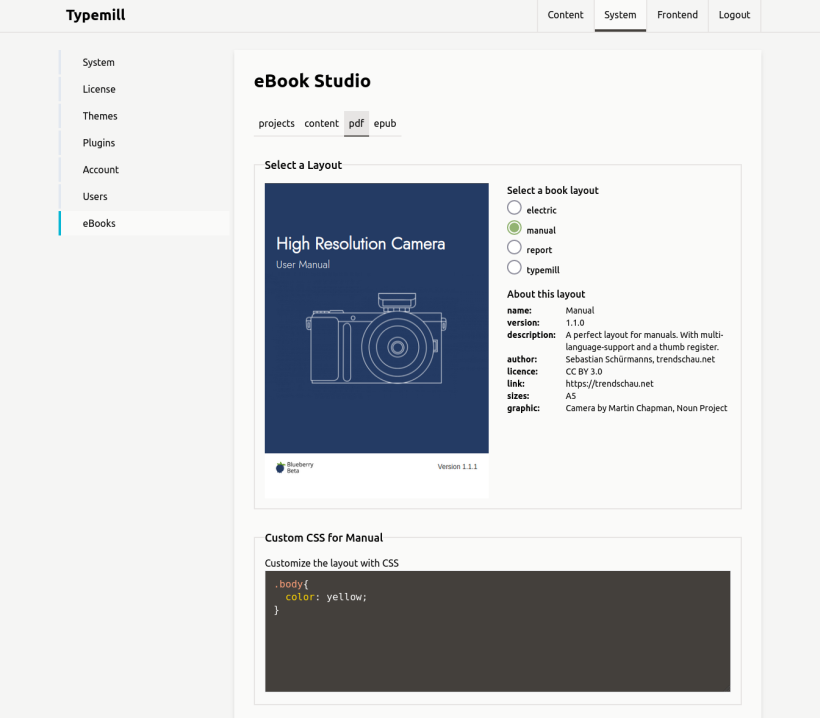
With the free ebook plugin you can turn your Typemill website into an ebook production studio and create professional PDFs and EPUBs with your content.
Some highlights:
- Create and manage ebooks from the whole website or from each folder.
- Choose between ebook layouts.
- Add and exclude pages for the ebook.
- Create PDFs or EPUBs.
- Add your own CSS rules.
Access Control #
Decide who can view and manage your documentation. Publish public websites, create internal knowledge bases, or restrict access to selected pages and user roles.
User Roles and Access Management #
Typemill provides predefined user roles like "Administrator," "Editor," "Author," and "Member." You can protect the access to the whole website or individual pages.
Public Websites #
Publish your content as a public website that is accessible to everyone. Typemill provides the tools to structure your content, manage navigation, and present documentation, manuals, or other information through a customizable theme.
Internal Websites #
Create private websites for internal documentation, knowledge bases, handbooks, or team resources. Require users to log in before accessing your content while keeping the same flexible structure and publishing workflow.
Restricted Pages #
Control access to individual pages and sections of your website. Restrict selected content to specific users or user roles while leaving other pages publicly accessible, making it possible to combine public and private content in the same website.
Extensibility #
Adapt Typemill to your workflow with plugins, themes, and integrations. Use the REST API or connect external services such as AI providers or LDAP directories.
Plugins #
Enhance your website and your author interface with flexible plugins.
Get an overview of all plugins in the plugin marketplace.
Themes #
Change the frontend design of your website with flexible themes.
Get an overview of all themes in the theme marketplace.
API #
Typemill follows an internal API approach. You can activate API access for each user and use Typemill in headless mode as a centralized content hub.
Some highlights:
- Activate API access for each user individually.
- Use user roles for the authorization of API access.
- Use API endpoints for content delivery, content creation, or administrative tasks.
AI-Connectors #
Connect Typemill with AI services and use your content as a knowledge source for AI-powered workflows. AI connectors can make Typemill content available to external AI tools while keeping your documentation centrally managed and up to date.
LDAP-Connector #
Connect Typemill to an LDAP directory and use an existing user directory for authentication. The LDAP connector allows organizations to integrate Typemill into their existing identity infrastructure instead of maintaining a separate set of user accounts.
Ownership #
Your content stays under your control. Typemill is open source, self-hosted, file-based, and free from vendor lock-in, making it easy to own, migrate, and maintain your documentation.
Open Source #
Typemill CMS, along with many plugins and themes, is free and open source under the MIT license. For users with advanced needs, Typemill also offers premium plugins, themes, and application services with affordable annual licenses. These help fund ongoing development and contribute to making Typemill a sustainable open source project.
Simple Installation #
You can install Typemill manually using a downloadable ZIP file, via GitHub, or with Docker. All you need is a server (Apache or Nginx) and PHP 8.1 or higher. Simply upload the files, set the correct file permissions, and visit your new website.
Check out the starter guide or the documentation for full installation instructions.
No Database Required #
Typemill is a lightweight flat-file CMS that works without a database. All content is stored in plain Markdown files, and all configurations are saved in simple YAML files.
Some highlights:
- Super easy installation, no database setup
- Simple backups and easy migration to another server.
- Markdown files remain fully portable and can be reused in other tools or systems.
And Much More #
Typemill includes many more features than listed here. You can also extend it with community and premium plugins, themes, and custom integrations to fit your own workflow.
System Settings #
Configure your system with extensive settings and manage accounts and users.
Some highlights:
- Restrict the website to authenticated users or restrict each page individually.
- Activate password recovery and login verification.
- Manage headers like CORS and CSP in detail.
- Activate proxy detection, security logs, and much more.
Login Verification Code #
Activate a login verification code for your website and protect your website from account hacking.
Some highlights:
- Always get a notification if someone tries to log in with a new device.
- Get a 5-digit verification code to complete your login.
- Specific for each device you use.
- Login is verified for 24 hours.
Performance #
Typemill is lightweight and clean with a compressed size of approximately 2MB. Websites built with Typemill provide high performance. They usually get full points from Google PageSpeed without any modifications or additional optimizations.
Technology Stack #
Typemill is built with a modern technology stack with Vue, Tailwind and Slim PHP. For the sake of simplicity, we do not use any frontend pipelines. Just drop in your files and start to code the easy way.
Some highlights:
- Runs seamlessly with PHP 8 or higher and operates without a database.
- Vue.js 3, Tailwind CSS 2, and Slim PHP 4.
- Flat-file design with Markdown files.
- Use YAML to configure forms, themes, plugins, and more.
- Create themes with HTML, CSS, and Twig.
- Build plugins using PHP and Vue.
- Define forms for nearly everything using YAML.
- Supports an API-based architecture and offers a headless mode for developers.