New capabilities to help teams build more advanced, more impactful Genie Agents

by [Hanlin Sun](https://www.databricks.com/blog/author/hanlin-sun) and [Sydney Sundell](https://www.databricks.com/blog/author/sydney-sundell)
• Deeper, multi-step analysis: Enable Genie Agents to tackle complex business questions with Agent mode, now accessible via APIs for custom applications and external tools.
• Enhanced data analysis: Unlock deeper insights by combining structured data with unstructured content like documents and PDFs stored in Unity Catalog volumes.
• Improved agent curation: Streamline the creation and optimization of custom agents with Genie Code, allowing you to easily configure instructions, diagnose performance, and manage agent quality.
At Data and AI Summit, we announced the evolution of Genie Spaces to Genie Agents, expert-curated agents that provide trusted answers on specific high-priority domains of your business. Since then, we’ve continued to expand Genie Agents’ capabilities, enabling them to answer a broader range of questions while also making them easier to curate.
Our latest set of updates make Genie Agents more powerful, more comprehensive, and easier to create from your team’s existing workflows. Here’s what’s new.
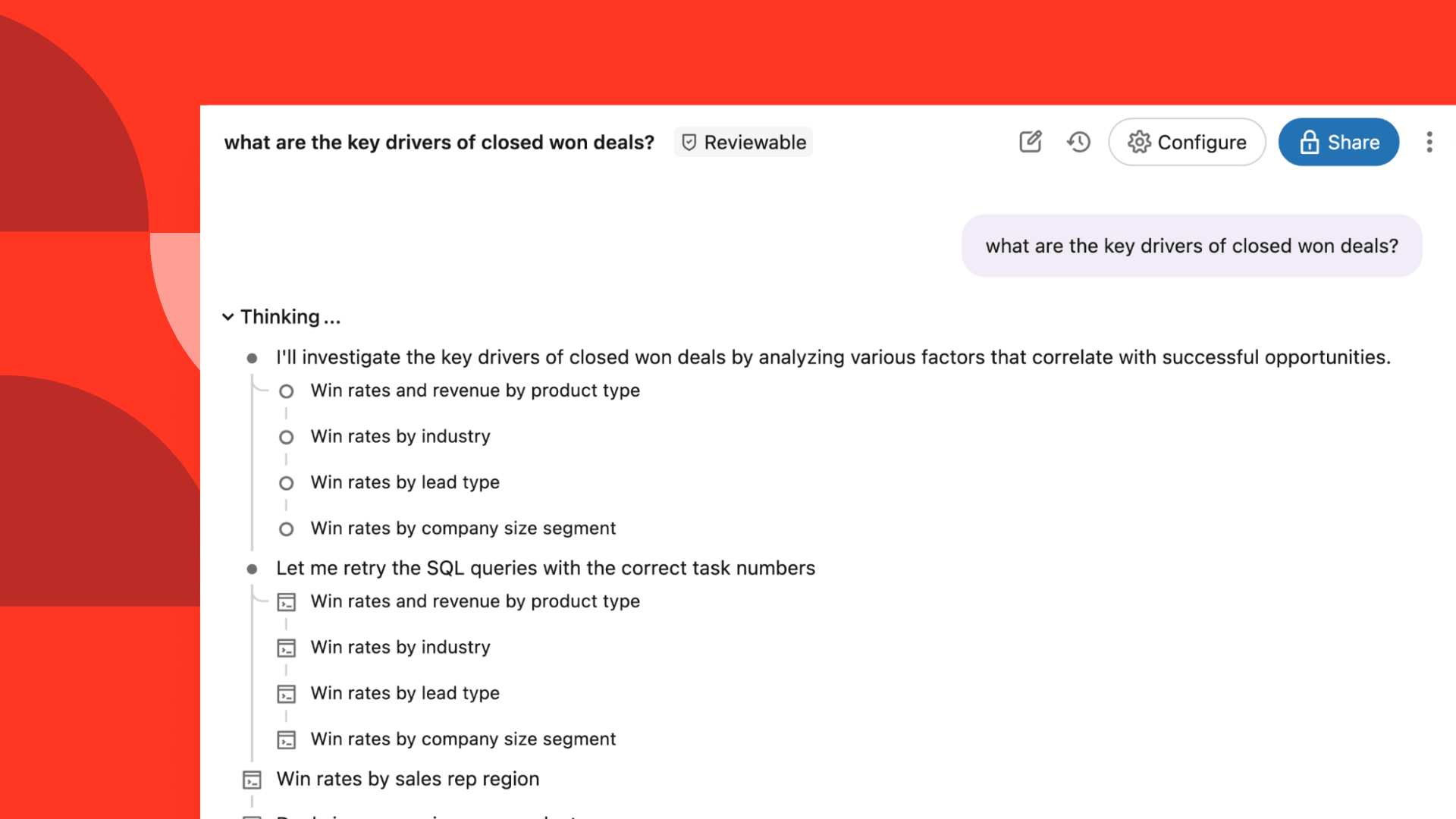
While Chat mode is effective for quick, factual lookups on your data, more nuanced and complex questions require more reasoning from your agent. For those deeper investigations, Agent mode, the agentic reasoning loop that powers multi-step analysis, is now available for all Genie Agents. Instead of stopping and responding after a single query, Agent mode can create and refine a research plan, explore data across multiple iterative queries, and return a report with findings, visualizations, and citations. For open-ended business questions that previously required a data analyst and a full research plan, Agent mode can now serve as your real-time research partner. Developers can now also bring multi-step reasoning and analysis beyond the Databricks UI with Agent mode APIs. The APIs let developers integrate Agent mode into custom applications, chatbots, scheduled reports, and internal tools, with responses streaming to clients through Server-Sent Events (SSEs). Developers can hold complete conversations with follow-ups and retrieve Agent mode conversations and messages via API for programmatic monitoring. We’ve also added visualization support via API, allowing for rich visual insights and data tables to support text responses.
Whether you're building a customer-facing analytics portal, an internal Slack bot, or a custom dashboard experience, the Agent Mode API lets you bring deep reasoning abilities to wherever your end users live. For more details and availability, visit our documentation.
Answers to business questions may not rely on data in tables alone—they often require context from unstructured data to paint a full picture. To help your teams answer questions across data types, Genie Agents can now analyze files stored in Unity Catalog volumes, allowing agents to answer questions on your PDFs, documents, slide decks, and images alongside structured data in a single conversation.
Agent builders can attach up to 10 volumes to a Genie Agent, empowering business users to ask questions that combine context from those files with governed tables. For example:
Unstructured data analysis runs in Agent mode, using multi-step reasoning to retrieve and analyze the most relevant file content. It respects Unity Catalog permissions, meaning users only see files they have access to, and supports content search indexing for faster, higher-quality retrieval across large volumes.
For teams working across larger collections of documents, content search improves speed and performance. Content search prepares and indexes your files so that the Genie Agent can use them more effectively, which improves its ability to reason over those files and answer questions with lower latency. For more details and availability, visit our documentation. To help users build more Genie Agents at-scale, we’ve invested heavily into making Genie Agent curation faster and more flexible. We’ve enhanced Genie Code with a number of tools and custom-built skills to help data experts curate high-quality, custom Genie Agents.
First, Genie Code can help authors build a high-quality baseline Genie Agent. Simply describe your agent’s purpose, example user questions, and desired data sources, and Genie Code will create the Genie Agent and add a set of instructions. It leverages the metadata available in Unity Catalog about the associated tables, and previous queries using those tables.
After you’ve set up your agent, Genie Code can also help you diagnose failures. Users can instruct it to analyze specific conversation failures or benchmark runs, and Genie Code will review the agent’s existing context and the specific errors to propose improvements to the Genie Agent’s context.
Finally, Genie Code can help you manage agents in production. As end users continue to ask questions and provide feedback on your agent, curators can ask Genie Code to help summarize the key question topics and top feedback trends to better understand Genie’s knowledge gaps. Genie Code can even suggest context improvements to resolve the detected gaps.
Authors can always review Genie Code’s suggestions before saving the suggested instructions, example SQL queries, or knowledge store configurations. To learn more about creating and managing Genie Agents with Genie Code, visit our documentation.
Data questions almost never start and stop with just one person—they typically inform cross-functional decisions, and often spark further analysis. To support insight democratization, users can now share chats from specific Genie Agents.
Shared conversations are kept up-to-date. New messages, edited visualizations, and follow-up analyses remain visible to anyone with access to the shared link. Genie Agent users can also share conversations with the agent authors to review conversation quality and respond to feedback.
For more information on sharing chats with teammates and agent authors, visit our documentation. These updates, combined with recent enhancements to our Genie Agents authoring experience, are all designed to help users create smarter Genie Agents with more speed and confidence. If you’re just getting started, dive in by creating your first agent with Genie Code or Genie One. Then, use Agent mode to ask your simple and complex data analysis questions, or connect your Unity Catalog volumes to provide your agent context on unstructured data.
Visit the Genie Agents documentation** **page for more information on new features.
Subscribe to our blog and get the latest posts delivered to your inbox.