Table of contents #
Structured output with per-field confidence scores through the Nutrient Data Extraction API.
- Excel-to-Markdown conversion usually flattens a sheet into one grid or renders it as an image and runs optical character recognition (OCR) first.
- Nutrient Data Extraction API now reads XLSX workbooks cell by cell and returns tables, headings, and notes as separate sections.
- In an internal test, it converted workbooks 76 times faster than the previous render-and-OCR path.
- It opened all 408 files in a test corpus built from the Apache POI test suite.
A spreadsheet looks like the most structured file a pipeline will ever receive. It has a grid, named sheets, and often tables that are explicitly defined with names and ranges. Even so, many retrieval-augmented generation (RAG) pipelines lose data in Excel without noticing. The losses come from the content around the cells: the title above a table, the note in cell A1, the blank spacer row, and the second table further down the same sheet.
Nutrient Data Extraction API now reads XLSX workbooks from their cells. Nutrient engineer Costinel Mitrea built the change and summed it up: “Workbooks are now read as workbooks, not as pictures of workbooks.” This post covers what that means for the Markdown a large language model (LLM) receives.
Why spreadsheets break LLM pipelines #
A typical business workbook isn’t one table. A single sheet often holds:
- A title in a merged cell across the top
- A note such as “All amounts in USD thousands”
- Two or three tables, separated by blank spacer rows
- Totals, footnotes, and a comment column someone added later
A person reads that layout at a glance. A converter has to decide where one table ends and the next begins, which row is the header, and whether a blank cell means zero, unknown, or nothing at all.
Each wrong decision ends up in the model’s context. A merged banner read as a data row pushes the real header row down, so every column gets the wrong name. A blank cell exported as NaN looks like a value. A whole number exported as 412.0 looks like a measurement with a decimal part.
Large sheets add a second problem. A converter that renders pages turns a long sheet into a long stack of images, and every image has to be recognized before any text comes back.
Two common approaches, and what each loses #
Most Excel-to-Markdown converters take one of two routes. Both return text, but neither returns the layout a person sees.
Render and OCR
The first approach treats a workbook like a scanned document. The converter paginates each sheet as if printing it, renders every page as an image, and runs OCR on the pixels.
This is what the Data Extraction API did with spreadsheets until this change, and it still does for Excel formats other than XLSX. Sheets were rendered at 200 dots per inch (DPI) and sent through the same recognition pipeline as scans.
Text comes back, but rendering discards the structure stored in the file: sheet names, the cell grid, merged ranges, defined tables, and number formats. Table boundaries then have to be rediscovered from pixels. Wide sheets are cut at the edges of the printed page, so one table can arrive in two halves.
Data frame conversion
The second approach loads each sheet into a data frame and prints it as a table. MarkItDown, Microsoft’s open source converter, handles Excel files this way. Its converter reads every sheet with pandas and presents “each sheet … as a separate Markdown table.”
That keeps the cells, but it inherits the data frame defaults. MarkItDown’s issue tracker documents the side effects, and all four items below were still open on 30 September 2026:
- Blank cells become `NaN` ([#183(opens in a new tab)](https://github.com/microsoft/markitdown/issues/183) and[#2498(opens in a new tab)](https://github.com/microsoft/markitdown/issues/2498) ).
- Literal text such as “NA” or “NULL” also becomes `NaN` ([#2498(opens in a new tab)](https://github.com/microsoft/markitdown/issues/2498) ).
- One blank cell makes its whole column numeric with decimals, so `412` renders as`412.0` ([#2484(opens in a new tab)](https://github.com/microsoft/markitdown/issues/2484) ).
- Worksheets marked hidden are included in the output ([pull request #2456(opens in a new tab)](https://github.com/microsoft/markitdown/pull/2456) ).
Because each sheet becomes one table, the title, the note, and both tables on a sheet also end up as rows of the same grid.
How the Data Extraction API reads a workbook #
The new path skips rendering and OCR and reads values, merged ranges, and table definitions from the file itself. Each visible sheet becomes one page of output, which is then cut into the regions a person would see: tables, the titles above them, and standalone lines of text.
The cuts follow a few rules:
- Empty rows first, then empty columns. A completely empty row that crosses the sheet is a boundary. Inside each strip, a completely empty column is the next boundary.
- Defined tables are never cut. A table defined in Excel keeps its full range, whatever the blank rows inside it suggest.
- Narrow blank columns are gutters. A blank column narrower than its neighbors counts as spacing inside one table, not as a gap between two.
- Matching strips go back together. Two strips a blank column would separate, covering exactly the same rows, are rejoined.
- Merged banners become headings. A merged title directly above a table becomes a heading, and the real header row below it becomes header cells.
Regions are then read in order, by starting row and then by column. One or two lone values become paragraphs, and three or more become a list. A label above many values becomes a one-column table.
The gutter and rejoin rules fix failures in an earlier version. That version split an ordinary calendar into a header table, five stray paragraphs, and two unrelated grids.
The regions go into the same document structure the API builds for PDFs. Parse and extract return the same JSON elements and Markdown for a workbook as for a PDF, so one schema and one pipeline cover both.
What the Markdown looks like #
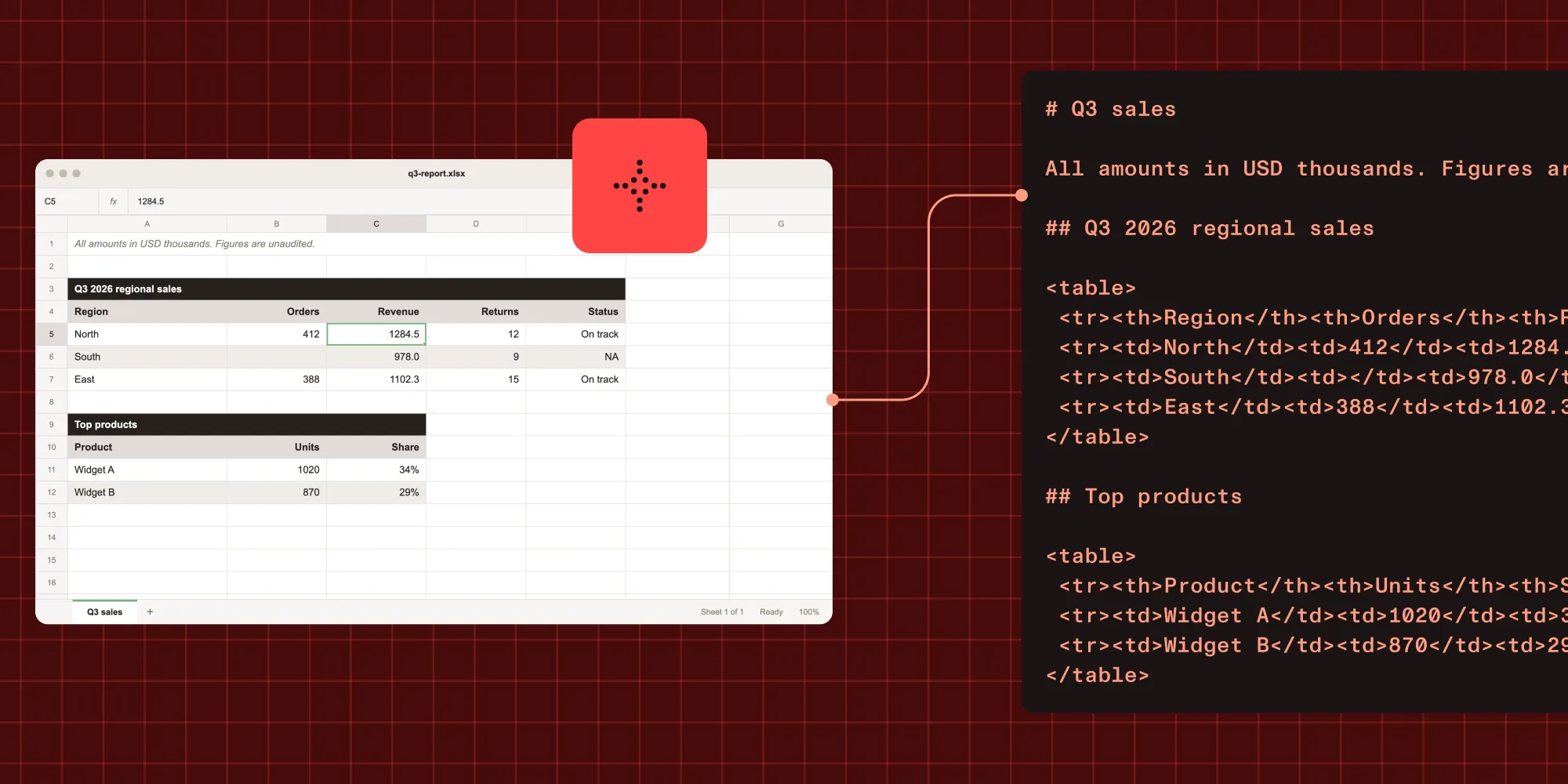
Take this example workbook, which has one visible sheet with a note, two titled tables, a blank cell, and a literal “NA,” plus one hidden sheet:
The Markdown below illustrates the output format for that workbook; it isn’t a captured response:
Compared with a one-grid conversion, the output changes in these ways:
- The sheet name becomes the top-level heading.
- The note in A1 becomes a paragraph instead of the first row of a table.
- Each merged title is a heading, with the real header row as header cells below it.
- The two tables stay separate.
- The blank cell stays blank, and “NA” stays “NA.”
34%comes back as displayed, not as0.34.- The hidden sheet doesn’t appear.
Speed and reliability #
Reading cells is far less work than rendering pages. In internal tests in September 2026, the same 40 workbooks ran with the same script on the same machine, before and after the change. They converted 76 times faster than on the previous render-and-OCR path. Both runs used debug builds, so the ratio matters more than the absolute times.
Three of those 40 workbooks used to hit a two-minute timeout and never convert. They now finish in seconds.
The robustness tests used a larger corpus of 408 workbooks: the spreadsheet files from the Apache POI test suite, plus 14 generated files. All 408 converted with zero failures, including files saved in the Strict Open XML format. Across 987 sheets, the conversion produced 1,582 tables, 90 headings, and 465 paragraphs.
The work also fixed two file-opening bugs. Damaged packages are now repaired and read again. Table styles that lack optional flags no longer fail the load, which mostly affected files written by tools other than Excel.
These are spreadsheet results. For PDF accuracy, see the Data Extraction API benchmarks.
What it doesn’t do yet #
The following limits apply to the current output:
- Only XLSX takes the new path. Other Excel formats, such as XLS, are still accepted and go through the previous conversion path.
- Hidden sheets aren’t converted. This matches what printing the workbook shows. A workbook that keeps its source data on a hidden sheet returns only the visible sheets.
- Cells return displayed values. Each cell carries the text Excel shows, not the stored number or the formula. A cell that holds 1.25 formatted to one decimal comes back as 1.3.
- Side-by-side tables of identical height stay merged. Two tables next to each other that cover exactly the same rows come back as one table.
Convert Excel to Markdown with one request #
Send the workbook to the parse endpoint and request Markdown output:
The Markdown string is in the response’s output.markdown field, with one section per visible sheet. For typed fields instead of Markdown, send the workbook to the extract endpoint with a JSON Schema, the same way as a PDF.
Each sheet arrives with headings above its tables and notes, so the heading-based chunking used for PDFs works for workbooks too. A folder that mixes PDFs, scans, and spreadsheets can go through one parser and one chunking strategy. The RAG ingestion example walks through that pipeline with PDFs.
Conclusion #
A spreadsheet holds more structure than its grid of cells, and a converter that keeps that structure gives an LLM cleaner context. Nutrient Data Extraction API now reads XLSX workbooks cell by cell. Titles and notes come back as headings and paragraphs, separate tables stay separate, and blank cells stay blank.
In internal tests, the cell-by-cell path was 76 times faster than the previous render-and-OCR path. The same parser, schema, and chunking strategy now cover PDFs and spreadsheets.
Check the limits against your own files. Only XLSX takes the new path, hidden sheets aren’t converted, and cells return displayed values rather than stored numbers or formulas. You can test the conversion on your own workbooks with 5,000 free credits every month(opens in a new tab).
FAQ #
Send the workbook to Nutrient Data Extraction API’s parse endpoint with output.format set to markdown. The response’s output.markdown field holds one section per visible sheet. Each section has headings, paragraphs, and tables that a chunker can split on headings.
Yes. A merged title directly above a table becomes a heading, and the real header row below it becomes header cells. Tables defined in Excel keep their full range.
No. Hidden sheets aren’t converted, which matches what printing the workbook shows.
XLSX workbooks are read cell by cell. Other Excel formats, such as XLS, are still accepted and go through the previous conversion path. The supported file types guide lists every accepted format. CSV files aren’t a listed input type.