Modern AI applications are increasingly memory- and compute-intensive. As their resource demands grow, these processes begin contending for the same underlying resources, often leading to workload instability, node failures, and even job failures. This post introduces Ray's Resource Isolation feature and explains how it was built using Linux kernel control groups (cgroup-v2), demonstrating how it helps guarantee:
Stability: No node or job failures under resource contention.
Predictability: Workloads continue making progress with available resources, even during contention.
Visibility: Resource contention issues surface through actionable error messages.
Ray with Resource Isolation enabled was able to deliver up to ** 1.5x** speedup and
node deaths and job failures on previously unstable workloads such as large video data processing pipelines and significant stability improvement to high resource consumption workloads across the board.
0## LinkChallenges with growing workload resource demands
From the emergence of text-only models like GPT-3 to the recent explosion of foundation models in drug discovery, autonomous driving, and multimodal LLMs, the data these models consume has become increasingly diverse. Naturally, processing and training on higher dimensional data such as images and videos means significantly larger resource demands.
Ray provides the expressivity needed to coordinate these complex workloads. However, as the compute and memory requirements of individual workers increase with data size, resource-heavy workloads can begin contending for resources with critical Ray processes, leading to instability and even job failures.
Consider the following simple example.
import ray
import time
import torch

ray.init()

@ray.remote
def random_matmuls(vec):
    M = torch.rand(32 * 1024, 32 * 1024, dtype=torch.float64) # 8 GiB tensor
    res = M @ vec
    return res

out_refs = []
input_vec_ref = ray.put(torch.rand(32 * 1024, dtype=torch.float64))
for _ in range(16):
    out_refs.append(random_matmuls.remote(input_vec_ref))

ray.wait(out_refs, num_returns=len(out_refs))
The script demands a total of 128 GiB of memory to run all tasks in parallel. When the script is run on a host with less memory, the terminal periodically becomes unresponsive, and errors like the following start to appear:
Worker exit type: UNEXPECTED_SYSTEM_EXIT Worker exit detail: Worker unexpectedly exits with a connection error code 2. End of file. There are some potential root causes.
(1) The process is killed by SIGKILL by OOM killer due to high memory usage.
(2) ray stop --force is called.
(3) The worker is crashed unexpectedly due to SIGSEGV or other unexpected errors.
As execution continues, the tasks begin to repeatedly fail, and progress slows to a crawl.
Finally, if the oversubscription factor is increased (by attempting to run more tasks), the observed lag only worsens until the raylet itself becomes unresponsive. Alas, the node is declared dead, and all is lost.
Obviously this behavior is undesirable. As resource demand increases, the cluster should still deliver the following:
Remain stable while under resource contention.
Continue to make progress on the workload with the physical resources that are available.
Provide clear signals that tasks within the workload are failing due to contention.
LinkRay’s memory model
To better understand why the instability in the workload occurred, it is necessary to first examine Ray's high-level memory model.
Ray’s memory usage consists of three main components:
consisting of the memory usage of critical ray processes such as the GCS and raylet responsible for the cluster health as well as processes running outside of ray’s process userspace such as the kernel itself.System Memory Usageconsisting of the memory usage of Ray’s distributed object store used for sharing objects across the cluster. For example, aObject Store Memory Usagetorch.Tensor
returned as the output of a task.consisting of the memory usage of the workloads/applications running on the host. For example, aApplication Memory Usagetorch.Tensor
allocated during the execution of user code in a task or actor.
Both object store and application usage are driven by the workload. In the example above, as the memory demand of application processes grows, the applications begin to contend with Ray system processes such as the raylet for memory. Contention leads to processes waiting prolonged periods to acquire sufficient memory. When the raylet stalls for long enough that it fails to respond to health checks, the entire node is declared dead and all progress on the node is lost.
LinkKernel Out-Of-Memory kills
Memory contention is only the first issue. As shown in the example, once system memory is fully exhausted, the Linux OOM killer activates to terminate processes and relieve memory pressure.
Although the Linux kernel OOM killer follows a simple heuristic for killing processes, from the perspective of Ray, processes are selected almost arbitrarily. This can prevent a workload from finishing if the OOM killer repeatedly selects processes with the most progress.
Ideally, some work should always be guaranteed to finish, even under heavy resource contention.
Thus, the following problems must be addressed:
Resource contention can cause critical processes to stall and even fail, leading to cluster instability and potential job failures.
Unpredictability in worker deaths can prevent jobs from making progress.
The simple example highlights memory contention, but CPU contention follows a similar pattern. Increased oversubscription leads to critical system processes becoming CPU-starved, ultimately resulting in node failure.
LinkShortcomings of the existing Ray memory monitor
Prior to the resource isolation work, Ray lacked an effective means of protecting the Raylet from CPU contention.
For memory protection, Ray relied on a poll-based memory monitor to enforce a 95% memory limit across the host. This approach hoped to solve the first problem by ensuring that there’s always some memory left for the critical ray systems to grab, and the second problem by executing a custom killing policy that guaranteed a killing order before the arbitrary linux kernel OOM killer kicked in.
However, this approach often misses spikes between intervals when memory-hungry processes consume all available memory rapidly.
Furthermore, this approach struggles when many memory-hungry tasks are queued. Killing one to relieve pressure often means another immediately takes its place, leading to kernel OOMs and continued instability.
Thus a more effective means of memory protection was needed.
Linux provides an abstraction for resource isolation via Control Groups (cgroups) that are a natural fit for addressing this problem. Cgroups can be thought of as a linux kernel feature that provides the ability to group processes and place different types of resource constraints on the group. For more details on cgroups see the cgroup documentation.
LinkSolving Memory Contention #
LinkRay’s Cgroup Hierarchy
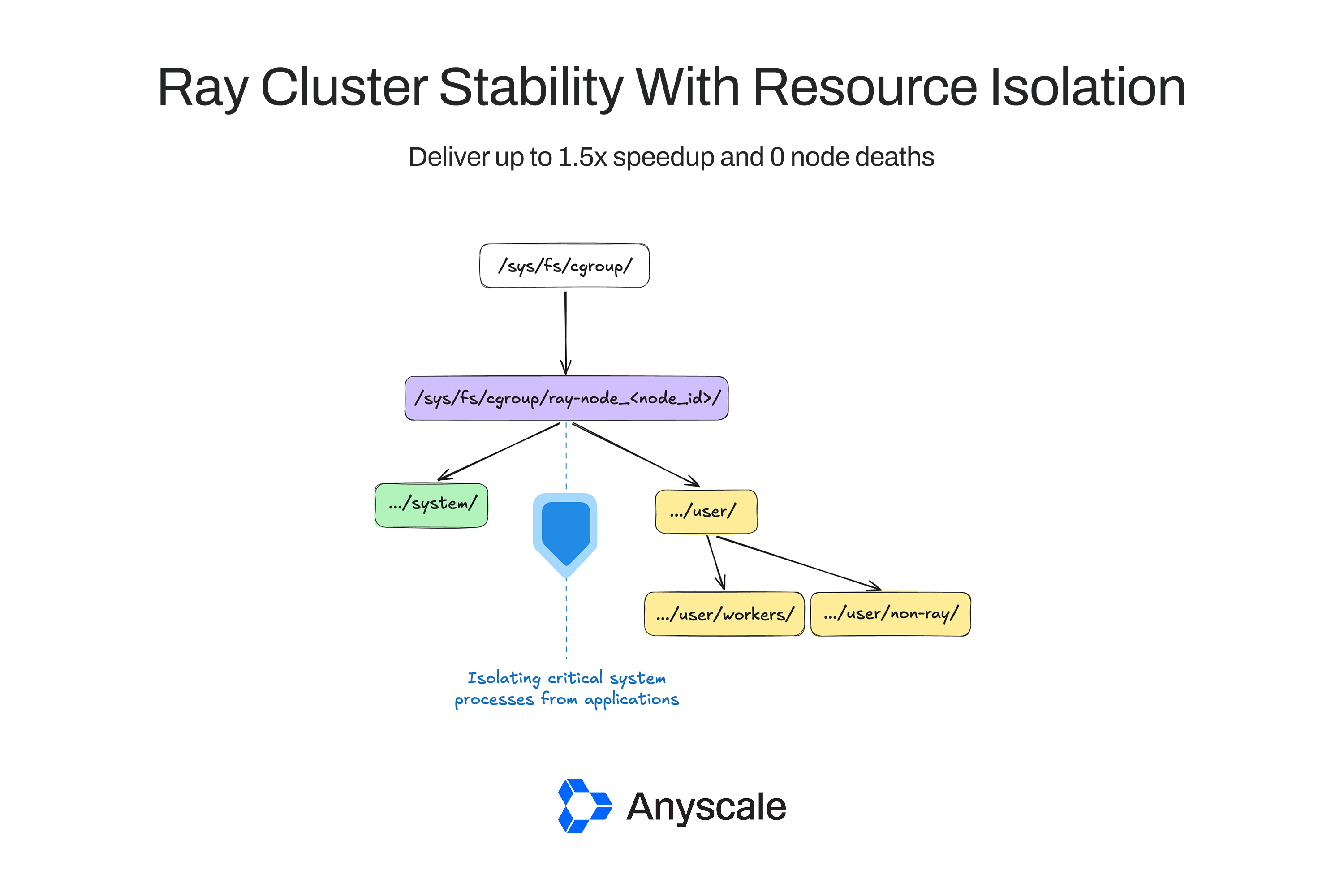
To protect Ray's critical system processes, they are isolated using the following cgroup structure:
This hierarchy includes two primary branches:
The
system
cgroup contains all Ray system processes, including the GCS and raylet.The
user
cgroup contains all workloads running on the node. It is further divided intoworkers
(actual workload processes) andnon-ray
(other processes in the same user space, for example, a process created by a ray actor).The
workers
cgroup which actually holds the processes running the workload.The
non-ray
cgroup which contains all other non-ray processes running in the same user space as ray. Note thatnon-ray
processes outside the userspace holding the ray processes will not be included within thenon-ray
cgroup.
To ensure critical system processes have sufficient memory, a memory.low
constraint is set equal to a default of 10% of total memory (with a minimum of 500MiB and a maximum of 10GiB) on the system cgroup. However, this constraint only ensures that this memory is reclaimed last and serves as a performance optimization. It cannot guarantee memory will always be available.
A memory.high
constraint is applied to the user
cgroup, equal to the sum of the object store and application memory. This constraint prevents uncaught memory bursts that a polling monitor might miss by having the kernel throttle memory intensive processes as soon as the limit is reached. Thus, this functionally reserves the remaining capacity for system processes.
The memory.max
constraint is often a common choice when applying memory constraints. However it is avoided here because it triggers immediate kernel OOM kills, which are undesirable for performance and visibility. On the other hand, memory.high
is guaranteed by the kernel to only throttle the processes within the memory constrained cgroup instead of OOM killing them.
With this, the first problem of resource contention leading to critical system failures is addressed by isolating the system memory usage from the application memory usage.
LinkCgroup Based Memory Monitors
At this point it seems that cgroups have resolved the issue. However, only setting memory.high
can lead to workloads stalling for long periods of time as their processes are constantly being throttled without ever being able to grab enough memory. Some processes still need to be killed to relieve memory pressure.
To do so, the event memory monitor was introduced. It registers a trigger with the cgroup upper bound. As soon as the upper bound is exceeded, the kernel notifies the monitor, and the event monitor selects a fraction of the workers to kill to ensure the remaining workers will not continue to be throttled.
Ray is workload-aware, allowing it to make better killing decisions than the Linux kernel. The memory monitor follows a simple work-preserving heuristic to select workers. Execution time is assumed to represent progress and priority is given to killing tasks with the shortest execution time. This ensures that tasks started earlier are more likely to complete, unlike the kernel OOM killer, which may arbitrarily terminate high-progress processes. For more details, see Ray's killing policy documentation.
Once again, it would seem that the problems have been resolved. However, cgroup still presents one last challenge.
Ray’s object store is provisioned by the raylet (a system process) to allow all worker processes to share it. Since it is shared by processes belonging to both the system and user cgroups, based on how linux cgroup performs memory accounting, it’s possible for the object store usage to be shifted between the system and user cgroup. See the memory ownership documentation on cgroup for more details.
This means total memory could be exhausted even if the user cgroup monitor isn't triggered. To address this, a threshold monitor is used that tracks combined object store memory usage across cgroups along with the application heap memory usage to ensure the total limit is never exceeded.
With both monitors, Ray’s OOM killer is now ensured to always trigger before the kernel OOM killer. Thus, the second problem of unpredictable kernel OOM killer preventing workload completion is solved by ensuring ray’s work preserving OOM killing policy is always triggered instead.
Ray was not able to log insightful context at the time of Linux kernel OOM kills as the kernel’s SIGKILL cannot be intercepted. As the cherry on top, by eliminating kernel OOMs, Ray now also provide much more context on the cause for OOM by logging the memory footprint of each worker and their resource requests:
Considered workers: [
Selected to kill: (Task: job ID=01000000, lease ID=0600000001000000ffffffffffffffffffffffffffffffffffffffffffffffff, task name=hungry_hippo, required resources={CPU: 1}, pid=3310152, actual memory used=0.67GB, worker ID=3e3d8f80b70d48b643d79ed2292b5d4f779820a964e55ad65413687d)
Selected to kill: (Task: job ID=01000000, lease ID=0400000001000000ffffffffffffffffffffffffffffffffffffffffffffffff, task name=hungry_hippo, required resources={CPU: 1}, pid=3310153, actual memory used=21.64GB, worker ID=0e5649d39c15609c0db6a5cf95de94befded2ee7da2facbf64b52e6f)
(Task: job ID=01000000, lease ID=0500000001000000ffffffffffffffffffffffffffffffffffffffffffffffff, task name=hungry_hippo, required resources={CPU: 1}, pid=3310151, actual memory used=21.95GB, worker ID=34241048bfb59ac29bd5e32d706c9bd41eafc6972c9bcbada99464e7)
(Task: job ID=01000000, lease ID=0000000001000000ffffffffffffffffffffffffffffffffffffffffffffffff, task name=hungry_hippo, required resources={CPU: 1}, pid=3310149, actual memory used=21.87GB, worker ID=2cc6dbeef4ebc06789de65fb43e04fbe1feebf1e699902ece89a8328)
(Task: job ID=01000000, lease ID=0200000001000000ffffffffffffffffffffffffffffffffffffffffffffffff, task name=hungry_hippo, required resources={CPU: 1}, pid=3310155, actual memory used=21.85GB, worker ID=14d4cc84e2f21ba3edbc9948b780d67013afbffda99dd33e829d56d3)
(Task: job ID=01000000, lease ID=0100000001000000ffffffffffffffffffffffffffffffffffffffffffffffff, task name=hungry_hippo, required resources={CPU: 1}, pid=3310147, actual memory used=21.53GB, worker ID=c90db9af23d78530d1f848c1301bc4b877925fe9122bc70948ad9489)
]
LinkSolving CPU Contention #
Again, the goal is to guarantee
Stability: ensure critical system processes have enough CPU to make progress during contention.
Predictability: when the system is not fully utilized, application workloads should be granted as much CPU as possible.
The CPU controller's cpu.weight
constraint allows the allocation of a proportion of CPU to a cgroup. Unlike memory constraints, this proportional allocation guarantees system processes their share during contention while allowing application processes to use any idle system capacity when it's available.
By default, 5% of the CPU is allocated to system processes (minimum 1 core, maximum 3 cores). These values can be overridden via manual configuration.
LinkEvaluating the impact on workloads #
So how does Ray with Resource Isolation compare to its previous state? Consider the mini example from before. If these synthetic workloads are run on a larger scale at varying degrees of oversubscription and task length (short tasks are synthetic tasks that complete under a second, and long tasks are those that complete around 10 seconds), enabling resource isolation significantly decrease time to complete and eliminate kernel OOMs.
The completion time improvement comes from solving the second problem of Linux kernel OOM kills causing unpredictable worker deaths that fail to preserve progress by eliminating kernel OOM kills with Ray’s work preserving killing policy.
At lower oversubscription levels, the existing polling monitor performs similarly, as there is less risk of memory usage spiking between monitoring intervals.
Resource isolation has been tested on numerous real-world workloads and demonstrated significant stability improvements across the board. One example is the following video data preprocessing pipeline which was previously one of the most unstable workloads.
A notable aspect of this workload is that the videos read in vary in lengths, and in correlation, size. Thus, an untuned pipeline would experience fluctuations in resource consumption, leading to contention.
| | | | Time (s) | | 3426.77 +/- 579.74 | 986.30 +/- 471.44 | Time (% of ideal case) | | 347.4% | 100% | Ray OOMs | | 54.56 +/- 32.08 | 0 | Kernel OOMs | | 163.33 +/- 24.94 | 0 | Node failures | | 5.33 +/- 1.37 | 0 | Job failures | | 1 | 0 |
The experiment was conducted on a 10-node L4 GPU cluster (averaged over 7 runs). Resource isolation reduced kernel OOM kills to zero and improved completion time. While the baseline suffered node and job failures due to memory contention, resource isolation provided the necessary stability for system processes.
Thus running with resource isolation has also addressed the first problem of resource contention leading to node deaths by ensuring critical system processes always have enough resources to make progress.
LinkNext Steps #
LinkUsing Resource Isolation
Resource Isolation was introduced in Ray 2.56, and we are actively looking for feedback! You can enable resource isolation by following these simple steps:
First, ensure the environment allows Ray to create and configure cgroups:
Configure Cgroup v2. See the Ray docs for
.__how to enable cgroup v2__Ensure ray has read/write permission to the root cgroup path so that ray can create the cgroup hierarchy described above.
It’s also possible to let ray start from a separate cgroup directory using
--cgroup-path
with your own custom cgroup. But please make sure that the memory and cpu controllers are enabled on the cgroup passed in.
Once the environment is prepared, start Ray with resource isolation:Pass the
--enable-resource-isolation
flag toray start
on all nodes.
Refer to the official guide for more details, and please file
for any problems or feedback encountered!
an issue### LinkThe Road Ahead
This post introduced resource isolation to Ray which leveraged Linux’s Control Groups to enhance Ray’s stability under resource contention by isolating critical system processes from workload processes.
However, there are many workloads and use patterns of ray that introduce long running actor(s) that are also responsible for coordinating child tasks and actors that should be protected. We will be looking to introduce actor and task level resource isolation for adding greater expressivity to ray in the near future.
Should there be a “try this template” to test it out or anything that leads user to try with new functionality?
Table of contents
- Challenges with growing workload resource demands
- Ray’s memory model
- Kernel Out-Of-Memory kills
- Shortcomings of the existing Ray memory monitor
- Solving Memory Contention
- Ray’s Cgroup Hierarchy
- Cgroup Based Memory Monitors
- Solving CPU Contention
- Evaluating the impact on workloads
- Next Steps
- Using Resource Isolation
- The Road Ahead