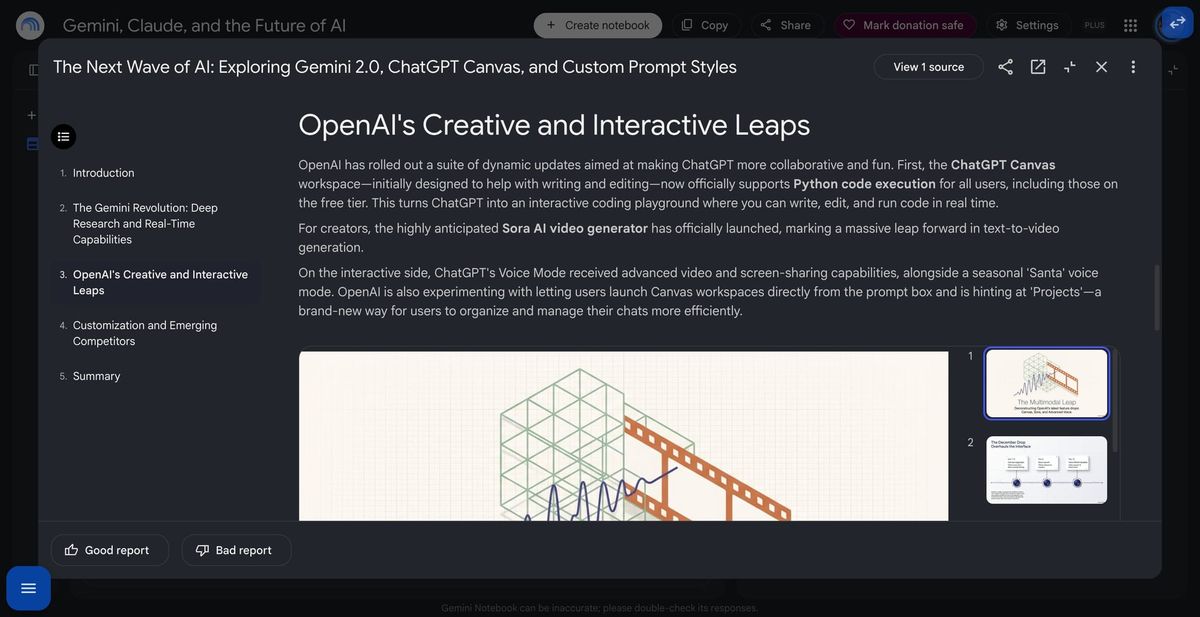
Google is nearing launch of Interactive Reports in Gemini Notebook. The feature surfaced only recently, alongside labels marking it as new, and now appears functional enough to generate and test.
Rather than an entirely new artifact type, an interactive report is a longer-form report that can contain other Gemini Notebook artifacts. A report can include placeholders for a mind map, slide deck, quiz, or flashcards. These elements are not generated automatically. Readers initially see an “Add” option, which triggers generation of the selected artifact.
After creation, the artifact is added to the notebook itself while also remaining embedded directly in the report. Readers can browse slides, navigate a mind map, or use learning materials without leaving the report. So far, we tested mind maps, slide decks, quizzes, and flashcards. It remains unclear whether it will support additional Studio outputs.
The format could be particularly useful for students, educators, researchers, and people publishing notebooks as explainers, since one document can combine written context with several source-grounded formats.
Google has been steadily turning Gemini Notebook, previously NotebookLM, into a broader research and learning workspace. Reports, slide decks, mind maps, quizzes, flashcards, and other Studio artifacts are already available separately. Google has also expanded notebook sharing and connections across its Gemini ecosystem. Interactive reports appear to bring those existing pieces into a single presentation layer.
Google has not publicly announced the report format. Given that the feature is now functional and carries new-feature labeling, a release could be close, although no rollout date is currently known.