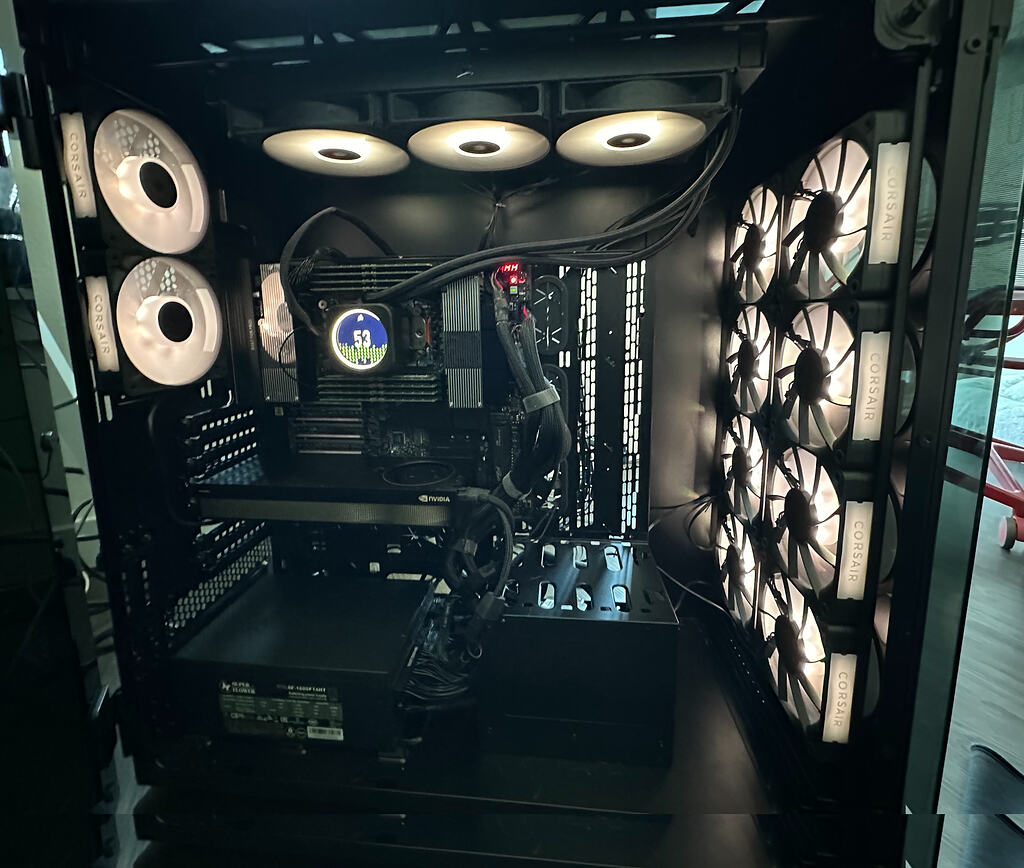
Recently saw Supermicro at Super Compute 2025 Overview and thought to share my build.
I got a 4x RTX6000 Blackwell Max-Q node in place that I built out from my original rtx6000 ada workstation from 2024. I’ve shared this node with friends and collegues, which we mostly used for local inference, ML experiments and pyspark jobs, so I thought to put this out as a reference for them based on my earlier notes, and as I now got good six months since my last upgrade.
#
- dual-boot (ubuntu 24.04 LTS / windows) workstation for local LLM inference — 4x RTX6000 Blackwell Pro Max-Q build
- CPU: AMD Ryzen Threadripper PRO 7985WX (64-core)
- GPU: 4x NVIDIA RTX6000 Blackwell Pro Max-Q Workstation Edition (96 GB × 4 = 384 GB)
- RAM: 8x Kingston KSM56R46BD4PMI-64HAI 64GB DDR5 (512GB)
- Platform: Asus WRX90E-SAGE SE
- PSU Super Flower Leadex Titanium 1700W ATX 3.1 (SF-1700F14HT)
- Case : Corsair Obsidian 1000D
- Cooling : front: 8x iCUE LINK RX120 RGB 120mm, back: 2x iCUE LINK RX120 RGB 120mm, aio: Corsair H170i Elite XT 420mm RGB
- Storage : 12TB Gen5 NVMe M.2 (2x Crucial T710 4TB RAID0 mdadm, 1x Crucial T705 4TB), 80TB SATA (4x Seagate Exos X24 20TB RAID0 mdadm)
- Status: Complete (timeline: 06/30/24 - 12/23/25)
- Final parts cost (with WA tax) : $54092 (+$816 UPS)
Thoughts:
- Is 15A enough? Not really, ideally use 20A/120V or better 20A/240V (NEMA 6-20R) if possible. I ran from regular 15A, but GPU workloads cap the CPU clock with
sudo cpupower frequency-set -u 2.20GHz - 0-day model support : could be limited. Labs would build against datacenter hopper/blackwell SM90 / SM100 and may not release the model runtime that would run on SM120. You may need to assemble your own model runtime if you want an early support for your quants on SM120.
- Cost variance : RAM and Storage prices would inflate the costs if built in mid 2026.
- Build difficulty : mostly straightforward, nothing unconventional.
- Airflow : Obsidian 1000D gives massive clearance but there is decent distance between front fans array and stacked GPUs, I’d go for a case geometry that is tigther.
#
I stumbled on the You can now train a 70b language model at home post (Mar 2024), which got me thinking about building my own ML workstation. I wasn’t doing any prior training work so I couldn’t judge the practically of all ideas there. I hadn’t put together a custom PC since I was a kid (last one had an NVIDIA GeForce 7950 GX2), so going off-the-shelf felt like the safer bet. I looked at Lambda Labs, and their salesman was kind enough to put together a reference spec: Dual 6000 Ada, 32-core CPU, 256GB RAM at $23772. I didn’t have a way to justify that kind of outlay, and rough math put the quote at ~18% margin over May 2024 retail parts. So the goal became a custom build, spread across 2 years of bonuses. Initially:
- Match the reference spec, but go 512GB RAM to stay at 2x VRAM if I ever expand to 4x RTX6000 Ada.
- Newer cases were out, but I picked the Corsair Obsidian 1000D — liked its more brittle feel, and the massive clearance left for 4 GPUs.
- AIO and cooling from Corsair for no real reason, other than guessing a popular ecosystem might mean better support for Linux.
- Start with one RTX6000 Ada, add one per bonus till 4x.
- ASRock WRX90 WS EVO as the base — figured a later release than the WRX90E-SAGE meant better stability (so I thought)
#
07/19/2024: all components arrived, initial assembly with single RAM DIMM will never POST. Flushing fresh bios through remote management interface would always get stuck. ASRock customer support suggested replacement.
07/25/2024: ASRock WRX90 WS EVO replacement arrived, same problem. Refunded through newegg and ordered ASUS Pro WS WRX90E-SAGE SE instead.
08/04/2024: ASUS Pro WS WRX90E-SAGE booted on the first try and took a good ~4-5 minutes. Initial build complete. full load lands between 800~900W from the wall.
10/20/2024: added second RTX6000 Ada. (now can hit 1200W)
08/06/2025: gpt-oss-120b just landed and would run well on 96GB VRAM with llama.cpp but trying it inside claude code (behind litellm) for anything practical would go quite poorly. 2bit quantization of Qwen3-Coder-480B-A35B-Instruct-GGUF works seemingly better with regards to its tool calling but with off, a couple of turns would take 10-15 minutes to complete. GGUF Hardware requirement says 180GB and that means 4 ada cards to get it running. Yay, okay, so second-hands ada card can be bought around $5k each, bringing this to rougly $10k investment. At the same time, new blackwell GPUs were recently released but are completely sold out across all distributors. The catch is that the VRAM doubles per card, so 96GBs. It’s MSRP shows $8.4k and technically if I can sell current GPUs at a reasonable price, and blackwell stock stabilizes, maybe I can double the GPU VRAM and upgrade the generation for a smaller outlay then 10k.
08/30/2025: RTX6000 pro max-q blackwell began listing again at $9k, I was impatient and got it as soon as I saw, but just ~10 days later PNY began listing at MSRP of $8.4k. With new GPU installed I needed to sell old gen before the prices drop, the deal I got on itsworthmore was 4k per card (70% from MSRP) and so once complete, I bought the second PNY RTX6000 pro max-q blackwell at MSRP. Result: doubling VRAM with total outlay of $9.4k excluding tax.
11/15/2025: various model checkpoints sitting around would use most of the storage space - ordered 4x Seagate Exos X24 20TB for the cold storage.
11/26/2025: ordered remaining two cards as we needed more compute for the coursework. Also thought to upgrade the original 1600W PSU to 1700W as 4 GPUs system would be hitting very close to that ceiling. Doing some exploration around long-running agents and running MCTS-style moatless-tree-search burned a lot of tokens and would still take days to iterate agianst benchmarks.
12/22/2025: GPUs and PSU arrived and 4 GPU is complete. I no longer have a space for anthenas bracket, so I got mobile antennas WiFi 6E Antenna U.FL MHF4 Tri-Band that would just stick out the back case opening.
final:
#
- ASUS Pro WS WRX90E-SAGE SE: $1,433 (amazon)
- NVIDIA RTX6000 Blackwell Pro Max-Q Workstation Edition 4x: $9954 Aug 2025 (NVIDIA) + $9172 Sept 2025 (PNY) + 2x $8853 Dec 2025 (PNY) (newegg)
- AMD Ryzen Threadripper PRO 7985WX 3.2 GHz 64-Core sTR5 Processor: $8129 (b&h photo-video)
- Kingston 64GB ECC Registered DDR5 5600 (PC5 44800) Server Memory Model KSM56R46BD4PMI-64HAI 8x: $2338 at 6/30/2024 (newegg)
- Crucial T705 4TB PCIe Gen5 NVMe M.2 SSD: $595 (amazon)
- Crucial T710 4TB PCIe Gen5 NVMe M.2 SSD x2: $882 (amazon)
- Seagate Exos X24 20TB x4: $1896 (amazon)
- Super Flower Leadex Titanium 1700W ATX 3.1: $639 (newegg)
- CORSAIR XTM70 Extreme Performance Thermal Paste, 3g: $43 (newegg)
- Corsair Obsedian Series 1000D: $579 (amazon)
- Corsair H170i Elite XT 420mm RGB Liquid CPU Cooler: $300 (corsair)
- Corsair iCUE LINK RX120 RGB 120mm 10x: $334 (corsair)
- Silkland 80Gbps DisplayPort Cable 2.1 6.6FT/2M: $22 (amazon)
- Cable Matters 2-Pack 6 Pin PCIe to Molex Power Cable 6 Inches: $9 (amazon)
- SSSUWP Motherboard 9pin USB2.0 to Dual 9pin Extension Cable x2: $14 (amazon)
- SZSDMY USB 3.0 Motherboard Header Splitter,19/20 Pin 1 to 2: $15 (amazon)
- Intel AX210NGW for Laptop NIC Wi-Fi 6E Wireless NIC Supports 6GHz Band Also Supports Bluetooth 5.3: $22 (amazon)
- WiFi 6E Antenna U.FL MHF4 Tri-Band 6GHz 5GHz 2.4GHz Internal Laptop Wi-Fi Antennas for AX200 AX210 1675X M.2 NGFF Card $10 (amazon)
- GOLDENMATE 2000VA/1600W (460Wh LiFePO4), AVR, Line Interactive Sinewave UPS: $816 (amazon)
#
Final system runs dual boot Ubuntu 24.04 LTS and Windows 11. Windows is corp enrolled, BitLocker is required and so it takes its own Crucial T705. Other drives exclusive to linux: 2x Crucial T710 4TB in RAID0 and 4x Seagate Exos X24 20TB in RAID0 - both through mdadm.
Usage:
Ubuntu: predominantly as a headless compute node for LLM inference (sudo systemctl isolate multi-user.target) that (for now) runs DeepSeek-V4-Flash per DEPLOY-MXFP4-W4A4-DEEPSEEK-V4-FLASH-SM120.md. System runs stably with uptimes generally in 35 - 40 days range.
Windows/WSL2: sporadically used for work as building large monorepos on 7985WX would be several times faster then on my M2 Max macbook. I didn’t get a fully headless workflow there as I needed interactive auth often, generally wasn’t able to get long multi-week uptimes as Windows Remote Desktop on my build would seldomly crash windows into green screen (win11 insiders) during connection attempt after several days of uptime.
#
With 4GPUs, upgraded Superflower Leadex Titanium 1600W to Superflower Leadex Titanium 1700W ATX 3.1. With 2 12V-2x6 sockets, there is enough to drive all 4 GPUs, but there is no spare PCIe 8pin cable to drive 2 iCUE Links (back and front fans are through its own iCUE link) from last available 9th 8-pin socket. This Leadex Titanium gen rolls 9 same modular 8-pin outputs but comes with 2x CPU and 6x PCIe 6+2 cables: 6x PCIe are all taken by 2 remaining GPUs + 2 auxilary PCIE_8P(1)_PWR / PCIE_8P(2)_PWR power that WRX90 needs for multi-GPU configuration. (The keying here is different from prev gen so its Gen 5 12VHPWR PSU Cable won’t work). There is one 6pin to 4x Molex in the box, but keying for SATA / Molex are the same with old gen, so I was able to reuse one molex cable from the old PSU to drive each ICUE link through seperate cable via 2 Molex → 6 Pin PCIe. One other 6pin used to power 4x SATA and one used to power Commander Core that comes with AIO. This leave the PSU with one spare 6pin and one 8pin output per drawing below.
WRX90 comes with 2 USB2.0 headers, each uses a splitter to wire 2 ICUe Links, AIO CPU LCD and Commander Core. I was never able to figure out how to chain built-in 1000D Commander Pro (that comes with the case) through this so that all 5 get detected. I only lose case’ front pannel leds so I never resolved that.
Base power estimate on full load sums to rough 1760W DC, which sits above TDP, cybernetics measurements point to 90% efficiency at 100% load on 115V which would trip 15A breaker (~1950W AC wall) if that load is sustained. I got to trigger it once when stress testing uncapped load when CPU boosted to 350W during full GPU load. My rental space doesn’t expose me a 20A breaker, so this runs from regular 15A behind a UPS. I needed to compromise a bit, where at default I would limit CPU(Threadripper PRO 7985WX) frequency upper bound in linux with sudo cpupower frequency-set -u 2.20GHz that would have CPU peaking at 190-200W with the build running stably below 1800W AC on full GPU load.
All peripherals except the node itself were routed through a seperate kitchen breaker, where the node runs through the GOLDENMATE 2000VA/1600GW (line-interactive sinewave UPS). I’ve got their Online Double Conversion model first but that it would trip my breaker immediately as soon as I plug into my PSU (when switched off), I switched to line-interactive sinewave, I cannot confirm yet if the transfer time is truly 4-6 ms per model spec, the system was stable during 2 power outages during last 6 month but it was not at a full load. For now though, UPS manages to operates over it TDP generally registering in range of 1650~1760W AC on UPS on sustained full GPU loads (disregarding its over-TDP beeping).
If I could I would size it against Super Flower Leadex Titanium 2200W if I had a NEMA 6-20R outlet.
#
jurkovic-nikola/OpenLinkHub works out of the box in Ubuntu.
#
#
Ran 10min gpu-burn at both 250W and 300W caps, GPU fans on auto, front case fans on sustained 2000RPM (back / AIO on normal) at ambient 21°. gpu_burn covers tf32, so for the precisions that are used in inference (bf16/fp8/fp4) I used _scaled_mm for fp8, flashinfer’s mm_fp4 (cutlass backend, the Sm120B12x kernel) for fp4.
GPU layout:
GPU3 (bus: E1:00 position: 3): PNY 300W cap
GPU0 (bus: 01:00 position: 2): NVIDIA 300W cap
GPU2 (bus: C1:00 position: 1): PNY 325W cap
GPU1 (bus: 02:00 position: 0): PNY 325W cap
GPUs are housed with slight gaps in between which made some difference. My previous setup had GPU3 and GPU0 swapped with sandwitched top card (position 2) unable to maintain 300W after 3 minutes while thermally throttling and dropping to 272W as it reached and maintained 92°. Swapping the top 2 cards and housing them with wider gap helped to maintain 300W draw across all 4 cards during 10min burn. (Note, bottom 2 PNY cards that were bought in Nov 2025 show 325W max power cap with their serial starting with 1792725 vs 1792425 for earlier 300W cap cards).
Below: dense throughput broken out per card, shown as TFLOPS @ sustained-MHz / peak°C so you can see each die’s clock and temp, plus MFU vs NVIDIA’s published Max-Q dense peak.
250W
| precision | spec peak/card | GPU0 | GPU1 | GPU2 | GPU3 | total | MFU | | tf32 | 219.5 | 93 @1108/89° | 101 @1177/82° | 102 @1192/89° | 107 @1194/86° | 404 | 46% | | bf16 | 438.9 | 197 @1136/89° | 216 @1203/83° | 217 @1215/89° | 227 @1222/87° | 857 | 49% | | fp8 | 877.9 | 392 @1149/89° | 426 @1211/83° | 432 @1231/89° | 451 @1240/87° | 1700 | 48% | | fp4 | 1755.7 | 697 @1174/89° | 750 @1266/83° | 766 @1260/89° | 800 @1267/87° | 3013 | 43% |
300W
| precision | spec peak/card | GPU0 | GPU1 | GPU2 | GPU3 | total | MFU | | tf32 | 219.5 | 117 @1331/91° | 123 @1381/88° | 124 @1392/91° | 126 @1412/88° | 491 | 56% | | bf16 | 438.9 | 245 @1324/91° | 256 @1373/88° | 258 @1382/91° | 261 @1397/88° | 1019 | 58% | | fp8 | 877.9 | 482 @1329/91° | 501 @1376/88° | 504 @1387 /91° | 511 @1399/88° | 1998 | 57% | | fp4 | 1755.7 | 849 @1358/91° | 880 @1410/88° | 886 @1415/91° | 900 @1430/88° | 3515 | 50% |
<sub>cells are TFLOPS @sustained-MHz /peak°C; MFU = total TFLOPS / (4 × per-card peak). +20% power → +17% (fp4) to +22% (tf32) throughput. Sustained-MHz is the mean of nvidia-smi clocks.sm sampled at 1Hz over the loaded portion of the 10min soak, peak°C the max temperature.gpu over the same window.</sub>
MFUs are in 43-58% range as NVIDIA quotes the TFLOPS/TOPS against the clock of 2286 MHz, which gpu-burn only holds for the first few seconds.
The sandwiched upper card (GPU0) is the worst of the four in every precision and runs the hottest alongside sandwitched GPU2 — 89° at 250W and 91° at 300W vs 82-88° for the open-ended GPU1/GPU3. Going 250W→300W buys ~+17-22% throughput with the two sandwiched cards hitting 91°.
#
Targeting coding models at our 384GB VRAM scale, we have 2 practical choices for the current (2606) gen: deepseek v4 flash and minimax m3. With fp8_e4m3 kv cache, minimax m3 with 428B total param sits on the upper bound for this hardware at nvfp4/mxfp4, as 1M context needs MEM_FRACTION_STATIC of at least 0.94. The tricky part for those models is that we don’t always get a model runtime released by model providers for SM120 at day 0. Both for dsv4-flash and m3 I needed to assemble the model runtime for target quants of MXFP4 W4A4. MXFP4 choice was driven primarily by the fact I didn’t want to re-quantize dsv4-flash weights that came in MXFP4 for its routed experts.
For MoE kernels I went with flashinfer because per 0.6.12 we have CuTe-DSL SM120 kernels for NVFP4 in place. Extending those to MXFP4 seemed reasonable. That flashinfer fork’s MXFP4 MoE GEMM is shared across both stacks, where dsv4 runs the base kernel, but m3 (served from MXFP4 quant of olka-fi/MiniMax-M3-MXFP4) needed SwiGLU-OAI activation. Additionally, for swebench workload, runtime CuTe-DSL JIT was substantial, so dynamic-m tweak was added on top of those same kernels, so that m is not part of precompiled kernel cache key.
| customization | dsv4-flash | minimax-m3 | | MoE FFN | MXFP4 kernel + SiLU | same MXFP4 kernel + SwiGLU-OAI | | dense / attn linears | — (stock FP8) | MXFP8 scheme + split-K + routing | | attention | custom HMMA .so + split-KV indexer | — (stock Triton) | | checkpoint / KV | — (stock) | fix + fp8-KV gate lift |
Both stacks now live on pinned sglang + flashinfer with setup per sglang-sm120-mxfp4
I put together a small harness (rtx-pro-6000-bench) to sweep a concurrency ladder (1, 2, 4, 8, 16, … 128) at a fixed input/output length that samples per-GPU telemetry (power, temp, mem-BW, PCIe, KV%). Decode throughput scales as expected with concurrency at short prompts, with dsv4 slightly better (temps° are the four cards GPU0/1/2/3, means over the loaded window):
| input | conc | dsv4 tok/s | dsv4 mean mem-BW | dsv4 mean PCIe tx/rx | dsv4 mean W | dsv4 temps° 0/1/2/3 | m3 tok/s | m3 mean mem-BW | m3 mean PCIe tx/rx | m3 mean W | m3 temps° 0/1/2/3 | | 2,048 | c80 | 697 | 30% | 33/41 GB/s | 1,003 W | 89/82/87/85 | 1,076 | 50% | 19/18 GB/s | 1,104 W | 89/85/89/86 | | 4,096 | c48 | 435 | 29% | 32/41 GB/s | 994 W | 88/83/87/85 | 382 | 50% | 29/27 GB/s | 1,124 W | 90/85/89/86 | | 8,192 | c56 | 248 | 27% | 33/43 GB/s | 979 W | 89/84/87/85 | 237 | 49% | 29/27 GB/s | 1,123 W | 91/86/89/86 | | 16,384 | c48 | 149 | 24% | 35/47 GB/s | 942 W | 88/82/87/85 | 129 | 47% | 30/26 GB/s | 1,113 W | 91/86/89/86 | | 32,768 | c32 | 77 | 22% | 34/44 GB/s | 913 W | 87/79/86/82 | 68 | 44% | 30/25 GB/s | 1,119 W | 90/85/89/86 | | 65,536 | c24 | 39 | 19% | 34/45 GB/s | 926 W | 88/81/86/84 | 35 | 43% | 29/24 GB/s | 1,102 W | 91/86/89/86 |
output throughput and system power vs concurrency across all input lengths, dsv4 (left) and m3 (right):
m3’s decode scales better as context grows: −46% (72.6 → 39.2 tok/s). dsv4’s indexer rescans the whole KV every step (one CTA per row) and falls off harder: −79% (52.9 → 11.1). so the gap widens from 1.4× at 32K to 3.5× at 1M:
| input | m3 TTFT | m3 decode | dsv4 TTFT | dsv4 decode | m3/dsv4 | | 32,768 | 0.4 s | 72.6 | 0.31 s | 52.9 | 1.4× | | 131,072 | 0.9 s | 65.8 | 0.79 s | 38.7 | 1.7× | | 262,144 | 1.9 s | 59.3 | 1.58 s | 28.6 | 2.1× | | 524,288 | 4.2 s | 50.1 | 3.26 s | 18.7 | 2.7× | | ~1.04M | 7.7 s | 39.2 | 6.46 s | 11.1 | 3.5× |
system power during the 1M single-stream run (300W/GPU cap), dsv4 (left) and m3 (right):
<sub>dsv4 900W mean / 1,055W peak vs m3 1,083W / 1,196W — m3 sustains ~183W more while decoding ~39 vs ~10 tok/s.</sub>
Models score close on our stack on swe-bench verified — dsv4 76.0% (380/500, vs lab-reported 79.0%, −3.0%), m3 74.8% (374/500, vs 80.5%, −5.7%) on mini-swe-agent 2.4.2 harness. Our DSv4 weights are what deepseek published, while m3 experts are quantized down which could explain a higher diff bar a more minimal agentic harness we run. As as practical reference, these should be comparable to claude sonnet 4.5 / 4.6.
Looking at a 250W and 300W sweep for the two largest — m3 (428B/23B, sglang/mxfp4) and qwen3.5-397b-a17b (397B/17B, vllm/nvfp4). The gain for 20% more power is: m3 ~+10%, qwen ~+5% — and efficiency (tok/s/W) drops (m3 1.51→1.48, qwen 1.14→1.06). m3 converts better as it is hungrier model so it has headroom; qwen and dsv4 would leave less to gain.
| input | m3 W250 (tps) | m3 W300 (tps) | m3 Δ | qwen W250 (tps) | qwen W300 (tps) | qwen Δ | | 2,048 | 1,427 | 1,593 | +11.6% | 1,041 | 1,124 | +7.9% | | 4,096 | 401 | 445 | +11.1% | 865 | 908 | +5.0% | | 8,192 | 219 | 237 | +8.2% | 616 | 649 | +5.3% | | 16,384 | 123 | 134 | +8.4% | 366 | 387 | +5.8% | | 32,768 | 64 | 71 | +10.7% | 205 | 212 | +3.5% | | 65,536 | 33 | 35 | +7.5% | 98 | 102 | +4.5% |
#
Firmware RAID looked attractive, but ASUS never published RAIDXpert2 linux drivers for WRX90 and I wasn’t able to get this to work for ubuntu 24.04, it was overall tedius as enabling RAIDXpert in bios brakes my windows boot. Current setup runs linux’s RAID0 mdadm for 2x Crucial T710 4TB for /hot partition and 4x Seagate Exos X24 20TB for /cold. Windows runs of its own dedicated single Crucial T705 4TB, as it is corp-enrolled and it requires Bitlocker on that.
nccl would get stuck on 2 device all_reduce that would make TP=2 vllm get stuck during initial weights . Disabling ACS and IOMMU fixed it with nccl_tests all_reduce tests on 2 GPUs working per
CUDA_VISIBLE_DEVICES=0,1 ./build/all_reduce_perf -b 8 -e 512M -f 2 -g 2