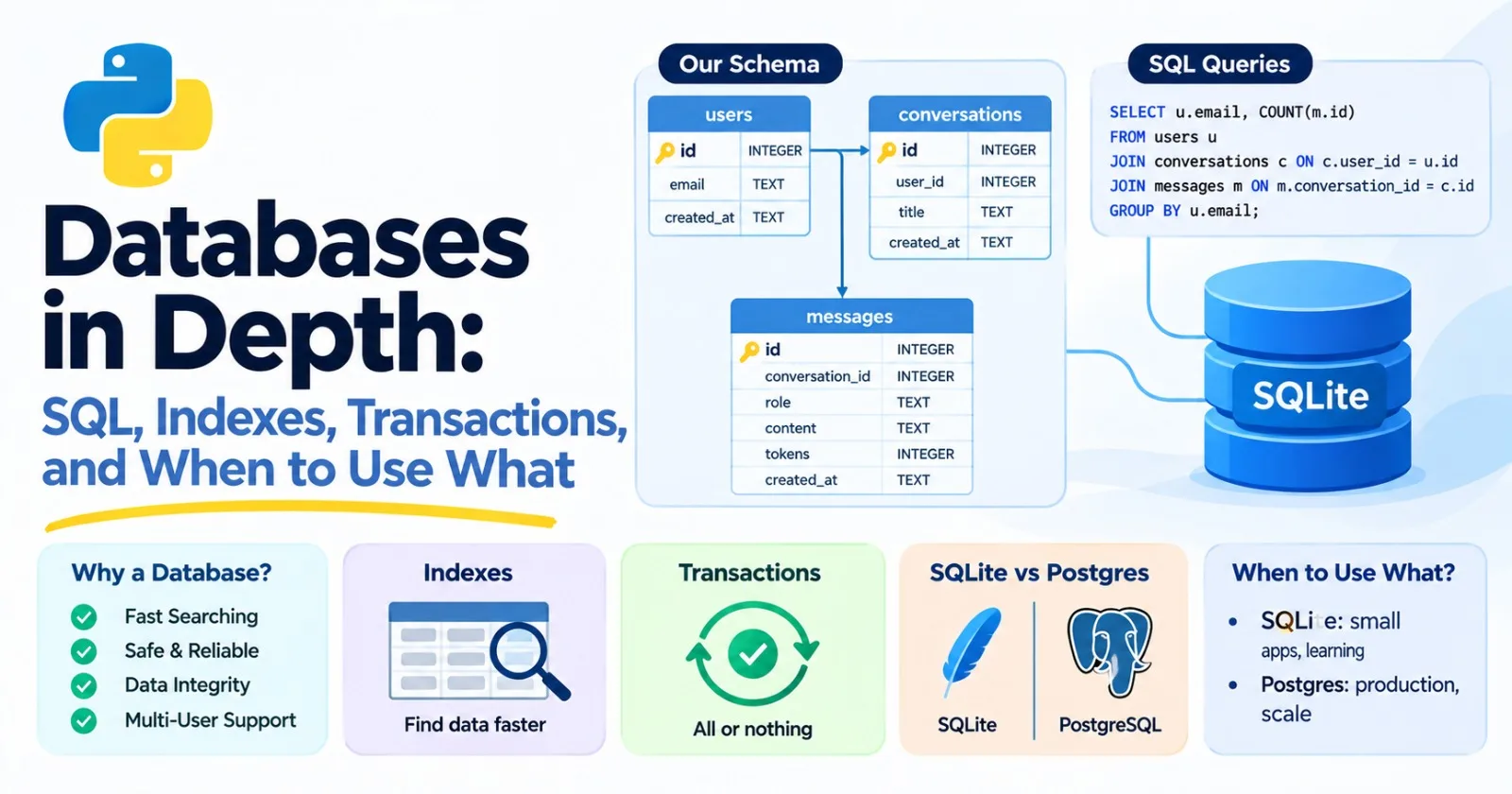
So far, everything our programs remember disappears when they stop. A real AI app has to remember a lot: users, conversations, documents, which prompts were sent, what the model answered, how many tokens it cost, and whether the user clicked thumbs up. That's the job of a database, and it's the next step in becoming a real engineer. This post is core.
We'll learn it by doing. Python comes with a small database called SQLite built in, so there's nothing to install, and almost everything we learn carries straight over to Postgres, the database most production AI apps use. It also links back to earlier posts: indexes are the trees from Post 16 and the speedups from Post 18, a good schema looks like the Pydantic models from Post 10, and tests can use a throwaway database like the fixtures from Post 13.
Why not just use files? #
You could store everything in a JSON file, or in a Python dictionary that you save now and then. For small things, that works. But it breaks down quickly:
- Searching means and scanning everything.
- Two users at once can overwrite each other's changes.
- A crash halfway through writing can leave a corrupted file.
- Nothing checks your data. A typo in a field name just silently creates a new field.
A database solves all four. It stores data in an organized way, finds things fast, lets many users work at once, survives crashes, and enforces rules about what's allowed in.
Tables, rows, and keys #
Most databases you'll use are relational. Data lives in tables, like spreadsheets with strict rules. Each row is one record, and each column is one kind of fact about it.
Tables connect through keys. A primary key is a column that uniquely identifies each row, usually a number called id. A foreign key is a column that points at a row in another table. Here's the structure for a small chat app:
- A user has an
idand an email. - A conversation belongs to a user, so it holds a
user_idthat points at a user. - A message belongs to a conversation, so it holds a
conversation_id.
Notice that a message doesn't copy the user's email. It points at the conversation, which points at the user. Each fact lives in exactly one place, so if the email changes, you change it once.
The language for talking to relational databases is SQL, which is short for Structured Query Language. It's been around for decades, it's the same idea everywhere, and it's among the most valuable skills you can add.
SQLite: a database with nothing to install #
SQLite keeps a whole database in a single file (or entirely in memory), and Python includes it:
import sqlite3

conn = sqlite3.connect(":memory:")    # a throwaway database that lives in RAM
Use ":memory:" for experiments and tests, or a filename like "app.db" to keep the data on disk. SQLite is a great fit for learning, testing, and small apps. For a real service with many users writing at once, you'd move to Postgres, which we'll cover below.
Designing a schema #
A schema is the structure of your tables. Here's one for our chat app:
CREATE TABLE users (
    id INTEGER PRIMARY KEY,
    email TEXT NOT NULL UNIQUE,
    created_at TEXT NOT NULL
);

CREATE TABLE conversations (
    id INTEGER PRIMARY KEY,
    user_id INTEGER NOT NULL REFERENCES users(id),
    title TEXT,
    created_at TEXT NOT NULL
);

CREATE TABLE messages (
    id INTEGER PRIMARY KEY,
    conversation_id INTEGER NOT NULL REFERENCES conversations(id),
    role TEXT NOT NULL CHECK (role IN ('user', 'assistant', 'system')),
    content TEXT NOT NULL,
    tokens INTEGER,
    created_at TEXT NOT NULL
);
By convention, SQL keywords are written in capitals, though it isn't required. The pieces on each column are constraints, rules the database enforces so bad data can't get in:
PRIMARY KEYmarks the unique identifier.NOT NULLmeans the value is required.UNIQUEmeans no two rows can share the value. Here, no two users with the same email.REFERENCES users(id)makes it a foreign key.CHECK (...)lets you write your own rule. Here, a message's role must be one of three values.
Constraints are the database version of the validation that Pydantic did in Post 10, and they have a big advantage: they protect your data no matter which program writes to it. Let's load some data and watch them work. Here's a connection with a schema, and some rows:
conn = sqlite3.connect(":memory:")
conn.execute("PRAGMA foreign_keys = ON")
conn.executescript(SCHEMA)    # the three CREATE TABLE statements above

conn.executemany(
    "INSERT INTO users (id, email, created_at) VALUES (?, ?, ?)",
    [
        (1, "[email protected]", "2026-10-01T09:00:00Z"),
        (2, "[email protected]", "2026-10-02T10:30:00Z"),
        (3, "[email protected]", "2026-10-03T08:15:00Z"),
    ],
)
(The conversations and messages are inserted the same way. The full runnable file is in the mini project at the end.) Now try to break the rules:
conn.execute("INSERT INTO messages (conversation_id, role, content, created_at) VALUES (1, 'robot', 'x', 'x')")

conn.execute("INSERT INTO users (email, created_at) VALUES (NULL, 'x')")

conn.execute("INSERT INTO users (email, created_at) VALUES ('[email protected]', 'x')")
Every one of those is rejected, with a clear message.
Two SQLite surprises
SQLite has a couple of quirks that catch people out, and it's better to meet them now.
Foreign keys are off by default. See the PRAGMA foreign_keys = ON line? SQLite doesn't enforce foreign keys unless you turn them on, for each new connection. With it on, inserting a message for a conversation that doesn't exist fails:
IntegrityError: FOREIGN KEY constraint failed
With it off, the "orphan" row is accepted quietly. When I tried it, the database happily stored a message pointing at conversation 999, which doesn't exist. Postgres always enforces them, so this is just an SQLite habit to build: turn them on.
Types are loose. SQLite will store text in an INTEGER column without complaint:
conn.execute("CREATE TABLE t (n INTEGER)")
conn.execute("INSERT INTO t VALUES ('abc')")
conn.execute("INSERT INTO t VALUES ('42')")
print(conn.execute("SELECT n, typeof(n) FROM t").fetchall())
The '42' was converted to a number, but 'abc' stayed text, in a column declared as an integer. If you want strict types, add the STRICT keyword to the end of the table definition (CREATE TABLE t (n INTEGER) STRICT), and the same insert fails with a clear error. Postgres is strict by default.
Getting data in and out safely #
You've seen ? in the code above. Those are placeholders, and they're one of the most important habits in this whole post.
SQL injection
It's tempting to build a query with an f-string, since you know f-strings well by now. Never do this with data that came from outside your program. Here's why:
evil = "nobody' OR '1'='1"

rows = conn.execute(f"SELECT email FROM users WHERE email = '{evil}'").fetchall()
print(rows)
The query that actually ran was:
SELECT email FROM users WHERE email = 'nobody' OR '1'='1'
The text we pasted in broke out of the quotes and added its own condition, '1'='1', which is always true. It returned every user. A malicious person can use this trick to read data they shouldn't, change it, or delete it. It's called SQL injection, and it's one of the oldest and most damaging security bugs in software. This matters even more now: if your app lets a model write or influence a query, the model's output is untrusted input too.
The fix is to pass values separately, so the database treats them as data and never as code:
rows = conn.execute("SELECT email FROM users WHERE email = ?", (evil,)).fetchall()
print(rows)    # []
The database looks for a user whose email is literally nobody' OR '1'='1, finds none, and returns nothing. Always use placeholders. (The symbol varies by database. SQLite uses ?, and the common Postgres library, psycopg, uses %s. The principle is the same.)
Reading rows
By default, rows come back as plain tuples. Setting a row_factory lets you access columns by name, which is much more readable:
conn.row_factory = sqlite3.Row
row = conn.execute("SELECT id, email FROM users WHERE id = 1").fetchone()
print(row["email"], dict(row))    # [email protected] {'id': 1, 'email': '[email protected]'}
Asking better questions #
Here's the data we'll query. Three users, three conversations, and eight messages:
| User | Conversation | Messages |
|---|---|---|
| asha | "Python help" | 4 (about generators) |
| asha | "Trip ideas" | 2 |
| ravi | "Resume review" | 2 (one has no token count recorded) |
| meera | (none) |
The basics: WHERE, ORDER BY, LIMIT
SELECT id, role, content
FROM messages
WHERE conversation_id = 1 AND role = 'user'
ORDER BY created_at DESC
LIMIT 5;
(3, 'user', 'Show an example')
(1, 'user', 'How do generators work?')
WHERE filters rows, ORDER BY sorts them (DESC for newest first), and LIMIT caps how many come back.
Aggregates and GROUP BY
Functions like COUNT, SUM, AVG, MIN, and MAX summarize rows. GROUP BY does it per group:
SELECT role, COUNT(*) AS n, SUM(tokens) AS total_tokens, AVG(tokens) AS avg_tokens
FROM messages
GROUP BY role;
('assistant', 4, 24, 8.0)
('user', 4, 20, 5.0)
HAVING is like WHERE, but for groups, after they've been counted. Which users have more than one conversation?
SELECT user_id, COUNT(*) AS conversations
FROM conversations
GROUP BY user_id
HAVING COUNT(*) > 1;
(1, 2)
Joins: combining tables
Because each fact lives in one table, answering real questions means combining tables with a JOIN. "How many tokens has each user used?" needs all three:
SELECT u.email, SUM(m.tokens) AS total_tokens
FROM users u
JOIN conversations c ON c.user_id = u.id
JOIN messages m ON m.conversation_id = c.id
GROUP BY u.email
ORDER BY total_tokens DESC;
('[email protected]', 40)
('[email protected]', 4)
(u, c, and m are short aliases for the table names.) Each ON says how two tables line up.
Notice something. meera is missing. She has no conversations, so a plain JOIN (called an inner join) drops her. If you want to keep every user, even those with nothing to match, use a LEFT JOIN:
SELECT u.email, c.title
FROM users u
LEFT JOIN conversations c ON c.user_id = u.id;
('[email protected]', 'Python help')
('[email protected]', 'Trip ideas')
('[email protected]', 'Resume review')
('[email protected]', None)
Meera shows up, with None (SQL's NULL) where the conversation would be. And that gives you a handy trick for finding things that don't have a match, such as users who've never started a chat:
SELECT u.email
FROM users u
LEFT JOIN conversations c ON c.user_id = u.id
WHERE c.id IS NULL;
Making queries readable: CTEs
A CTE (common table expression), written with WITH, gives a name to an intermediate result, like a variable. It makes a long query much easier to read:
WITH counts AS (
    SELECT conversation_id, COUNT(*) AS n
    FROM messages
    GROUP BY conversation_id
)
SELECT c.title, counts.n
FROM counts
JOIN conversations c ON c.id = counts.conversation_id
WHERE counts.n >= 2
ORDER BY counts.n DESC;
Window functions
Here's a question that comes up constantly: what's the latest message in each conversation? GROUP BY can't easily give you the whole row. A window function can, by numbering the rows within each group:
SELECT conversation_id, role, content
FROM (
    SELECT m.*,
           ROW_NUMBER() OVER (PARTITION BY conversation_id ORDER BY created_at DESC) AS rn
    FROM messages m
)
WHERE rn = 1;
(1, 'assistant', 'Here is a small example.')
(2, 'assistant', 'Day 1: Alfama and the castle.')
(3, 'assistant', 'Lead with your strongest project.')
PARTITION BY splits the rows into groups, ORDER BY sorts within each group, and ROW_NUMBER() numbers them, so rn = 1 is the latest one in each group.
NULL is not a value
NULL means "unknown or missing," and it behaves in surprising ways. One of Ravi's messages has no token count, so it's NULL:
SELECT COUNT(*) FROM messages WHERE tokens = NULL;     -- 0  (!)
SELECT COUNT(*) FROM messages WHERE tokens IS NULL;    -- 1
Nothing is ever equal to NULL, not even NULL. You have to ask with IS NULL. Aggregates also skip NULL s:
SELECT COUNT(*), COUNT(tokens), SUM(tokens), AVG(tokens) FROM messages;
-- 8, 7, 44, 6.2857...
There are 8 messages, but COUNT(tokens) counts only the 7 that have a value, and the average is over those 7. That can quietly skew your numbers. When a column can be NULL, always ask yourself what the missing rows should mean.
Indexes: why queries are fast #
Remember Post 18. A search through a list is O(n), and a search through a balanced tree is O(log n). A database faces the same choice. Without help, finding all the messages in one conversation means reading every row in the table: a full table scan, O(n). An index is an extra structure, usually a balanced tree (Post 16), that lets the database jump straight to the matching rows.
You can ask the database how it plans to run a query. In SQLite that's EXPLAIN QUERY PLAN. I filled a messages table with 200,000 rows spread over 2,000 conversations, and ran this:
SELECT id, content FROM messages WHERE conversation_id = 777 ORDER BY created_at;
Without an index, the plan is:
SCAN messages
USE TEMP B-TREE FOR ORDER BY
SCAN means every row gets read. It took about 15 milliseconds per query. Then I created an index:
CREATE INDEX idx_messages_conversation ON messages (conversation_id);
SEARCH messages USING INDEX idx_messages_conversation (conversation_id=?)
USE TEMP B-TREE FOR ORDER BY
SEARCH ... USING INDEX means it jumped straight to the right rows. About 0.11 milliseconds. But there's still a sort step, USE TEMP B-TREE FOR ORDER BY. A composite index over two columns fixes that, because it keeps the rows sorted by the second column inside each value of the first:
CREATE INDEX idx_messages_conv_time ON messages (conversation_id, created_at);
SEARCH messages USING INDEX idx_messages_conv_time (conversation_id=?)
Now the sort is gone, because the index already delivers rows in order. About 0.09 milliseconds, which is roughly 170 times faster than the scan, on a table that's still small by real standards. (Your numbers will differ.)
Rules of thumb for indexes
- Index the columns you filter, join, and sort by. Foreign key columns like
conversation_idare classic candidates. - Primary keys and
UNIQUEcolumns are indexed automatically. - Column order matters in a composite index. An index on
(conversation_id, created_at)helps queries that filter onconversation_id, or on both. It doesn't help a query that filters only oncreated_at. - Indexes aren't free. Every insert, update, and delete has to update every index too. I inserted 200,000 rows into a three-column table with no indexes, and then with three indexes. The indexed one took about4 times longer (0.67 seconds versus 0.16). They also take space. So don't index everything. Index what your real queries need.
- Wrapping a column in a function can defeat the index. Look at what happens with email lookups. This uses the index:
SELECT id FROM users WHERE email = '[email protected]'
-> SEARCH users USING COVERING INDEX idx_users_email (email=?)
But if you make the search case-insensitive with lower(), the database can no longer use the index on email:
SELECT id FROM users WHERE lower(email) = '[email protected]'
-> SCAN users
The fix is an expression index, which indexes the lowercased value itself. After CREATE INDEX idx_users_email_lower ON users (lower(email)), the same query shows SEARCH users USING INDEX idx_users_email_lower.
- Searching inside text can't use a normal index. A pattern like
LIKE '%word%'has to look at every row. For real text search, databases have dedicated full-text search features.
EXPLAIN is the database's version of the profiler from Post 15. When a query is slow, look at the plan first, instead of guessing.
Transactions: all or nothing #
Imagine saving a chat turn: you store the user's message, call the model, then store the model's reply. What if the model call fails after the first insert? You'd have a question with no answer sitting in your database.
A transaction groups several statements so that either all of them take effect, or none do. In Python's sqlite3, the connection itself works as a context manager (Post 8): it commits if the block finishes normally and rolls back if an exception escapes.
def save_exchange(conn, conversation_id, question, answer_func):
    with conn:    # commit on success, roll back on any error
        conn.execute(
            "INSERT INTO messages (conversation_id, role, content) VALUES (?, 'user', ?)",
            (conversation_id, question),
        )
        answer = answer_func(question)
        conn.execute(
            "INSERT INTO messages (conversation_id, role, content) VALUES (?, 'assistant', ?)",
            (conversation_id, answer),
        )
When I ran it once successfully, there were 2 messages in the table. Then I ran it with a model function that raises an error. The error propagated, and the count was still 2. The user message, which had already been inserted inside the block, was rolled back along with everything else.
(Note that with conn: doesn't close the connection. It only ends the transaction.)
A warning, though. There's a design trap hiding in this example. Don't hold a transaction open while you wait on something slow, such as a model call that takes 30 seconds. An open transaction can hold locks that block other users. A better pattern is to call the model first, then open a transaction that just saves the results, which is quick. The add_exchange method in the mini project does exactly that.
ACID
You'll hear transactions described with the word ACID:
- Atomic : all or nothing, as above.
- Consistent : the rules (constraints) always hold. A transaction that would break one is rejected.
- Isolated : transactions running at the same time don't see each other's half-finished work.
- Durable : once committed, the data survives a crash or power cut.
That's a lot of safety you'd have to build yourself with files.
Concurrency and lost updates
Isolation matters when two things happen at once. Here's a bug that catches people. Imagine a counter, and two workers that each read it, add one, and write it back:
a = conn.execute("SELECT n FROM counter").fetchone()[0]    # worker A reads 0
b = conn.execute("SELECT n FROM counter").fetchone()[0]    # worker B reads 0
conn.execute("UPDATE counter SET n = ?", (a + 1,))         # A writes 1
conn.execute("UPDATE counter SET n = ?", (b + 1,))         # B writes 1 (A's update is lost!)
Two increments happened, but the counter says 1. This "read, compute in Python, write back" pattern is a race condition, just like the thread problem in Post 14. The fix is to let the database do the arithmetic in one atomic statement:
UPDATE counter SET n = n + 1;
Run that twice, and you get 2. This is the right way to handle things like usage quotas. Say each user has some credits:
def use_credit(conn, user_id):
    with conn:
        cursor = conn.execute(
            "UPDATE quotas SET credits = credits - 1 WHERE user_id = ? AND credits > 0",
            (user_id,),
        )
        return cursor.rowcount == 1
The AND credits > 0 check and the subtraction happen together, atomically. rowcount tells you whether a row was actually updated, so True means "credit used" and False means "out of credits." With a user who had 2 credits, three calls gave [True, True, False]. A CHECK (credits >= 0) constraint on the column adds a safety net, so even careless code can't push the balance below zero.
Postgres, which handles many users at once, offers more tools here, such as different isolation levels and SELECT ... FOR UPDATE to lock a row while you work on it. The principle is the same: make the database do the read-and-change in one step.
Schema design tips #
- Put each fact in one place. This is callednormalization . Don't copy a user's email into every message. Point at the user instead.
- Many-to-many relationships need a third table. If a document can have many tags and a tag can belong to many documents, create a
document_tagstable with adocument_idand atag_id. - Store timestamps in UTC. Format them consistently (ISO 8601 text works in SQLite, and Postgres has a proper
timestamptztype). Convert to a user's local time only when showing them. - A JSON column is fine for messy, changing data. Model APIs return nested JSON, and you often want to keep the whole raw response for debugging. Store it in a text column (SQLite) or a
jsonbcolumn (Postgres), and you can still query inside it:
conn.execute("INSERT INTO runs (model, response) VALUES (?, ?)", ("some-model", json.dumps(payload)))

conn.execute(
    "SELECT json_extract(response, '$.usage.output_tokens') FROM runs"
).fetchall()
Keep the things you filter and sort on as proper columns, and use JSON for the rest.
- Change schemas with migrations. Don't hand-edit a production database. Tools called migration tools keep a versioned history of every schema change, so you can apply the same changes to every environment. (Alembic is a common one in Python.)
- ORMs exist. An object-relational mapper, like SQLAlchemy, lets you work with tables as Python classes. They can save time, but they're built on SQL, and you'll understand them far better because you know SQL first.
Postgres: the production database #
PostgreSQL, usually called Postgres, is the database most real services use. It's open source, very reliable, and rich in features. The SQL you've learned works almost unchanged. What it adds:
| SQLite | Postgres | |
|---|---|---|
| Setup | None. It's a file. | A separate server program |
| Many users writing at once | One writer at a time | Many, handled well |
| Types | Loose by default (opt in to STRICT ) |
Strict |
| Placeholders (Python) | ? |
%s (with psycopg) |
| Auto-numbered ids | INTEGER PRIMARY KEY |
GENERATED ... AS IDENTITY |
| JSON | Text with JSON functions | jsonb , which can be indexed |
| Extras | Few | Many extensions |
| Best for | Learning, tests, local apps | Production services |
The extension that matters most to AI engineers is pgvector. It lets Postgres store embeddings and find the nearest ones to a query. That means your users, documents, and vectors can live in one database, and you can filter by metadata and search by meaning in the same query. For moderate amounts of data that's often all you need, and we'll compare it with dedicated vector databases in Post 52.
To try Postgres, the easiest route is a container (we'll learn Docker properly in Post 23):
docker run --name pg -e POSTGRES_PASSWORD=secret -p 5432:5432 -d postgres:16
And from Python, with the psycopg library (pip install "psycopg[binary]"):
import os

import psycopg

with psycopg.connect(os.environ["DATABASE_URL"]) as conn:
    row = conn.execute(
        "SELECT id FROM users WHERE email = %s", ("[email protected]",)
    ).fetchone()
The connection string comes from an environment variable (Post 12), and looks like postgresql://user:password@localhost:5432/dbname. Notice the %s placeholder.
I should be upfront: my test environment had SQLite but no Postgres, so I ran all the SQL in this post on SQLite, and I'm describing Postgres from knowledge. The Postgres code above is a sketch. Check the current docs for your version.
One more thing for production: opening a database connection is slow and servers cap how many they allow, so real apps use a connection pool, a set of ready-to-use connections that requests borrow and return.
NoSQL and friends #
"NoSQL" is a loose label for databases that aren't relational tables. Each kind has a job:
| Kind | Example | Good for |
|---|---|---|
| Key-value / in-memory | Redis | Caching model answers (using the hash-key idea from Post 16), rate limits, sessions, job queues |
| Document | MongoDB | Nested JSON-like records whose shape varies a lot |
| Search engine | Elasticsearch, OpenSearch | Full-text search with ranking |
| Graph | Neo4j | Data that's mostly relationships (Post 16's graphs) |
| Vector database | Specialized stores, or Postgres with pgvector | Nearest-neighbor search over embeddings |
My honest advice: start with Postgres (or SQLite while you're small). It handles an enormous range of needs, including JSON, full-text search, and vectors. Add something else when you have a specific reason: Redis when you need a very fast cache, a dedicated vector database when you outgrow pgvector. Choosing a trendy database before you have a problem is a classic way to create extra work.
Habits for AI apps #
What should an AI app actually store? A few suggestions:
- The prompts and responses , so you can debug and later build evals (Post 60). Decide how long you keep them, and treat anything containing personal information carefully.
- Which model and version produced each answer, because behavior changes between versions.
- Token counts and cost for every call, so you can see where the money goes.
- Latency , including time to first token (Post 20).
- User feedback , like thumbs up or down. It's gold for evaluation.
- Embeddings, along with the name of the model that made them. Vectors from different models can't be compared with each other.
- Never store secrets in plain text , and never in a column anyone can read.
- Back up your data , and test restoring from the backup.
Testing with a database #
From Post 13: tests should be fast and independent. An in-memory SQLite database is ideal, since each test can get a fresh, empty one:
import pytest

from chatlog import ChatLog, Message

@pytest.fixture
def log():
    chat_log = ChatLog(":memory:")
    yield chat_log      # the test runs here
    chat_log.close()    # cleanup afterward

def test_failed_exchange_leaves_nothing_behind(log):
    user = log.get_or_create_user("[email protected]")
    chat = log.start_conversation(user)
    with pytest.raises(Exception):
        log.add_exchange(chat, Message("user", "hi", 1), Message("robot", "bad", 1))
    assert log.history(chat) == []
This uses a fixture with yield, where the code after the yield runs as cleanup. (I couldn't run pytest here, but I ran the same steps by hand against the code below and the behavior is exactly as shown: the failed exchange leaves zero messages.)
Mini project: a chat log #
Let's put it all together in one class, using the classes and dataclasses from Post 9. Create chatlog.py:
import sqlite3
from dataclasses import dataclass
from datetime import datetime, timezone

SCHEMA = """
CREATE TABLE IF NOT EXISTS users (
    id INTEGER PRIMARY KEY,
    email TEXT NOT NULL UNIQUE,
    created_at TEXT NOT NULL
);

CREATE TABLE IF NOT EXISTS conversations (
    id INTEGER PRIMARY KEY,
    user_id INTEGER NOT NULL REFERENCES users(id),
    title TEXT,
    created_at TEXT NOT NULL
);

CREATE TABLE IF NOT EXISTS messages (
    id INTEGER PRIMARY KEY,
    conversation_id INTEGER NOT NULL REFERENCES conversations(id),
    role TEXT NOT NULL CHECK (role IN ('user', 'assistant', 'system')),
    content TEXT NOT NULL,
    tokens INTEGER,
    created_at TEXT NOT NULL
);

CREATE INDEX IF NOT EXISTS idx_messages_conversation ON messages (conversation_id, id);
"""

def utc_now():
    return datetime.now(timezone.utc).isoformat(timespec="seconds")

@dataclass(frozen=True)
class Message:
    role: str
    content: str
    tokens: int | None = None

class ChatLog:
    def __init__(self, path=":memory:"):
        self.conn = sqlite3.connect(path)
        self.conn.row_factory = sqlite3.Row
        self.conn.execute("PRAGMA foreign_keys = ON")
        self.conn.executescript(SCHEMA)

    def close(self):
        self.conn.close()

    def get_or_create_user(self, email):
        with self.conn:
            self.conn.execute(
                "INSERT INTO users (email, created_at) VALUES (?, ?) ON CONFLICT (email) DO NOTHING",
                (email, utc_now()),
            )
        row = self.conn.execute("SELECT id FROM users WHERE email = ?", (email,)).fetchone()
        return row["id"]

    def start_conversation(self, user_id, title=None):
        with self.conn:
            row = self.conn.execute(
                "INSERT INTO conversations (user_id, title, created_at) VALUES (?, ?, ?) RETURNING id",
                (user_id, title, utc_now()),
            ).fetchone()
        return row["id"]

    def add_exchange(self, conversation_id, question, answer):
        """Save a question and its answer together, or neither."""
        with self.conn:
            for message in (question, answer):
                self.conn.execute(
                    "INSERT INTO messages (conversation_id, role, content, tokens, created_at) "
                    "VALUES (?, ?, ?, ?, ?)",
                    (conversation_id, message.role, message.content, message.tokens, utc_now()),
                )

    def history(self, conversation_id, limit=10):
        """The most recent messages, oldest first."""
        rows = self.conn.execute(
            """
            SELECT role, content, tokens FROM (
                SELECT id, role, content, tokens FROM messages
                WHERE conversation_id = ?
                ORDER BY id DESC
                LIMIT ?
            )
            ORDER BY id
            """,
            (conversation_id, limit),
        ).fetchall()
        return [Message(row["role"], row["content"], row["tokens"]) for row in rows]

    def usage_by_user(self):
        rows = self.conn.execute(
            """
            SELECT u.email, COUNT(m.id) AS messages, COALESCE(SUM(m.tokens), 0) AS tokens
            FROM users u
            LEFT JOIN conversations c ON c.user_id = u.id
            LEFT JOIN messages m ON m.conversation_id = c.id
            GROUP BY u.id
            ORDER BY tokens DESC, u.email
            """
        ).fetchall()
        return [(row["email"], row["messages"], row["tokens"]) for row in rows]

    def search(self, word, limit=5):
        rows = self.conn.execute(
            "SELECT conversation_id, content FROM messages WHERE content LIKE ? ORDER BY id LIMIT ?",
            (f"%{word}%", limit),
        ).fetchall()
        return [(row["conversation_id"], row["content"]) for row in rows]

if __name__ == "__main__":
    log = ChatLog()
    asha = log.get_or_create_user("[email protected]")
    ravi = log.get_or_create_user("[email protected]")
    log.get_or_create_user("[email protected]")
    assert log.get_or_create_user("[email protected]") == asha    # no duplicate user

    chat = log.start_conversation(asha, "Python help")
    log.add_exchange(
        chat,
        Message("user", "How do generators work?", 6),
        Message("assistant", "A generator yields values lazily.", 8),
    )
    log.add_exchange(
        chat,
        Message("user", "Show an example", 4),
        Message("assistant", "Here is a small example.", 7),
    )
    other = log.start_conversation(ravi, "Resume review")
    log.add_exchange(
        other,
        Message("user", "Review my resume", 4),
        Message("assistant", "Lead with your strongest project.", 9),
    )

    print("Last 3 messages in the first chat:")
    for message in log.history(chat, limit=3):
        print(f"  {message.role}: {message.content}")

    print("\nUsage by user:")
    for email, messages, tokens in log.usage_by_user():
        print(f"  {email:<20}{messages} messages, {tokens} tokens")

    print("\nSearch for 'generator':", log.search("generator"))

    try:
        log.add_exchange(
            chat,
            Message("user", "This will fail", 5),
            Message("robot", "bad role", 5),
        )
    except sqlite3.IntegrityError as error:
        print("\nRejected:", error)
    print("Messages in the first chat:", len(log.history(chat, limit=100)))

    plan = log.conn.execute(
        "EXPLAIN QUERY PLAN SELECT id FROM messages WHERE conversation_id = 1 ORDER BY id DESC LIMIT 3"
    ).fetchall()
    print("Plan:", [row[3] for row in plan])
Run it, and you should see:
Last 3 messages in the first chat:
  assistant: A generator yields values lazily.
  user: Show an example
  assistant: Here is a small example.

Usage by user:
  [email protected]    4 messages, 25 tokens
  [email protected]    2 messages, 13 tokens
  [email protected]   0 messages, 0 tokens

Search for 'generator': [(1, 'How do generators work?'), (1, 'A generator yields values lazily.')]

Rejected: CHECK constraint failed: role IN ('user', 'assistant', 'system')
Messages in the first chat: 4
Plan: ['SEARCH messages USING COVERING INDEX idx_messages_conversation (conversation_id=?)']
Here's what to notice:
get_or_create_userusesON CONFLICT ... DO NOTHING, so asking for the same email twice returns the same user instead of crashing or creating a duplicate. (That syntax works in both SQLite and Postgres.)add_exchangeis one transaction. The deliberately bad exchange at the end has a valid user message followed by an assistant message with a role of"robot". The second insert fails theCHECKconstraint, and the whole transaction rolls back, so the first message isn't saved either. The chat still has 4 messages.historyreturns only the most recent messages , with a limit, then reorders them oldest-first. That's the same "keep only the last few messages" idea asdeque(maxlen=...)from Post 16, and it keeps the cost of resending history under control (Post 18).- Placeholders everywhere. Even the search term goes through
?. (One caveat:%and_typed by a user are wildcards insideLIKE. For a real search feature, use full-text search.) - The query plan shows the index at work. It says
COVERING INDEX, meaning the index alone had everything the query needed, so the database never even touched the table. - The database persists. Pass a filename instead of
":memory:", such asChatLog("app.db"), close the log, open it again, and the data is still there. I checked that too.
Make it yours
- Add full-text search. SQLite has a feature called FTS5 for this: look up
CREATE VIRTUAL TABLE ... USING fts5. - Add a
deleted_atcolumn for soft deletes (marking rows as deleted instead of removing them), and update the queries to ignore them. - Add a
quotastable and a method that uses an atomic update like the one above. - Write a pytest file using the fixture from earlier, with at least five tests.
- Add a
feedbackcolumn and a method that returns the average rating per day. - Port it to Postgres: switch to
psycopg, change?to%s, and useGENERATED ... AS IDENTITYfor the ids. - Run
EXPLAIN QUERY PLANon each query, and find one that scans the whole table.
Practice #
About 20 minutes of real effort on each before asking for help.
- Write SQL to find: users with no conversations, the average token count per message role, and the three conversations with the most messages.
- Turn off foreign keys, insert an orphan row, then turn them on and see what changes.
- Demonstrate SQL injection against a table of your own, then fix it with placeholders.
- Fill a table with 200,000 rows and time the same query with and without an index. Look at the plan each time.
- Show with
EXPLAIN QUERY PLANthat wrapping an indexed column inlower()stops the index being used, then fix it with an expression index. - Write a transaction that inserts two related rows, make the second one fail, and prove that neither row remains.
- In your own words, explain why "read the value in Python, add one, write it back" can lose an update, and how a single
UPDATEavoids it. - Design a schema for a RAG app (documents, chunks, and embedding metadata). Which columns would you index, and why?
Then ask an AI tutor to review your answers, and don't let it rewrite them.
What to take away #
- A database gives you structure, fast search, concurrency, durability, and rules that protect your data. Files give you none of those.
- Tables hold rows. Primary keys identify rows, and foreign keys link them. Each fact lives in one place.
- Constraints (
NOT NULL,UNIQUE,CHECK, foreign keys) stop bad data at the door. In SQLite, turn foreign keys on for every connection, and considerSTRICTtables. - Always use placeholders. Building SQL with f-strings is how SQL injection happens.
- Joins combine tables,
LEFT JOINkeeps unmatched rows,GROUP BYsummarizes, and window functions rank within groups.NULLneedsIS NULL. - An index turns an O(n) scan into an O(log n) search. Check with
EXPLAIN, index what you really query, and remember that indexes slow writes. - A transaction is all or nothing. Don't hold one open during slow calls. Let the database do read-and-change in one atomic statement.
- Start with Postgres (or SQLite while small). Add Redis, a search engine, or a vector database only when you have a specific reason.
- For AI apps, store prompts, responses, model versions, token counts, latency, and feedback.
Previous: Post 20, Networking & the Web
Next in the series: Post 22, Git & GitHub Workflows, where we cover branching, pull requests, and code review, so your work is safe, shareable, and easy to collaborate on.