Reporting record #
Finding
Cursor 3.16.17 contains a working, gated Desktop Bridge that lets the bundled cursor CLI enumerate agent threads open in Cursor Desktop and submit follow-up instructions to them.
How we verified
Methods: reverse engineering, testing.
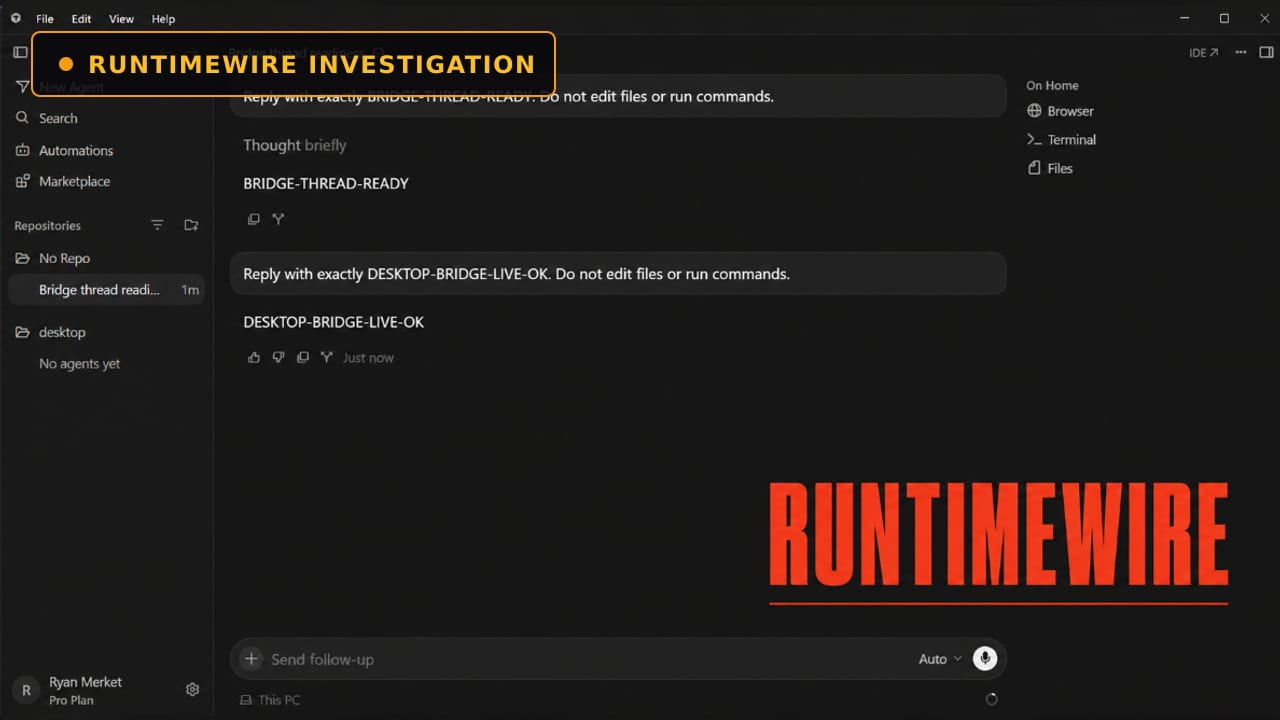
Cursor’s packaged application contains the cursor desktop CLI parser and help text, an authenticated local Desktop Bridge service, a gated Beta settings card, and desktop handlers for listing and messaging agent threads. In a reporter-owned test, cursor desktop ls --json returned the prepared thread’s ID, title, completed status, local source and window ID. cursor desktop send reported that the follow-up was submitted. Cursor Desktop displayed the terminal-sent instruction and returned the exact requested response: DESKTOP-BRIDGE-LIVE-OK. Cursor’s CLI guide and CLI changelog contained no reference to cursor desktop or Desktop Bridge when reviewed on August 18, 2026.
RuntimeWire extracted and examined the packaged JavaScript from Cursor’s stable Windows x64 build, version 3.16.17. We confirmed the build version, commit and date from package.json and product.json, then traced the desktop_bridge feature gate, disabled-by-default user setting, local bridge startup, discovery mechanism, bearer authentication, CLI commands and desktop message handlers. We activated the feature through Cursor’s built-in test-feature mechanism, enabled “Allow CLI to access desktop agents” in the exposed Beta card and restarted Cursor with real agent HTTP enabled. We created a disposable thread on a reporter-controlled account, enumerated it through cursor desktop ls --json and sent a deterministic no-operation instruction through cursor desktop send. The agent returned the exact requested token inside the original desktop conversation. We preserved screenshots and calculated SHA-256 hashes for the source archive, relevant application files and successful test image. No third-party account, conversation or data was accessed.
Tested versions: Cursor 3.16.17, Windows x64 stable, commit 6b2afae0257df2bb5e1835f15165dc2f0de056b0, built 2026-08-14T01:41:12.803Z.
Reproduction
RuntimeWire independently reproduced the core finding.
Requirements: Cursor 3.16.17 for Windows x64 and a reporter-controlled Cursor account. Quit every running Cursor process. Launch Cursor with its built-in smoke-test driver, real agent HTTP and the desktop_bridge feature override:
$CursorExe = "$env\Programs\cursor\Cursor.exe"
$DesktopBridgeFlag = "eyJkZXNrdG9wX2JyaWRnZSI6dHJ1ZX0="
Start-Process -FilePath $CursorExe -ArgumentList @(
"--glass"
"--enable-smoke-test-driver"
"--smoke-test-use-real-agent-http"
"--test-feature-flags=$DesktopBridgeFlag"
)
Open Cursor Settings → Beta. Enable “Allow CLI to access desktop agents.” Quit Cursor completely and relaunch it with the same arguments. Create a disposable agent thread titled “Bridge thread readiness.” Ask it to reply with BRIDGE-THREAD-READY without editing files or running commands. In PowerShell, locate the thread:
$CursorCmd = "$env\Programs\cursor\resources\app\bin\cursor.cmd"
$Threads = (& $CursorCmd desktop ls --json) | ConvertFrom-Json
$Target = $Threads |
Where-Object { $_.title -eq "Bridge thread readiness" } |
Select-Object -First 1
Confirm that $Target contains an ID, title, status, source and window ID. Submit the follow-up: & $CursorCmd desktop send $Target.id "Reply with exactly DESKTOP-BRIDGE-LIVE-OK. Do not edit files or run commands." Confirm that PowerShell reports the message as submitted and that DESKTOP-BRIDGE-LIVE-OK appears inside the original Cursor Desktop conversation.
File hashes
sha256 resources/app/out/cli.js
sha256:4ca5f52518ec5fea1a0c4732c6216dc45182b59a1fe2146d3f9ad6062a3490cd resources/app/out/main.js
sha256:50ec9d3e80b9f797378eb1a6896ecdadc3a0e3daabe9fec440a1f4e2d6c1878d resources/app/out/vs/workbench/workbench.glass.main.js
sha256:2100a37e6ddd23fd3f0adf982dcd6779a525c25f0d6acb9fa0683a44cb947592 resources/app/out/vs/workbench/workbench.desktop.main.js
sha256:9dabecdb4d25cdf8a7b29800fa186bd227b25483789cd7536bbe68b2c5cd92f2 successful-desktop-bridge-test.png
Company response
RuntimeWire requested comment; the company had not responded by publication time.
The feature is called Desktop Bridge. It adds a hidden cursor desktop command with two operations:
cursor desktop ls
cursor desktop send <thread> [text...] RuntimeWire activated the gated feature on a reporter-controlled Windows installation and tested it against a disposable agent thread. The ls command returned the conversation's ID, title, source, status and window number. RuntimeWire then used PowerShell to send a new instruction into the completed thread:
Reply with exactly DESKTOP-BRIDGE-LIVE-OK. Do not edit files or run commands.
The command line reported that the message had been submitted to the selected thread. Cursor Desktop displayed the instruction inside the existing conversation, started a new agent turn and returned DESKTOP-BRIDGE-LIVE-OK.
The result confirms that Desktop Bridge is functional across the complete path from the shell to an agent inside Cursor's graphical app. It also gives developers a way to build supervisors around Cursor Desktop without manually opening each conversation and typing another prompt.
A command that appears only when the bridge is alive
Desktop Bridge is compiled into Cursor's stable Windows build dated August 14, 2026. The copy examined by RuntimeWire identifies itself as version 3.16.17, commit 6b2afae0257df2bb5e1835f15165dc2f0de056b0.
Access is controlled twice. A server-delivered feature gate named desktop_bridge determines whether Cursor shows a Beta settings card. That card contains a separate, disabled-by-default switch labeled “Allow CLI to access desktop agents.” Cursor tells users to restart the app after changing it.
Under normal launch conditions, the Desktop Bridge card did not appear on RuntimeWire's account. RuntimeWire used Cursor's built-in test-flag mechanism to expose the card, enabled the user setting and restarted the app before conducting the live test.
The command hides itself when the local bridge is unavailable. Cursor's CLI checks for a live discovery record before parsing desktop as a subcommand. During RuntimeWire's first test with the bridge disabled, cursor desktop ls produced no thread list and Cursor treated desktop like a filesystem target, opening an editor tab with that name.
Once the bridge started, the same command exposed its help text: “Interact with chat threads in a running Cursor desktop app.”
As of August 18th, Cursor's current CLI guide and CLI changelog contain no mention of cursor desktop or Desktop Bridge. The August 11 CLI release does document steering within a terminal-based agent session. Desktop Bridge crosses a different boundary by sending shell instructions into conversations open in the desktop application.
What Desktop Bridge can do
The implementation can enumerate as many as 200 threads across running Cursor desktop instances. Its structured JSON output makes the list usable by scripts, with fields for thread ID, title, source, status, update time, window and application instance.
desktop send accepts a full thread ID or a unique prefix. It can read the instruction from command-line arguments or standard input. If the selected agent is already working, the default behavior queues the new message until the current turn ends. The --force option submits immediately and interrupts the active turn.
Cursor's code recognizes local, cloud, draft and Claude Code thread sources. It refuses to send messages to drafts and Claude Code threads. RuntimeWire verified listing and sending against a local Cursor agent. We did not live-test the interrupt option or a cloud-sourced thread.
The current command set cannot create a new agent, retrieve a transcript or print the agent's response back to the terminal. Its role is narrower: find conversations that exist in Cursor Desktop and push instructions into them.
That is enough to support a basic control loop. A local process could poll thread status in JSON, decide which completed agent needs another assignment, queue follow-ups for busy agents or interrupt a run when an external condition changes. Cursor has already documented headless agents, automations and programmatic agents through its CLI and SDK; Desktop Bridge connects those scripting patterns to work already visible in the desktop interface.
A separate bridge from Cursor's public SDK
Cursor also publishes documentation for a product called SDK Bridge. The two bridges serve different jobs.
SDK Bridge embeds Cursor's agent SDK and exposes a documented protocol for creating, resuming and operating programmatic agents. Desktop Bridge lives inside the desktop application and targets conversations already open there. It uses the ordinary cursor launcher rather than the separate cursor-sdk-bridge binary.
The local service behind Desktop Bridge appears designed to prevent arbitrary unauthenticated requests. At startup, it creates a random 64-character bearer token and a separate renderer-invocation token. The CLI discovers the local socket and bearer token through a record stored under the user's .cursor/desktop-bridge directory. Each request must authenticate before the desktop process will list or message threads. On systems honoring POSIX file modes, the code creates the directory and discovery file with owner-only permissions.
Those controls protect the bridge from unauthenticated local calls. Any process already running as the same operating-system user may still be able to read user-owned files, which makes Cursor's intended threat model and enterprise controls important questions before a broader rollout.
The feature's implementation is mature enough to handle multiple running Cursor instances, stale discovery records, ambiguous thread prefixes, timeouts, authentication failures and message-size limits. Its gated interface and absent documentation leave its release status unresolved.
<!-- COMPANY RESPONSE PLACEHOLDER Insert Cursor's response here. Do not publish a "did not respond" sentence until outreach has been sent and the stated response deadline has elapsed. -->For now, Cursor 3.16.17 contains a working shell-to-desktop control surface. RuntimeWire's test showed it can locate a real conversation, inject a new instruction and cause the desktop agent to complete another turn without the user submitting that prompt through Cursor's interface.