This is Part 2 to the post I made last week about creating your own agent harness (no idea how to link it, just check my username)
There’s really only 3 models I’d recommend in the “small” model space that would be mostly reliable (mostly is carrying a lot of water here) for doing long context, multi turn agentic workloads: Qwen 3.6 27b (best if you have vram for it), Qwen 3.6 A3B 35b (best if you’re splitting cpu/ram and best for performance) and Gemini 4 26b A4b (really fast, good research and web search but lazy on coding and sometimes ignores skills). I haven’t extensively tested anything below this parameter count, but others who have did not give positive feedback.
The ideal setup for these models is about 32 gig of vram with blackwell tensor cores. This means, single 5090, dual 5080 or dual 5060ti 16 gig. The 5060ti 16g is the absolute sweet spot for a decent home LLM setup without costing a fortune. Now if you want to go even cheaper you can get dual 9060 XT 16 gig cards, but you will be on ROCm not CUDA, which is GETTING BETTER… but CUDA will just work. Similarly you could use the 40 or 30 series here as well. Just try to shoot for 32 gig if possible. 24 gig will still work but you might need a more aggressive quant on the model and much less context. Context will already be a struggle with 32 gig and a good quant
I went with the dual 5060ti 16 gig setup with Zotac cards, that max out around 180w. When you’re doing layer parallel inference (default in llama.cpp) the max power draw is actually around 180w, even with 2 cards going. The reason for this is the model’s layers are split between both cards vram buffers, and each token feeds forward from one cards layers to the next. Both cards are not really lit up at the same time. Super power efficient, and doesn’t pump out a ton of heat in my office!
Ok now for the software. There’s tons here to discuss and lots of options… j/k, you’re gonna use llama.cpp in server mode. That’s it, ignore everything else, it’s crap for a smaller setup like this. Everything else is harder to set up, harder to manage, harder to tune, and you probably won’t even get more perf from it because fancy shit like tensor parallel and slotting won’t work with your gamer rig of a PC or is only relevant to multi-tenant setups. You are building this thing for you, and you alone. Maximum straight line performance!
This being said, you should also be compiling it yourself. This is a bit trickier on windows but they have good docs. On Linux, where you SHOULD be running your AI server, it’s pretty trivial. Ubuntu 26.04 server is perfect, use the built in driver down apt install cuda (13.1 not 13.2!!) and you’re good to go on compiling. Learn how to use git clone to clone the repo, learn how to compile it. Or just use my script here:
➜  ~ cat build-llama.sh
#!/bin/sh
export PATH=/usr/local/cuda/bin:/usr/local/sbin:/usr/local/bin:/usr/sbin:/usr/bin:/sbin:/bin:/usr/games:/usr/local/games:/snap/bin:/snap/bin
cd llama.cpp
git pull
rm -rf build
cmake -B build -DGGML_CUDA=ON -DCMAKE_INSTALL_PREFIX=$HOME/llama-bin -DCMAKE_INSTALL_RPATH=$HOME/llama-bin/lib -DCMAKE_BUILD_WITH_INSTALL_RPATH=ON
cmake --build build --config Release -j10
cmake --install build
This dumps the binaries and libraries in ~/llama-bin, which is a great place for them to live. If you execute the bin’s out of the build directory, be ready to cry when the build fails and you can’t start your llama-server again. If you’re new to all this stuff go ask chat gippity or claude about how to apt get build-essentials and cmake and git and all the stuff needed. They’re pretty good at walking you through it. Actually this is true for all of Linux/Ubuntu…. I mean it’s time to switch, get off windows, AI makes it 100x easier to figure things out that used to churn people out of Linux desktops.
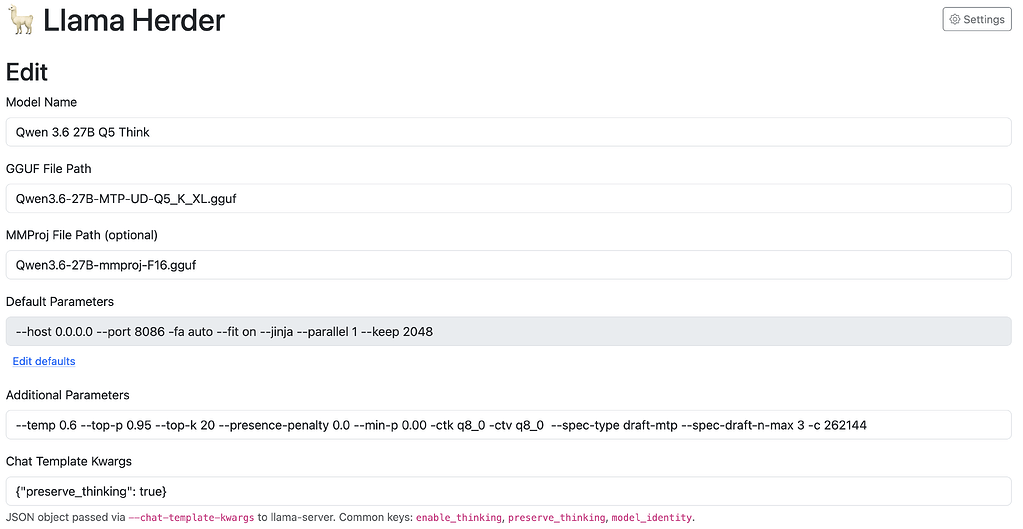
There’s a LOT to learn about model formats and quants and sampler settings and chat templates (not joking this time, very very deep topic), I’d recommend hanging out in the Reddit localllama sub for getting deep on the topic. But basically you’re always picking a GGUF formatted model in a specific quantization level (Q4/5/6) and providing the sampler settings that are appropriate for the model and sometimes messing with the context size, the kv cache format and a few other things. To shortcut, here’s the settings I use for Qwen 3.6 27b:
This is a screenshot of my model switcher. You don’t need to use one of these as the newer llama.cpp server has a built in switcher, but I use mine to control all the startup params. The model name here is just a field I provide, the GGUF I use is the Unsloth Qwen 3.6 27b with multi token prediction in Q5 UD (5 bit weights by variable by layer to preserve quality) quant. The host and port can be anything you want (0.0.0.0 means accessible across the network). -fa auto turns on flash attention if needed (this model needs it), -fit on means fit all the layers to the hardware you have in the best way possible, –jinja means use jinja templating for the chat template, this is not optional but default I think nowadays. For agents you’ll need it. –parallel 1 means don’t allocate memory for multi tenancy, also increases token gen rate, –keep 2048… this is harder to explain, it means it’s going to keep the first 2048 tokens from the prompt and tool definitions for when you exceed the context window and llama.cpp is going to context-shift the current conversation. You WANT this to maintain reliability in longer exchanges. –temp 0.6 --top-p 0.95 --top-k 20 --presence-penalty 0.0 --min-p 0.00 are all the sampler settings I mentioned above. This is the recommended setup for Qwen 3.6 doing agent work. You can check Unsloth’s guide to running the model for other settings. Don’t think about it just use these. -ctk q8_0 -ctv q8_0 means run the k/v cache for the model in 8 bit mode instead of 16 bit. This results in some detail loss but allows you to run full context window sizes. –spec-type draft-mtp --spec-draft-n-max 3 means the model will do multi token prediction which is a HUGE bump in token gen performance, for the price of a bit of extra vram. For dense models like the 27b, you WANT this. -c 262144 just means run the model at full 256k context. You CAN run 128k or 64k if you want, and some people will claim it’s better, but you’ll be hitting the VERY SLOW context-shift quite often when it’s doing more complex tasks. These same settings can be used on the 35b MoE model. This is pretty much maxed out performance for intelligence/speed for the 27b dense. You’ll need every bit of it for an agent harness.
Even if you have a larger Strix Halo, or an nvidia DGX spark or a dual 3090 setup, Qwen 3.6 27b is still recommended, but you can keep the k/v at F16 and move up to Q6 or Q8 for the model weights.
Now if you’re stuck with 16 gig or (eek) 8 gig vram, there’s still hope! Qwen 3.6 35B A3B! This is the MoE version of the model which splits the model up into “experts” and routes tokens so no more than 3b parameters are active at any time. Llama.cpp is very good at splitting the model with the -fit option so important stuff goes on the GPU and the experts sit in system ram. This model still runs reasonably fast and mostly smart as long as you have 32 gig ram. The GPU will do prompt processing, expert routing and some other stuff. Gemma 4 26b is the same generally, just look up the sampler settings google recommends. I won’t spend much time on tuning this model because the other 2 are generally better, unless you want really good creative writing and deep research. Gemma is great for those.
Ok so now what can you expect to work RELIABLY with these kinds of models:
- General web search and question answering. All 3 models are rock solid here assuming your harness has exposed web search as a tool. Even asking dozens of follow up questions where it has to do further research, they’re fine.
- Checking the local system logs, dmesg, service status and asking questions about versions, installed software, etc. No problems. Sometimes the models will bite off a large chunk of the logs, just tell them to limit their exploration to a few days/weeks worth to prevent it.
- General sysadmin work like updating packages/snaps/firmware/flatpacks, all good. Even managing things like node and python packages installed for development. “Update the moofile python package on the router” kinda stuff, very solid.
- More complex hardware interrogation tasks like checking the battery health on a laptop, using nvidia or amd tools to look at temps/power, cpu and memory related status and models. Or things like managing remote machines over ssh, full network takeover! Pretty good. I find they can get wiggly sometimes with different vendor specific tooling like the lenovo battery stuff. If you do AI network, make sure the network skill has detailed descriptions of what your machines do and what they’re for. Good times here.
- Creating shell/python scripts, systemd timers and scripts, launchd (mac). Scripts to operate ffmpeg or other well known commands: Pretty good, Qwen models start to pull away here and 27b really starts to shine in reliability
- Coding simple to medium complexity web apps, electron, QT, more complex command line tools, creating and modifying firewall rules and dnsmasq configs: Yeah qwen 27b here again. At this point Qwen 35b will struggle on some tasks.
- Very complex codebases, multithreaded apps, game engines, highly optimized compute things, niche languages (ie not Python, Node, Go, Rust, C/C++): Probably game over for the local models. Intelligence remains pretty spiky, so you might get some great results with some ralph looping but you’re outside what these things can do reliably.
The next step up is something like Deepseek v4 Flash which is much much more hardware and Deepseek Pro or GLM 5.2 which is hardware so expensive you won’t be listening to a rando on the internet for doing the setup. Even DSv4 Flash can struggle a lot with a big Rust/C++ codebase, so my advice is this is the end of the road for local. You now worry about optimizing your token/$ spend on neoclouds like Fireworks.ai, or buying into plans from Deepseek/Kimi/zAI and figuring out what you should do local and what you want to send to Chinese providers.
Didn’t want to end this one on a bummer, but reality is what it is right now. You can get VERY far and do tons of useful things on the small models. But you need to have your expectations in the right place before you drop $1500 in hardware… more so if you’re going to drop $15000 for an RTX6000 Pro to run DSv4 Flash and even more if you’re dropping $100k on a B300 DGX Station for GLM 5.2.
So build the hardware, optimize the setup, build the harness, and borg your entire network.