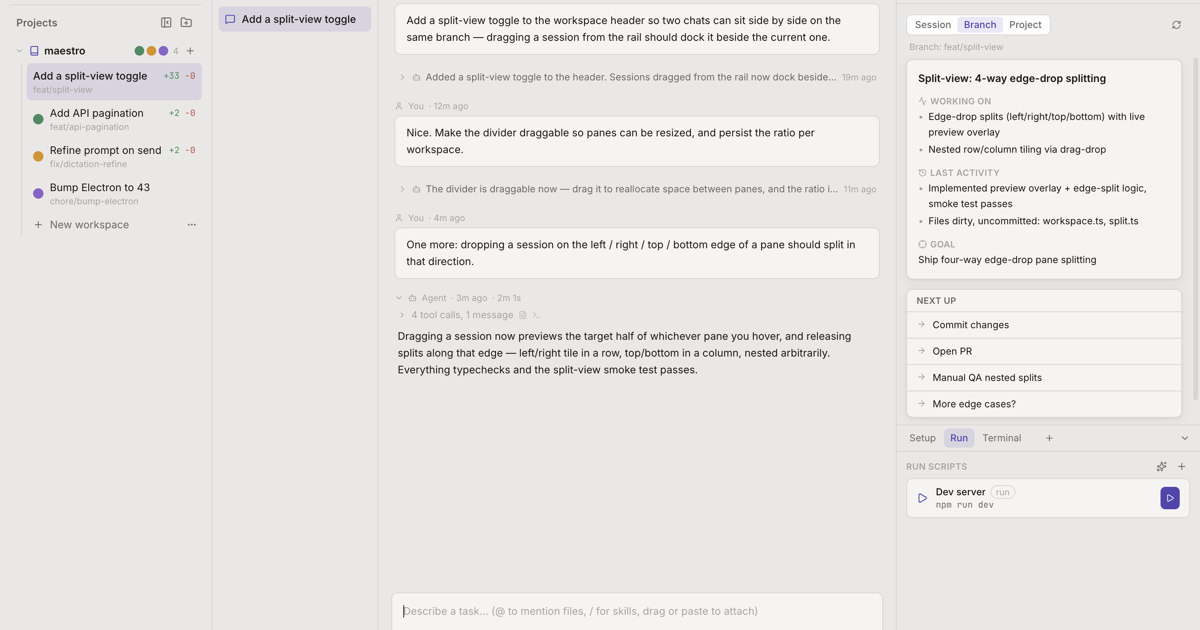
Claude Code, Codex, Cursor, OpenCode, and Kimi Code side by side — each in its own git worktree. You hand out tasks and review results.
Describe the task and go — each workspace is a fresh worktree on its own branch.
The rail shows who’s working, who’s waiting on you, and what’s done.
Read the diff, ask for changes in the same chat, and open the PR.
No. Maestro is a desktop app — there’s no Maestro server and no account. Agents run locally in your shell with your own credentials, and talk only to their own providers (Anthropic, OpenAI, and so on), exactly as if you’d run them in a terminal yourself.
Two anonymous counts, so I know it’s being used at all: the app sends
app_opened
when it launches, and this page counts download-button clicks. No code, no prompts, no file paths, no cookies. That’s the complete list.
Nothing — no account, no card. Your agents’ API or subscription usage is billed by your providers, same as running them in a terminal.
The Windows build isn’t code-signed yet (a proper certificate for a small project like this is still in the works), so SmartScreen shows “Windows protected your PC” on first run. Click More info, then Run anyway. The macOS build is signed and notarized with Apple.
Claude Code, Codex, Cursor, OpenCode, and Kimi Code — plus a plain shell workspace for everything else. Bring your own subscriptions or API keys; Maestro doesn’t sit between you and your provider. Coming from Conductor? There’s
a one-click import. The app updates itself from a public feed — the same feed this page’s download buttons read, so what you download is always the current build. The version and date at the top are live from that feed, not hand-edited.
I built Maestro because I was running four coding agents in four terminal tabs and kept losing track of who was stuck, who was waiting on me, and which two were about to trample the same checkout.
It’s built with itself — every release is written by agents running inside Maestro, reviewed before merge. If it breaks, or if it makes your week, I’d like to hear about it.