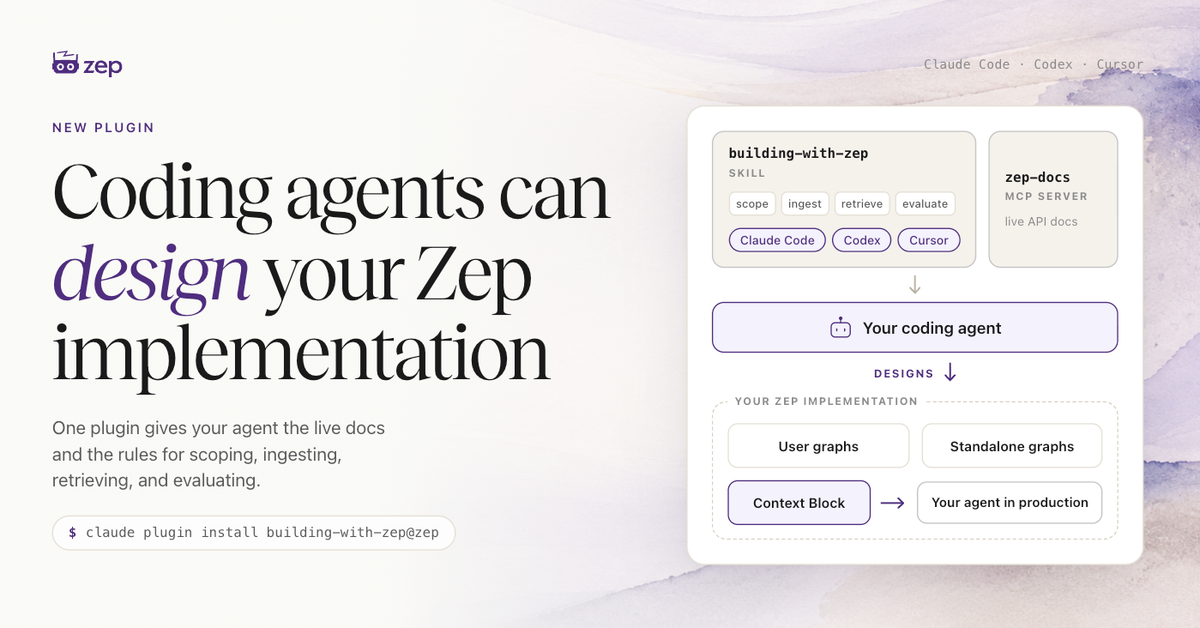
Zep now ships one plugin for Claude Code, Codex, and Cursor. It gives your coding agent the Zep documentation MCP server and the new building-with-zep skill, which encodes how to design and evaluate an agent memory implementation around the use case you need to deliver.
Key takeaways #
One plugin for Claude Code, Codex, and Cursor. TheBuild with Zep pluginbundles a newagent memorydesign skill with Zep's documentation MCP server, and one directory installs in all three. Other agents that supportAgent Skillsand remote MCP servers install the two components separately.Your agent can reliably design a Zep implementation for your use case. OneSKILL.md
file carries a summary of Zep, the architectural philosophy, the evaluation philosophy, and the key design decisions, and your agent loads all of it before reading any documentation. That whole picture keeps the agent from over-indexing on the two or three pages a search happens to surface.The skill measures success against your use case, end to end. Success means your agent receives complete context and produces accurate answers for the task it has to do. That same measurement shows whether the next improvement belongs in ingestion or in retrieval, so you spend effort on the change that improves end business value.Your agent makes the architectural choices deliberately. The skill names the design decisions an implementation turns on, and without it your agent would settle them by default. For example: which graphs exist and along what tenancy lines; who reads which graph, decided in your application layer; what data belongs in Zep at all; which retrieval strategy fits.The Method names, parameters, and limits come from live documentation with no API key, and all 251 pages are addressable as whole-page reads. The skill and its configuration are open source.zep-docs
MCP server supplies current detail.
What it is #
The Build with Zep plugin is building-with-zep@zep
, and it installs in Claude Code, Codex, and Cursor from one directory. It bundles two components.
The ** building-with-zep skill** is new. It holds a summary of Zep, the architectural philosophy, the four-step implementation workflow, and the evaluation method. Your agent loads the skill automatically, with no command to run.
The ** zep-docs MCP server** serves Zep's documentation over remote HTTP at
https://docs-mcp.getzep.com/mcp
, with no API key. The skill deliberately holds no method names or parameters, so it confirms anything version-sensitive against a live page, and all 251 documentation pages are addressable as whole-page reads.## Why it matters
The skill lets your agent reliably design a Zep implementation for your use case. Documentation lists the options for each design decision without choosing among them.
The skill is a single file, and your agent reads the whole thing into context before it writes any Zep code. That file holds a summary of what Zep is, the architectural philosophy, the evaluation philosophy, and the key design decisions. Your agent therefore has the whole picture before it opens a documentation page, rather than the two or three pages a search would have surfaced. An agent working from those fragments tends to over-index on one feature, or to miss how the pieces fit together to serve your goal.
The skill also sets an evaluation philosophy, which is to measure the whole pipeline against the use case you need to deliver rather than checking each stage in isolation. A Zep implementation resolves into four steps, and each one carries a design decision.
| Step | The decision |
|---|---|
| Scope | User graph, standalone graph, or both |
| Ingest | Thread messages or graph.add |
| Retrieve | Context Block, template, or manual assembly |
| Evaluate | Context completeness or answer accuracy |
The four steps a Zep implementation resolves into. Source: the building-with-zep skill.
Two things make those decisions hard to settle:
Most settings have no single correct value. The right configuration is rarely obvious before you measure anything.Local fixes are tempting. Perfecting one step tells you very little about the whole pipeline.
For example, we sometimes see customers working hard to eliminate duplicate entities, where the graph holds two nodes for one real-world person or company. A duplicate that will not resolve usually means Zep needs more context to establish identity, so that work can matter. Merging the two nodes is often not the change that moves the end result, though, because a search about that entity returns both nodes and the agent still receives complete context.
An end-to-end evaluation separates the changes that matter from the ones that do not. The skill points your agent at Zep's evaluation harness, and it guides the agent in building a gold dataset for your use case. That dataset pairs the questions you need answered with the answers you expect. The harness scores context completeness, which is Zep's job, separately from answer accuracy, which is your prompt's, so you know which side needs the work. Evaluate Zep for your use case has the full method.
How to use it #
Claude Code and Codex install from your terminal rather than from inside an agent session. Each pair adds the getzep/zep
repository as a plugin marketplace, then installs the plugin from it.
Claude Code:
claude plugin marketplace add getzep/zep
claude plugin install building-with-zep@zep
Codex:
codex plugin marketplace add getzep/zep
codex plugin add building-with-zep@zep
Cursor works differently. It needs version 2.5 or later, and the command runs inside an Agent chat rather than a terminal. Type it in full, because it does not appear in autocomplete:
/add-plugin building-with-zep@https://github.com/getzep/zep
One directory serves all three runtimes. Each reads its own manifest and loads the same copy of the skill. In Cursor, verify the install under Settings ▸ Plugins, and approve the zep-docs
server the first time your agent calls it.
There is no plugin format beyond those three, though the skill and the server install separately in any agent that supports Agent Skills and remote MCP servers, including GitHub Copilot, VS Code, and Gemini CLI. Many agents read .agents/skills/
inside a project, or ~/.agents/skills/
for every project, and the skill is one file that can go in either:
curl -fsSL https://raw.githubusercontent.com/getzep/zep/main/plugins/building-with-zep/skills/building-with-zep/SKILL.md \
  --create-dirs -o ~/.agents/skills/building-with-zep/SKILL.md
The Agent Skills standard defines the skill's layout but not where agents look for skills, so check your agent's documentation. Then add the zep-docs
server to that agent, per the documentation MCP server setup.
After that there is nothing to invoke. The skill loads on its own when you add memory to an agent, ingest chat or business data, search the graph, or debug retrieval. It queries zep-docs
whenever it needs an exact signature.
Getting started #
You need a Zep project and an API key. The plugin helps an agent build with Zep in your codebase and provisions nothing itself, so create a project at app.getzep.com if you don't have one yet.
Once the plugin is installed, the quickest way to see the skill work is to ask for a design before any code:
I'm building an internal AI platform for my company, with agents for
several teams. Before writing any code, design the Zep implementation:
which graphs to create, what data goes into each, how the agents
retrieve context, and how I will know it works.
Your agent works through the four steps and confirms version-sensitive details against the live documentation.
Implement Zep with agents: install the plugin and see what it does.app.getzep.com: create a project and get an API key.Architecture patterns: the scoping decisions the skill applies, in full.plugins/building-with-zep: the skill and its MCP configuration, open source.
FAQ #
Which coding agents does it support? The plugin format covers Claude Code, Codex, and Cursor, and Cursor needs version 2.5 or later. Beyond those three, the skill and the documentation server install separately in any agent that supports Agent Skills and remote MCP servers, including GitHub Copilot, VS Code, and Gemini CLI. In a client that speaks MCP but not skills, add the documentation MCP server alone and skip the skill.
What does the skill change about the code my agent writes? It changes the decisions that precede the code. The agent picks a graph scope deliberately and prepares data so identity resolves. It chooses a context surface that exists for that graph type, then checks the result against your use case rather than checking each stage on its own.
Do I have to invoke the skill? No. It is model-invoked, so it loads when the work involves Zep: adding memory to an agent, ingesting data, searching the graph, or debugging retrieval.
How is this different from Zep's Memory MCP Server? The zep-docs
server in this plugin serves documentation about Zep, so your coding agent can read a current page while it writes. The Memory MCP Server is a separate product that connects an end user's own agent memory to an MCP client. One serves pages; the other serves a user's context.
Will the skill go stale? The zep-docs
server is remote, so your agent always searches the current documentation. The skill is a file on disk, and new guidance reaches you only when the plugin updates. Claude Code needs auto-update enabled for the third-party zep
marketplace; Codex refreshes on startup by default. Cursor pins the install commit, so track updates from a local clone instead. Keep the plugin up to date has the commands for each, and the changelog lists what each release changed.