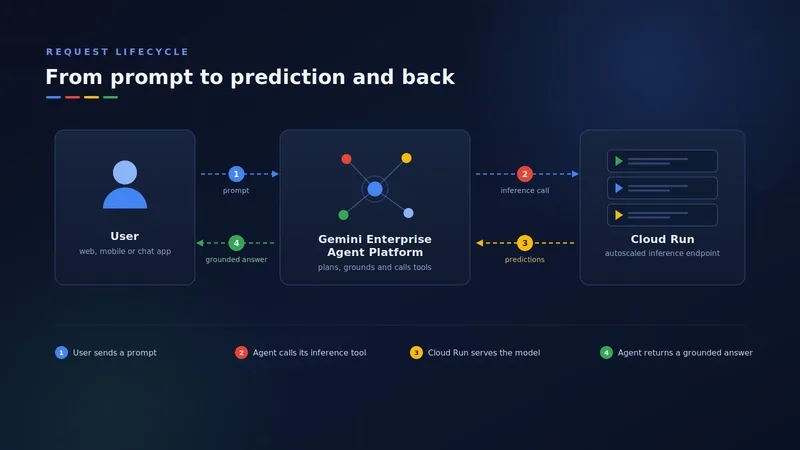
GeminiEnterprise Agent Platform for the heavy lifting of orchestration and inference.
The beauty of this hybrid architecture is the separation of concerns. We treat Cloud Run as the "brains" of our business logic—it's where our front-end lives and where we host our Model Context Protocol (MCP) servers. Meanwhile, the Agent Platform acts as the runtime that handles intent analysis and memory. If we need to swap from a Flash model to a Pro model, we can do it in the platform settings without redeploying a single line of code in our application layer.
For anyone looking for a practical tutorial on getting this live, here is the workflow we used to get our first agent deployed.
Setting up the Agent Logic #
We used the Agent Development Kit (ADK) to define the agent's behavior. One thing that tripped us up early on was the docstrings. In this setup, docstrings aren't just for other developers—they are actually functional instructions for the LLM. If your docstring is vague, the agent won't know when to trigger the tool.
from google.adk.agents import Agent

def call_internal_business_system(query: str) -> str:
 """Invokes secure business workflows deployed on Cloud Run."""
 return "Data retrieved from secure internal backend."

root_agent = Agent(
 name="enterprise_inference_agent",
 model="gemini-3.5-flash",
 tools=[call_internal_business_system]
)
Deployment and Scaling #
Once the agent is defined, the deployment to Cloud Run is straightforward. Since Cloud Run is serverless, it scales to zero when we aren't using it, which saved our department a significant chunk of the budget during off-hours.
-
Package the application into a container.
-
Use the
gcloud run deploy
command to push the image to the registry.
- Connect the service to the Agent Runtime via the GCP console.
Real-world Performance Takeaways #
After running this in production for a few months, here is how the performance breaks down:
Deployment Speed: We went from "idea" to "live endpoint" in under an hour because we weren't configuring Kubernetes pods.Security: By putting Identity-Aware Proxy (IAP) in front of Cloud Run, we ensured that only authenticated employees could hit the AI endpoints.Latency: Using the Flash models for simple routing and the Pro models for complex reasoning kept our response times snappy.
If you're building a professional AI workflow, don't overcomplicate the stack. Pairing a serverless compute layer with a managed inference platform is the fastest way to get a real-world LLM agent into the hands of your users.
Next Why is my n8n dashboard showing a green "Active" dot while my →