Kilo's Cloud Agents are now more personal, configurable, and connected.
Cloud Agents let you run Kilo from anywhere without a local machine. Spin up an agent from the web or automate with webhooks, point it at a repo, and it works in an isolated container so you’re free to do anything else.
The Kilo team recently implemented several updates that make the Cloud Agents workflow feel less like a bot running on your behalf, and more like a collaborator agent that does the heavy lifting for you.
Your name on every commit #
Previously, when a Cloud Agent opened a PR, the commit history reflected that. Now, you can connect your personal GitHub account through your own integration, and every commit and PR the agent creates is authored by you, with the Kilo bot listed as co-author.
Your contribution graph reflects the work you directed, code owners get pinged correctly, and reviewers know who was behind a change without having to dig. The agent did the typing, but it was your call - and the git log now agrees.
Profiles that know your repo #
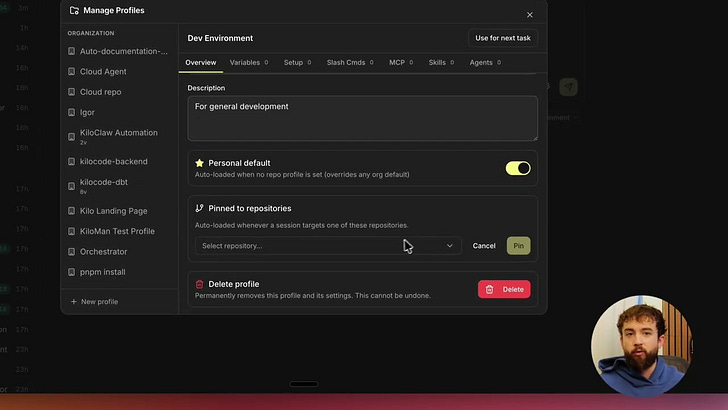
Agent environment profiles bundle the env vars, secrets, and setup commands a session needs. This update provides support for deeper configurations - you can now include custom agents, skills, MCP servers, and slash commands - so the session that boots already has your modes and project-specific skills loaded.
Additionally, you can set a default profile per repository instead of one global default. Point a session at a repo, and it automatically picks up the right environment for that project, with no manual selection each time.
This upgrades Cloud Agents from a basic, web-based coding agent to a fully-equipped, customized, and personalized agent that understands how you prefer to work from the start.
PR status at a glance #
When a Cloud Agent opens a PR, you can now see its status directly in the Kilo dashboard without bouncing over to GitHub to check whether CI passed or the branch is ready to merge. The status shows up alongside the session that created it, so you know at a glance whether something needs your attention or whether it’s already good to merge.
Remote sessions #
Remote sessions bridge your local machine and the Cloud Agents dashboard. Enable remote mode in the CLI, and your active local sessions show up in the web interface right next to your cloud sessions. Your machine still handles the compute, but the session is fully accessible from anywhere: messages and responses sync in real time, the agent’s questions route to whatever device you’re on, and you can pick up mid-session from somewhere else without starting over.
It’s the last piece in making Kilo sessions genuinely device-agnostic. Start something locally, check in on it from your phone, hand it off to a cloud session when you close the laptop. Same session, wherever you are.
Try it now #
Everything above is live. Head to app.kilo.ai to connect your GitHub account and set up repository profiles. Update your Kilo extension or CLI to get remote sessions, and let us know what you think about all of these changes in our Discord!