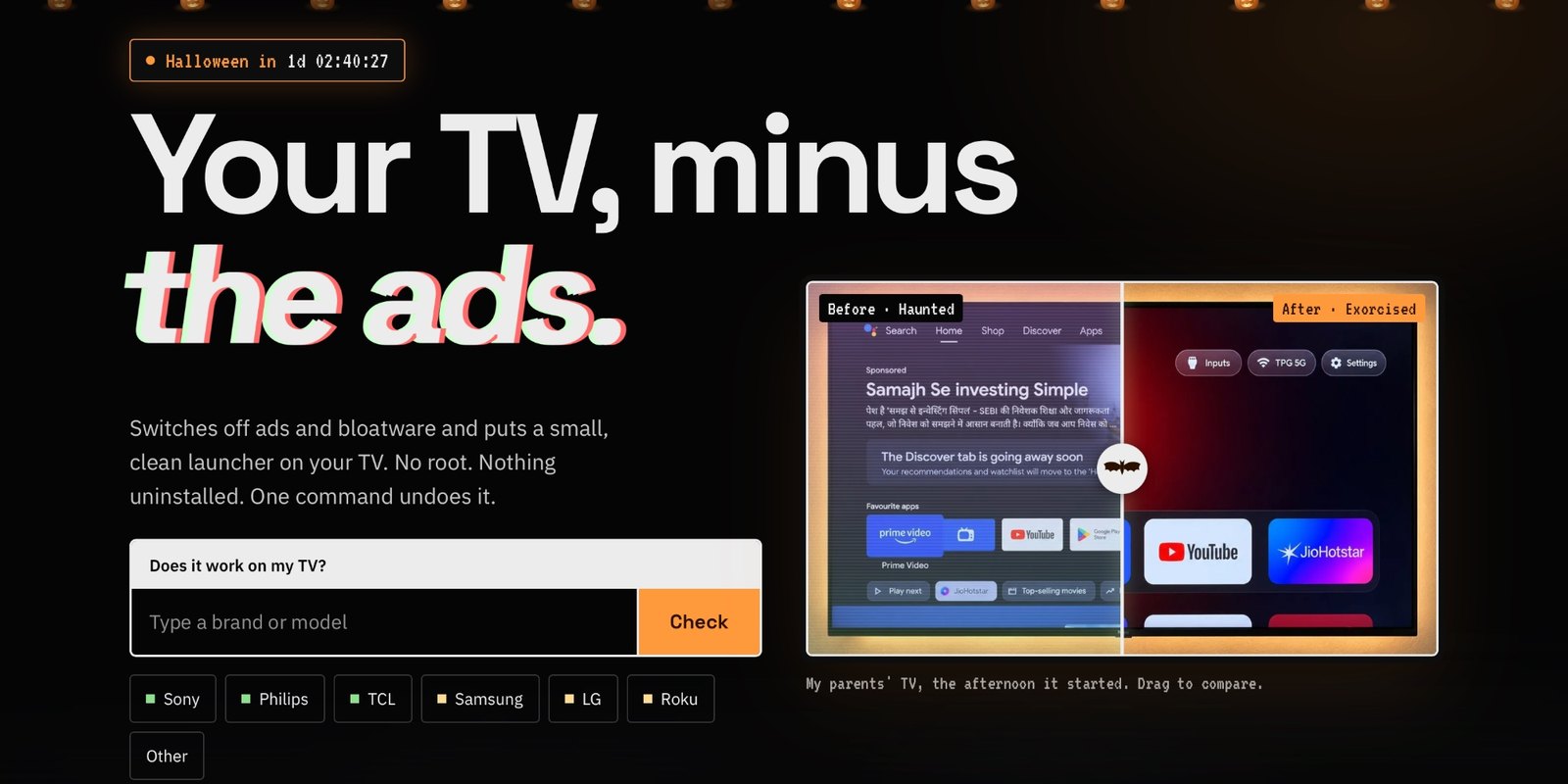
CleanYourTV’s website in October 2026, showing a before and after of the Google TV home screen on Gathin’s parents’ TV, where the project started. Image: CleanYourTV
CleanYourTV is a free, open-source project that strips the sponsored rows, ad services and tracking apps from Android TV and Google TV sets over your Wi-Fi, then swaps the cluttered home screen for a clean launcher that looks like an Apple TV, with an AI coding assistant such as Claude Code doing most of the work. It started as one developer’s afternoon fix for his parents’ Xiaomi TV and became one of the most popular vibe-coded projects of 2026. Here is what it does, how to use it, which TVs it works on, and what to do if you have a Samsung, LG or Roku.
Jump to:
[What is CleanYourTV?](#what-is-cleanyourtv)

[How to use it](#how-to-use)

[Without a laptop](#no-laptop)

[Which TVs work](#supported-tvs)

[Samsung, LG, Roku, Vizio](#samsung-lg-roku)

[Is it safe?](#is-it-safe)

[How to undo it](#undo)

[Countries](#countries)

[FAQ](#faq)
Last checked: October 29, 2026.
What is CleanYourTV? #
CleanYourTV is a set of scripts, debloat lists and a small home-screen app, published on GitHub by the developer Gathin as Gathin23/cleanyourtv with its own site at cleanyour.tv. It was called tv-vibehack until October 19, 2026, and old links still work. It is released under the MIT licence, so it costs nothing to use.
It began with this post on October 17, 2026:
Vibe coded my parents' TV this afternoon!
It was showing a sponsored ad before you could even get to Netflix.
Gave Claude Code the model number, it found the TV on wifi, removed 25 Xiaomi packages and wrote a new launcher.
Looks like an Apple TV now lol
October 17, 2026 Other people started doing the same to their own TVs and sent in what they had switched off. According to the project, that produced lists for more than 170 TV models from over 200 contributors in four days. By October 29 the repository had about 45,000 stars, 5,600 forks and 440 contributors, and its readme lists tested setups for 360 TV models from 97 brands.
It does three things:
- Backs up the list of installed apps and settings.
- Switches off the maker’s telemetry, ad services, sponsored content rows and preloaded apps, using Android’s own
pm disable-usercommand. Nothing is uninstalled. - Installs a new home screen : a launcher of about 561 KB with a dock of your favourite apps, a grid for the rest, an Inputs button for HDMI and live TV, a clock screensaver and 30 languages. It has no network permission and no background services.
Your streaming apps, HDMI inputs, live TV and the Play Store stay, and you choose whether to keep the voice assistant, Chromecast and software updates.
How to use CleanYourTV with Claude Code #
The quickest way is to let a coding assistant run it. The project says Claude Code, OpenAI’s Codex, Gemini CLI or Antigravity CLI all work, and that the whole job takes about fifteen minutes. You need a computer on the same Wi-Fi as the TV, with Python 3, a Java JDK from version 17 to 22, and Android SDK platform 34 with build-tools 34 (the assistant builds the launcher on your computer).
- On the TV: go to Settings › Device Preferences › About, press OK onBuild seven times to unlock Developer options, go back, open Developer options and turn onUSB debugging . If you also see a Network or ADB debugging switch, turn that on too.
- On your computer: download the project with
git clone https://github.com/Gathin23/cleanyourtv, open that folder in your coding assistant, then paste in the contents of itsPROMPT.mdfile with your TV’s model number filled in. - Follow along: accept the “Allow USB debugging?” message on the TV, then answer the assistant’s questions: which apps you use, how many sit in the dock and in what order, and whether to keep the voice assistant, Chromecast and updates.
Cloning the project matters: the assistant then uses its tested scripts, which take a backup and keep a restore record, instead of improvising its own. If your model isn’t on the list yet, the prompt has the assistant find the bloat on your set and ask before switching off anything you might use.
The same steps run without an AI assistant: the readme’s “Doing it by hand” section has every command for Mac, Linux and Windows (PowerShell). If you use Claude Code, a job like this eats into your plan’s usage, so our guide on making Claude Code limits last may help.
Clean Your TV app: no laptop, no coding #
If you only have an Android phone, a separate community-built Clean Your TV app by the developer udhaykumarbala does the same clean-up over Wi-Fi in about five minutes. It finds the TV, shows you a plan of what goes off and what stays, saves a restore point on the phone and only then makes changes. A watchdog puts the TV’s own home screen back if the phone doesn’t confirm within 150 seconds. It needs an Android phone on Android 9 or newer with a screen lock, and network debugging switched on in the TV’s settings (the app shows where, and turns it off at the end). Version 0.4.0 is a free APK download under the MIT licence, with no accounts or ads; Google Play and F-Droid versions are promised.
Which TVs does CleanYourTV work on? #
It works on anything running Android TV or Google TV with Android 8.0 or newer. You can search for your model at cleanyour.tv/tvs.
| TV or streamer | Remove ads and bloat | New home screen |
|---|---|---|
| Google TV and Android TV sets (Sony, TCL, Xiaomi, Philips, Hisense, Sharp, Panasonic and more) | Yes | Yes |
| Chromecast with Google TV, Google TV Streamer, Nvidia Shield | Yes | Yes |
| Amazon Fire TV and Fire TV Stick | Partly | No |
| A few China-market TCL sets | Yes | No |
| Samsung (Tizen), LG (webOS), Roku, Vizio, Hisense VIDAA | No | No | Fire OS won’t hand the home screen to another launcher, so only the debloat half works, and the 2015 Fire TV box refuses even that. The Chromecast and Google TV Streamer need a one-off pairing step for Wireless debugging. Source: CleanYourTV readme.
The brands with the most tested lists are TCL (77 models), Sony (41), Xiaomi (34), Philips (19), Skyworth (15) and Hisense (11), plus projectors from Epson, XGIMI, Anker Nebula and others.
Clean your TV on Samsung, LG, Roku or Vizio #
CleanYourTV can’t run on Samsung, LG, Roku, Vizio or Hisense VIDAA TVs because they don’t run Android and have no ADB connection. Its non-Android guide shows how to switch off the biggest privacy drain with the remote instead: automatic content recognition (ACR), which identifies what’s on screen, including live TV and HDMI, and reports it for advertising. The project cites a 2024 study that found opting out in the settings stopped Samsung and LG TVs’ traffic to ACR servers.
| Brand | What it calls ACR | Where to turn it off (recent models) |
|---|---|---|
| Samsung | Viewing Information Services | Settings › All Settings › General & Privacy › Terms & Privacy |
| LG | Live Plus | All Settings › General › System › Additional Settings (2021 to 2024 models) |
| Roku TV | Smart TV Experience | Settings › Privacy › Smart TV Experience, or my.roku.com |
| Vizio | Viewing Data | All Settings › Privacy & Legal (or Admin & Privacy) |
Menu paths move between model years and software updates; the CleanYourTV guide lists every year’s path.
The guide also covers moving the TV to your router’s guest network and blocking ad and tracking domains with Pi-hole, AdGuard Home or NextDNS, listing which domains to keep so the TV still works.
Is CleanYourTV safe? #
It is designed to be reversible: it doesn’t root the TV, flash firmware or delete anything, and it only uses switches the TV offers its owner. The scripts refuse to leave the TV without a home screen. The main risks the project lists are these:
- Switching off something the TV needs. Lists are applied in small batches with a restore ready. On Google TV, the setup app can take over the home screen and crash-loop the system if handled wrongly, which the scripts guard against.
- Leaving debugging on. Network ADB is unencrypted on port 5555, and on some firmware any device on your Wi-Fi can then control the TV. When you finish, turn off USB, Network and Wireless debugging in Developer options, revoke the debugging authorisations, and reboot. The new launcher keeps working without debugging.
- Fake sites. The only official links are cleanyour.tv and the GitHub repository; other domains using the name, such as cleanyourtv.com, are not run by the project. There is no prebuilt download of the launcher: you build it yourself with the project’s script.
- Warranty. The project says changing a TV’s software may affect its warranty or support.
AI agents that can reach the devices on your home network deserve some caution in general: Anthropic’s own red team warned on October 12, 2026 that cheap Android TV boxes could one day host self-copying AI models. Keep the job to your own TV, and watch what the assistant does.
How to undo CleanYourTV, and what happens after an update #
Keep the list you applied. One command, tools/restore.sh with that list, puts every app back and returns the home screen to the original launcher (Google TV owners add the stock launcher’s name, given in the readme). If the TV can’t be reached from a computer, its own Settings › Apps page can switch apps back on, and a factory reset from the recovery menu is the last resort.
A firmware update installs over the cleaned-up system, so some apps come back, the stock home screen returns and new preloads can appear. Turn debugging back on and run the project’s check.py with your list to see what changed; adding --fix puts it right.
CleanYourTV doesn’t remove ads inside apps. The readme suggests Android’s Private DNS setting pointed at an ad-blocking resolver such as AdGuard DNS, which stops many in-app ad and tracker domains but not YouTube ads, and means that resolver sees every lookup your TV makes.
Does it work in the US, UK, Europe, India and Australia? #
It works in any country, because it talks to the TV over your own Wi-Fi and needs no account or online service. The tested lists cover sets sold worldwide, including global brands such as TCL, Sony, Hisense, Philips and Xiaomi, Walmart’s onn and RCA in the US, Kogan in Australia, Vu in India, and Thomson, Grundig and Freebox in Europe. The readme comes in eight languages and the launcher follows the TV’s language. For a TV in someone else’s home, the project explains a private Tailscale link and warns never to open the ADB port on a router.
It is one of a growing number of everyday fixes built with AI coding tools, alongside projects such as free Adobe app alternatives built with Claude and personal Android apps you can now vibe-code and run from Google Play.
Frequently asked questions #
Is CleanYourTV free?
Yes. CleanYourTV is free and open source under the MIT licence, and so is the community Clean Your TV phone app. If you use Claude Code, Codex or another coding assistant to run it, that tool’s own plan applies.
Does CleanYourTV work on Samsung TVs?
No. Samsung TVs run Tizen, not Android, and have no ADB connection, so CleanYourTV can’t run on them. You can still turn off Samsung’s tracking, called Viewing Information Services, in Settings › All Settings › General & Privacy › Terms & Privacy on recent models.
Does CleanYourTV work on LG webOS TVs?
No. LG TVs run webOS, so the scripts don’t work, although the project lists some community webOS ports. To stop LG’s content tracking, turn off Live Plus in the TV’s settings and decline the optional User Agreements.
Does CleanYourTV work on Roku?
No, Roku devices don’t run Android. On a Roku TV, turn off Automatic Content Recognition under Settings › Privacy › Smart TV Experience, or in Privacy Settings at my.roku.com. Roku sticks don’t have ACR.
Does it work on a Fire TV Stick?
Partly. It can switch off Amazon’s ad and bloat packages on most Fire TV devices, but Fire OS won’t let another launcher become the home screen, so you keep Amazon’s home screen. The 2015 Fire TV box refuses the debloat too.
Do I need Claude Code to use CleanYourTV?
No. Claude Code, Codex, Gemini CLI and Antigravity CLI all work, you can run the commands yourself from the readme, or you can use the Clean Your TV app on an Android phone with no computer at all.
Can CleanYourTV brick my TV?
It is designed not to: nothing is rooted, flashed or uninstalled, and apps are only switched off. The main risk is disabling something the TV relies on. The restore script, the TV’s Settings › Apps page or, at worst, a factory reset brings it back.
Does CleanYourTV remove YouTube ads?
No. It removes ads and sponsored rows from the home screen and switches off ad and tracking services, but not ads inside apps such as YouTube. Private DNS with an ad-blocking resolver blocks some in-app ads, but not YouTube’s.
Will the ads come back after a TV update?
Often, yes. A firmware update can re-enable packages and restore the stock home screen. Run the project’s check.py with your list after an update, and add --fix to put things back.
Is cleanyourtv.com the official site?
No. The project says its only official links are cleanyour.tv and the Gathin23/cleanyourtv repository on GitHub, and that cleanyourtv.com is not run by it.